AI Code Review for Beginners: Let AI Check Your Code Quality
Why Use AI for Code Review?
Code review is a critical part of software development for ensuring code quality. Traditionally, this requires team members to spend significant time examining code line by line. Now, AI tools can complete preliminary reviews in seconds, helping you identify potential issues, security vulnerabilities, and optimization opportunities.
This tutorial is designed for programming beginners and independent developers, teaching you how to use AI tools to efficiently review code.
Prerequisites
Before you begin, prepare the following:
- Code snippet: A piece of code you want to review (Python, JavaScript, Java, etc.)
- AI tool: ChatGPT, Claude, Ciyuano, or other AI platforms that support code conversations
- Clear goal: What do you want to check? Security? Performance? Code standards?
Step 1: Prepare Your Code
Copy the code you want to review into a text editor. It is recommended to keep each review under 200 lines so the AI can analyze each line more carefully.
Tip: If the code is long, split it by functional modules and review them in batches.
Here is a sample code snippet we will use for the demonstration:
def process_data(data):
    result = []
    for item in data:
        if item != None:
            result.append(item)
    return result

data = [3, 1, None, 4, 1, None, 5]
data.sort()
print(process_data(data))
Step 2: Write the Review Prompt
The quality of your prompt directly determines the review quality. A good prompt should include:
- Programming language: Tell the AI what language you are using
- Review dimensions: Security, performance, readability, best practices, etc.
- Context: The purpose and runtime environment of the code
- Expected output: What kind of feedback you want from the AI
Recommended prompt template:
Please review the following Python code from these dimensions:
1. Potential errors or bugs
2. Security issues
3. Performance optimization suggestions
4. Code standards and readability

Code purpose: Data processing function for cleaning list data
Runtime: Python 3.10+

Code:
[paste your code]

Please categorize by severity (error/warning/suggestion) and provide corrected code.
Step 3: Get AI Review Results
Send the prompt and code to the AI and wait for the analysis. Typically, the AI will return a structured review report within seconds.
A typical review report includes:
- Errors: Issues that will cause the program to crash or produce incorrect results
- Warnings: Potential risks that may be triggered under specific conditions
- Suggestions: Improvements to enhance code quality
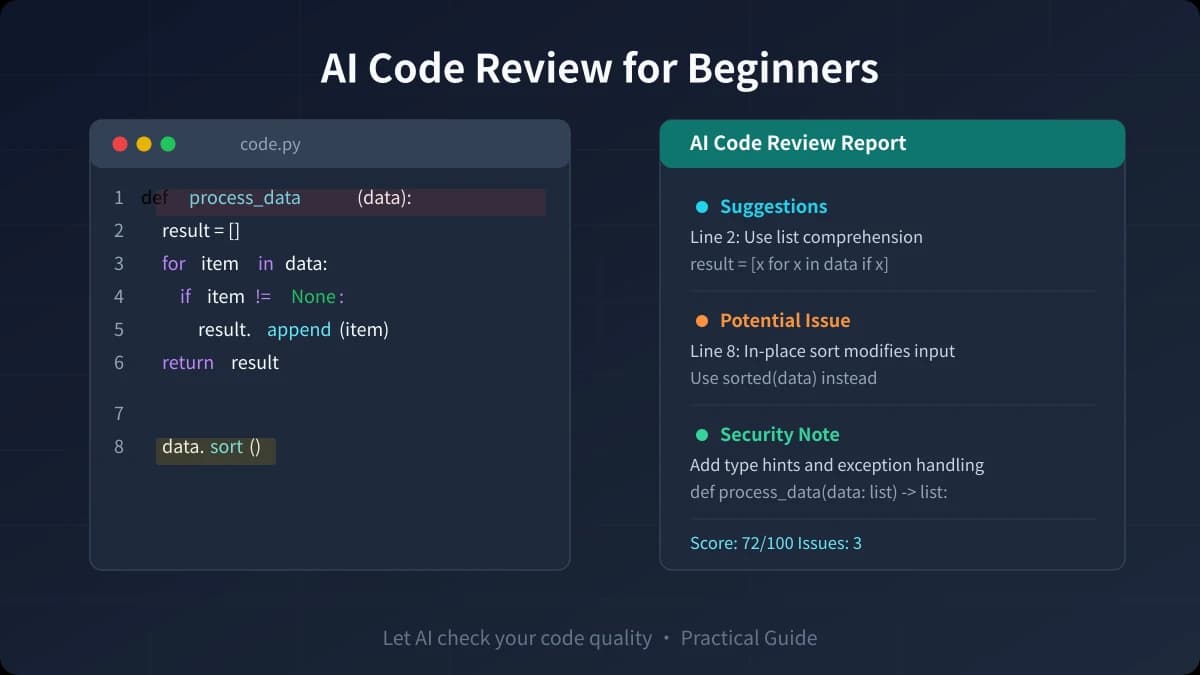
For our sample code, the AI may point out:
- Line 4:
item != Noneshould be changed toitem is not None(Python best practice) - Line 9:
data.sort()modifies the list in-place, which may affect the caller - Missing type annotations and exception handling
- Can use list comprehension to simplify the code
Step 4: Improve Code Based on Suggestions
After receiving the review results, improve the code by priority:
- Fix errors first: All issues marked as "errors" must be fixed
- Handle warnings: Assess the severity of warnings and decide whether to modify
- Selectively adopt suggestions: Decide whether to optimize based on actual needs
Improved code example:
from typing import Optional

def process_data(data: list[Optional[int]]) -> list[int]:
    """Clean list data by removing None values"""
    return [item for item in data if item is not None]

data = [3, 1, None, 4, 1, None, 5]
sorted_data = sorted(data)
print(process_data(sorted_data))
Advanced Tips
1. Dimension-Specific Reviews
Do not ask the AI to check everything at once. You can do multiple passes, each focusing on one dimension:
- Security review: "Please check this code for SQL injection, XSS, sensitive information leakage, and other security issues"
- Performance review: "Please analyze the time complexity of this code and suggest more efficient implementations"
- Maintainability review: "Please evaluate the readability and maintainability of this code and suggest refactoring"
2. Ask AI to Explain, Not Just Conclusions
Add "Please explain the cause and impact of each issue" to your prompt. This way, you not only know what is wrong but also understand why it is wrong, helping you avoid repeating the same mistakes.
3. Build Personal Review Templates
Save your commonly used review prompts as templates. Next time you review code, just apply the template to save time.
Use Cases
- Personal projects: When there is no team review, let AI do the first round of checks
- Learning programming: Learn best practices through AI feedback
- Team pre-review: Run AI review before submitting a PR to improve team review efficiency
- Legacy code maintenance: When taking over unfamiliar code, use AI to quickly identify potential risks
Important Notes
- AI review cannot fully replace human review — it may miss business logic issues
- Do not blindly accept all suggestions; judge based on actual situations
- When dealing with sensitive code, make sure to anonymize it before sending to AI
- Different AI models have varying review capabilities; cross-validate important code
AI code review is a powerful tool for improving development efficiency. Mastering this skill is like having an experienced colleague checking your code quality at any time. Starting today, try using AI to review your next piece of code.
Related Articles
AI Speech to Text: Beginner's Guide to Convert Voice to Text in 3 Steps
Learn how to convert speech to text using AI tools. Perfect for meeting notes, content creation, and video subtitles. Three practical scenarios with step-by-step instructions.
TutorialsAI Local Deployment Guide: Run Large Models in 3 Steps for Free
Learn how to deploy AI models locally in just 3 steps. No coding experience needed, completely free, and your data stays private on your own computer.
TutorialsAI Shopping Decision Guide: From Price Comparison to Avoiding Pitfalls
Learn how to use AI for shopping decisions. From price comparison to avoiding pitfalls - make smarter purchasing choices with AI assistance.
Comments are not yet available, stay tuned