AI Painting 101: Create Stunning Images with AI from Scratch

What exactly is AI painting?
In simple terms, AI painting means you describe the image you want in words, and the AI automatically generates the picture for you. You don't need to know how to draw or learn Photoshopâjust type and describe, and you can create beautiful images in various styles.
For example, if you enter "an orange cat sitting on a Paris café windowsill, sunset, warm tones," the AI can produce an illustration or photorealistic image matching the description in just a few seconds.
This article will teach you the core techniques of AI painting from scratch. No art background requiredâjust follow the steps.
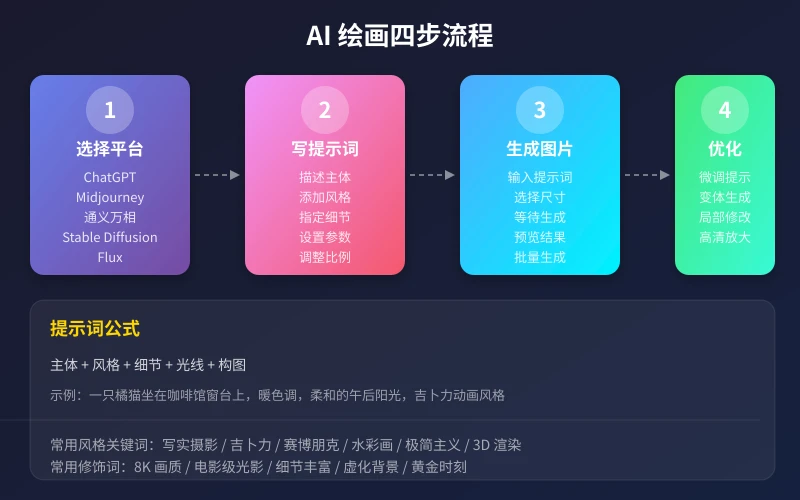
Step 1: Choose an AI painting tool
There are many AI painting tools on the market. Here are a few of the best options for beginners:
Recommended tool comparison
ChatGPT (GPT-4o / DALL·E 3)
- Pros: Generates images directly in the conversation, good support for Chinese prompts, easiest to use
- Best for: Everyday illustrations, creative exploration, quick image generation
- Cost: Free version has usage limits; Plus users have unlimited access
Midjourney
- Pros: Highest image quality, strong artistic feel, active community
- Best for: Pursuing high-quality artwork, commercial use
- Cost: Starting at $10/month
Tongyi Wanxiang (Alibaba)
- Pros: Generous free quota, best Chinese understanding, no VPN required
- Best for: Chinese users, Chinese-language scenarios, budget-conscious users
- Cost: Basic features are free
Flux (Open Source)
- Pros: Completely free, can run locally, excellent image quality
- Best for: Users with technical skills, privacy-conscious users
- Cost: Free (requires GPU hardware)
For beginners: If this is your first time trying AI painting, we recommend starting with ChatGPT or Tongyi Wanxiang. They are the easiest to use and have the best Chinese support with no extra setup required.
Step 2: Learn to write prompts
The prompt is the description you give to the AI, and it directly determines the quality of the generated image. Writing good prompts is the most essential skill in AI painting.
Universal prompt formula
A good prompt usually includes the following 5 elements:
Subject + Style + Details + Lighting + Composition
For example:
- Subject: An orange cat
- Style: Studio Ghibli animation style
- Details: Sitting on a café windowsill, with a latte in front
- Lighting: Soft afternoon sunlight
- Composition: Warm tones, shallow depth of field
Combined: "An orange cat sitting on a café windowsill, with a latte in front, Studio Ghibli animation style, soft afternoon sunlight, warm tones, shallow depth of field"
Common style keywords
- Photorealistic: Photo-quality results, great for product shots, portraits
- Studio Ghibli style: Warm, healing animation style
- Cyberpunk: Neon lights, futuristic tech vibe
- Watercolor: Fresh, delicate artistic style
- Minimalist: Clean, white space, premium feel
- 3D render: Strong sense of depth, great for product display
- Pixel art: Retro game style
- Oil painting style: Classical artistic feel
Common modifiers
- Improve quality: 8K, ultra-high definition, intricate details, sharp focus
- Optimize lighting: Cinematic lighting, golden hour, soft light, backlight
- Control composition: Close-up, wide-angle, top-down, symmetrical composition, blurred background
- Adjust atmosphere: Dreamy, cozy, mysterious, bright, dark mood
Step 3: Hands-on demonstration
Below we use ChatGPT as an example to show the full AI painting workflow. Other tools operate in a similar way.
Scenario 1: Generating social media images
- Open ChatGPT and switch to the GPT-4o model
- Enter your prompt in the input box, for example:
Prompt example: A cover image for a food blog, a steaming bowl of beef noodles, chopsticks lifting noodles in mid-action, warm tones, shallow depth of field, food photography style, 8K quality
- Wait 10â30 seconds; the AI will generate 1â4 images
- Choose the best one and click download
Scenario 2: Generating illustrations for a WeChat article
- Decide on the style and dimensions you need
- Enter your prompt, for example:
Prompt example: Flat illustration style, a person sitting at a desk working on a laptop, coffee and a plant on the desk, blue-purple tones, modern minimalist style, suitable as an illustration for a WeChat article
- If you're not satisfied, adjust the prompt and regenerate
- Ask the AI to generate multiple variations and pick the best one
Scenario 3: Generating product display images
- Describe your product's appearance and the desired scene
- Enter your prompt, for example:
Prompt example: A skincare product with a white bottle placed on a marble countertop, flowers and candles beside it, soft natural light streaming in from a window, minimalist style, commercial product photography, white background
- After generation, you can ask the AI to fine-tune details, such as "change the background to light wood"
Step 4: Refining and iterating
The first image the AI generates is often not perfectâyou need to learn how to refine it.
Tip 1: Adjust the prompt
If the generated image is not ideal, try the following adjustments:
- Image too dark? Add "bright lighting" or "plenty of sunlight"
- Wrong style? Specify the style clearly, e.g., "photorealistic style" instead of "illustration style"
- Poor composition? Add "centered composition" or "golden ratio"
- Missing details? Add specific descriptions, e.g., "a young woman wearing glasses"
Tip 2: Use negative prompts
Telling the AI what you don't want can effectively improve image quality:
- Don't want blurriness? Add "sharp, in focus"
- Don't want distortion? Add "normal proportions, natural anatomy"
- Don't want clutter? Add "clean background, simple composition"
Tip 3: Iterate multiple rounds
- Start with a simple prompt to generate a base image
- Study the result and identify what you don't like
- Add or modify descriptions based on the original prompt
- Repeat until you're satisfied
Advanced techniques
Image-to-Image
Beyond generating images from text, you can also upload a reference image and have the AI create based on it. For example, upload a sketch and let the AI turn it into a beautiful illustration.
Style transfer
Upload a photo and specify an artistic style you want; the AI will transform the photo into that style. For instance, turn your selfie into an oil painting or anime style.
Inpainting
Modify specific parts of an already generated image. For example, change only the background, adjust just the facial expression, or tweak the colors.
Frequently asked questions
Q: Can I use AI-generated images commercially?
It depends on the tool and subscription plan you use. ChatGPT Plus users can use DALL·E generated images commercially; Midjourney's paid plans also support commercial use. We recommend checking each platform's terms of service before use.
Q: Who owns the copyright of the generated images?
Currently, most AI painting tools' terms state that paid users have the right to use the generated images. However, specific copyright ownership varies by country's laws, so keep an eye on the latest regulations.
Q: Why are my generated images always unsatisfactory?
The most common reason is that your prompt isn't specific enough. Try organizing your description using the universal formula (subject + style + details + lighting + composition), and you'll see much better results.
Q: Will AI painting replace human artists?
AI painting is a powerful auxiliary tool, but creativity, aesthetics, and emotional expression remain uniquely human strengths. Many artists are already using AI to improve efficiency and get inspirationâAI and human artists are more collaborators than competitors.
Q: Chinese prompts vs. English promptsâwhich works better?
For tools that support Chinese like ChatGPT and Tongyi Wanxiang, Chinese prompts already work very well. For tools like Midjourney, English prompts tend to be more stable. If your English isn't strong, you can describe in Chinese and ask the AI to translate it into an English prompt for you.
Summary
AI painting is not mysteriousâit all comes down to three things: choosing the right tool, writing good prompts, and being patient with iteration.
- Beginners: start with ChatGPT or Tongyi Wanxiang
- Use the universal formula for prompts: subject + style + details + lighting + composition
- Don't expect a perfect image on the first try; multiple rounds of iteration are normal
- Study excellent prompts from others and learn from them
Now open an AI painting tool and try generating your first image!
đ Related Articles
AI Mobile Photography Assistant Practical Guide: Composition Tips, Scene Optimization, and Post-Processing All in One
Can't take good photos with your phone? This article teaches you how to use AI tools to handle composition, settings, and post-processing. From food to portraits, from daytime to night scenes, four scenarios broken down step by step. Even beginners can capture stunning photos that get likes on social media.
TutorialsAI Sleep Management Assistant: Track Sleep, Improve Routine, and Boost Sleep Quality
Struggling with sleep? This article shows you how to use AI tools to track sleep data, analyze sleep patterns, and create personalized improvement plans. From trouble falling asleep to waking up in the middle of the night, AI helps you find the root cause and continuously optimizeâa sleep management guide that even beginners can use.
TutorialsAI Legal Assistant Guide: Contract Review, Rights Protection & Document Drafting Made Easy
Can't understand your lease? Don't know how to handle a workplace dispute? AI can help you review contracts, analyze legal issues, and draft legal documents. This guide covers three practical scenarios to turn AI into your personal legal advisor.
đŹ Comments are not yet available, stay tuned