AI Prompt Writing for Beginners: How to Get Better Answers from AI

Many people feel frustrated when using AI chat tools: "Why are the answers never quite right?" In most cases, the issue isn't the AI — it's how you ask.
This guide teaches you a simple, practical method for writing better AI prompts, turning vague questions into precise ones that get you much better results.
Why Does Prompt Quality Matter?
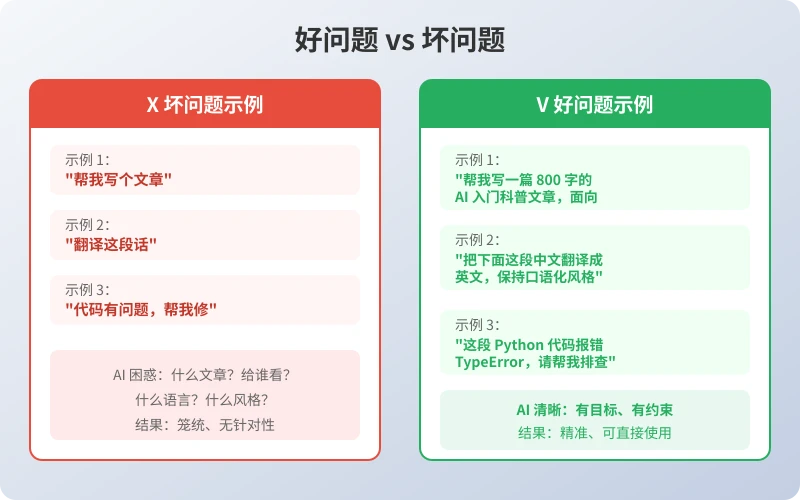
The same AI can give wildly different answers depending on how you phrase your question. Here's a real comparison:
As you can see, vague questions leave AI guessing, while specific questions let it deliver exactly what you need.
The 4-Step Prompt Method
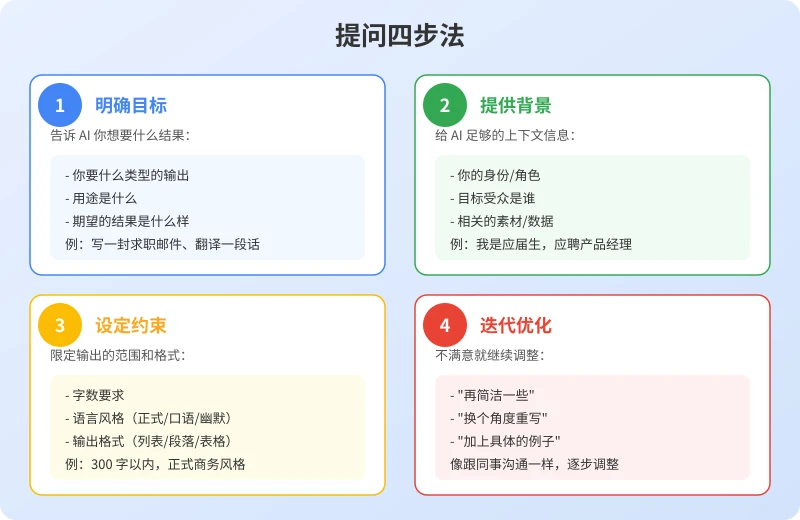
Master this simple four-step method to dramatically improve AI responses:
Step 1: Define the Goal
Before asking, think about what result you want. Tell AI:
- What type of output you need (article, list, table, code)
- What it's for (boss review, social media, homework)
- What the ideal result looks like
Example: "Help me write a job application email" is much better than "Write me something."
Step 2: Provide Context
AI doesn't know your situation, so give it enough background:
- Who you are (student, professional, entrepreneur)
- Who the audience is (recruiter, client, friend)
- Relevant materials or data (resume content, product info)
Example: "I'm a fresh CS graduate applying for a product manager role" beats "Help me write a cover letter."
Step 3: Set Constraints
Limit the scope and format to avoid overly long or off-target responses:
- Word count (under 300 words, no more than 500 words)
- Tone (formal business, casual, humorous)
- Output format (bullet points, paragraphs, comparison table)
Example: "In formal business style, under 300 words" tells AI exactly what you need.
Step 4: Iterate and Refine
It's normal to not be satisfied with the first response. Keep adjusting like chatting with a colleague:
- "Make it more concise, remove unnecessary content"
- "Rewrite from a different angle"
- "Add concrete examples"
- "Make the tone more professional"
AI won't get annoyed — multi-turn conversations often produce better results.
Real-World Examples
Here are practical demonstrations of the four-step method in common scenarios:
Scenario 1: Writing a Weekly Report
Basic prompt: "Help me write a weekly report"
Improved prompt: "This week I completed user registration feature development, fixed 3 production bugs, and attended a product requirements review. Please write a 200-word weekly report in formal work report style, listing this week's work and next week's plan in bullet points."
Scenario 2: Translating Text
Basic prompt: "Translate this text"
Improved prompt: "Translate the following Chinese text into English. The target readers are overseas clients. Keep it professional but not stiff, maintaining a business style. Preserve the core meaning of the original."
Scenario 3: Learning a New Concept
Basic prompt: "What is an API"
Improved prompt: "I'm a complete beginner. Please explain what an API is using everyday life examples, no technical jargon. Use 3 analogies to help me fully understand."
Common Mistakes to Avoid
- Too brief: "Write me an article" — AI doesn't know what, for whom, or what style
- Too many questions: Cramming 5 questions into one message, AI may miss some
- No feedback: Switching topics when unsatisfied instead of telling AI how to improve
- Treating AI like a search engine: AI excels at generation and analysis, not just information lookup
Summary
Good prompting is a skill you can practice. Remember this formula:
Goal + Context + Constraints + Iteration = High-Quality Answers
Start using this four-step method today, and you'll see a dramatic improvement in the quality of AI responses.
Related Articles
AI 帮你写简历:从零到专业,五步搞定求职利器
不管你是应届生还是职场转行,AI 都能帮你把简历从"凑合能用"变成"眼前一亮"。本文用五个步骤,手把手教你用 AI 生成、修改、优化出一份真正能拿面试的专业简历。
AI 语音转文字:零基础实操指南,三步把说话变成文字
还在打字到手指发酸?还在为会议记录发愁?AI 语音转文字技术已经非常成熟,学会使用它,可以帮你把说话直接变成文字,效率提升数倍。本文将手把手教你选择工具、完成转写、导出使用,让 AI 成为你的打字替身。
Tech FrontierAI 提问技巧入门:让 AI 回答更准确的 7 个实用方法
明明 AI 功能强大,但每次提问得到的回答都差强人意?其实问题往往不在 AI,而在于你提问的方式。本文用最直观的方式教你 7 个让 AI 回答更准确的实用技巧,包括四要素公式、精准提问、背景信息、拆分任务、追问迭代、万能模板和常见错误,小白也能立即上手。
Comments are not yet available, stay tuned