AI Resume Writing Guide: Generate a Professional Resume in 3 Steps

Why Use AI to Write Your Resume?
Writing a resume is the first step in job hunting, and it's one that many people find challenging. Not sure how to describe your work experience? Uncertain about how to organize your skills? Struggling with formatting? AI resume assistants can solve all these problems.
This tutorial is designed for absolute beginners. No design or writing experience needed. You just need to provide basic information, and AI can generate a professional, clear, and targeted resume for you.
Getting Ready
Before you begin, prepare the following:
- An AI chatbot (ChatGPT, Claude, or any similar tool)
- Your basic info (name, contact details, education)
- Work experience (companies, roles, what you did)
- Target job posting (optional, but helps AI be more precise)
Generate a Professional Resume in 3 Steps
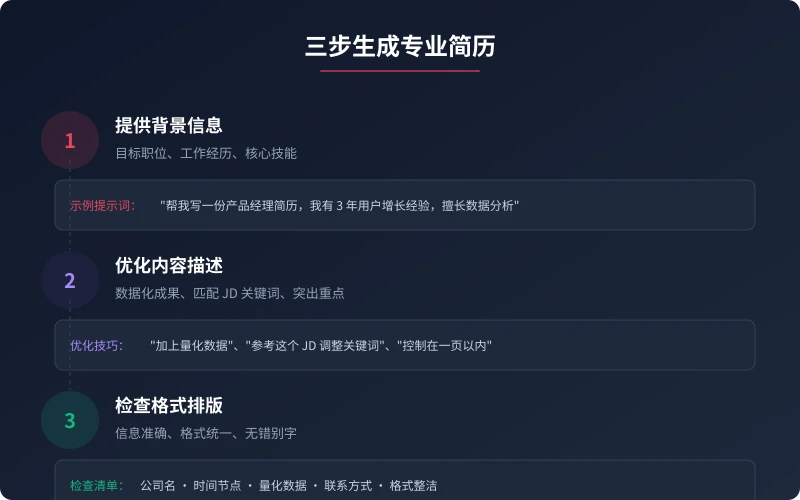
Step 1: Provide Your Background
Tell AI three key pieces of information:
- Target position — What role are you applying for? (Product manager, frontend engineer, marketing specialist...)
- Work history — Where have you worked? What did you do?
- Core skills — What are you good at? Any certifications or achievements?
Example prompt:
Help me write a product manager resume. I have 3 years of user growth experience and 2 years of e-commerce product experience. Skilled in data analysis and user research, with PMP certification.
Step 2: Optimize Content Descriptions
AI will generate a complete resume draft. Next, you need to:
- Make AI use quantified data for your achievements ("Increased conversion by 30%" is more compelling than "Improved conversion")
- Adjust keywords to match the target job description
- Remove irrelevant content and highlight key points (aim for one page)
Optimization prompt examples:
"Add quantified data to each experience" · "Adjust keywords based on this JD" · "Keep it to one page" · "Highlight my data analysis skills"
Step 3: Check Format and Layout
Before copying to your email or application, confirm:
- All information is accurate (company names, dates, figures)
- Formatting is consistent (date format, punctuation, spacing)
- No typos or grammatical errors
- Contact details are correct (email, phone, LinkedIn)
Common Resume Scenarios
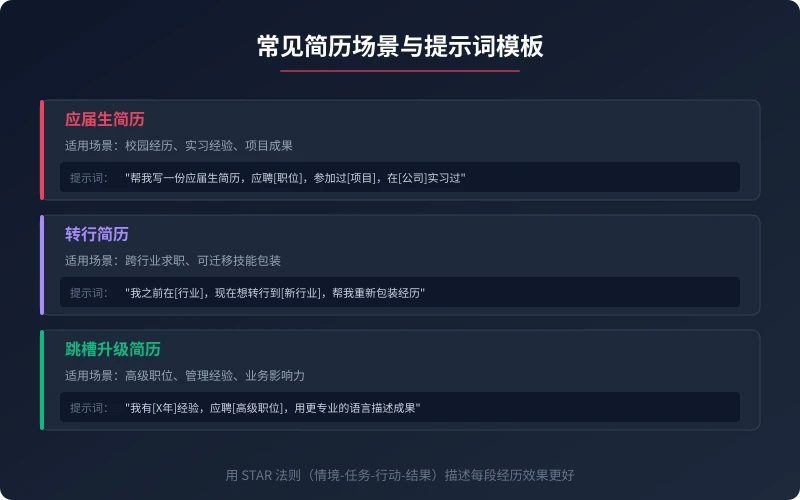
Scenario 1: Fresh Graduate Resume
No formal work experience? Don't worry. AI can help you package campus activities, internships, and project experience into competitive content.
Prompt template:
Write a fresh graduate resume for [Company]'s [Position]. I study [Major] at [University], participated in [Project/Competition], and interned at [Company] for [X months].
Scenario 2: Career Switch Resume
Want to change industries but unsure how to write about it? AI can help you find connections between past experience and target roles, highlighting transferable skills.
Prompt template:
I previously worked in [Industry] as [Position], now switching to [New Industry]'s [New Position]. Help me repackage my experience to highlight relevant skills.
Scenario 3: Career Upgrade Resume
Have experience but aiming for a promotion? AI helps you describe your achievements in more advanced language, making your resume more impactful.
Prompt template:
I have [X years] of experience and am applying for [Senior Position]. Use more professional language to describe my work achievements, emphasizing management experience and business impact.
Advanced Tips
After mastering the basic 3 steps, these tips will help you write even better resumes:
- Customize for each position — Don't use one resume for all companies; adjust keywords and focus based on each JD
- Use the STAR method — Situation → Task → Action → Result for describing each experience
- Have AI write a cover letter too — Beyond the resume, a good cover letter can make you stand out
- Iterate multiple times — Start with AI generating a framework, then gradually add details and data
Pro tip: A resume is not an essay — it doesn't need to be lengthy. Recruiters spend an average of only 6-10 seconds scanning a resume, so key information should be in the most prominent position. Use data to speak and let achievements prove your ability.
Summary
Using AI to write your resume isn't "cheating" — it's about presenting your strengths more clearly. AI handles the wording and structure, but the core content and authenticity of your resume need your oversight. Master the three steps of "Provide Background → Optimize Description → Check Layout" and you can quickly write a professional resume.
Start using AI to optimize your resume today. You'll find that a resume that used to take a whole day can now be done in 30 minutes.
Related Articles
AI 本地部署入门:零基础三步跑起大模型,完全免费
不用注册、不用充钱、完全离线。本文手把手教你用 Ollama 等工具,在自家电脑上部署运行开源大模型,从零开始完成本地 AI 部署的全过程。
TutorialsAI 帮你做购物决策:从比价到避坑的完整实操指南
买手机、买耳机、买电脑,AI 真的能帮你选对吗?本文用五个实操步骤,手把手教你让 AI 完成价格对比、参数解析、口碑筛选和避坑提醒,小白也能 10 分钟搞定购物决策。
TutorialsAI 语音输入与语音转文字:零基础 5 分钟上手,解放双手的写作新方式
打字太慢?说话比打字快 3 倍。这篇文章手把手教你用 AI 语音输入工具,从选择工具、开始录音到转文字、编辑导出,五大步骤、六大场景,让你从此"说话即写作"。
Comments are not yet available, stay tuned