AI 智能家居控制助手实用指南:语音控制、设备联动、自动化场景一步到位
下班回家前,空调已经调好温度;说一句"晚安",全屋灯光自动关闭、门锁上锁、窗帘拉好——这不是科幻电影,用 AI + 智能家居设备就能实现。本文手把手教你从零搭建一套语音控制的智能家居系统。
什么是 AI 智能家居
传统智能家居是"你点一下,它动一下"——通过手机 App 手动控制灯光、空调、窗帘。而 AI 智能家居的核心升级在于三点:
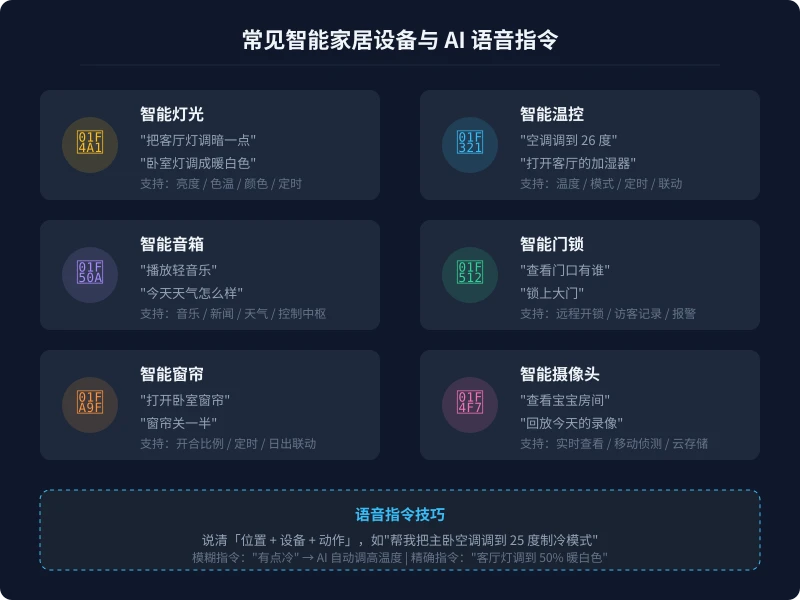
- 语音交互:不用掏手机,直接说话控制设备,"帮我把客厅灯调暗"
- 意图理解:不用记精确指令,说"有点冷",AI 自动调高空调温度
- 自动化联动:设备之间互相配合——你出门时,灯关、空调关、门锁上、摄像头开启,一键搞定
简单来说,AI 让智能家居从"遥控器"升级成了"管家"。
你需要哪些设备
搭建智能家居不需要一步到位,可以从几个核心设备开始,逐步扩展。以下是推荐的入门设备清单:
第一梯队:必买(入门三件套)
| 设备 | 预算 | 推荐品牌 | 核心功能 |
|---|---|---|---|
| 智能音箱 | 200-500 元 | 小爱同学 / 天猫精灵 / 小度 | 语音控制中枢 |
| 智能灯泡/灯带 | 30-80 元/个 | Yeelight / 米家 | 亮度/色温/颜色调节 |
| 智能插座 | 30-60 元/个 | 米家 / 涂鸦 | 定时开关、电量统计 |
第二梯队:进阶(提升体验)
| 设备 | 预算 | 推荐品牌 | 核心功能 |
|---|---|---|---|
| 智能窗帘电机 | 300-600 元 | Aqara / 米家 | 定时开合、日出联动 |
| 智能门锁 | 800-2000 元 | 鹿客 / 德施曼 / 小米 | 指纹开锁、远程控制 |
| 温湿度传感器 | 50-100 元 | Aqara / 米家 | 联动空调/加湿器 |
| 人体传感器 | 50-80 元 | Aqara / 米家 | 自动开关灯 |
第三梯队:安防(出门在外更安心)
| 设备 | 预算 | 推荐品牌 | 核心功能 |
|---|---|---|---|
| 智能摄像头 | 100-300 元 | 小米 / 萤石 | 实时查看、移动侦测 |
| 烟雾/燃气报警器 | 80-150 元 | 小米 / 海曼 | 异常报警推送手机 |
新手建议:先花 500 元左右买第一梯队三件套体验一下,觉得好用再逐步扩展。不要一上来就买一堆,先感受"语音控制"的便利。
四步完成搭建
第一步:选择生态平台
智能家居设备需要一个统一的"中控平台"来管理。国内主流平台:
- 米家(小米):设备种类最多、价格最亲民,入门首选
- 天猫精灵:阿里生态,适合已有天猫精灵音箱的用户
- HomeKit(苹果):安全性好,iPhone 用户体验佳,但设备少、价格高
- Home Assistant:开源平台,支持几乎所有品牌,适合折腾党
建议选一个平台,尽量买同一生态的设备,减少兼容性问题。
第二步:安装设备并联网
- 下载对应的 App(米家 App / 天猫精灵 App 等)
- 注册账号并登录
- 将设备通电,进入配网模式(通常长按设备上的按钮 5 秒)
- 在 App 中点击"添加设备",按照提示连接 Wi-Fi
- 为每个设备命名,建议用"位置+设备"格式:客厅灯、卧室空调、书房插座
命名技巧:设备名称要口语化,因为你之后要用语音控制它。叫"客厅主灯"比叫"yeelight-001"好识别得多。
第三步:配置语音控制
以小爱同学为例:
- 打开小爱同学 App → 设置 → 智能家居
- 授权关联你的米家账号
- 系统自动同步所有已添加的设备
- 对着音箱说"小爱同学,打开客厅灯",测试是否正常
如果设备名在 App 中叫"客厅灯",语音指令也说"客厅灯"就行。不需要额外设置——设备名就是语音指令的一部分。
第四步:创建自动化场景
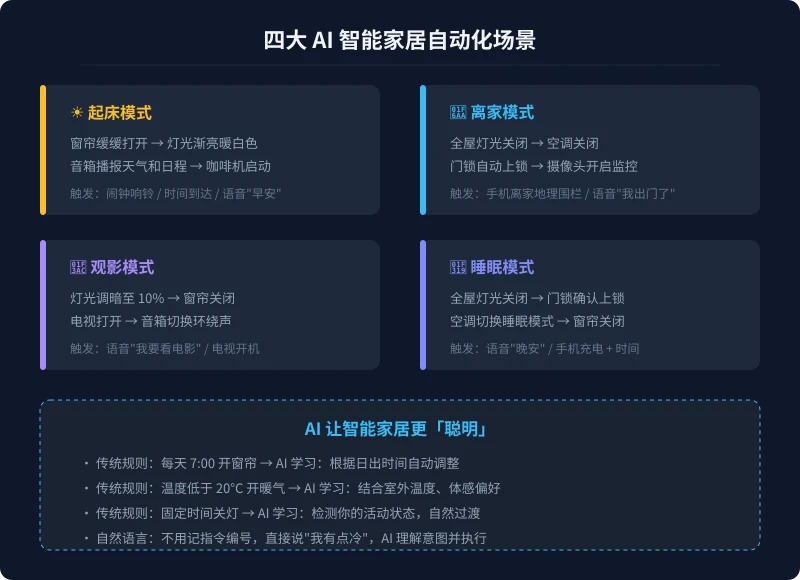
这是智能家居最强大的功能。在 App 中设置"场景"或"自动化",让多个设备联动:
常用场景示例:
- 回家模式:门锁开锁 → 客厅灯亮 → 空调开启 → 窗帘打开
- 离家模式:说"我出门了" → 全屋灯关 → 空调关 → 门锁上锁 → 摄像头开启
- 起床模式:闹钟响 → 窗帘打开 → 灯光暖白 → 音箱播报天气
- 睡眠模式:说"晚安" → 全屋灯关 → 门锁确认 → 空调切睡眠模式
AI 让智能家居更聪明的 5 个场景
场景一:自然语言控制
传统智能家居需要精确指令:"打开客厅灯"。AI 智能家居支持模糊表达:
- "有点冷" → AI 自动调高空调温度 2 度
- "太亮了" → AI 把当前房间灯光调暗 20%
- "我要睡觉了" → AI 执行睡眠模式场景
- "帮我营造一个浪漫的氛围" → AI 调暗灯光、切换暖色、播放轻音乐
场景二:智能节能
AI 通过学习你的生活习惯自动优化能耗:
- 检测到房间 30 分钟无人 → 自动关灯、关空调
- 根据室外温度自动调节空调目标温度,避免过度制冷/制热
- 根据日照强度自动调节窗帘开合比例,减少空调负担
- 统计每月各设备用电量,给出节能建议
场景三:安防智能升级
AI 让安防从"被动录像"变成"主动预警":
- 摄像头 AI 识别到陌生人 → 推送手机警报 + 自动录像
- 检测到烟雾/燃气异常 → 关闭燃气阀 + 打开窗户 + 拨打电话
- 门锁连续 3 次密码错误 → 自动锁定 + 推送手机通知
- 离家后门窗传感器检测到异常开启 → 立即报警
场景四:老人/儿童关怀
- 老人起夜 → 人体传感器检测到 → 走廊灯自动亮起柔和夜灯
- 设置"一键求助"语音指令 → AI 自动拨打家人电话
- 儿童房摄像头 AI 检测到哭声 → 推送通知给父母
- 冰箱传感器检测到门长时间未关 → 语音提醒
场景五:多设备协同场景
- 手机闹钟响 → 窗帘打开 → 灯光渐亮 → 音箱播报日程 → 咖啡机启动
- 扫地机器人完成清扫 → 自动回充 → 推送清扫报告到手机
- 洗衣机洗完 → 音箱语音提醒 → 手机推送通知
主流平台对比
| 平台 | 优势 | 劣势 | 适合人群 |
|---|---|---|---|
| 米家 | 设备最多、性价比高 | 部分设备需搭配小米网关 | 入门用户首选 |
| Apple HomeKit | 安全性高、Siri 控制 | 设备少、价格贵 | 苹果全家桶用户 |
| Home Assistant | 开源、支持最多品牌 | 需要技术基础、自己维护 | 技术爱好者 |
| 天猫精灵 | 阿里生态、购物联动 | 设备种类不如米家 | 阿里生态用户 |
实用技巧与注意事项
网络要求
- 智能设备大多使用 2.4GHz Wi-Fi,确保路由器开启了 2.4GHz 频段
- 设备数量多时建议用独立的 IoT 网络,避免和手机电脑抢带宽
- Mesh 路由器比单路由器覆盖更好,大户型必备
安全建议
- 摄像头、门锁等安防设备选择大品牌,关注固件更新
- 不要把所有设备放在同一个 Wi-Fi 网络中,安防设备建议独立网络
- 定期检查摄像头的访问记录,确保没有异常登录
- 智能门锁保留物理钥匙作为备用方案
选购避坑
- 先确认生态兼容性:买之前看设备是否支持你的平台(米家/HomeKit 等)
- 不要贪便宜买杂牌:便宜设备可能断网、延迟高、固件不更新
- 注意通信协议:Wi-Fi 设备直接连路由器,Zigbee/蓝牙设备需要网关
- 预留扩展空间:开关底盒选零火版本,方便后续替换智能开关
预算参考
| 方案 | 预算 | 覆盖设备 | 体验 |
|---|---|---|---|
| 入门体验 | 300-500 元 | 音箱 + 2 个灯泡 + 1 个插座 | 语音开关灯、定时控制 |
| 舒适生活 | 2000-5000 元 | 全屋灯光 + 窗帘 + 空调控制 + 传感器 | 场景联动、自动化控制 |
| 全屋智能 | 1-3 万元 | 上述全部 + 门锁 + 安防 + 家电联动 | 真正的全屋 AI 管家 |
总结
AI 智能家居不是极客的玩具,它正在成为普通人的生活方式。核心步骤就四步:选平台 → 装设备 → 配语音 → 建场景。记住几个关键点:
- 从入门三件套开始,不要一上来买一堆
- 尽量选同一生态的设备,减少兼容问题
- 设备命名要口语化,方便语音控制
- 自动化场景是核心价值,花时间配置几个常用场景
- 安防设备选大品牌,定期更新固件
花 300 块钱买个智能音箱加两个灯泡,你就能体验到"说句话开灯"的便利。等你习惯了这种生活方式,再逐步扩展到窗帘、空调、门锁——那时候你会发现,智能家居不是未来,而是现在。
相关文章
AI 语音转文字:零基础实操指南,三步把说话变成文字
还在打字到手指发酸?还在为会议记录发愁?AI 语音转文字技术已经非常成熟,学会使用它,可以帮你把说话直接变成文字,效率提升数倍。本文将手把手教你选择工具、完成转写、导出使用,让 AI 成为你的打字替身。
教程指南AI 本地部署入门:零基础三步跑起大模型,完全免费
不用注册、不用充钱、完全离线。本文手把手教你用 Ollama 等工具,在自家电脑上部署运行开源大模型,从零开始完成本地 AI 部署的全过程。
教程指南AI 帮你做购物决策:从比价到避坑的完整实操指南
买手机、买耳机、买电脑,AI 真的能帮你选对吗?本文用五个实操步骤,手把手教你让 AI 完成价格对比、参数解析、口碑筛选和避坑提醒,小白也能 10 分钟搞定购物决策。
评论功能暂未开放,敬请期待