AI-Powered Coding Learning Assistant for Beginners: A Complete Guide to Writing Your First Line of Code in 5 Minutes from Scratch

Why Learn Programming with AI?
Many people want to learn programming, but they get discouraged when they see a screen full of English code. In reality, programming isnât as hard as you thinkâespecially now with AI. AI is like a 24/7 programming tutor: it knows what you donât, it can fix what you write wrong, and it can explain things in plain language when you donât understand.
In the past, learning to code meant reading hundreds of pages of textbooks, setting up environments, installing software, and wasting half a day without even writing a line of working code. Now? Just open an AI chat window, tell it what you want to do, and it can generate code for you, explaining each line in simple terms.
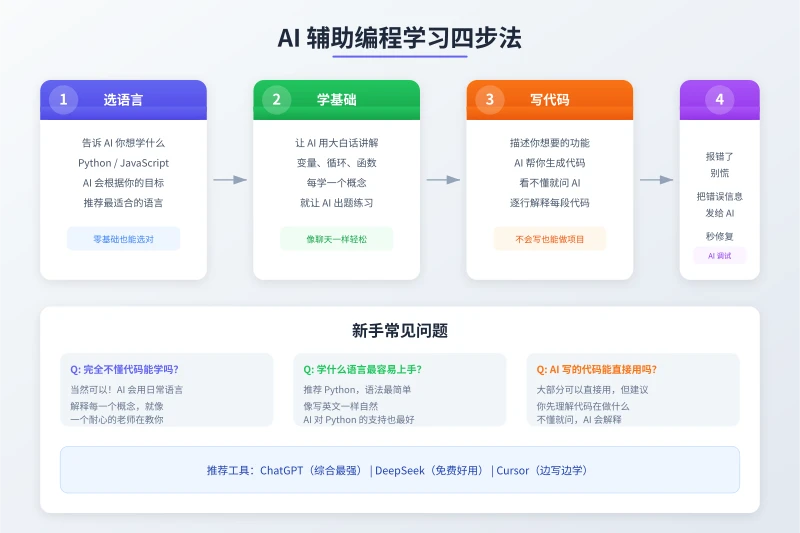
Step 1: Choose the Right Programming Language
There are many programming languages, but beginners only need to remember one name: Python. Why? Because its syntax is the simplest, reads like English, and AI support for Python is the best.
How to Talk to AI?
Tell AI directly about your background and goals:
Sample question: "I'm a complete beginner and want to learn programming to build automation tools, like batch processing Excel. What language do you recommend?"
AI will give suggestions based on your situation. In most cases, it will recommend Python. If you have other needs (like building a website), it might recommend JavaScript.
Donât Overthink It
Just go with Python. Itâs one of the most popular programming languages in the world, with plenty of tutorials, a large community, and high job demand. Most importantly, itâs really easy to learn.
Step 2: Let AI Teach You the Basics in Plain Language
After picking a language, donât rush into projects. First, spend 1â2 hours having AI help you understand a few core concepts. You donât need to memorize syntaxâjust understand what each thing does.
5 Concepts You Must Know
Ask AI to explain them one by one:
- Variables: Like a box that stores data. For example,
name = "Xiao Ming"puts the name "Xiao Ming" into the box calledname. - Data Types: Numbers, text, boolean values. AI will tell you when to use which.
- Conditionals: If... then... For example, "If it rains, bring an umbrella" becomes an
ifstatement in code. - Loops: Doing something repeatedly. For instance, "print numbers 1 to 100" can be done with a single line using a loop.
- Functions: Package a block of code into a tool that you can call anytime. Itâs like having a "make tea" buttonâpress it and the whole process runs automatically.
How to Talk to AI?
Sample question: "Explain Python variables in plain language, give me 3 real-life examples, and then give me 3 practice questions."
AI will explain in a way you can understand and give you exercises. After you finish, send your answers to AI and it will tell you if theyâre correct and where you went wrong.
Step 3: Let AI Write Your First Project
Once youâve learned the basic concepts, you can start working on projects. You donât need to write everything from scratchâfirst, let AI generate the code, then you understand and run it.
Recommended Projects for Beginners
- Number Guessing Game: The computer randomly picks a number, you guess, and it tells you if youâre too high or too low.
- Simple Calculator: Input two numbers and an operator, and it automatically calculates the result.
- To-Do List: Add, view, and delete tasks.
- Random Password Generator: Enter the password length, and it generates a random password.
How to Talk to AI?
Sample question: "Please write a Python number guessing game: The computer randomly picks a number between 1 and 100, the user enters a guess, the program says whether it's too high or too low, and keeps going until they guess correctly. Include Chinese comments for every step."
Note the last partâ"Include Chinese comments for every step." This is important because comments help you understand what each line of code does.
Running the Code
Once you have the code, you need a place to run it. The easiest ways:
- Run online: Go to replit.com, create an account, start a new Python project, paste the code, and click Run.
- Run locally: Download and install Python (python.org), then open the code file with IDLE or VS Code and run it.
Beginners are advised to use an online platform first to avoid the hassle of installation and configuration.
Step 4: Donât Fear ErrorsâLet AI Debug for You
You will definitely run into errors when codingâthatâs normal. A programmerâs daily life is dealing with errors. The key is, you donât need to understand the error message yourself; just copy the entire error and paste it to AI.
Common Error Scenarios
Scenario 1: Syntax Error
For example, missing a colon or a parenthesis. AI will tell you "Line 5 is missing a colon," and you just add it.
Scenario 2: Wrong Output
For example, you want the program to print 1 to 10, but it only prints 1 to 9. Send the code and the actual output to AI, and it will find the logic issue.
Scenario 3: Completely Unreadable Error
For example, TypeError: 'NoneType' object is not iterable. Donât panicâjust copy the entire error message and ask AI: "This code gave this error. What does it mean? How do I fix it?"
Debugging Question Template
"When I run this code, I get the following error: [paste error message]. Here is the code: [paste code]. Please help me analyze the cause and fix it."
Recommended AI Tools for Learning Programming
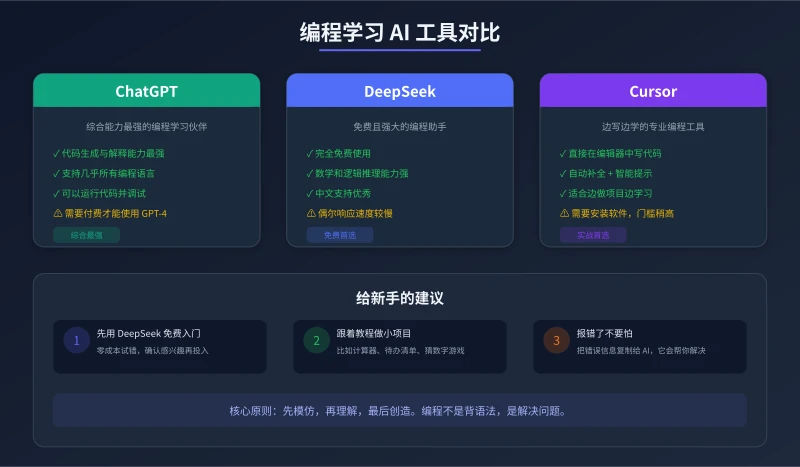
DeepSeek (Best Free Option)
Completely free, strong coding capabilities, especially in math and logical reasoning. Good Chinese language support, suitable for Chinese users. Itâs enough for beginners to get started.
ChatGPT (Most Comprehensive)
Best at code generation and explanation, supports almost all programming languages. The paid version (GPT-4) is better, but the free version is also sufficient. If your budget allows, upgrading is recommended.
Cursor (Learn by Coding)
This is a dedicated code editor with a built-in AI assistant. As you write code, it automatically suggests, completes, and explains. Suitable for those who want to learn in depth, but requires software installation and has a slightly higher learning curve.
5 Tips for Beginners
1. Imitate First, Understand Later
Donât try to understand everything from the start. First, let AI write code for you, run it successfully, and then understand it line by line. Itâs like learning to cook: follow the recipe first, then after youâve made it a few times, study why itâs done that way.
2. 30 Minutes a Day Is Enough
You donât need to study for 5 hours straight. Spending 30 minutes a day chatting with AI about one concept and doing one practice exercise is far more effective than cramming.
3. Projects Beat Reading
The fastest way to learn programming is by building projects. Even a tiny project (like a calculator) is more useful than reading 100 pages of tutorials. Because when you work on a project, you encounter real problems, and solving real problems is how you truly learn.
4. Always Ask AI "Why"
After AI gives you code, donât just copy and paste it to run. First ask, "What does this code mean?" "Why is it written this way?" "Is there a better way to write it?" Understanding is more important than running.
5. Save Your Code and Conversations
When you come across good code snippets or AI explanations, save them. You can refer to them later for similar problems. Itâs recommended to create a dedicated folder for study notes and code.
Frequently Asked Questions
Do I Need Good English to Learn Programming?
No. The English vocabulary used in programming is very limited, and AI can explain all concepts in Chinese. However, as you go deeper, youâll naturally become familiar with some common English terms.
How Long Until I Can Build Something?
If you study 30 minutes a day, you can build your first small project (like a number guessing game) in about 1â2 weeks. After 1â2 months, youâll be able to create practical automation tools.
Is Code Written by AI Considered Plagiarism?
Using AI to assist with learning and writing code is perfectly reasonable, just like using a calculator for math problems. However, if youâre a student and the assignment requires independent work, you should distinguish between learning scenarios and assessment scenarios.
What Can I Do After Learning?
A lot! Automate Excel processing, batch rename files, scrape web data, write small tools, do data analysis, and even develop websites and apps. Programming is a skill that can greatly improve your efficiencyâyou wonât regret learning it.
đ Related Articles
AI Mobile Photography Assistant Practical Guide: Composition Tips, Scene Optimization, and Post-Processing All in One
Can't take good photos with your phone? This article teaches you how to use AI tools to handle composition, settings, and post-processing. From food to portraits, from daytime to night scenes, four scenarios broken down step by step. Even beginners can capture stunning photos that get likes on social media.
TutorialsAI Sleep Management Assistant: Track Sleep, Improve Routine, and Boost Sleep Quality
Struggling with sleep? This article shows you how to use AI tools to track sleep data, analyze sleep patterns, and create personalized improvement plans. From trouble falling asleep to waking up in the middle of the night, AI helps you find the root cause and continuously optimizeâa sleep management guide that even beginners can use.
TutorialsAI Legal Assistant Guide: Contract Review, Rights Protection & Document Drafting Made Easy
Can't understand your lease? Don't know how to handle a workplace dispute? AI can help you review contracts, analyze legal issues, and draft legal documents. This guide covers three practical scenarios to turn AI into your personal legal advisor.
đŹ Comments are not yet available, stay tuned