AI-Powered Fitness Plans: A Beginner's Guide to Scientific Training
Many people want to get fit but don't know where to start: what to train, how much to do, or how to schedule rest days. These questions often discourage beginners from even trying. The good news is, you can use AI tools to quickly generate a scientific training plan tailored just for you. This guide will walk you through creating an AI-powered fitness program, even if you've never exercised before.
Why Use AI for Fitness Planning?
The traditional approach is either hiring a personal trainer (expensive) or searching for tutorials online (disorganized and not personalized). AI offers clear advantages:
- Personalized customization: Plans tailored to your age, weight, fitness level, and goals
- Easy adjustments: After training for a while, tell AI how you feel and it dynamically optimizes your plan
- Zero barrier: No professional knowledge needed — just describe what you want in natural language
- Free: Compared to personal trainers charging hundreds per session, AI plans are completely free
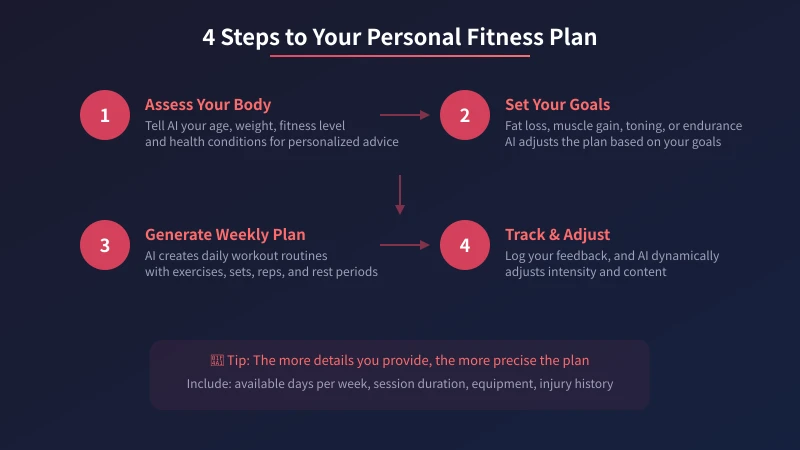
Step 1: Assess Your Physical Condition
Before talking to AI, prepare the following information. The more details you provide, the more precise the plan will be:
- Basic info: Age, gender, height, weight
- Fitness level: Complete beginner / occasional exercise / some experience
- Health conditions: Any old injuries like herniated discs or knee problems
- Available resources: Home gym or commercial gym? What equipment do you have?
- Schedule: How many days per week, how long per session
Example Prompt
I'm a 28-year-old male, 175cm tall, weighing 78kg, with basically no exercise experience. I want to lose fat, can train 5 days a week, about 40 minutes each session. I have a pair of 5kg dumbbells and a yoga mat at home. Please create a 4-week training plan for me.
Step 2: Set Clear Training Goals
Different goals lead to very different training plans. Common fitness goals include:
- Fat loss: Combination of cardio and strength training, focusing on calorie burn
- Muscle gain: Primarily strength training, focusing on progressive overload
- Toning: Targeted training for specific areas (abs, glutes, etc.)
- Overall fitness: Comprehensive training to improve both cardiovascular and muscular fitness
Tell AI your primary goal. If you have multiple goals, indicate priorities. For example: "I mainly want to lose fat, but also hope to develop some ab definition."
Step 3: Generate Your Weekly Training Plan
This is the most critical step. Ask AI to generate a detailed weekly plan. A good plan should include:
- Daily training theme (e.g., upper body strength day, cardio day, rest day)
- Each exercise's name, sets, and reps
- Rest periods between sets
- Warm-up and stretching routines
Sample AI-Generated Weekly Plan (Fat Loss Beginner)
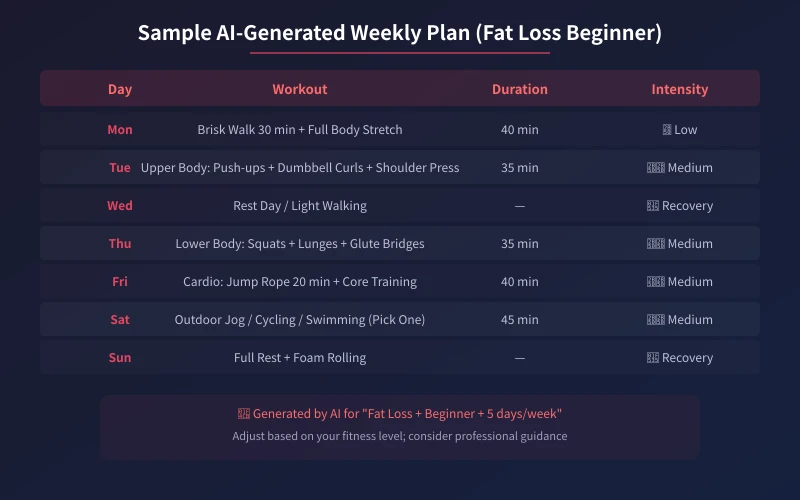
The above is a typical plan generated by AI based on "fat loss + beginner + 5 days per week." Notice these key design principles:
- Alternating strength and cardio: Avoid training the same muscle group on consecutive days, allowing recovery time
- Progressive intensity: Start with low intensity and gradually increase training volume
- Recovery days included: At least 1-2 rest or light activity days per week
Step 4: Track Feedback and Adjust Dynamically
A plan shouldn't be set in stone. After following it for a while, communicate your feelings to AI:
- Too easy: Tell AI "this weight feels very light" and it will increase intensity
- Too hard: Say "I can't finish the prescribed reps" and AI will reduce difficulty
- Uncomfortable movement: Describe the specific area and AI will suggest alternative exercises
- Want variety: Ask AI to rearrange exercises to keep things fresh
Advanced Follow-up Example
I've been following this plan for two weeks. My knees feel uncomfortable during squats. Also, I feel the upper body strength training could be more intense. Please adjust my plan.
AI will replace the problematic exercise based on your feedback while increasing the sets or difficulty for upper body training. This "conversational adjustment" is the biggest advantage of AI fitness plans.
Practical Tips
- Start with low intensity: The most common beginner mistake is going too hard too soon, leading to injury or giving up
- Record your training data: Use your phone's notes or a fitness app to log weights and reps each session, then share with AI as adjustment data
- Combine with nutrition: Fat loss = 30% exercise + 70% diet — you can also ask AI to create a meal plan
- Evaluate after 4 weeks: Your body needs time to adapt, so don't change plans too frequently
- Focus on proper form: AI can tell you what to do, but for exercise form, refer to video tutorials
AI Fitness Prompt Templates
Copy these templates, fill in your information, and get started right away:
- Initial plan: "I'm a [age]-year-old [gender], [X]cm tall, weighing [X]kg, with [no exercise experience / occasional exercise / some experience]. My goal is [fat loss / muscle gain / toning], I can train [X] days per week, [X] minutes per session. I have [equipment list] at [home / gym]. Please create a 4-week training plan."
- Plan adjustment: "I've been following your plan for [X] weeks, [specific feelings]. Please adjust the [specific area or exercise]."
- Nutrition pairing: "I'm doing [training type] training, my goal is [fat loss / muscle gain]. Please create a daily meal plan of approximately [X] calories."
AI isn't magic, but it can help you overcome the "I don't know how to start" barrier. Start today — use AI to create your first fitness plan and take the first step toward a healthier life.
Related Articles
AI Speech to Text: Beginner's Guide to Convert Voice to Text in 3 Steps
Learn how to convert speech to text using AI tools. Perfect for meeting notes, content creation, and video subtitles. Three practical scenarios with step-by-step instructions.
TutorialsAI Local Deployment Guide: Run Large Models in 3 Steps for Free
Learn how to deploy AI models locally in just 3 steps. No coding experience needed, completely free, and your data stays private on your own computer.
TutorialsAI Shopping Decision Guide: From Price Comparison to Avoiding Pitfalls
Learn how to use AI for shopping decisions. From price comparison to avoiding pitfalls - make smarter purchasing choices with AI assistance.
Comments are not yet available, stay tuned