A Practical Guide to AI Resume Writing Assistants: Resume Diagnosis, Content Optimization, and Interview Preparation All in One
Why You Need an AI Resume Writing Assistant?
Writing a resume is one of the most troublesome tasks for every job seeker. You may have plenty of experience, but it reads flat; you may be highly capable, but your resume reads like a laundry list. Even more painful is sending out dozens of applications only to receive a handful of interview invitations.
AI can act as your "resume consultant"—tell it about your experiences, and it can help you highlight key points, optimize wording, and match job keywords. This article will guide you through the 5 most common resume scenarios, teaching you step-by-step how to use AI to craft an impressive resume.
Preparation
You will need an AI conversation tool. Here are a few recommendations:
- ChatGPT (OpenAI): The most popular AI conversation tool, usable with the free version, excels at structured output
- Claude (Anthropic): Good at long-text analysis and deep reasoning, very detailed for resume optimization
- Tongyi Qianwen / ERNIE Bot: Domestic large language models with strong Chinese comprehension, more familiar with the local job market
- Ciyuano Platform: Aggregates multiple models, allows one-click switching, suitable for comparing different optimization solutions
Choose any one to start. It is recommended to use it on a computer for easy copying, pasting, and editing.
Scenario 1: Let AI Write a Resume from Scratch
Fresh graduates, career changers, or those who haven't written a resume in a long time often don't know where to start. AI can help you organize scattered experiences into a well-structured resume.
Steps
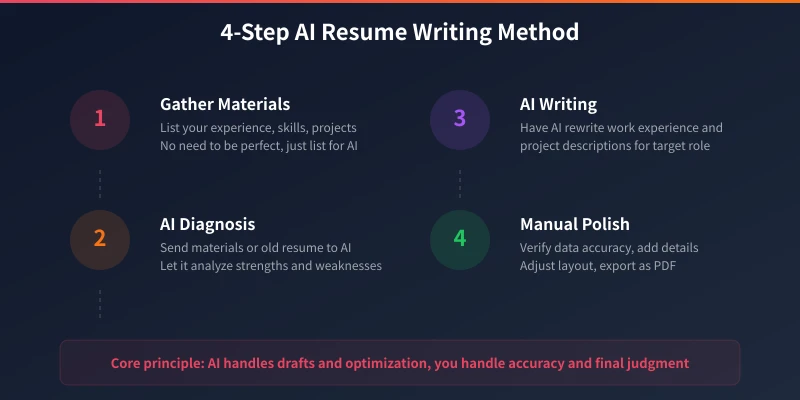
- Open the AI tool and briefly introduce your background: education, major, internship or work experience, skills
- You don't need to write perfectly; just tell the AI the information you have, like chatting
- Tell the AI what type of position you are applying for
- The AI will generate a complete first draft of your resume for you
Example Prompt:
I am a 2025 graduate majoring in Computer Science. During college, I worked on 2 web projects (an e-commerce website and an online education platform), interned at a startup for 3 months as a front-end developer, and am proficient in React, Vue, Node.js. I scored 520 on CET-4 and won second prize in a university-level programming competition. I am looking for a front-end developer position. Please help me write a resume.
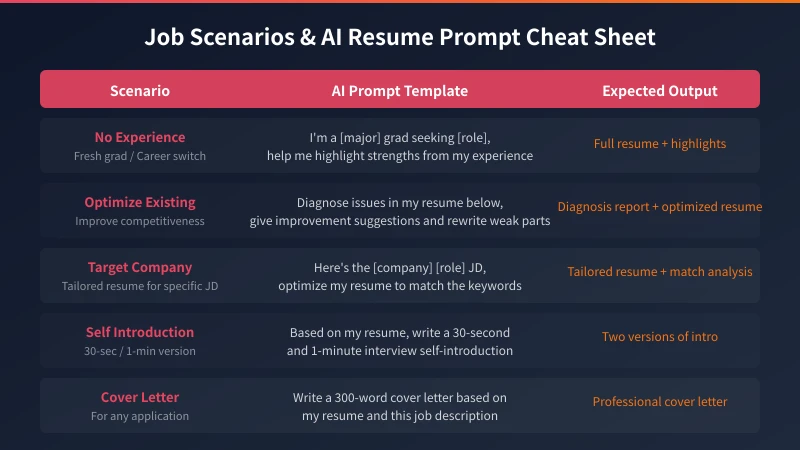
The AI will generate a complete resume containing sections like personal information, education background, internship experience, project experience, skills list, honors and awards, etc. You can then ask the AI to "make the project experience more compelling" or "help me quantify my work achievements."
Advanced Tips
- Tell the AI your true experiences—don't fabricate them. AI is responsible for optimizing wording; you are responsible for authenticity.
- Ask the AI to rewrite each experience using the STAR method (Situation, Task, Action, Result).
- If you are unsure about your highlights, first ask the AI to "dig out possible highlights from my experiences."
Scenario 2: Let AI Diagnose and Optimize an Existing Resume
If you already have a resume but it's not effective, AI can act like a professional HR professional to diagnose issues and provide optimization suggestions.
Steps
- Copy and paste your entire resume to the AI
- Ask the AI to diagnose the problems in your resume from an HR perspective
- The AI will point out specific issues: vague descriptions, lack of quantifiable data, non-standard formatting, etc.
- Ask the AI to provide revision suggestions for each issue and rewrite the content
Example Prompt:
You are an HR with 10 years of experience. Please diagnose my resume from the following perspectives: 1) Is the content persuasive? 2) Do the keywords match the job requirements? 3) Is the layout clear? 4) Are there any obvious negative factors? Please analyze each item and provide revision suggestions. [Paste full resume text]
The AI will list each problem in the resume, for example, "Responsible for company website development" is too vague. It might suggest changing it to "Independently led the company website redesign, reducing initial page load time from 3.2 seconds to 0.8 seconds and increasing mobile responsiveness rate from 60% to 100%."
Advanced Tips
- Ask the AI to compare your resume with the target job's JD (Job Description) to identify keyword gaps.
- Ask the AI to prioritize optimization suggestions by "Negative factors > Improvement points > Positive highlights."
- After optimization, have the AI review it again for iterative improvement.
Scenario 3: Let AI Customize Your Resume for a Specific Position
Mass-applying for jobs yields poor results because resumes are not tailored for each position. AI can help you quickly analyze the JD and adjust your resume's match.
Steps
- Find the job JD (Job Description) for the position you want to apply for.
- Send both the JD and your resume to the AI.
- Ask the AI to analyze the key requirements in the JD and find matching points in your experiences.
- The AI will generate a resume optimized specifically for that position.
Example Prompt:
Here is a job JD from a company: [Paste JD]. This is my resume: [Paste resume]. Please analyze the 3-5 core competencies that this position values most, then adjust my resume to highlight the experiences and skills that match these competencies. Keep all experiences real; do not fabricate anything.
The AI will help you rearrange the priorities of your resume. For example, if the JD emphasizes "performance optimization," the AI will place your relevant performance-related experiences more prominently and add more matching keywords.
Advanced Tips
- Prepare a "master resume" (the most complete version) and ask the AI to customize based on it for each application.
- Ask the AI to list the "hard requirements" and "bonus points" in the JD, ensuring all hard requirements are covered.
- If you truly don't meet a certain hard requirement, ask the AI to help you think of a reasonable alternative wording.
Scenario 4: Let AI Help You Prepare for Interview Self-Introductions
Once your resume passes the screening, the first hurdle in the interview is the self-introduction. Many people either talk too long and ramble, or get nervous and draw a blank. AI can help you prepare different versions of your self-introduction.
Steps
- Send your resume to the AI.
- Ask the AI to write a 30-second and a 1-minute version of your self-introduction based on the resume.
- The AI will summarize your strengths in a natural, conversational way.
- You can practice based on the AI's suggestions until you speak naturally and fluently.
Example Prompt:
Based on my resume, help me write two versions of a self-introduction for an interview: 1) A 30-second elevator version, concise and powerful; 2) A 1-minute detailed version, highlighting project experience and core strengths. Make it conversational, natural, and not sound like you are reading a script.
The AI will generate something like: "Hello interviewers, I'm XX, a Computer Science graduate. During college, I independently developed two web projects, one of which, an e-commerce website, reached a daily visit count of 5000. During my internship at XX company, I was responsible for front-end refactoring, improving page load speed by 75%. I am particularly interested in front-end performance optimization and hope to develop in this direction."
Advanced Tips
- Let the AI adjust the focus of the self-introduction for different companies.
- Let the AI simulate an interviewer, ask 3 follow-up questions based on your self-introduction, and help you prepare answers.
- Record the self-introduction written by the AI and listen back to adjust the pace and tone.
Scenario 5: Let AI Help You Write a Cover Letter
Many foreign companies and large corporations require a Cover Letter. AI can help you write a professional yet warm cover letter.
Steps
- Tell the AI the company and position you are applying for.
- Provide your resume and the company's job JD.
- Ask the AI to write a cover letter of around 300 words.
- Review the content generated by the AI to ensure it matches your actual situation.
Example Prompt:
I want to apply for the [Position Name] at [Company Name]. Here is the job JD: [Paste JD], and this is my resume: [Paste resume]. Please write a cover letter of around 300 words. Requirements: 1) Opening should state the application motivation; 2) Middle section should showcase core competencies matching the position; 3) Closing should express sincerity. The tone should be professional but not overly formal.
The AI will help you write a well-structured, focused cover letter. You just need to check the details to ensure there are no factual errors.
Important Considerations for Using AI Resume Tools
Although AI is a great resume assistant, there are a few points to pay special attention to:
- Never fabricate experiences: AI can help you optimize wording and highlight strengths, but all experiences must be real. Background checks will verify every piece of information.
- Manually review after AI optimization: AI can sometimes over-polish or generate inaccurate descriptions. Always check every word before submitting.
- Maintain your personal style: Content generated by AI can be template-like. Add your own expression habits to give the resume more personal character.
- Multiple iterations yield better results: Don't expect perfection in one go. Have AI diagnose -> you revise -> AI review again -> revise again. Usually, 2-3 rounds yield great results.
- Be mindful of information security: Do not enter sensitive information like ID numbers or bank card numbers into AI. Personal information on a resume (name, phone, email) is generally fine.
Summary
The core value of AI resume writing lies in "efficiency" and "precision." Traditionally, writing a resume might involve agonizing for days, while AI can provide a professional-level draft or optimization plan in minutes. More importantly, AI can help you review your resume from an HR perspective, identifying issues you might not see yourself.
Starting today, try sending your existing resume to an AI and let it diagnose it. You might be surprised to find how many areas can be optimized. On your job-seeking journey, let AI be your resume consultant.
Related Articles
AI Speech to Text: Beginner's Guide to Convert Voice to Text in 3 Steps
Learn how to convert speech to text using AI tools. Perfect for meeting notes, content creation, and video subtitles. Three practical scenarios with step-by-step instructions.
TutorialsAI Local Deployment Guide: Run Large Models in 3 Steps for Free
Learn how to deploy AI models locally in just 3 steps. No coding experience needed, completely free, and your data stays private on your own computer.
TutorialsAI Shopping Decision Guide: From Price Comparison to Avoiding Pitfalls
Learn how to use AI for shopping decisions. From price comparison to avoiding pitfalls - make smarter purchasing choices with AI assistance.
Comments are not yet available, stay tuned