AI Social Media Assistant: Build an Efficient Content Pipeline
Social media management is a daily pain point for many personal brands and small teams — writing copy, planning schedules, replying to comments, analyzing data, every step is time-consuming. This article teaches you how to use AI to compress these repetitive tasks to just 2-3 hours per week, even if you have zero technical background.
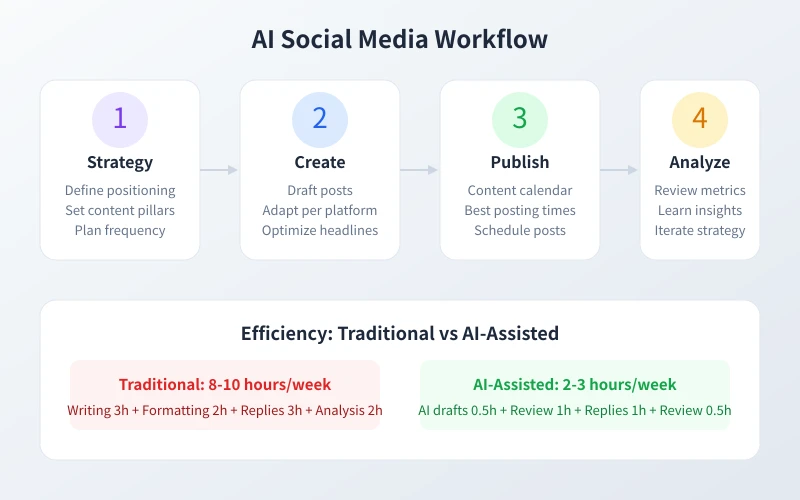
What Can AI Do for You
Before you start, let's look at the four major areas AI can cover in social media management:
Content Creation: Writing copy, adjusting tone, crafting headlines, storytelling — AI can quickly generate drafts based on your needs, and you only need to review and fine-tune.
Scheduling & Planning: Tell AI your industry and target audience, and it can help you create a weekly or even monthly content calendar, including what to post each day and when.
Engagement & Replies: Facing all kinds of comments, AI can help you quickly generate appropriate, warm-hearted responses — no more staring at the screen blankly.
Data Analysis: Hand over your analytics data to AI, and it can identify which content performs best, the optimal posting times, and what your follower demographics look like.
Step 1: Define Your Account Positioning
Before using AI to generate any content, you need to think through a few basic questions. This step doesn't require AI, but it will determine the quality of all subsequent AI output.
Open a notepad and write down the following:
- Who are you: Individual blogger? Brand? Freelancer?
- Your target audience: Age, occupation, interests, pain points?
- Your core value: What can you offer that others can't?
- Which platforms to use: WeChat, Xiaohongshu, Douyin, Weibo, Zhihu?
- Your posting frequency: Daily? Three times a week?
Tip: Your positioning doesn't need to be perfect from the start. Write a general direction first, then adjust as you go. The key is to take action, not to pursue perfection.
Use AI to Help with Positioning
If you can't even figure out your positioning, just ask AI directly:
I want to create a social media account about [your interest/industry], targeting [target audience]. Please help me analyze:
1. How big is the market opportunity in this direction?
2. What differentiated positioning should I adopt?
3. Which platforms should I prioritize?
4. What's the recommended posting frequency?
Step 2: Batch Generate Content with AI
This is where AI delivers the most value. Many people spend 30 minutes to an hour writing a single social media post, but with AI, you can generate a draft in 5 minutes.
Generate a Weekly Content Plan
I am [your identity], running an account on [platform name] about [your topic]. Target audience: [audience description]. Please create a content plan for next week (Monday to Sunday), requirements:
1. A different content angle each day
2. Each post should have a suggested title and key selling point
3. Mark the best time to post
4. Present in a table format
Generate Each Post Individually
Once you have the plan, ask AI to write drafts for each post. The key is providing enough context:
Please write a [platform name] post about [specific topic]. Requirements:
- Eye-catching headline, within 20 characters
- 300-500 words body text, clearly segmented
- Tone: casual/professional/humorous/warm
- End with an engagement prompt
- Include 3-5 relevant hashtags
Important Reminder: Always review AI-generated content before publishing. Check factual accuracy, tone appropriateness, and sensitive information. AI is your assistant, not your replacement.
Step 3: Create a Publishing Schedule
With content ready, the next step is publishing. Different platforms have different optimal posting times.
Generally, common best posting times are:
- Xiaohongshu: 12:00-13:00, 20:00-22:00
- WeChat: 7:30-8:30 (commute), 20:00-21:00
- Douyin: 12:00-13:00, 19:00-22:00
- Weibo: 10:00-11:00, 20:00-23:00
- Zhihu: 20:00-22:00 (deep reading hours)
Step 4: Efficiently Reply to Comments and DMs
Engagement is the soul of social media, but replying to each comment manually is very time-consuming. AI can help you quickly generate reply drafts.
Batch Process Comments
Here are some recent comments on my account. Please generate a reply for each:
1. "Does this method actually work?"
2. "Can you explain step 3 in more detail?"
3. "Amazing, saved!"
4. "Is there a beginner-friendly version?"
Reply requirements: warm and natural, not too formal, use appropriate emojis.
Step 5: Use AI to Analyze Performance Data
Regular reviews are key to improving your social media performance. Export your analytics data and let AI analyze it.
Here are my performance metrics this week. Please analyze:
1. Top 3 performing posts — why did they work?
2. What went wrong with worst-performing content?
3. Patterns in optimal posting times?
4. How to adjust strategy next week?
5. 3 specific improvement suggestions
Ready-to-Use Prompt Templates
Template 1: Viral Headline Generator
My article topic is [topic], target platform is [platform]. Generate 10 eye-catching headlines with numbers or specific benefits, sparking curiosity, within 15-20 words.
Template 2: Trending Topic Content
The trending topic is [topic]. My positioning is [positioning]. Write a post connecting the trend to my niche, maintaining quality, ending with a discussion prompt, including 3-5 hashtags.
Advanced Tips
Build Your Prompt Library: Save prompts that work well as reusable templates.
Give AI Enough Context: More context = better output. Share your identity, audience, style preferences.
Batch Operations: Give AI a week's worth of needs at once for better coherence.
Human-AI Collaboration: AI handles 70% of repetitive work; you focus on 30% of creative strategy.
Conclusion
Using AI for social media management comes down to two words: batch and reuse. Generate a week's content framework at once, batch-write drafts, then review and adjust. Spend the saved time on strategy, community building, and creative ideation. Follow this five-step process, and even with zero experience, you can establish your AI-assisted workflow within a week. Start today.
Related Articles
AI Speech to Text: Beginner's Guide to Convert Voice to Text in 3 Steps
Learn how to convert speech to text using AI tools. Perfect for meeting notes, content creation, and video subtitles. Three practical scenarios with step-by-step instructions.
TutorialsAI Local Deployment Guide: Run Large Models in 3 Steps for Free
Learn how to deploy AI models locally in just 3 steps. No coding experience needed, completely free, and your data stays private on your own computer.
TutorialsAI Shopping Decision Guide: From Price Comparison to Avoiding Pitfalls
Learn how to use AI for shopping decisions. From price comparison to avoiding pitfalls - make smarter purchasing choices with AI assistance.
Comments are not yet available, stay tuned