Buying home appliances and gadgets is one of the most headache-inducing shopping scenarios for many people. Specs are confusing, model numbers are hard to remember, and prices change daily. But if you know how to ask the right questions, AI can become your most reliable shopping advisor.
This article will walk you through how to use AI for appliance and gadget shopping, from needs analysis to final purchase, with solid guidance every step of the way.
Step 1: Figure Out What You Actually Need
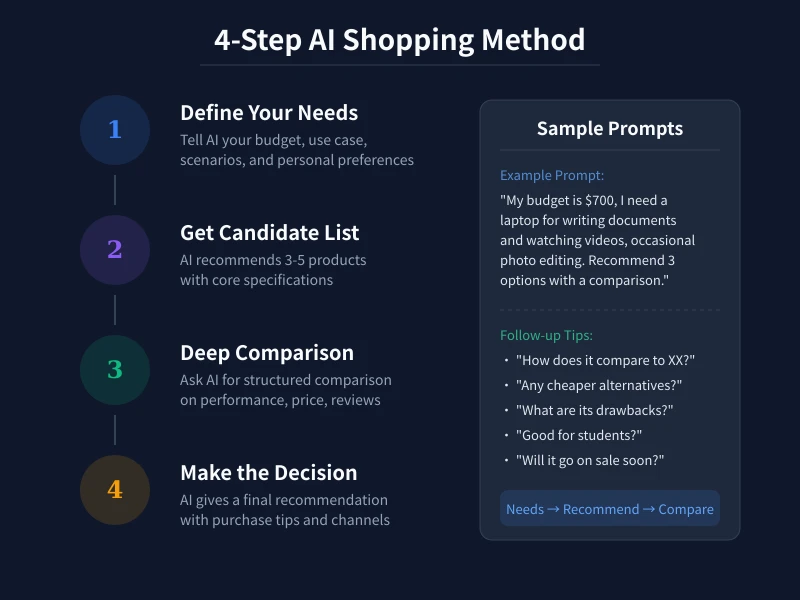
Many people start by asking "recommend a laptop" — this is way too vague, and AI can only give a generic answer. You need to clarify three core pieces of information first:
- Budget range: e.g., $400–$700
- Primary use: office work, gaming, video editing, kids' online classes
- Special requirements: lightweight and portable, long battery life, large screen, quiet operation
Providing all this information at once is far more effective than just saying "recommend a computer."
Step 2: Have AI Generate a Candidate List
Once you've defined your needs, ask AI to recommend 3–5 products. The key is to have AI include core specs so you can compare them side by side.
Practical prompt example:
"My budget is around $550. I mainly use it for writing documents and watching videos, with occasional Photoshop editing. Please recommend 3 laptops and list their prices, processors, RAM, screen size, weight, and battery life."
AI will give you a clearly structured candidate list. If it's not in table format, follow up with: "Please compare these three in a table with their core specs."
Step 3: Deep Comparison — Uncover Real Differences
Once you have your candidate list, don't rush to buy. Keep asking follow-up questions to get deeper comparisons:
- Pros and cons: "What are the pros and cons of each? What scenarios are they best for?"
- User reviews: "What do actual users say about this model? Any common issues?"
- Value analysis: "Overall, which one offers the best value for money?"
- Competitor comparison: "How does it compare to Brand X at the same price point?"
The key here is multi-turn dialogue. Each follow-up question helps uncover deeper insights for a smarter decision.
Step 4: Confirm Details and Buy with Confidence
Before making your final decision, have AI check a few easily overlooked details:
- After-sales support: How many years of warranty? Is it nationwide? Are service centers accessible?
- Purchase channels: Official flagship store, self-operated e-commerce, or physical retail — which offers the best deal?
- Sale timing: Major shopping festivals like Prime Day, Black Friday, or seasonal sales usually offer better prices
- Accessories: Do you need to buy a case, docking station, screen protector, or other extras?
Pro tip: Copy the AI-recommended product names into e-commerce platforms to check actual prices and promotions, then cross-reference with AI's suggestions.
Common Scenario Prompt Templates
Scenario 1: Buying a Phone
"Budget $250–$400. I mainly scroll through short videos, take photos, and chat on messaging apps — not much gaming. I want a larger screen with a good camera. Recommend 3 options with a comparison table."
Scenario 2: Buying an Air Conditioner
"15 sqm bedroom, budget under $400. Need fast cooling, low noise, and energy efficiency. Recommend a few options and explain the real electricity cost difference between top-tier and mid-tier energy ratings."
Scenario 3: Buying a Tablet
"Want a tablet for my kid's online classes, budget around $250. Need an eye-friendly screen, support for learning apps, and all-day battery life. Recommend a few and compare screen technology and parental controls."
Scenario 4: Buying a Robot Vacuum
"90 sqm apartment with a cat, mostly tile and wood floors. Budget under $350, want a vacuum-mop combo with auto dust collection. Recommend 3 options and compare obstacle avoidance and noise levels."
Tips for Using AI in Shopping
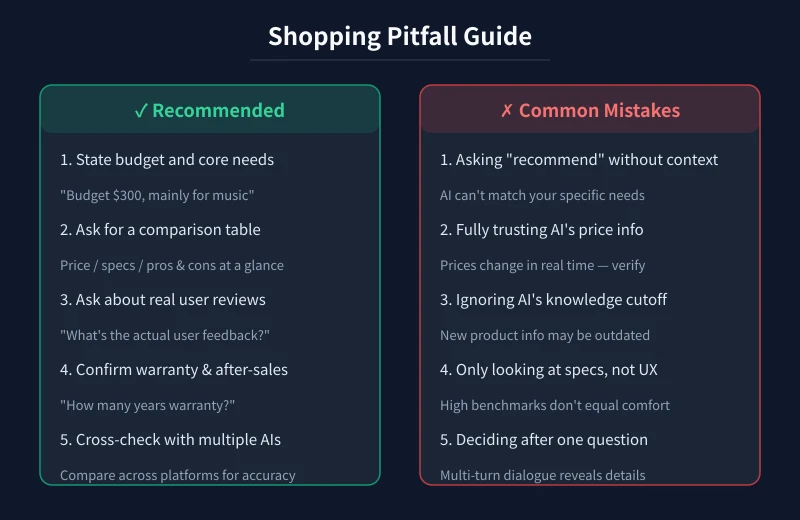
- Verify prices: AI's training data has a cutoff date — prices may have changed. Always confirm actual prices on e-commerce platforms before buying
- New products may be missing: AI might not know about newly released products. Combine AI advice with tech media reviews
- Don't rely on just one AI: Different AIs have different training data. Cross-validate with two or more AIs for more reliable conclusions
- Specs vs. real experience: High benchmark scores don't equal comfort. For subjective factors like feel, build quality, and system smoothness, watch real user review videos
- Watch out for marketing fluff: AI sometimes references marketing content. Stay skeptical of overly "perfect" recommendations
Conclusion
Using AI for appliance and gadget shopping comes down to four steps: define your needs → generate candidates → deep comparison → confirm and buy. Remember, AI is your shopping assistant, not the final decision-maker. Combine AI's suggestions with real information from e-commerce platforms, and you'll find the product that truly fits your needs.
Next time before you shop, try spending 10 minutes with AI for a thorough comparison. The money you save and the pitfalls you avoid will make those 10 minutes more than worth it.