Learn Languages with AI: Practice Speaking, Fix Writing & Memorize Words from Scratch
Why Learn Languages with AI?
Private tutors cost a fortune per hour, vocabulary apps force rote memorization, and you always end up watching movies with subtitles on... AI can solve all these language learning pain points.
The core advantage of AI language learning is personalization + always available. It can be your speaking partner, writing coach, vocabulary trainer, and reading assistant — available 24/7, never gets tired of your questions, and won't make it awkward when you make mistakes.
This article covers 4 of the most practical scenarios for learning languages with ChatGPT, Claude, Tongyi Qianwen, and other AI tools. No technical background needed — just follow the steps.
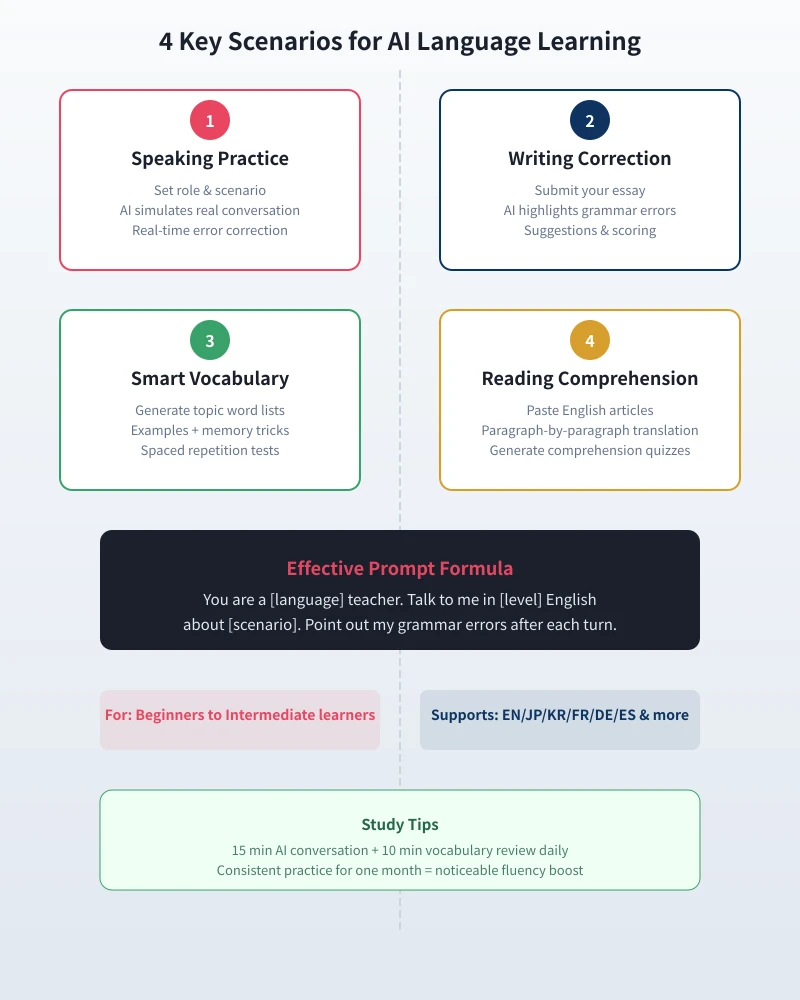
Scenario 1: AI Speaking Practice
This is the most powerful feature of AI for language learning — you can have realistic conversations with AI anytime, anywhere. It adjusts difficulty to your level and corrects your errors after each exchange.
Step-by-Step Guide
- Open any AI chat tool (ChatGPT, Claude, Tongyi Qianwen, etc.)
- Enter this prompt to set up your practice scenario:
Prompt Template:
"You are an English teacher, and I am at beginner level. Please have a simple English conversation with me about ordering at a coffee shop. After each exchange, point out my grammar errors in Chinese and tell me more natural ways to express myself."
- Start chatting in English, trying to form sentences on your own
- AI will give corrections and suggestions after each reply
- After 10-15 minutes, ask AI to summarize your most common mistakes
Recommended Scenario Topics
- Daily conversation: self-introduction, weather, hobbies, food
- Travel: hotel check-in, asking for directions, taxi, airport check-in
- Workplace: meeting presentations, email confirmation, phone calls
- Shopping: bargaining, returns, product inquiries
Advanced Tips
As your level improves, adjust your prompts:
- Increase difficulty: "Discuss the impact of AI on employment with me in upper-intermediate English"
- More corrections: "Strictly correct every grammar error I make, including tenses, articles, and prepositions"
- Exam simulation: "Simulate IELTS Speaking Part 3, score me and suggest improvements"
Scenario 2: AI Writing Correction
When writing essays or emails in English, AI is more powerful than any spell checker — it doesn't just find errors, it explains why they're wrong and how to improve.
Step-by-Step Guide
- Write a short piece of English yourself (50-200 words is fine)
- Paste your text into the AI chat
- Use this prompt:
Prompt Template:
"Please correct this English text. Do the following: 1) Highlight all grammar errors and explain why they're wrong; 2) Provide a corrected version; 3) Point out expressions that could be more natural; 4) Score this writing out of 10."
Correction Example
Your original text:
"Yesterday I go to the park and see a very beautiful flower. I want to took a photo but my phone is no battery."
AI correction:
- Tense errors: go → went, see → saw (past events require past tense)
- Verb form: want to took → wanted to take (infinitive uses base form)
- Better expression: is no battery → was out of battery / had died
- Score: 5/10 — meaning is understandable, but tenses need work
Prompts for Different Writing Scenarios
- Business email: "Make this email more formal and professional"
- Academic paper: "Rewrite this in academic English with more logical connectors"
- Casual writing: "Make this more conversational and natural-sounding"
Scenario 3: AI Smart Vocabulary Building
Traditional vocabulary memorization is boring and forgettable. AI can generate topic-based word lists with example sentences and memory tricks, then create quizzes to reinforce learning.
Step-by-Step Guide
- Tell AI what type of vocabulary you want to learn
- Use this prompt:
Prompt Template:
"Help me compile 20 high-frequency English words related to travel. For each word, provide: phonetic transcription, Chinese meaning, a practical example sentence, and a memory trick (such as word roots, mnemonics, etc.)."
Recommended Vocabulary Topics
- Business English: meeting, email, report, negotiation vocabulary
- Daily conversation: common phrases and slang
- Exam vocabulary: CET-4/6, IELTS, TOEFL core words
- Professional terms: IT, finance, medical terminology
Review and Testing
After studying, ask AI to test you:
"Create 10 multiple-choice questions using the 20 words we just covered to test my understanding."
AI will generate fill-in-the-blank, matching, and multiple-choice questions to reinforce your memory.
Scenario 4: AI Reading Comprehension Assistant
Encountering unknown words or complex sentences while reading English articles? AI can translate paragraph by paragraph, highlight key vocabulary, explain grammar structures, and generate comprehension quizzes.
Step-by-Step Guide
- Find an English article you want to read (news, blog, paper, etc.)
- Paste the article into AI chat (split into sections if too long)
- Use this prompt:
Prompt Template:
"Help me do a close reading of this English article: 1) Translate each paragraph; 2) Highlight key vocabulary and phrases; 3) Explain the grammar structure of complex sentences; 4) Create 5 comprehension questions at the end."
Recommended Reading Materials
- Beginner: VOA Learning English, BBC Learning English
- Intermediate: NYT simplified, TED talk transcripts
- Advanced: The Economist, academic papers, English novels
Effective Prompt Formula
When practicing languages with AI, a good prompt template doubles your learning efficiency:
Universal Formula:
"You are a [language] teacher. Talk to me in [level] [language] about [scenario]. After each exchange, point out my [error types] and suggest [improvement directions]."
Formula Parameters
- Language: English / Japanese / Korean / French / German / Spanish
- Level: Beginner / Intermediate / Advanced / IELTS 6 / TOEFL 80
- Scenario: Daily conversation / Business / Travel / Academic
- Error types: Grammar errors / Word choice / Pronunciation / Unnatural expressions
- Improvement: More formal / More casual / More concise / More academic
Common Mistakes and How to Avoid Them
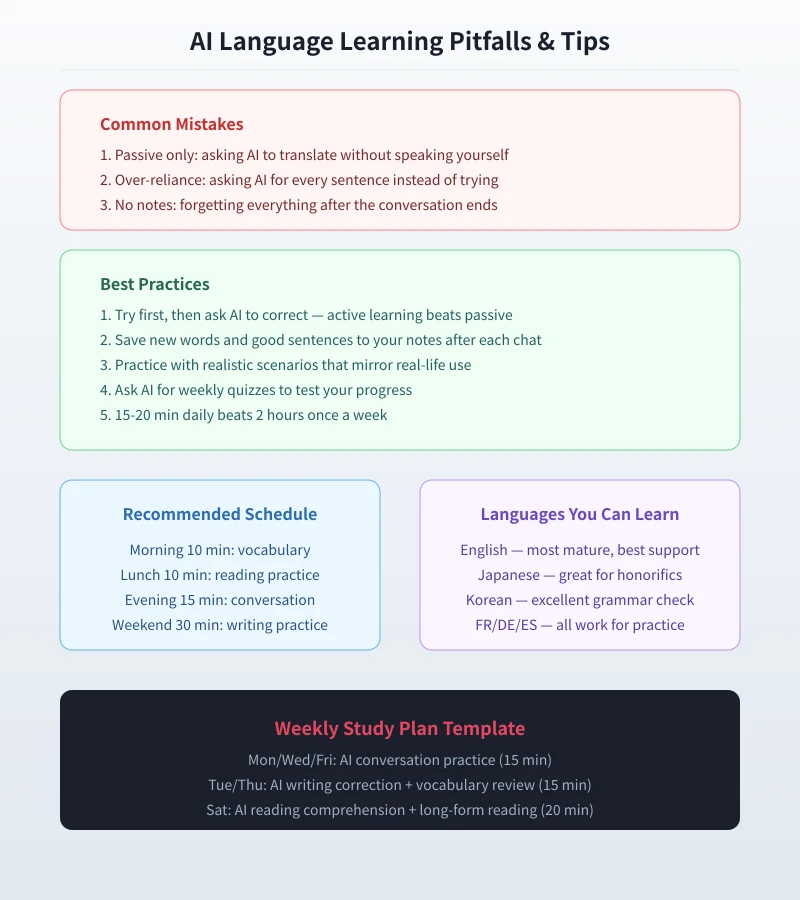
Mistake 1: Passive learning only
Only asking AI to translate sentences without speaking or writing yourself. Language learning requires active output — you can't learn by just reading.
Mistake 2: Over-reliance
Asking AI to check every sentence instead of trying first. The right approach is to write/speak first, then have AI correct you.
Mistake 3: Not taking notes
Closing the page after each conversation and forgetting everything. After each practice session, save new vocabulary, good sentences, and error summaries to your notes.
Mistake 4: Inconsistent practice
Occasionally studying for 2 hours doesn't beat 15 minutes daily for a month. Language learning relies on consistent input and output.
Recommended Study Schedule
- Daily 15-20 minutes: Speaking practice or writing exercises
- 2-3 times per week: Vocabulary building + review quizzes
- Once per week: Long-form reading + comprehension tests
After one month of consistent practice, you'll notice significant improvements in speaking fluency, writing accuracy, and vocabulary size. AI is your most patient teacher — never tires of your questions, never judges your mistakes, always available.
Supported Languages
AI language learning supports virtually all major languages:
- English: Most mature, best resources, most accurate corrections
- Japanese: Great for honorifics and conversation practice
- Korean: Strong grammar correction capabilities
- French, German, Spanish: All support conversation practice and writing correction
- Other languages: Italian, Portuguese, Russian, etc. are also supported, though accuracy may vary
Related Articles
AI Resume Writing: From Zero to Professional in 5 Steps
Learn how to use AI to write a professional resume. Five simple steps from basic information to polished final draft. Perfect for job seekers who want to stand out.
Productivity ToolsAI Note Organization: Build a Personal Knowledge System in 5 Steps
Learn how to use AI for note organization. Build a personal knowledge system in 5 steps. Perfect for knowledge workers and students.
Productivity ToolsAI Side Hustle Planning: Find Your Second Income Source
Want to earn extra income through a side hustle but don't know where to start? AI can help you analyze your skills, match directions, make plans, and track progress. Find your ideal side hustle within a month, even with zero experience.
Comments are not yet available, stay tuned