AI-Assisted Coding for Beginners: Write Code, Fix Bugs, Learn Programming with AI
Have you always wanted to learn programming but felt overwhelmed by walls of code every time you opened a tutorial? Or maybe you wrote a small script, hit an error you couldn't understand, and gave up? The good news is — AI coding assistants can now handle most of these problems for you.
This tutorial is designed for complete beginners. We'll walk you through how to use AI tools to assist with programming, taking you from "can't write a single line of code" to "able to complete small projects independently."
What is an AI Coding Assistant?
An AI coding assistant is like a 24/7 online programming tutor. You tell it what you want to do in plain language, and it generates code, explains code, and fixes errors for you.
Currently popular AI coding tools include:
- ChatGPT / Claude — General-purpose AI, great for learning and asking questions
- GitHub Copilot — Code editor plugin that autocompletes as you type
- Cursor — AI editor designed specifically for coding
- Tongyi Lingma — Made by Alibaba, excellent Chinese language support
For beginners, we recommend starting with ChatGPT or Claude since they require no software installation — just open a browser and start using them.
Five Steps to Get Started with AI Programming
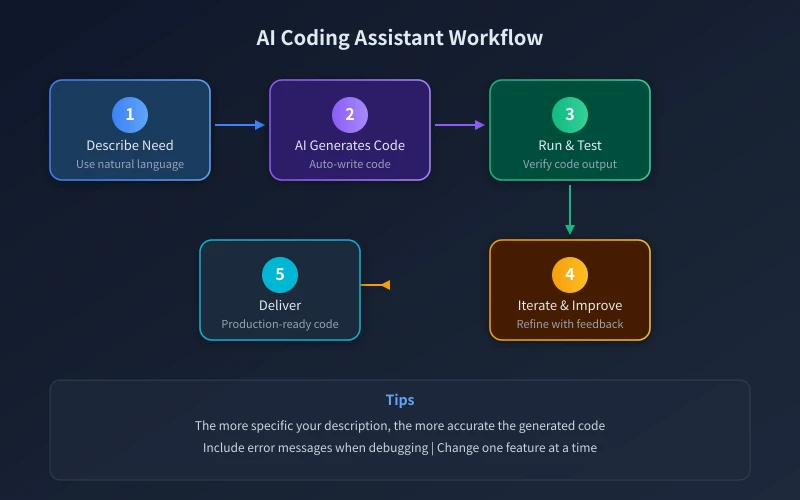
Step 1: Describe Your Needs
Open ChatGPT or Claude and explain what you want to build in simple words. No need to use technical jargon — the more specific, the better.
For example, if you want to build a calculator:
- Bad prompt: "Help me write a calculator" (too vague)
- Good prompt: "Help me write a simple calculator program in Python that can add, subtract, multiply, and divide. The user inputs two numbers and an operator, and it outputs the result."
Step 2: Let AI Generate Code
AI will generate complete code based on your description. The first version might not be perfect — that's completely normal.
You can follow up with questions like:
- "What does this code do? Please explain line by line"
- "Can you add error handling? For example, show a message when the user enters non-numeric input"
- "Can you make a GUI version of this?"
Step 3: Run and Test
Copy the AI-generated code to your computer and run it. For beginners, we recommend using online coding platforms that require no software installation:
- Replit (replit.com) — Supports multiple languages, runs directly in the browser
- Google Colab (colab.research.google.com) — Great for Python, free to use
Step 4: Ask AI When You Get Stuck
Errors during execution are normal. Copy the complete error message to AI, and it will help you analyze the cause and provide a fix.
Key tip: Don't just say "it errored" — send the complete error message including error type, line number, and surrounding context.
Step 5: Iterate and Improve
Perfect code on the first try is almost impossible. Through ongoing conversation with AI, gradually improve your program. Change only one feature at a time to make debugging easier.
Hands-On Example: Build a To-Do List Tool with AI
Let's demonstrate the complete AI programming workflow with a real example.
1. Define Requirements
Tell AI: "I want to build a command-line to-do list tool that can add tasks, view the task list, mark tasks as complete, and delete tasks. Data should be saved to a local file."
2. Get the Code
AI will generate complete Python code. Read the code and comments carefully to understand what each part does.
3. Run and Test
Create a new project in Replit, paste the code, and click Run. Test the add, view, complete, and delete functions to make sure they work.
4. Request Improvements
"Can you add a feature to sort by date?" "Can you use different colors to show completed vs incomplete tasks?"
After a few rounds of conversation, you'll have a fully functional to-do list tool, and along the way you'll have learned file operations, list processing, user input handling, and other fundamental programming concepts.
Best Practices for AI Programming
Learning to Ask Questions Matters More Than Learning to Write Code
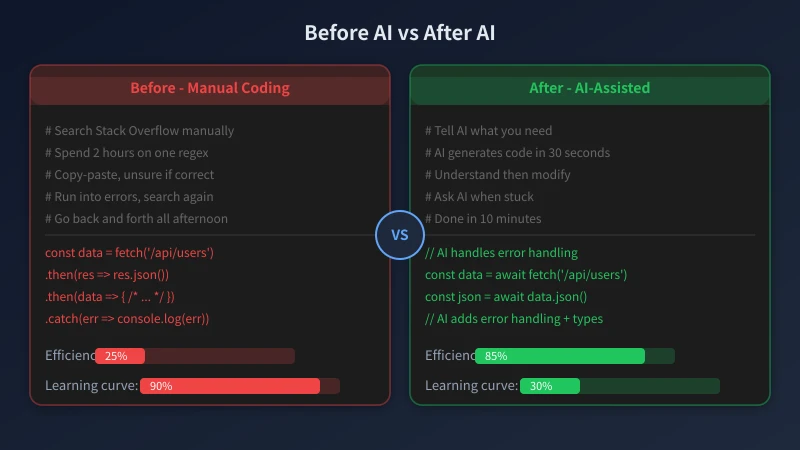
The core of AI programming isn't memorizing syntax — it's learning how to clearly describe problems. Good questioning ability = good programming ability.
Understanding Code Matters More Than Copying Code
After getting AI-generated code, first ask it to explain what each line does. Understanding the principles means you'll be able to solve similar problems on your own next time.
AI is a Tool, Not a Replacement
AI can write code for you, but it can't make decisions. Architecture design, requirements analysis, user experience — these core skills still need to be developed by you.
Start with Small Projects
Don't start with a massive project. Begin with calculators, to-do lists, number guessing games, and other small projects. Build confidence before tackling complex projects.
Frequently Asked Questions
Q: Can I learn programming without knowing English?
A: Absolutely. Tell AI your requirements in Chinese, and it will generate code in the corresponding language. Many programming tools also support Chinese interfaces.
Q: What if AI-generated code has bugs?
A: Send the error message to AI, and it will help you fix it. Try a few times — AI can usually solve most issues.
Q: Is using AI to write code cheating?
A: No. Just like using a calculator isn't cheating, AI is a tool for improving efficiency. What matters is that you understand the logic of the code.
Q: Is learning programming still worthwhile?
A: Yes. AI is good at writing code but not at understanding requirements, designing systems, or making product decisions. Programmers who know how to use AI are 10x more efficient than those who don't.
Summary
AI coding assistants have dramatically lowered the barrier to learning programming. You don't need to memorize all the syntax or work through thick tutorials. You just need to learn to describe problems clearly, and AI can turn your ideas into code.
Open ChatGPT right now, describe a small tool you'd like to build, and let AI help you create it.
Related Articles
AI Speech to Text: Beginner's Guide to Convert Voice to Text in 3 Steps
Learn how to convert speech to text using AI tools. Perfect for meeting notes, content creation, and video subtitles. Three practical scenarios with step-by-step instructions.
TutorialsAI Local Deployment Guide: Run Large Models in 3 Steps for Free
Learn how to deploy AI models locally in just 3 steps. No coding experience needed, completely free, and your data stays private on your own computer.
TutorialsAI Shopping Decision Guide: From Price Comparison to Avoiding Pitfalls
Learn how to use AI for shopping decisions. From price comparison to avoiding pitfalls - make smarter purchasing choices with AI assistance.
Comments are not yet available, stay tuned