AI Image Generation Tutorial: A Complete Guide from Text to Beautiful Images
Have you ever tried describing an image in words and letting AI draw it for you? That is the magic of AI image generation. No drawing skills required — as long as you can type, you can create stunning images.
This tutorial will take you from zero to hero, mastering the complete workflow of AI image generation. Whether you want social media graphics, a personal avatar, or just want to experience AI creativity, this guide has you covered.
How AI Image Generation Works
The core of AI image generation tools is simple: you input a text description (called a prompt), and the AI generates a corresponding image. The more detailed your description, the closer the result will be to what you want.
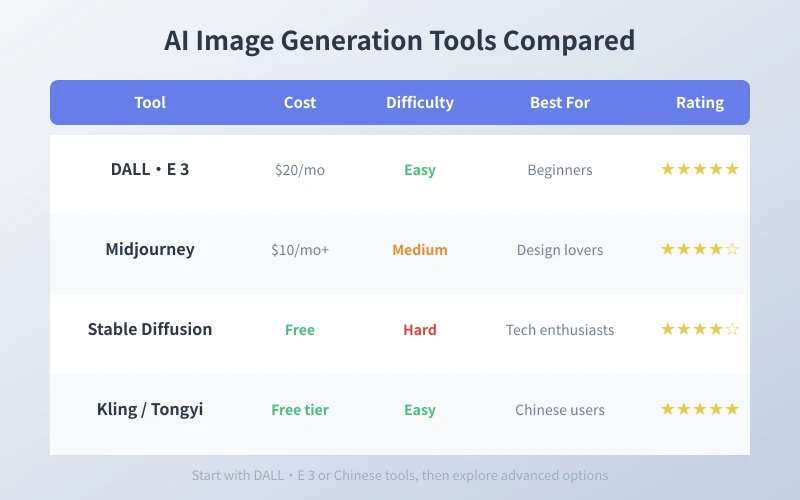
Currently popular AI image generation tools include:
- DALL·E 3: Built into ChatGPT, easiest to start with
- Midjourney: High image quality, great for creative design
- Stable Diffusion: Open source and free, can run locally
- Kling / Tongyi Wanxiang: Chinese tools with good Chinese support and free tiers
Three Steps to Your First AI Image
Step 1: Learn to Write Prompts
Prompts are the soul of AI image generation. A good prompt typically contains three elements:
1. Subject: What do you want to draw? For example, "a cat", "a castle", "a girl running".
2. Style: What style do you want? For example, "watercolor style", "realistic photography", "cyberpunk", "cartoon anime".
3. Details: Colors, lighting, background, composition. For example, "warm tones", "backlit", "city nightscape background".
Here is an example of a complete prompt:
"An orange cat sitting on a windowsill, rainy city nightscape outside, warm lighting, realistic photography style, high definition details"
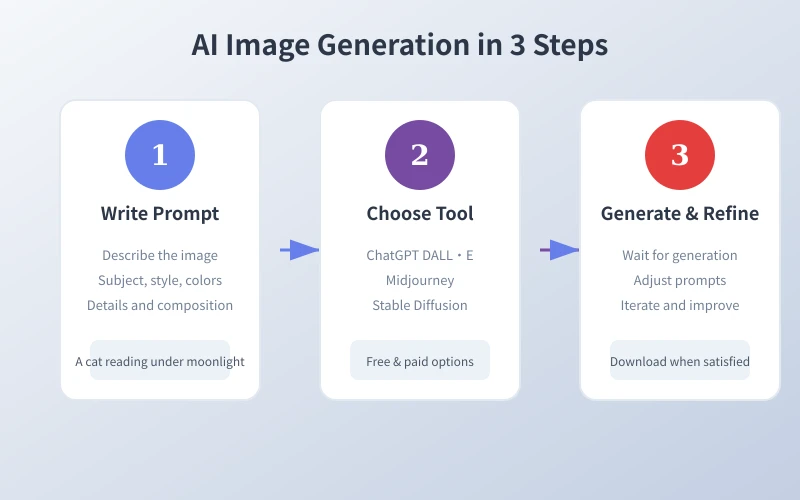
Step 2: Choose the Right Tool
Complete beginners: ChatGPT (DALL·E 3) is recommended. Simply type your Chinese description in the chat box and the AI will generate images automatically. No extra accounts or complex setup needed.
Want more control: Try Midjourney. It uses Discord and produces excellent quality images, but requires a paid subscription.
Like to tinker: Stable Diffusion is your best choice. Open source, free, runs locally, supports custom models, but requires some technical knowledge.
Best for Chinese users: Kling and Tongyi Wanxiang have the best Chinese support, free tiers, and easy registration — highly recommended as starting points.
Step 3: Generate and Refine
After entering your prompt, the AI typically generates images within 10-60 seconds. The first result may not be perfect, so you will need to adjust your prompt:
Image too dark? Add "bright lighting" or "sunlight".
Incorrect body proportions? Add "correct body proportions" or "natural pose".
Wrong style? Specify the style clearly, like "watercolor", "oil painting", or "3D render".
Adjust one or two keywords at a time until you are satisfied. This is the core technique of AI image generation.
Practical Use Cases
Case 1: Social Media Graphics
Need images for a Xiaohongshu post? Generate consistent cover images with AI — more efficient than searching stock photo libraries. Example prompt:
"Minimalist food photography, an elegant dessert plate, light wooden table, natural light, overhead angle"
Case 2: Personal Avatar and Wallpapers
Want a unique avatar? Let AI generate a cartoon self-portrait:
"Cartoon style young man avatar, short hair, glasses, smiling, simple background, vector illustration style"
Case 3: Product Concept Art
Need product concept art for your startup? AI can quickly generate prototypes:
"Modern minimalist mobile app interface design, dark theme, showing data analytics dashboard, UI design style"
Common Questions and Solutions
Q: The generated image quality is not good enough?
A: Try more detailed prompts, or use a more advanced model (like Midjourney v6).
Q: Can I use AI-generated images commercially?
A: Policies vary by tool. DALL·E 3 and Midjourney paid users can usually use images commercially. Stable Diffusion images generally have no restrictions. Check the specific terms before use.
Q: How to keep consistent style across multiple generations?
A: Include fixed style keywords in your prompt, such as always adding "flat design style, blue and white color scheme". Midjourney also supports style reference features.
Summary
AI image generation is no longer some mysterious technology. As long as you master prompt writing and choose the right tool, anyone can create stunning images. Start today and try generating your first AI image.
Remember: a good prompt = subject + style + details. Practice makes perfect, and you will master this new skill in no time.
Related Articles
AI Speech to Text: Beginner's Guide to Convert Voice to Text in 3 Steps
Learn how to convert speech to text using AI tools. Perfect for meeting notes, content creation, and video subtitles. Three practical scenarios with step-by-step instructions.
TutorialsAI Local Deployment Guide: Run Large Models in 3 Steps for Free
Learn how to deploy AI models locally in just 3 steps. No coding experience needed, completely free, and your data stays private on your own computer.
TutorialsAI Shopping Decision Guide: From Price Comparison to Avoiding Pitfalls
Learn how to use AI for shopping decisions. From price comparison to avoiding pitfalls - make smarter purchasing choices with AI assistance.
Comments are not yet available, stay tuned