AI Prompt Writing for Beginners: How to Get Better Answers from AI
Many people feel frustrated when using AI chat tools: "Why are the answers never quite right?" In most cases, the issue isn't the AI — it's how you ask.
This guide teaches you a simple, practical method for writing better AI prompts, turning vague questions into precise ones that get you much better results.
Why Does Prompt Quality Matter?
The same AI can give wildly different answers depending on how you phrase your question. Here's a real comparison:
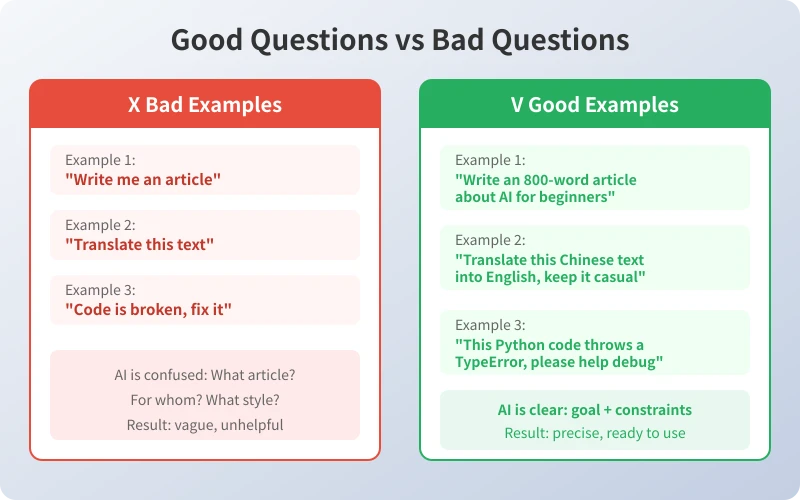
As you can see, vague questions leave AI guessing, while specific questions let it deliver exactly what you need.
The 4-Step Prompt Method
Master this simple four-step method to dramatically improve AI responses:
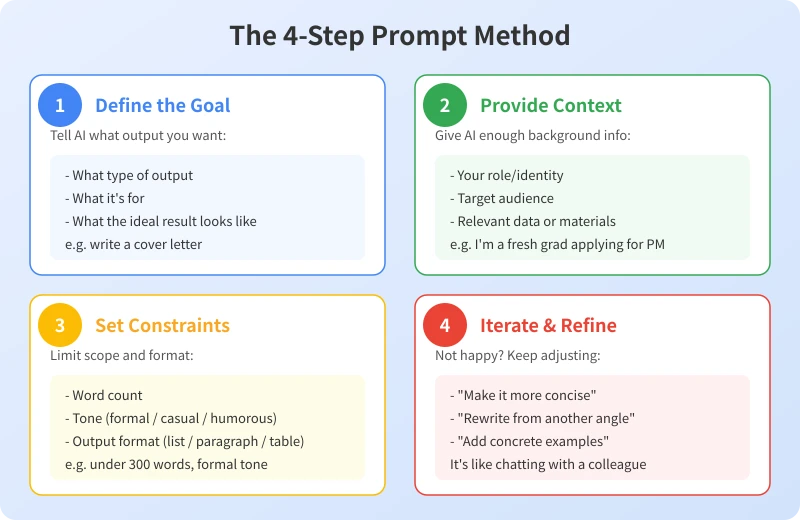
Step 1: Define the Goal
Before asking, think about what result you want. Tell AI:
- What type of output you need (article, list, table, code)
- What it's for (boss review, social media, homework)
- What the ideal result looks like
Example: "Help me write a job application email" is much better than "Write me something."
Step 2: Provide Context
AI doesn't know your situation, so give it enough background:
- Who you are (student, professional, entrepreneur)
- Who the audience is (recruiter, client, friend)
- Relevant materials or data (resume content, product info)
Example: "I'm a fresh CS graduate applying for a product manager role" beats "Help me write a cover letter."
Step 3: Set Constraints
Limit the scope and format to avoid overly long or off-target responses:
- Word count (under 300 words, no more than 500 words)
- Tone (formal business, casual, humorous)
- Output format (bullet points, paragraphs, comparison table)
Example: "In formal business style, under 300 words" tells AI exactly what you need.
Step 4: Iterate and Refine
It's normal to not be satisfied with the first response. Keep adjusting like chatting with a colleague:
- "Make it more concise, remove unnecessary content"
- "Rewrite from a different angle"
- "Add concrete examples"
- "Make the tone more professional"
AI won't get annoyed — multi-turn conversations often produce better results.
Real-World Examples
Here are practical demonstrations of the four-step method in common scenarios:
Scenario 1: Writing a Weekly Report
Basic prompt: "Help me write a weekly report"
Improved prompt: "This week I completed user registration feature development, fixed 3 production bugs, and attended a product requirements review. Please write a 200-word weekly report in formal work report style, listing this week's work and next week's plan in bullet points."
Scenario 2: Translating Text
Basic prompt: "Translate this text"
Improved prompt: "Translate the following Chinese text into English. The target readers are overseas clients. Keep it professional but not stiff, maintaining a business style. Preserve the core meaning of the original."
Scenario 3: Learning a New Concept
Basic prompt: "What is an API"
Improved prompt: "I'm a complete beginner. Please explain what an API is using everyday life examples, no technical jargon. Use 3 analogies to help me fully understand."
Common Mistakes to Avoid
- Too brief: "Write me an article" — AI doesn't know what, for whom, or what style
- Too many questions: Cramming 5 questions into one message, AI may miss some
- No feedback: Switching topics when unsatisfied instead of telling AI how to improve
- Treating AI like a search engine: AI excels at generation and analysis, not just information lookup
Summary
Good prompting is a skill you can practice. Remember this formula:
Goal + Context + Constraints + Iteration = High-Quality Answers
Start using this four-step method today, and you'll see a dramatic improvement in the quality of AI responses.
Related Articles
AI Speech to Text: Beginner's Guide to Convert Voice to Text in 3 Steps
Learn how to convert speech to text using AI tools. Perfect for meeting notes, content creation, and video subtitles. Three practical scenarios with step-by-step instructions.
TutorialsAI Local Deployment Guide: Run Large Models in 3 Steps for Free
Learn how to deploy AI models locally in just 3 steps. No coding experience needed, completely free, and your data stays private on your own computer.
TutorialsAI Shopping Decision Guide: From Price Comparison to Avoiding Pitfalls
Learn how to use AI for shopping decisions. From price comparison to avoiding pitfalls - make smarter purchasing choices with AI assistance.
Comments are not yet available, stay tuned