AI-Powered Daily Bookkeeping & Finance Planning: Manage Every Penny with AI
Ever reached the end of the month wondering where all your money went? Tried budgeting apps but gave up after two days? You don't need any special software — just an AI chat window can help you track spending, analyze habits, and plan your finances.
This guide shows you how to use AI for daily bookkeeping and financial planning. All through conversation, zero learning curve.
Why AI Bookkeeping Beats Traditional Apps
Traditional budgeting apps have pain points: manual entry every time, inaccurate categorization, complex interfaces you don't want to open. AI bookkeeping advantages:
- Flexible input: Text, voice, or photo — whatever's convenient
- Smart categorization: AI auto-identifies spending types
- Natural conversation: Chat like a friend — say "lunch was $5" and it's logged
- Deep analysis: Not just tracking — trend analysis and saving tips included
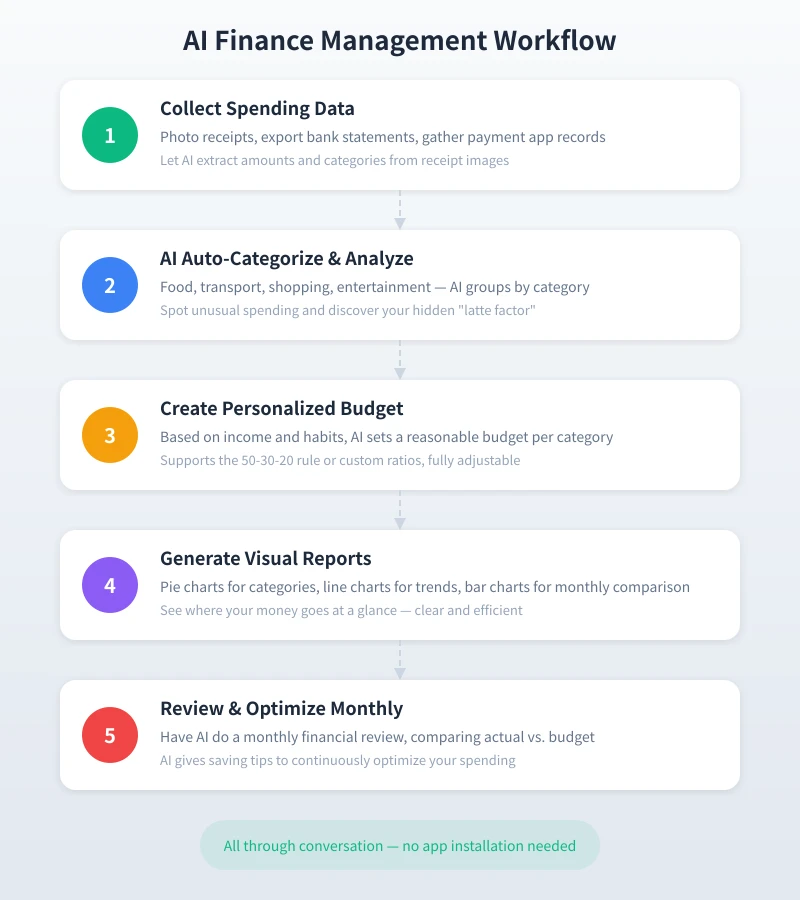
Step 1: Log Daily Spending Through Conversation
Open your preferred AI tool (ChatGPT, Claude, Gemini, etc.) and simply tell it about your expenses in natural language:
Text logging:
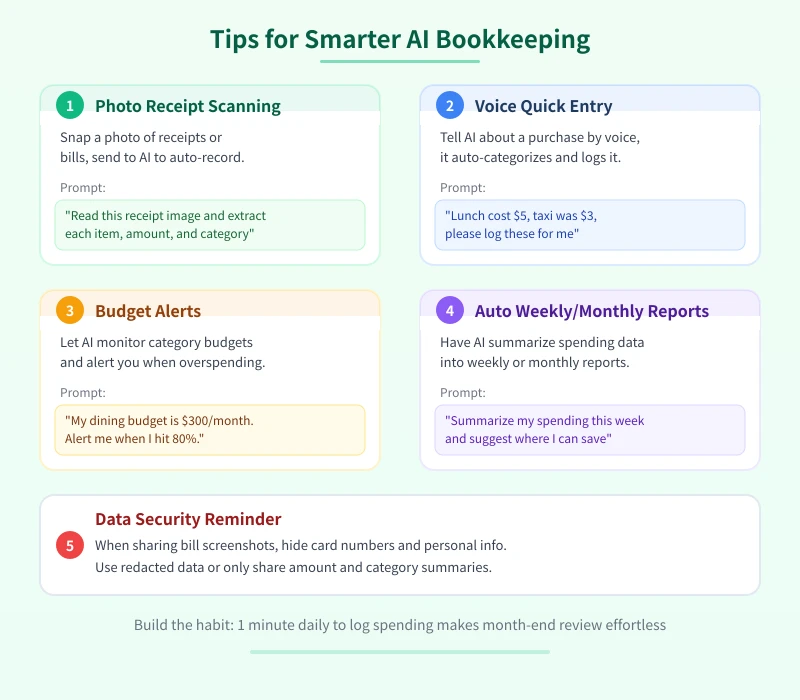
Try saying: "Log my spending today: breakfast $3, lunch $8, subway $2, coffee $5."
The AI will organize it into a neat table with time, amount, and category. Just 1 minute a day to sync your spending.
Voice logging:
If your AI tool supports voice input (most do), just speak naturally. For example: "Dinner cost $12, had noodles near the office." The AI auto-categorizes it as "dining" and adds a note.
Photo logging:
Snap a photo of a grocery receipt, restaurant bill, or delivery screenshot. Send it to AI with "please read this receipt" — it extracts each item's name and amount, auto-categorizes everything. 10x faster than manual entry.
Step 2: Let AI Categorize and Analyze
After a week of logging, ask AI to summarize by category:
Input: "Summarize this week's spending by category — show amounts and percentages."
AI outputs something like:
- Dining: $45 (42%)
- Transport: $12 (11%)
- Shopping: $25 (24%)
- Entertainment: $14 (13%)
- Other: $10 (10%)
You can follow up: "Which expenses were unnecessary?" AI identifies potential savings based on your patterns — like "You bought 4 coffees this week totaling $20; cutting to 2 saves $10."
Step 3: Create a Personalized Monthly Budget
With spending data in hand, set a budget. Tell AI your income and fixed expenses:
"My monthly income is $3,000, rent $1,000, utilities $80, phone $30. Create a reasonable monthly budget."
AI allocates by category using sensible ratios. The common "50-30-20 rule":
- 50% Needs ($1,500): Rent, food, transport, utilities
- 30% Wants ($900): Shopping, entertainment, socializing
- 20% Savings ($600): Emergency fund, investments, goals
Adjust ratios to fit your situation — AI breaks it down to specific amounts per category.
Step 4: Generate Spending Reports and Trend Charts
At month-end, ask AI for a financial summary:
Input: "Summarize this month's spending, compare against my budget, flag overages and savings, and suggest improvements for next month."
AI generates:
- Actual vs. budget comparison per category
- Overage alerts and savings highlights
- Spending trend analysis (what's increasing, what's decreasing)
- Specific money-saving recommendations
For visual charts, ask AI to help with Markdown tables or generate chart code for Excel or Google Sheets.
Step 5: Set Budget Alerts and Weekly Reviews
Set budget alert rules with AI. For example:
"My dining budget is $200/month. When I've spent $160, remind me to watch my spending."
During future logging sessions, AI auto-calculates running totals and alerts you when approaching limits. Weekly check-ins: "How much did I spend this week? How much budget remains? What should I watch out for?"
Advanced: Long-Term Financial Planning with AI
Beyond daily tracking, AI helps with bigger financial goals:
- Savings goals: "I want to save $3,000 for travel in a year — how much monthly? How to adjust spending?"
- Investment basics: "I have $500/month surplus, moderate risk tolerance — any investment suggestions?"
- Debt management: "I have credit card debt — what's the best repayment plan?"
- Major purchase planning: "I want to buy a $1,500 laptop next year — how to prepare?"
AI provides actionable plans tailored to your situation, helping you achieve financial goals step by step.
Data Security Reminders
When using AI for bookkeeping:
- Hide card numbers and personal IDs when sharing bill screenshots
- Never share full account numbers or passwords with AI
- Use redacted data — share only amounts and categories
- Choose AI platforms you trust and review their privacy policies
Conclusion
AI bookkeeping requires no new skills — if you can chat, you can budget. The core flow: record → analyze → budget → review → optimize. Spend 1 minute daily syncing expenses, 10 minutes monthly reviewing — your financial picture becomes crystal clear. No app downloads needed. Open an AI chat window and start managing every penny today.
Related Articles
AI Resume Writing: From Zero to Professional in 5 Steps
Learn how to use AI to write a professional resume. Five simple steps from basic information to polished final draft. Perfect for job seekers who want to stand out.
Productivity ToolsAI Note Organization: Build a Personal Knowledge System in 5 Steps
Learn how to use AI for note organization. Build a personal knowledge system in 5 steps. Perfect for knowledge workers and students.
Productivity ToolsAI Side Hustle Planning: Find Your Second Income Source
Want to earn extra income through a side hustle but don't know where to start? AI can help you analyze your skills, match directions, make plans, and track progress. Find your ideal side hustle within a month, even with zero experience.
Comments are not yet available, stay tuned