AI-Powered Personal Knowledge Management: Building Your Second Brain
Have you ever read tons of articles and taken loads of courses, only to forget everything a few days later? You've got heaps of notes, but can never find what you need when you need it?
That's a classic case of "missing knowledge management." The good news? AI can solve this easily. Today, I'll walk you through building your own "second brain" with AI so your knowledge never slips away.
What Is a "Second Brain"?
A "second brain" is a metaphor for using digital tools to support your memory and thinking. Its core principles are:
- Don't keep everything in your head — store information in an external system
- Don't just bookmark stuff — organize, connect, and internalize it
- Don't save and forget — make sure you can retrieve and use it anytime
In the past, building a second brain required tons of manual organizing. Now with AI, many of those steps can be automated.
Step 1: Choose Your Knowledge Management Tool
A craftsman is only as good as their tools. Here are some great tools that pair well with AI:
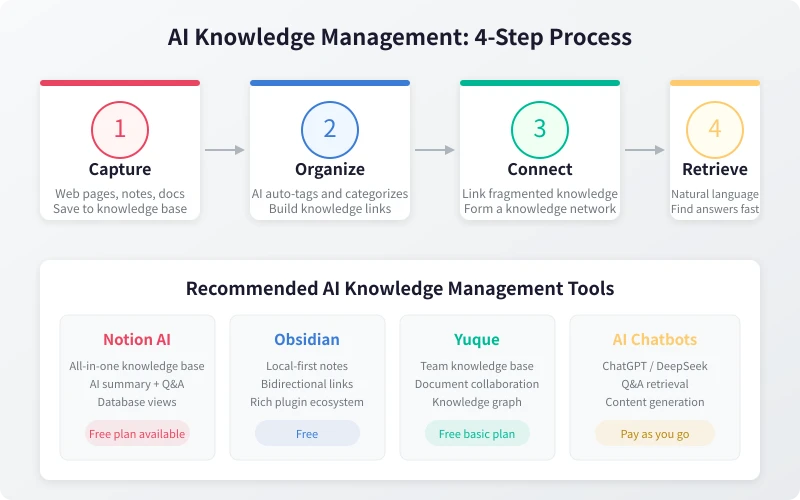
Notion AI — The All-Rounder
Notion is one of the most popular knowledge management tools out there, and it has built-in AI features that are perfect for beginners:
- Create databases to manage your notes
- AI can help you summarize, categorize, and generate tags
- Supports multiple views: tables, kanban boards, calendars, and more
- The free plan is enough for personal use
Obsidian — The Local-First Note-Taking Powerhouse
If you care more about data security and privacy, Obsidian is the better choice:
- All data is stored locally — nothing uploaded to the cloud
- Bi-directional linking makes knowledge naturally interconnected
- Rich plugin ecosystem with various AI integrations
- Completely free
Yuque — Best for Team Collaboration
If you need to share knowledge with your team, Yuque is worth a try:
- Great for building team knowledge bases
- Supports document collaboration and comments
- Knowledge graph feature visually displays connections
Step 2: Use AI to Organize Your Notes
Once you've picked your tool, the next step is to organize your scattered notes. This is where AI really shines.
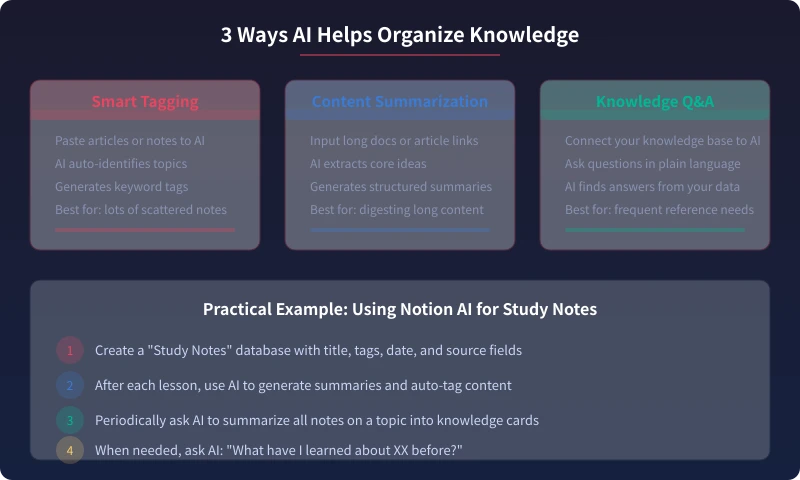
Method 1: Let AI Auto-Categorize and Tag
Here's how to do it:
- Copy the content of one of your notes
- Paste it into an AI (ChatGPT, DeepSeek, etc. all work)
- Enter this prompt: "Please analyze the topic of this content, give me 3–5 keyword tags, and suggest which category it should go into."
- The AI will return tags and category suggestions
- Add those tags to your note
Useful prompt:
I have a note with the following content: [paste content]. Please help me: 1) Summarize the core points (no more than 3 sentences); 2) Extract 3–5 keyword tags; 3) Suggest a category name; 4) List 2–3 related topics this note might connect to.
Method 2: Use AI to Create Content Summaries
For long articles or documents, you don't need to read every word. Let AI distill the key content:
- Paste the long document content into an AI
- Enter this prompt: "Please summarize this article in a structured way, including: core arguments, key evidence, and practical recommendations."
- The AI will output a concise summary
- Save the summary to your knowledge base
Method 3: Use AI to Build Knowledge Connections
The most important part of knowledge management is making connections. Isolated knowledge is hard to remember and use.
- Tell the AI what topics you've been learning recently
- Ask it to analyze the connections between those topics
- The AI will help you discover unexpected links
- Add bi-directional links in your notes to form a knowledge network
Step 3: Build Your Knowledge Retrieval System
Collecting and organizing is just the first step — the real value is being able to find what you need when you need it.
Option 1: Ask Notion AI Directly
Notion AI can answer questions about your knowledge base directly. For example:
- "What articles about machine learning have I saved?"
- "Summarize all my notes on product design."
- "What was that Python trick I learned last week?"
Option 2: Use an AI Chat Assistant for Retrieval
If you use Obsidian or other local tools, you can feed your note content to an AI:
- Export your notes as text
- Upload or paste them in an AI conversation
- Ask questions in natural language
Step 4: Build a Knowledge Management Habit
You've got the tools and methods — now the key is building the habit. Here are some tips:
Daily Habit (5 minutes)
- Spend 5 minutes each day recording what you learned
- No need to be detailed — a few sentences will do
- Let AI help you extract keywords
Weekly Habit (15 minutes)
- Spend 15 minutes each week reviewing your notes from the week
- Let AI create a weekly summary for you
- Discover connections between new and old knowledge
Monthly Habit (30 minutes)
- Spend 30 minutes each month organizing your knowledge base
- Delete outdated information
- Update your knowledge graph
- Let AI generate a monthly knowledge report
FAQ
Q: I don't have many notes. Do I still need knowledge management?
Yes. The earlier you start, the better. Waiting until you have hundreds of notes before organizing makes it much harder. Start today — categorize and tag every note from the start.
Q: Is it safe to use AI to organize my notes?
Most AI tools have privacy policies, but you should still be careful with sensitive information. Recommendations:
- Don't send passwords, financial info, or similar data to AI
- Consider locally-run AI tools (like Obsidian + a local model)
- Read the tool's privacy policy before using it
Q: Are free tools enough?
Absolutely. Notion's free plan, Obsidian, and Yuque's basic plan all meet personal needs. For AI, DeepSeek, Tongyi Qianwen, and other models offer free tiers.
Wrapping Up
The core workflow of AI knowledge management is four steps: Collect → Organize → Connect → Retrieve.
You don't need to build a perfect system all at once. Start with the simplest approach:
- Pick a tool today (I recommend Notion)
- Take one of your recent notes and organize it with AI
- Stick with it for a week to build the habit
- Gradually improve your knowledge system
Your second brain starts being built today.
Related Articles
AI Resume Writing: From Zero to Professional in 5 Steps
Learn how to use AI to write a professional resume. Five simple steps from basic information to polished final draft. Perfect for job seekers who want to stand out.
Productivity ToolsAI Note Organization: Build a Personal Knowledge System in 5 Steps
Learn how to use AI for note organization. Build a personal knowledge system in 5 steps. Perfect for knowledge workers and students.
Productivity ToolsAI Side Hustle Planning: Find Your Second Income Source
Want to earn extra income through a side hustle but don't know where to start? AI can help you analyze your skills, match directions, make plans, and track progress. Find your ideal side hustle within a month, even with zero experience.
Comments are not yet available, stay tuned