AI Video Script Writing Guide: Create Professional Short-Video Scripts from Scratch
Why You Need AI to Write Your Scripts
The hardest part of making short videos isn't filming or editing — it's writing the script. Many people stare at a blank document for thirty minutes, end up with mediocre copy, and naturally produce videos that get no engagement.
Script writing has three main pain points:
- Don't know what to write: You have plenty of ideas, but once you sit down, you don't know where to start
- Hard to control pacing: Open too slowly and viewers swipe away; end too abruptly and it feels stiff
- Inconsistent style: Casual one day, formal the next — followers can't identify your brand
AI can solve all of these problems. You just need to provide your core materials and requirements, and AI will generate a complete, well-paced, consistently-styled script. The key is learning how to "talk" to AI.
Write a Professional Script in 4 Steps
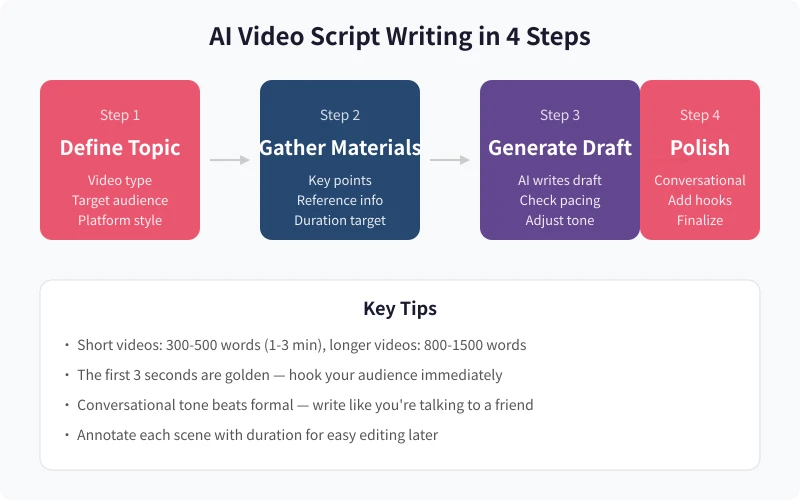
Step 1: Define Your Topic and Platform Style
Before asking AI to write a script, clarify three things:
- Video topic: What are you talking about? One topic explored deeply beats a pile of surface-level content
- Target platform: TikTok, YouTube, Instagram, and Bilibili have completely different styles. TikTok needs fast pacing and strong hooks; YouTube allows more depth; Instagram favors lifestyle content
- Target audience: Are you speaking to beginners or peers? The language style differs significantly
Pro tip: Find 3-5 popular videos in your niche on the target platform and note their opening styles, pacing, and duration. Share this info with AI to generate scripts that better match the platform style.
Step 2: Gather Your Materials
AI isn't magic — it needs your input to produce great scripts. The more specific your materials, the higher the output quality.
You need to prepare:
- Key points: The 2-3 core messages you want to convey
- Stories or examples: Your own experiences, data, or cases you've found
- Duration target: A 1-minute video is about 250-300 words; 3 minutes is about 700-800 words
- Style reference: Whose style do you want? Humorous, professional, or story-driven?
Step 3: Generate the Script with Prompts
Below are several ready-to-use prompt templates covering the most common video types.
General short video script template:
Please write a short video script with the following requirements:
1. Topic: [your topic]
2. Platform: [TikTok/YouTube/Instagram/Bilibili]
3. Duration: [X minutes, approximately X words]
4. Style: [lighthearted & humorous / professional & informative / narrative storytelling]
5. Target audience: [beginners / peers / specific group]
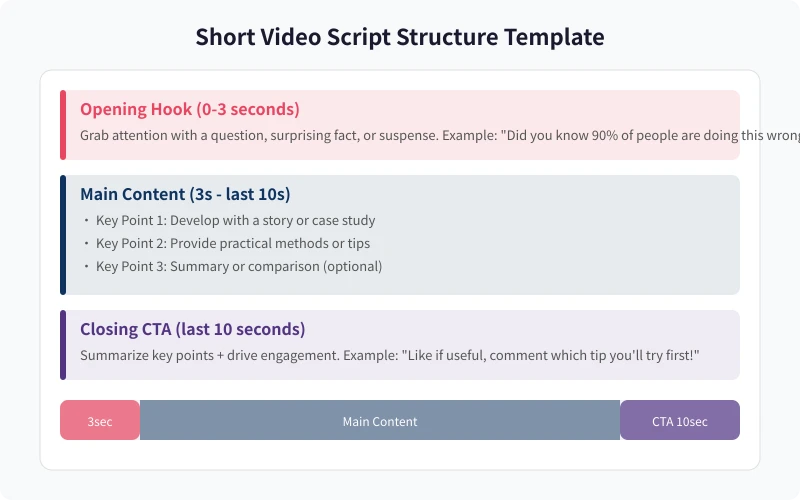
6. Open with a strong hook (question, surprising fact, or suspense)
7. Main content: 2-3 key points, each supported by examples or stories
8. End with an engagement CTA (like, comment, follow)
9. Annotate each scene with [duration] and [visual description]
Core materials: [paste your points, examples, data, etc.]
Product review script template:
Please write a product review video script:
1. Product: [product name and basic info]
2. Duration: [X minutes]
3. Structure: Opening hook → Product highlights → Real usage experience → Pros & cons summary → Buying advice
4. Tone: Authentic, objective, not salesy
5. Annotate each section with [duration] and [visual suggestions]
Product info: [paste product materials]
Educational/knowledge video script template:
Please write an educational video script:
1. Topic: [topic to explain]
2. Duration: [X minutes]
3. Open with a counter-intuitive fact or question
4. Structure: What → Why → How
5. Use plain language, avoid jargon
6. Annotate each section with [duration] and [visual suggestions]
Reference materials: [paste relevant materials]
Step 4: Polish and Finalize
The AI-generated draft is usually already decent, but you need to do a few things to make it great:
Check the rhythm:
Read the script out loud and see if it flows naturally. A good script should read like you're chatting with a friend, not reading from a teleprompter. If a sentence feels awkward when spoken, rewrite it.
Strengthen the hook:
The first 3 seconds determine whether viewers keep watching. If your opening is "Hey everyone, today I'm going to share..." — change it immediately to something more compelling:
- Question style: "Do you know why your videos never get views?"
- Contrast style: "I spent $5,000 on editing courses, only to discover the most important thing isn't editing at all"
- Data style: "After analyzing 100 viral videos, I found they all share one thing in common"
Make it conversational:
Replace formal language with casual speech. "Therefore we can conclude" becomes "So you see," "It's worth noting" becomes "Here's the key part," and "Additionally" becomes "Also."
Add pacing markers:
Annotate pauses, emphasis, and emotional shifts in the script for filming reference:
- (pause) — Take a beat here, give viewers time to think
- (emphasis) — Stress this point
- (casual) — Keep the tone relaxed
Platform-Specific Script Style Differences
TikTok / Instagram Reels
- Duration: 15-60 seconds mainly, up to 3 minutes max
- Pacing: Fast! A new information point or visual change every 5-8 seconds
- Opening: A strong hook in the first 3 seconds, or viewers swipe away
- Language: Casual, relatable, trending references are welcome
YouTube
- Duration: 8-15 minutes mainly
- Pacing: Can be slower, but needs logical progression
- Opening: Clearly tell viewers "what you'll learn in this video"
- Language: Can be more formal, but keep it approachable
Bilibili
- Duration: 3-10 minutes mainly
- Pacing: Slightly slower, with logical progression
- Opening: Can use a guided approach like "I recently discovered something interesting"
- Language: Can be more in-depth — Bilibili users appreciate substance
Instagram / Lifestyle platforms
- Duration: 1-3 minutes mainly
- Pacing: Lifestyle-oriented, authentic feel
- Opening: Show results or effects directly, like "Using this method, I lost 3 pounds in a week"
- Language: Like sharing with a friend, not lecturing
Frequently Asked Questions
Will AI-generated scripts be too templated?
If you just give AI a one-line prompt like "write me a script," it will indeed be generic. But if you provide detailed materials, clear requirements, and style references, the output will be highly targeted. Input quality determines output quality.
How do I make scripts more personal?
On top of the AI draft, add your own catchphrases, expressions you commonly use, and personal stories. AI builds the framework and fills in the content; you inject the soul. Within a few rounds, you'll develop your own script template.
Can AI help me write storyboards?
Yes. In your prompt, explicitly request "please output in storyboard format, including shot number, shot type, visual content, dialogue, duration, and notes" — and AI will generate a more professional storyboard. However, storyboards are better suited for those with some filming experience; beginners can start with standard script format.
The script is ready — how do I film it better?
Three tips: First, practice reading the script on camera a few times before the real take. Second, look at the lens, not at yourself on screen. Third, speak slightly faster than your normal conversation pace for better rhythm. The script is the foundation, but natural delivery on camera is equally important.
Related Articles
AI Speech to Text: Beginner's Guide to Convert Voice to Text in 3 Steps
Learn how to convert speech to text using AI tools. Perfect for meeting notes, content creation, and video subtitles. Three practical scenarios with step-by-step instructions.
TutorialsAI Local Deployment Guide: Run Large Models in 3 Steps for Free
Learn how to deploy AI models locally in just 3 steps. No coding experience needed, completely free, and your data stays private on your own computer.
TutorialsAI Shopping Decision Guide: From Price Comparison to Avoiding Pitfalls
Learn how to use AI for shopping decisions. From price comparison to avoiding pitfalls - make smarter purchasing choices with AI assistance.
Comments are not yet available, stay tuned