AI Creates Your Study Plan: Build an Efficient Learning Path from Zero
Studying Without a Plan Is Wasted Effort
Have you ever bought a bunch of online courses, bookmarked tons of tutorials, and a month later still haven't gotten past Chapter 1? Or planned to study for an exam, bought thick textbooks, flipped through a few pages, and given up?
The problem isn't that you're not working hard enough — it's that you lack a study plan that fits you. In the past, getting a personalized plan meant paying a tutor. Now you can ask AI to do it for free, quickly, and completely customized to your needs.
This article teaches you the complete method of using AI to create a study plan, with real prompt templates you can use right away.
Four Steps to an AI Study Plan
Step 1: Define Your Learning Goal
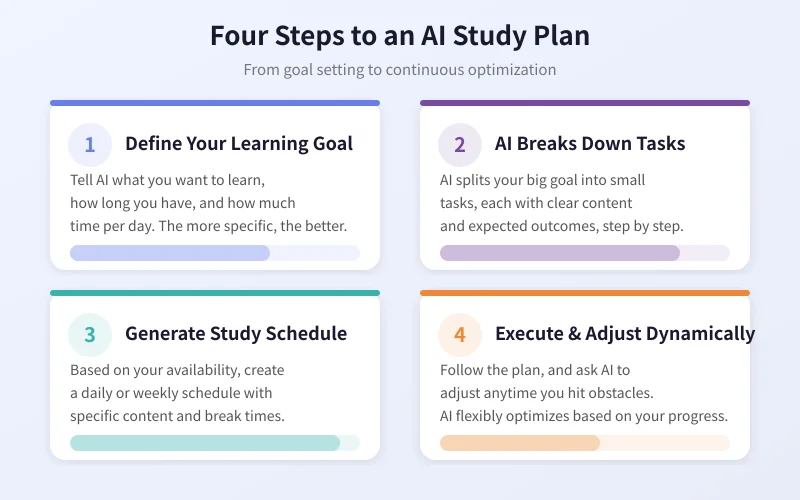
No matter how smart AI is, it needs you to tell it "what to learn" and "how to learn." The more specific your goal, the more precise the plan.
Information you need to tell AI:
- Learning content: What do you want to learn? (e.g., Python programming, CET-6 English, guitar)
- Available time: How much total time do you have? (e.g., 3 months, 6 months)
- Daily investment: How much time per day? (e.g., 1 hour, 2 hours)
- Current level: What's your current foundation? (e.g., complete beginner, some basics)
- Purpose: Why are you learning? (e.g., career, exams, hobby)
Step 2: Let AI Break Down Learning Tasks
With your goal defined, AI will break the big goal into small tasks. Each task has clear learning content and expected outcomes, so you know exactly what to do at each step.
Key tip: Ask AI to break it down by week or phase, not by day. Daily breakdowns are too granular and easily disrupted; weekly plans are more flexible and adaptable to unexpected situations.
Step 3: Generate Study Schedule
Tell AI your daily routine, and it will create a schedule that fits your reality. A good schedule considers:
- Which content suits morning study (requires focus) vs.fragmented time (review material)
- Building in a buffer day each week for catch-up or review
- Inserting break points to avoid study fatigue
- Setting periodic checkpoints (weekly quizzes, monthly summaries)
Step 4: Execute and Adjust Dynamically
A plan isn't set in stone. When you encounter difficulties, fall behind schedule, or discover new needs, you can ask AI to adjust anytime. This is the biggest advantage of an AI plan — it flexibly optimizes based on your actual situation.
Three Practical Scenarios
Scenario 1: Learn a New Skill
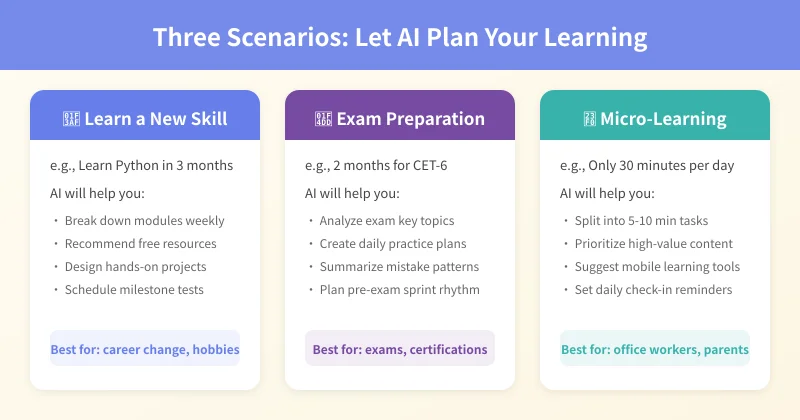
For example, you want to learn Python programming in 3 months. You can ask AI like this:
I want to learn Python programming in 3 months. I can invest 1.5 hours per day, and I'm a complete beginner with no programming experience. My goal is to find a data analysis job. Please create a detailed study plan broken down by week, with clear learning goals and practice tasks for each week.
AI will generate a week-by-week study plan, possibly including: Weeks 1-2 for basic syntax, Weeks 3-4 for data types and flow control, Weeks 5-6 for functions and modules, and so on. Each phase includes specific practice projects.
Scenario 2: Exam Preparation
For example, you have CET-6 in 2 months. You can ask:
I'm taking CET-6 in 2 months. I just passed CET-4 with a borderline score, and I can study 2 hours per day. Please create a study plan focusing on listening and reading, while also covering writing and translation. Arrange by week with specific practice amounts and target scores for each week.
AI will create a targeted review plan based on the exam syllabus and your level. For example, the first 4 weeks for building foundations (vocabulary + intensive listening/reading), the last 4 weeks for sprint mode (past papers + mock exams).
Scenario 3: Micro-Learning withfragmented Time
Office workers or parents may only have 30 minutes per day. You can ask:
I only have 30 minutes offragmented time per day (commute + lunch break), and I want to learn Japanese. My goal is to have simple daily conversations in 6 months. Please create a study plan suitable forfragmented time, recommending learning tasks that can be completed on a mobile phone.
AI will break learning content into 5-10 minute micro-tasks, prioritizing high-value content (common sentence patterns, core vocabulary), and recommend mobile-friendly learning tools and apps.
Practical Prompt Templates
Here are some ready-to-use prompt templates you can copy:
Template 1: General Study Plan
Please create a study plan for [learning content].
- Total time: [X months]
- Daily investment: [X hours]
- Current level: [zero basics/some basics/intermediate]
- Purpose: [career/exams/hobby]
Please break down by week, listing specific learning content, practice tasks, and expected outcomes for each week.
Template 2: Exam Prep Plan
I'm taking [exam name] in [X months]. Please create an exam prep plan.
- Current level: [describe your foundation]
- Daily study time: [X hours]
- Weak areas: [listening/reading/writing, etc.]
- Target score: [X points]
Please arrange by phase, with foundation building early and sprint mode later, with specific practice amounts each week.
Template 3: Micro-Learning Plan
I only have [X minutes] offragmented time per day and want to learn [learning content].
- Goal: [specific goal]
- Time frame: [X months]
- Available slots: [commute/lunch break/before bed]
Please break the learning content into [5-10] minute micro-tasks and recommend mobile-friendly learning methods.
3 Tips to Make Your Plan More Effective
1. Review Regularly, Adjust Promptly
Spend 10 minutes each week reviewing your progress with AI: What did you complete? What didn't you? Why? AI will adjust next week's plan based on your feedback.
2. Set Milestone Rewards
Ask AI to help you design a milestone reward system. For example, reward yourself with a movie after completing Phase 1, buy a desired book after reaching the halfway mark. Rewards drive motivation.
3. Find a Study Buddy
Ask AI to help you find study communities or partners. Studying alone makes it easy to give up; having companions makes persistence easier. AI can recommend relevant forums, groups, and accountability communities.
FAQ
Q: What if the AI's plan is too vague?
A: Keep asking follow-up questions. For example, "Please further break down Week 3's tasks into daily arrangements." AI can refine infinitely — the more specific your questions, the more detailed its answers.
Q: What if I can't follow the plan?
A: Tell AI about your difficulties. For example, "I'm too tired to study at night" — AI will adjust to morning or lunch break time. Or "This content is too hard to understand" — AI will recommend more beginner-friendly resources.
Q: How does AI know my level?
A: You can ask AI to give you a quick assessment. For example, "Please give me 10 Python beginner questions to test my level." Based on your answers, AI can more accurately match learning content to your ability.
Final Thoughts
The core of a study plan isn't "perfection" — it's "executability." A good plan should tell you what to do each day, leave room for adjustment when things get tough, and give you a sense of accomplishment when completed.
AI can help you generate a plan quickly, but execution is still up to you. Use the templates in this article and let AI create your personalized study plan today.
Related Articles
AI Speech to Text: Beginner's Guide to Convert Voice to Text in 3 Steps
Learn how to convert speech to text using AI tools. Perfect for meeting notes, content creation, and video subtitles. Three practical scenarios with step-by-step instructions.
TutorialsAI Local Deployment Guide: Run Large Models in 3 Steps for Free
Learn how to deploy AI models locally in just 3 steps. No coding experience needed, completely free, and your data stays private on your own computer.
TutorialsAI Shopping Decision Guide: From Price Comparison to Avoiding Pitfalls
Learn how to use AI for shopping decisions. From price comparison to avoiding pitfalls - make smarter purchasing choices with AI assistance.
Comments are not yet available, stay tuned