AI Prompting Techniques: 5 Core Methods to Double Your Answer Quality
Why Are Your AI Answers Always Disappointing?
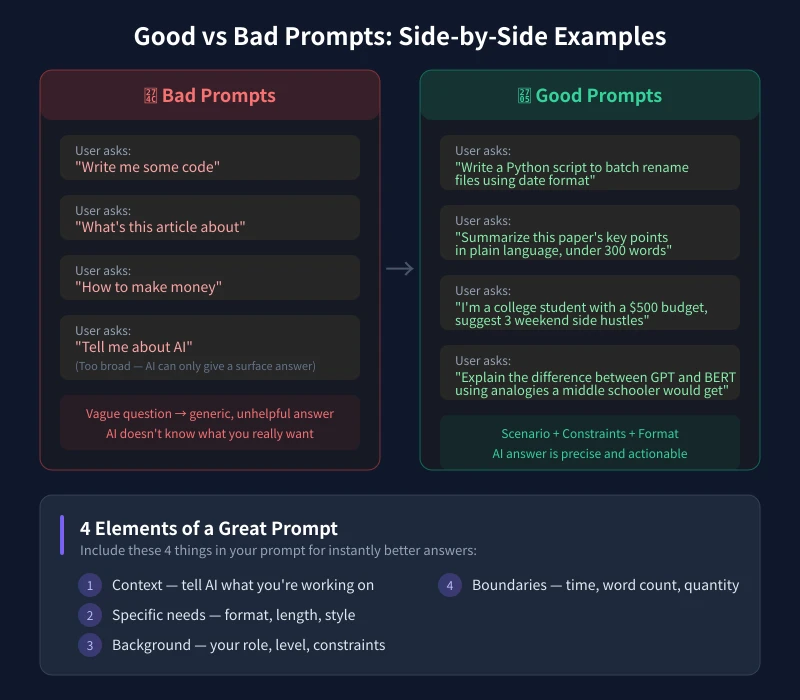
Many people share the same frustration with AI tools: they ask a question but get answers that are too generic, too vague, and not practical. The problem usually isn't the AI — it's how you ask.
Ask the same AI "write me some copy" versus "You are a senior e-commerce copywriter. Write 5 Xiaohongshu promotional posts for a Bluetooth earphone priced at $39, in a casual and lively tone, highlighting the noise-cancellation feature" — the results are worlds apart.
This article teaches you 5 proven prompting methods with real examples you can use immediately.
Method 1: Role Assignment — Make AI Act Like an Expert
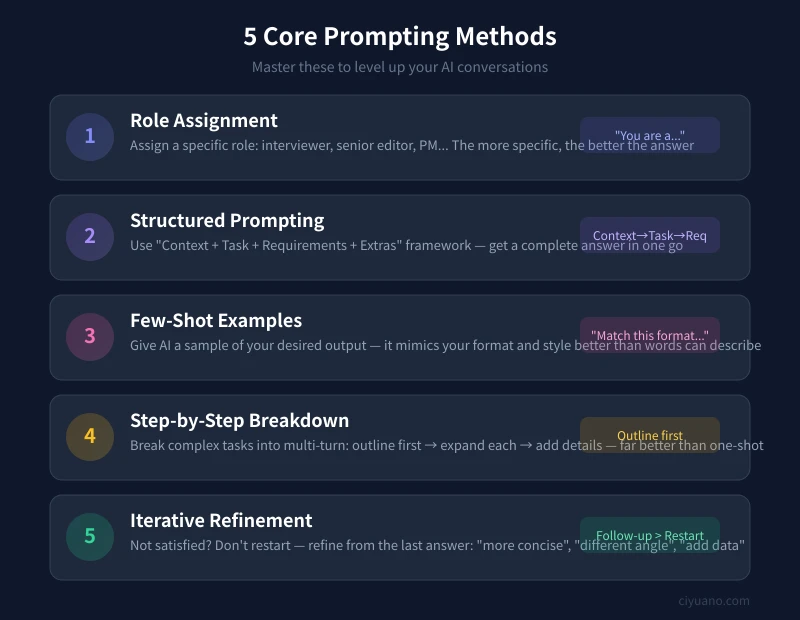
This is the simplest and most effective technique. Add a role description before your question, and AI's response shifts from "generic" to "expert perspective."
Why Does It Work?
When you tell AI "You are a senior product manager," it automatically activates knowledge and expression styles related to product analysis — as if you had a real consultant sitting next to you.
Steps
- Identify the type of expert you need: product manager, lawyer, English teacher, fitness coach...
- Start your prompt with "You are a professional with 10 years of experience in XXX"
- Add specific context about the role: industry, expertise area, work style
- Then ask your specific question
Practical Templates
- Writing: "You are a senior content editor skilled at writing viral articles. Please help me..."
- Learning: "You are a high school physics teacher who excels at explaining complex concepts with everyday examples. Please explain..."
- Work: "You are a data analyst with 8 years of experience. Please help me analyze this sales data..."
- Daily life: "You are a nutritionist. Please create a weekly meal plan based on my situation..."
Method 2: Structured Prompting — The Four-Part Formula
Don't try to squeeze a complex question into one sentence. Use the "Context + Task + Requirements + Extras" framework, and AI can give a complete, precise answer in one go.
The Four-Part Formula
- Context: What situation am I in when encountering this problem
- Task: What do I need AI to do
- Requirements: Output format, word count, style constraints
- Extras: Additional info, reference materials, special notes
Steps
- Clarify your context: who you are, what you're doing, what problem you face
- Define your task: what output you need from AI
- List your requirements: word limit, format preference, style
- Add relevant info: existing materials, reference examples, constraints
Practical Templates
Work report:
- Context: I'm a marketing specialist at a cross-border e-commerce company, main market is Southeast Asia
- Task: Help me write a Q2 quarterly work summary
- Requirements: About 1500 words, divided into performance review, problem analysis, and next quarter plan
- Extras: GMV grew 35% this quarter, but return rate increased from 5% to 8%
Learning:
- Context: I'm a product manager with zero coding background, wanting to understand technical implementation
- Task: Explain what a RESTful API is
- Requirements: No jargon, use a restaurant ordering analogy, under 500 words
- Extras: I only know the basic concepts of frontend and backend
Method 3: Few-Shot Examples — Show AI What You Want
Sometimes describing the format you want in words is tedious. Just give AI an example instead. This "Few-Shot" prompting method works far better than pure text descriptions.
Steps
- Prepare a sample of your desired output (something you wrote before, or found online)
- In your prompt, say "match the following format" or "mimic this style"
- Paste the example after your question
- Tell AI the specific content to process
Practical Templates
Writing a weekly report:
"Match the following weekly report format to write my summary:
Format reference:
1. Completed This Week
- Project A: finished XXX, 80% complete
2. Next Week's Plan
- Continue pushing XXX
3. Support Needed
- Need design team to help with XXX
My work content: [paste your work notes]"
Writing an email:
"Mimic the tone and format of this email to write a similar one to my client:
[paste reference email]
What I want to express: product delivery delayed by two weeks, apologize and offer a compensation plan."
Method 4: Step-by-Step Breakdown — Split Complex Tasks
Don't try to make AI complete a big task in one shot. Break complex tasks into multiple steps, follow up on each — quality far exceeds doing it all at once.
Steps
- Analyze your task and split it into 2-4 logical steps
- Step 1: Ask AI to create an outline or framework
- Step 2: Based on the outline, have AI expand each section
- Step 3: Individually optimize unsatisfactory parts
- Step 4: Have AI integrate the final version
Practical Templates
Writing an in-depth article:
- "I'm planning to write an article about remote work efficiency. Please create an outline with 5 sections"
- "Great, now expand Section 1 in about 300 words, including specific data and examples"
- "Section 3's angle is too common — rewrite it from a sharper perspective"
- "Now combine all sections, add an introduction and conclusion to form the complete article"
Creating a product plan:
- "I'm planning to build a study room booking app for college students. Please list the modules the plan should include"
- "First expand the user analysis and competitive analysis modules"
- "Then expand the feature design module, listing core features and priorities"
Method 5: Iterative Refinement — Follow-up Beats Restart
Not satisfied with the first answer? Don't rush to ask again. Refining based on the previous result is more efficient and produces better results.
Common Refinement Commands
- "More concise" — cut the fluff, keep the core
- "More detailed" — add specifics and examples
- "Different angle" — re-analyze from a new perspective
- "Add data support" — include specific numbers and citations
- "More conversational" — write like chatting with a friend
- "More professional" — use industry terminology
- "Give an example" — add concrete cases
- "What about the downsides" — add risks and caveats
Steps
- After receiving AI's answer, skim it and find the unsatisfactory parts
- Use the commands above to request targeted adjustments
- If a section is good, tell AI "keep this part, adjust the rest"
- Repeat 2-3 rounds until satisfied
Extra Tips: These Details Also Improve Answer Quality
Specify Output Format
Tell AI what format you want: table, list, step-by-step, dialogue, JSON, etc. Clear format = more organized answers.
Set Word Count Limits
"Under 300 words," "500-800 words," "3 points, 100 words each" — with word count requirements, AI won't write too long or too short.
Provide Reference Materials
Paste relevant documents, data, or links directly to AI. It will answer based on your materials instead of making things up.
Tell AI What NOT to Do
"No jargon," "skip the opening pleasantries," "no generic advice" — reverse constraints are equally important.
20 Ready-to-Use Prompt Templates (Copy & Paste)
Daily Efficiency
- "Organize these meeting notes into structured to-do items, sorted by priority: [paste content]"
- "Translate this text into Chinese, keeping technical terms accurate and tone natural: [paste content]"
- "Check this text for grammar errors and awkward expressions: [paste content]"
- "I have 30 minutes free. Help me list the 3 most worthwhile things to do today: [brief task list]"
Learning & Growth
- "Using the Feynman Technique, explain [concept] to me as if I'm a complete layperson"
- "Create a 30-day learning plan for [skill], 1 hour per day, I'm a complete beginner"
- "Explain [technical concept] using analogies from everyday things I'm familiar with"
- "Summarize the 3 core insights of this long article, one sentence each: [paste content]"
Work & Collaboration
- "Help me write an email declining a collaboration invitation, polite but firm, reason is schedule conflict"
- "Analyze this data and find the 3 most valuable insights, in language non-technical people can understand: [paste data]"
- "Help me prepare a 5-minute project report outline, focusing on results and next steps"
- "Rewrite this technical document as a product description for regular users: [paste document]"
Creative Content
- "Write 5 Xiaohongshu promotional posts for [product], target audience is [demographic], highlighting [selling point]"
- "Come up with 10 catchy blog titles for my [industry] blog that spark curiosity"
- "Write a social media post sharing my recent achievement, casual and humorous style"
- "Suggest 3 short video topics for [field] that are controversial enough to spark discussion"
Common Mistakes and How to Avoid Them
Mistake 1: Longer Is Always Better
No. What matters is information density, not word count. Remove irrelevant info and keep the core request.
Mistake 2: Ask Everything at Once
Break big questions into small ones, solve them one by one. AI handles small tasks with much higher accuracy than big ones.
Mistake 3: No Context Provided
AI doesn't know your background. "Help me improve my resume" is worse than "I'm a recent computer science graduate applying for frontend developer positions, please help me optimize this project description."
Mistake 4: Starting Over When Unsatisfied
Follow-up is more efficient than restarting. Fine-tune from the previous result instead of starting from scratch — saves time and gets better results.
Summary
Great AI prompting requires no technical background — just a change in how you ask. Remember these 5 methods:
- Role Assignment — make AI act like an expert
- Structured Prompting — the four-part formula
- Few-Shot Examples — show AI what you want
- Step-by-Step Breakdown — split complex tasks
- Iterative Refinement — follow-up beats restart
Start talking to AI differently today — you'll discover it's far more capable than you imagined.
Related Articles
AI Speech to Text: Beginner's Guide to Convert Voice to Text in 3 Steps
Learn how to convert speech to text using AI tools. Perfect for meeting notes, content creation, and video subtitles. Three practical scenarios with step-by-step instructions.
TutorialsAI Local Deployment Guide: Run Large Models in 3 Steps for Free
Learn how to deploy AI models locally in just 3 steps. No coding experience needed, completely free, and your data stays private on your own computer.
TutorialsAI Shopping Decision Guide: From Price Comparison to Avoiding Pitfalls
Learn how to use AI for shopping decisions. From price comparison to avoiding pitfalls - make smarter purchasing choices with AI assistance.
Comments are not yet available, stay tuned