AI Daily Productivity Assistant: 5 Practical Scenarios to Boost Your Work Efficiency

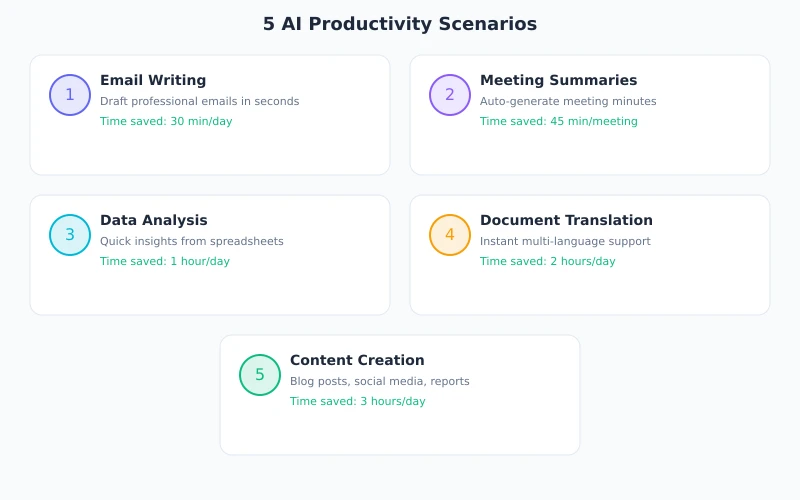
Many people think AI is only for programmers. In reality, anyone can use AI to dramatically boost their daily work efficiency. This article covers 5 common office scenarios and shows you exactly how to get things done with AI.
Scenario 1: Write Professional Emails in 30 Seconds
Email writing is one of the most time-consuming daily tasks. With AI, you only need to tell it what to write — it handles how to write it.
Step by Step
Step 1: Open the AI chat interface
Log in to Token Circle, enter the chat page, and select a suitable model (DeepSeek V4 or MiMo recommended).
Step 2: Enter your request
Tell the AI in natural language what email you want to write. For example:
Please help me write an email to confirm a meeting with a client next Wednesday at 2 PM. The topic is Q2 collaboration plan discussion, at the company's 3rd floor conference room. The tone should be formal but not stiff.
Step 3: Review and refine
AI will generate a complete email in seconds. You can further request:
- "Make the tone more relaxed"
- "Add a line about looking forward to the collaboration"
- "Also provide a Chinese version"
Scenario 2: Summarize Long Documents Instantly
Facing a 20-page report or contract? You don't need to read every word. Let AI extract the key information for you.
Step by Step
Step 1: Prepare the document content
Copy the text from your document. For PDFs, simply copy the text portion.
Step 2: Send it to AI
Paste the content into the chat box with your requirements:
Please summarize the core points of this report in 5 bullet points or fewer, each no more than 20 words. End with a one-sentence overall conclusion.
Step 3: Get a structured summary
You can also ask follow-up questions:
- "What are the risk points in this report?"
- "What are the amounts and deadlines mentioned?"
- "Compare the data in Section 3 and Section 5 — are there any contradictions?"
Scenario 3: Ask AI When You Don't Understand Something
When learning new concepts, search engines give you links — AI gives you answers. And you can keep asking until you truly understand.
Step by Step
Step 1: Ask directly
No need to be formal — just ask what you don't understand:
Explain in simple terms: what is an API? How is it different from a URL?
Step 2: Request simpler explanations
If the answer is too technical:
Explain it again using a restaurant ordering analogy
Step 3: Dig deeper
Once you grasp the basics, explore further:
- "What's the difference between an API and an SDK?"
- "What does RESTful API mean?"
- "Give me a real-life example of using an API"
Scenario 4: Quick Data Processing
Faced with messy data? AI can help you organize, analyze, and even suggest visualizations.
Step by Step
Step 1: Paste your data
Copy your spreadsheet data directly into the chat:
Here's this month's sales data. Please:
1. Summarize sales by region
2. Find the top 3 fastest-growing categories
3. Present results in a table format
Step 2: Get your analysis
AI will organize the data according to your requirements and return clear tables or lists.
Step 3: Further analysis
- "Write a data interpretation paragraph for my weekly report"
- "What chart type would best display this data?"
- "Predict next month's trends"
Scenario 5: Text Polishing and Translation
After writing your draft, let AI check grammar, improve expression, and even translate into other languages.
Step by Step
Step 1: Paste your draft
Please polish the following text. Requirements: keep the original meaning, make it more fluent and professional, fix grammar errors.
Step 2: Compare changes
AI returns the polished version and typically highlights what was changed and why.
Step 3: Multi-language conversion
- "Translate to English, maintain a formal tone"
- "Translate to Japanese, use proper honorifics"
- "Provide bilingual Chinese-English version"
Key Tips for Maximum Efficiency
Tip 1: Be specific
"Write me an email" is less effective than "Write a polite but firm collection email to a client." The more specific, the better.
Tip 2: Specify output format
Want a table? Say "in table format." Want a list? Say "numbered list." Want brevity? Say "under 100 words."
Tip 3: Break complex tasks into steps
Have AI create an outline first, then expand each section, then review the whole thing.
Tip 4: Leverage context
AI remembers previous messages in the same chat. Use this for multi-round deep discussions.
Get Started Now
No software to install, no coding required. Open your browser, log in to Token Circle, pick a model, and hand your most time-consuming task to AI.
Try it now: Register on Token Circle, choose a model, and start boosting your efficiency with AI.
Related Articles
AI Speech to Text: Beginner's Guide to Convert Voice to Text in 3 Steps
Learn how to convert speech to text using AI tools. Perfect for meeting notes, content creation, and video subtitles. Three practical scenarios with step-by-step instructions.
TutorialsAI Local Deployment Guide: Run Large Models in 3 Steps for Free
Learn how to deploy AI models locally in just 3 steps. No coding experience needed, completely free, and your data stays private on your own computer.
TutorialsAI Shopping Decision Guide: From Price Comparison to Avoiding Pitfalls
Learn how to use AI for shopping decisions. From price comparison to avoiding pitfalls - make smarter purchasing choices with AI assistance.
Comments are not yet available, stay tuned