AI Translation and Localization: Building a Multilingual Content Production Line with APIs

Have you ever encountered this scenario: you wrote an article in Chinese and wanted to publish an English version simultaneously, but after tweaking it with translation software again and again, you still weren’t satisfied? Or your product needs to support a multilingual interface, and every time you update the copy, you have to manually translate it all over again? This article teaches you how to build an automated translation pipeline using AI APIs—configure it once, batch produce high-quality multilingual content.
Why Use AI for Translation
Traditional translation methods generally fall into three categories, each with its own problems:
- Human translation: Best quality, but costly and slow—translating a 2000-word article could cost hundreds of yuan.
- Google/Baidu Translation API: Cheap and fast, but translations are stiff and often get technical terms wrong.
- Using translation software manually: Copy and paste piece by piece, inefficient, and formatting easily gets messed up.
The emergence of large language models has changed this landscape. Models like GPT-4, Claude, and DeepSeek can not only translate but also understand context, maintain consistent tone, and handle technical terminology. By calling their APIs, you can embed translation capabilities into any workflow.
Core advantages of AI translation:
- Context understanding — not word-for-word translation, but understanding the entire meaning and re-expressing it.
- Controllable style — you can specify different tones such as formal, conversational, technical documentation, etc.
- Consistent terminology — through prompt constraints, ensure that professional terms are translated the same way every time.
- Format preservation — HTML, Markdown, and other formats can be fully preserved.
Translation Workflow Overview
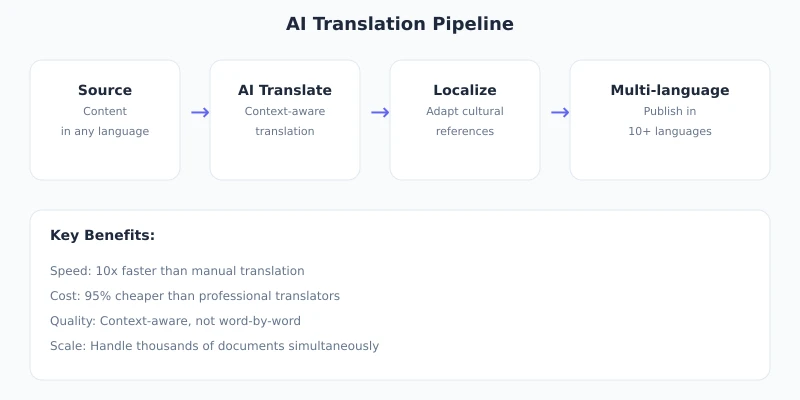
A complete AI translation pipeline includes 5 steps:
- Prepare the source text — ensure the source content is of good quality and clearly structured.
- Configure the API — set up your Ciyuano API key and model selection.
- AI translation — use a prompt to have the model complete the translation.
- Review and polish — check terminology, tone, and formatting for correctness.
- Multilingual publishing — publish the translated results to the corresponding language versions.
Now let’s go step by step in practice.
Step 1: Obtain an API Key
Create an API key in the Ciyuano dashboard:
- Visit www.ciyuano.com and log in.
- Go to Dashboard → API Keys → Create New Key.
- Enter "Translation Service" as the label, then copy the generated key.
Tip: Translation tasks don't require the highest-end models. Choose a cost-effective model (e.g., DeepSeek V4); you don't need the most expensive flagship model.
Step 2: Write the Translation Prompt
The quality of the translation depends heavily on the prompt. A good translation prompt should include the following elements:
You are a professional translation expert. Please translate the following content from Chinese to English.

Requirements:
1. Maintain the tone and style of the original text.
2. Use industry-standard translations for technical terms.
3. Preserve all HTML tags and formatting.
4. Output only the translation result, do not add any explanations.

Glossary:
- Large Language Model → Large Language Model (LLM)
- API Key → API Key
- Prompt → Prompt
- Token → Token

Source text:
{paste the source text here}
Key points for prompt design:
- Role setting — "Professional translation expert" works much better than "Please translate the following."
- Clear direction — specify the source and target languages.
- Glossary — fix the translations of key terms to avoid inconsistent results each time.
- Format requirements — explicitly tell the model to preserve HTML tags.
- Output constraints — ask for only the translated result, no extra fluff like "Here is the translation."
Step 3: Call the API to Perform Translation
You can use any tool that supports HTTP requests to call the Ciyuano API. Here is a minimal example:
curl https://api.ciyuano.com/v1/chat/completions \
  -H "Authorization: Bearer sk-relay-YOUR_API_KEY" \
  -H "Content-Type: application/json" \
  -d '{
    "model": "deepseek-v4",
    "messages": [
      {"role": "system", "content": "You are a professional translator. Translate the user content from Chinese to English, preserve HTML formatting, and output only the translation results."},
      {"role": "user", "content": "Source text..."}
    ]
  }'
If you prefer Python, you can write it like this:
import requests

resp = requests.post(
    "https://api.ciyuano.com/v1/chat/completions",
    headers={"Authorization": "Bearer sk-relay-YOUR_API_KEY"},
    json={
        "model": "deepseek-v4",
        "messages": [
            {"role": "system", "content": "You are a professional translator. Translate from Chinese to English, preserve HTML formatting."},
            {"role": "user", "content": "Hello world"}
        ]
    }
)

result = resp.json()["choices"][0]["message"]["content"]
print(result)
Step 4: Batch Translation in Practice
In real-world usage, you rarely translate just one sentence. A more common scenario is: a 2000-word article needs to be translated into 3 languages. Here are some practical tips:
4.1 Segment the Translation
Don't feed a long article to the model all at once. Split it by paragraphs or sections for better results:
- Split the article into multiple sections based on
<h2>or<h3>tags. - Translate each section individually, maintaining context (you can include the translation of the previous section as well).
- Finally, concatenate all translated sections.
4.2 Terminology Consistency
Include a glossary in the system prompt to ensure consistent translations each time:
Glossary Example:
API Key → API Key | LLM → LLM | Token → Token
relay service → Relay Service | Prompt Engineering → Prompt Engineering
4.3 Parallel Multilingual Translation
When translating the same content into multiple languages, you can send concurrent requests instead of waiting for one to finish before starting the next:
- English, Japanese, and Korean translation requests can be sent simultaneously.
- Each request’s system prompt specifies a different target language.
- Use the glossary to ensure consistency within the same language.
Step 5: Review and Polish
AI translation is already very good, but don’t trust it blindly. Before publishing, it’s recommended to check the following:
- Terminology check — are key terms translated correctly and consistently throughout the text?
- Format check — are HTML tags fully preserved, and do links work properly?
- Tone check — does the translated tone match the target audience (e.g., technical documentation for developers vs. product copy for users)?
- Length check — English is usually 30-50% longer than Chinese; confirm the layout won’t break.
Advanced tip: Have the AI review itself. Feed the translated result back to the model with the prompt: "Please check the following translation for any terminology errors or awkward phrasing, list the issues, and suggest corrections." This lets AI act as its own proofreader.
Cost Estimate
Translating a 2000-word Chinese article into English using DeepSeek V4 consumes about 3000-4000 tokens, costing less than 0.01 yuan. Even if you translate it into 5 languages, the total cost is still under 0.1 yuan.
Comparison:
- Human translation: 100-300 yuan per article
- Google Translation API: about 0.5 yuan per article
- AI API translation: about 0.02 yuan per article (single language)
AI translation has an overwhelming cost advantage, and its quality is already approaching that of professional human translators.
Practical Tips Summary
- Choose the right model — Translation doesn't need the most expensive model. Cost-effective models like DeepSeek V4 or GPT-4o-mini are sufficient.
- Write a good prompt — Role setting + glossary + format requirements — all three are indispensable.
- Process in segments — Split long articles by section, and include context for each segment.
- Concurrent requests — Translate multiple languages simultaneously to save time.
- Keep the original — Always preserve the source language version; translations are derivative content.
- Update the glossary regularly — As your business grows, continuously add new terminology pairs.
Final Thoughts
AI translation is not about replacing human translators; it’s about making translation cheap and fast enough that you can offer multilingual support in more scenarios. In the past, only large companies could afford multilingual content; now even a single person can maintain content in 5 languages.
The key is: turn translation from a "one-time manual task" into a "repeatable automated pipeline." Once you’ve set up the prompt and glossary, every new piece of content can be published in multiple languages with a single command.
If you haven’t tried using APIs for translation yet, go to Ciyuano now and create a key to give it a try.
Related Articles
AI Speech to Text: Beginner's Guide to Convert Voice to Text in 3 Steps
Learn how to convert speech to text using AI tools. Perfect for meeting notes, content creation, and video subtitles. Three practical scenarios with step-by-step instructions.
TutorialsAI Local Deployment Guide: Run Large Models in 3 Steps for Free
Learn how to deploy AI models locally in just 3 steps. No coding experience needed, completely free, and your data stays private on your own computer.
TutorialsAI Shopping Decision Guide: From Price Comparison to Avoiding Pitfalls
Learn how to use AI for shopping decisions. From price comparison to avoiding pitfalls - make smarter purchasing choices with AI assistance.
Comments are not yet available, stay tuned