AI Resume Writing Guide: Generate a Professional Resume in 3 Steps
Why Use AI to Write Your Resume?
Writing a resume is the first step in job hunting, and it's one that many people find challenging. Not sure how to describe your work experience? Uncertain about how to organize your skills? Struggling with formatting? AI resume assistants can solve all these problems.
This tutorial is designed for absolute beginners. No design or writing experience needed. You just need to provide basic information, and AI can generate a professional, clear, and targeted resume for you.
Getting Ready
Before you begin, prepare the following:
- An AI chatbot (ChatGPT, Claude, or any similar tool)
- Your basic info (name, contact details, education)
- Work experience (companies, roles, what you did)
- Target job posting (optional, but helps AI be more precise)
Generate a Professional Resume in 3 Steps
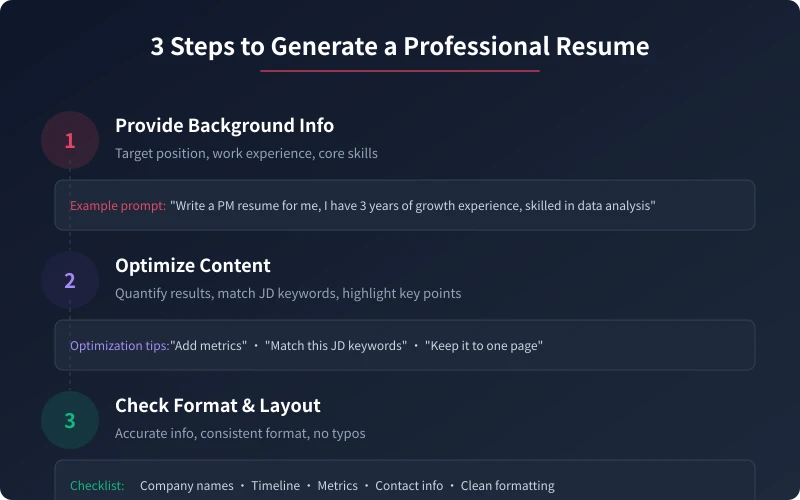
Step 1: Provide Your Background
Tell AI three key pieces of information:
- Target position — What role are you applying for? (Product manager, frontend engineer, marketing specialist...)
- Work history — Where have you worked? What did you do?
- Core skills — What are you good at? Any certifications or achievements?
Example prompt:
Help me write a product manager resume. I have 3 years of user growth experience and 2 years of e-commerce product experience. Skilled in data analysis and user research, with PMP certification.
Step 2: Optimize Content Descriptions
AI will generate a complete resume draft. Next, you need to:
- Make AI use quantified data for your achievements ("Increased conversion by 30%" is more compelling than "Improved conversion")
- Adjust keywords to match the target job description
- Remove irrelevant content and highlight key points (aim for one page)
Optimization prompt examples:
"Add quantified data to each experience" · "Adjust keywords based on this JD" · "Keep it to one page" · "Highlight my data analysis skills"
Step 3: Check Format and Layout
Before copying to your email or application, confirm:
- All information is accurate (company names, dates, figures)
- Formatting is consistent (date format, punctuation, spacing)
- No typos or grammatical errors
- Contact details are correct (email, phone, LinkedIn)
Common Resume Scenarios
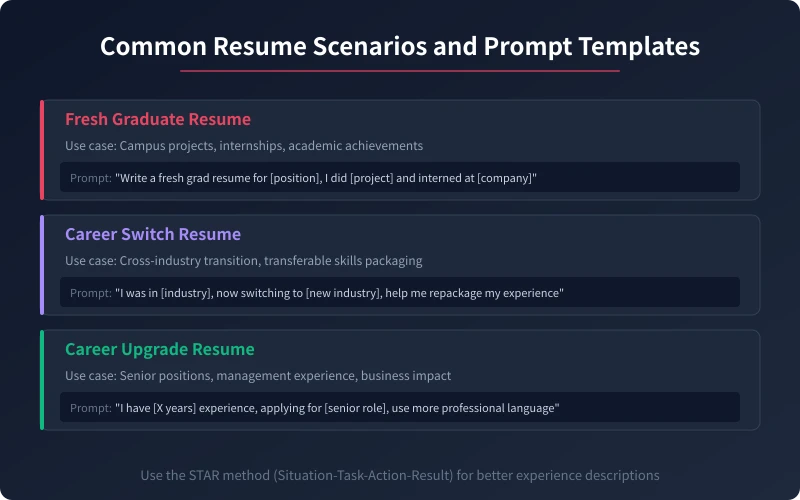
Scenario 1: Fresh Graduate Resume
No formal work experience? Don't worry. AI can help you package campus activities, internships, and project experience into competitive content.
Prompt template:
Write a fresh graduate resume for [Company]'s [Position]. I study [Major] at [University], participated in [Project/Competition], and interned at [Company] for [X months].
Scenario 2: Career Switch Resume
Want to change industries but unsure how to write about it? AI can help you find connections between past experience and target roles, highlighting transferable skills.
Prompt template:
I previously worked in [Industry] as [Position], now switching to [New Industry]'s [New Position]. Help me repackage my experience to highlight relevant skills.
Scenario 3: Career Upgrade Resume
Have experience but aiming for a promotion? AI helps you describe your achievements in more advanced language, making your resume more impactful.
Prompt template:
I have [X years] of experience and am applying for [Senior Position]. Use more professional language to describe my work achievements, emphasizing management experience and business impact.
Advanced Tips
After mastering the basic 3 steps, these tips will help you write even better resumes:
- Customize for each position — Don't use one resume for all companies; adjust keywords and focus based on each JD
- Use the STAR method — Situation → Task → Action → Result for describing each experience
- Have AI write a cover letter too — Beyond the resume, a good cover letter can make you stand out
- Iterate multiple times — Start with AI generating a framework, then gradually add details and data
Pro tip: A resume is not an essay — it doesn't need to be lengthy. Recruiters spend an average of only 6-10 seconds scanning a resume, so key information should be in the most prominent position. Use data to speak and let achievements prove your ability.
Summary
Using AI to write your resume isn't "cheating" — it's about presenting your strengths more clearly. AI handles the wording and structure, but the core content and authenticity of your resume need your oversight. Master the three steps of "Provide Background → Optimize Description → Check Layout" and you can quickly write a professional resume.
Start using AI to optimize your resume today. You'll find that a resume that used to take a whole day can now be done in 30 minutes.
Related Articles
AI Speech to Text: Beginner's Guide to Convert Voice to Text in 3 Steps
Learn how to convert speech to text using AI tools. Perfect for meeting notes, content creation, and video subtitles. Three practical scenarios with step-by-step instructions.
TutorialsAI Local Deployment Guide: Run Large Models in 3 Steps for Free
Learn how to deploy AI models locally in just 3 steps. No coding experience needed, completely free, and your data stays private on your own computer.
TutorialsAI Shopping Decision Guide: From Price Comparison to Avoiding Pitfalls
Learn how to use AI for shopping decisions. From price comparison to avoiding pitfalls - make smarter purchasing choices with AI assistance.
Comments are not yet available, stay tuned