AI Helps You Budget and Track Expenses: Even Beginners Can Manage Every Penny with AI
Why Can't Most People Stick to Bookkeeping?
Have you ever experienced this? At the start of the year, you're determined to track every expense, but after three days it starts feeling like a chore, and within a week you've given up entirely?
The pain points of traditional bookkeeping are obvious:
- Too tedious: Every time you spend money, you have to open an app, pick a category, enter the amount, select the date
- Easy to forget: When you're busy, you forget — and by the time you remember, you can't recall how much you spent
- Hard to analyze: You've recorded a mountain of data but have no idea how to analyze it or where to cut back
- No motivation: You don't know what use the records are anyway, so you gradually lose interest
But what if you had an AI bookkeeping assistant you could chat with anytime? Just say a sentence to log an expense, snap a photo to record a receipt, and get automatic weekly spending analysis — this is the bookkeeping method designed for modern life.
What Can AI Bookkeeping Do for You?
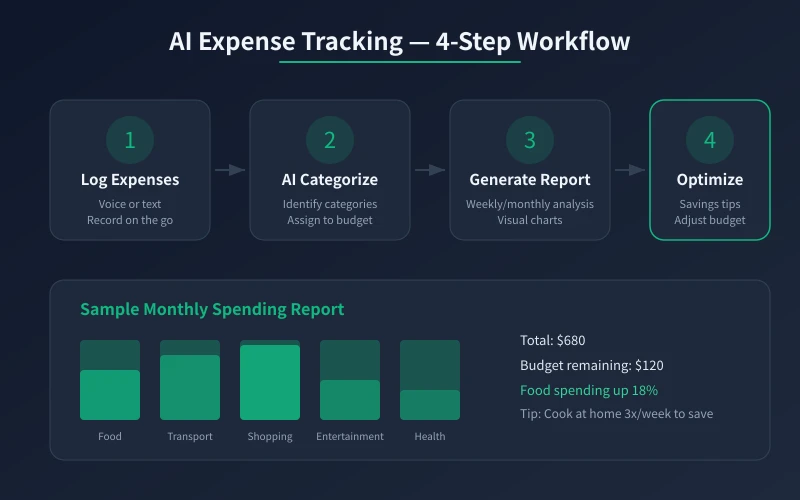
In short, AI can transform your bookkeeping from "manual recording" to "automatic management." Here are the four things it can do:
1. Voice and Text Bookkeeping
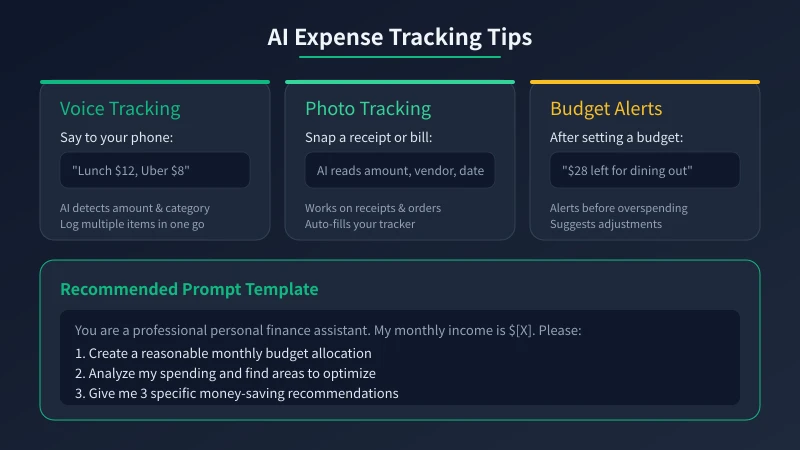
No need to open any app. Just tell the AI something like "lunch was 35 yuan, taxi was 28 yuan" and it automatically identifies the amounts, categories, and records them. You can even say "spent 200 today — 80 on food, 60 on books, 60 on taxi" to log three entries in one sentence.
The biggest advantage of this approach is lowering the barrier to bookkeeping. No app to open, no categories to select — just speak and record anytime.
2. Photo Recognition
Supermarket receipts, food delivery orders, gas station invoices — snap a photo and send it to the AI. It can automatically identify the amount, merchant, time, and even extract itemized details from a blurry receipt photo. For people who dislike manual data entry, this is a lifesaver.
3. Smart Categorization and Analysis
AI automatically sorts your expenses into categories like "dining," "transportation," "shopping," and "entertainment." It can also perform deeper analysis, such as:
- Your dining expenses are 20% higher than last month, mostly due to increased food delivery orders
- Your spending peaks on Wednesdays, possibly related to your dining-out habits
- You've purchased 3 similar items, suggesting potential impulse buying
None of this requires Excel skills or data expertise — AI explains it all in plain language.
4. Budget Suggestions and Alerts
Tell the AI your monthly income and fixed expenses, and it will help you create a reasonable budget plan. When you're about to exceed your budget, it alerts you: "Your dining budget has 200 yuan left with 10 days remaining in the month — I suggest keeping daily spending under 20 yuan."
Step-by-Step Guide: 5 Steps to Build an AI Bookkeeping System
Step 1: Tell the AI About Your Financial Situation
Before you start bookkeeping, give the AI an overview of your situation. You can say something like:
"Hi, I want to use you to help me with bookkeeping and financial management. Here's my situation: monthly income is 12,000 yuan, with fixed monthly expenses of about 5,000 yuan (rent 3,000, utilities 300, phone bill 100, transportation 200, other 1,400). Please help me create a monthly budget plan."
Based on your income and fixed expenses, the AI will help you plan a reasonable flexible budget, telling you how much to allocate for dining, shopping, entertainment, and savings.
Step 2: Set Your Budget Categories
Based on the AI's suggestions, decide your budget categories. Common classifications include:
- Dining: Daily meals, food delivery, snacks
- Transportation: Public transit, taxis, gas
- Shopping: Daily necessities, clothing, electronics
- Entertainment: Movies, games, social activities
- Health: Medical expenses, gym, supplements
- Education: Courses, books, training
- Savings: Fixed amount saved each month
No need to be overly detailed — 6 to 8 categories is enough. Too many categories actually adds to the bookkeeping burden.
Step 3: Build the Habit of Recording Anytime
This is the most critical step. Don't set aside special time for bookkeeping — instead, record it the moment you spend money:
- After eating: say "lunch 35"
- After a taxi ride: say "taxi 28"
- After shopping: say "supermarket 156"
- When you receive your salary: say "received salary 12,000"
Each entry only takes a few seconds. With voice input, you don't even need to type. The key is making bookkeeping an effortless action, not a task you have to consciously set out to do.
Step 4: Let AI Analyze Weekly
Spend 2 minutes each week to have the AI do a simple spending review. You can say:
"Help me analyze this week's spending — see if there's anything unusual or worth optimizing."
The AI will tell you:
- Total spending for the week
- Which categories went over budget
- How it compares to last week
- Specific money-saving suggestions
No need to dig through receipts or calculate numbers yourself — the AI handles it all.
Step 5: Monthly Summary and Adjustment
At the end of each month, have the AI generate a complete monthly report. Review what went well and what needs adjustment. For example:
- This month's dining expenses were 1,800 yuan, 300 yuan over budget — next month you can reduce food delivery orders
- You successfully saved 2,000 yuan this month — keep it up
- Shopping expenses were only 200 yuan — you can treat yourself a little
This kind of review doesn't require financial expertise — the AI tells you exactly what to adjust in the simplest terms.
Three Practical AI Bookkeeping Prompts
Here are three prompts you can copy and use directly:
Prompt 1: Create a Budget
"You are a professional personal finance assistant. My monthly income is [X] yuan, with fixed expenses including: rent [X] yuan, utilities [X] yuan, transportation [X] yuan, phone bill [X] yuan. Please create a reasonable monthly budget plan, including recommended limits for dining, shopping, entertainment, savings, and other categories, with explanations."
Prompt 2: Analyze Spending
"Here are my expenses for this month: [paste records]. Please analyze: 1. Spending breakdown by category 2. Changes compared to last month 3. Areas that can be optimized 4. Three specific money-saving suggestions. Please answer in concise, plain language without technical jargon."
Prompt 3: Create a Savings Plan
"My monthly income is [X] yuan, with fixed expenses of [X] yuan per month. I want to save [X] yuan in [X] months for [purpose]. Please create a feasible savings plan, including how much to save each month, how to allocate daily spending, and any money-saving tips."
Frequently Asked Questions
Is AI bookkeeping secure? Will it leak my financial information?
This depends on the platform you use. If you're privacy-conscious, you can choose locally deployed AI models (like Ollama) — all data is processed on your own computer and never uploaded to any server. If you use online AI services, it's best not to upload overly detailed bank statements; summarized descriptions work fine.
What if I don't have a regular income?
Freelancers and part-time workers can also use AI bookkeeping. You can tell the AI your average income over recent months, and it will help you create a flexible budget based on that average. Just update it whenever income comes in.
How is AI bookkeeping different from dedicated bookkeeping apps?
Dedicated apps (like Shouji and Waicai) offer more comprehensive features such as automatic bank statement syncing and chart-based analysis. The advantage of AI bookkeeping is more natural interaction — you can record and query through conversation without learning a complex interface. The two can be used together: AI for quick daily recording and analysis, and apps for long-term data storage.
How long before I see results?
Usually 2 to 4 weeks of consistent use will show noticeable results. You'll discover which expenses were "mindless" spending and which can actually be optimized. After one month, the AI can provide you with a valuable spending analysis report.
Conclusion
The core benefit of using AI as a bookkeeping assistant is lowering the barrier to bookkeeping. You don't need to learn complex software or spend time organizing data daily — just chat like you would with a friend and casually mention "lunch was 35."
Start today. Try it for one week. Spend less than a minute each day recording every expense. After a week, let the AI do an analysis for you. You'll be surprised how much you've been spending without even realizing it.
Managing money starts with tracking it well. And AI bookkeeping makes "tracking well" simpler than ever before.
Related Articles
AI Resume Writing: From Zero to Professional in 5 Steps
Learn how to use AI to write a professional resume. Five simple steps from basic information to polished final draft. Perfect for job seekers who want to stand out.
Productivity ToolsAI Note Organization: Build a Personal Knowledge System in 5 Steps
Learn how to use AI for note organization. Build a personal knowledge system in 5 steps. Perfect for knowledge workers and students.
Productivity ToolsAI Side Hustle Planning: Find Your Second Income Source
Want to earn extra income through a side hustle but don't know where to start? AI can help you analyze your skills, match directions, make plans, and track progress. Find your ideal side hustle within a month, even with zero experience.
Comments are not yet available, stay tuned