One of the most dreaded daily decisions is "what to eat today." Eating healthy, varied meals while considering budget and family preferences can all be delegated to AI. This step-by-step guide teaches you how to use AI tools to plan weekly meals, from menu design to shopping lists.
Why Use AI for Meal Planning?
The traditional approach involves flipping through cookbooks or scrolling through short videos for inspiration — inefficient and easy to miss nutritional balance. AI's advantages include:
- Speed: Generate a weekly menu in seconds, saving hours of indecision
- Nutritional balance: AI comprehensively considers protein, carbs, vitamins, and more
- Personalization: Flexibly adapts to family size, taste preferences, and budget
- Iterative: Modify anytime — AI remembers your preferences
Step 1: Describe Your Family Situation
Before chatting with AI, gather the following information:
- Family size and ages: Adults and children have different needs
- Taste preferences: No spicy food, no seafood, vegetarian, etc.
- Allergies or restrictions: Lactose intolerance, nut allergies, etc.
- Budget range: How much you spend on groceries daily or weekly
- Cooking ability: Kitchen beginner or expert, how much time you have for cooking
Organize this into a paragraph and send it to AI. The more detail, the better. For example:
Family of 3: my spouse and I are in our 30s, with an 8-year-old child. The kid doesn't eat spicy food, and my spouse is allergic to seafood. Daily grocery budget is $12-15. Weekdays need quick and easy recipes, weekends can be more elaborate. No repeated dishes throughout the week.
Step 2: Generate a Weekly Menu
With basic info ready, ask AI to plan the menu. The key is crafting a good prompt:
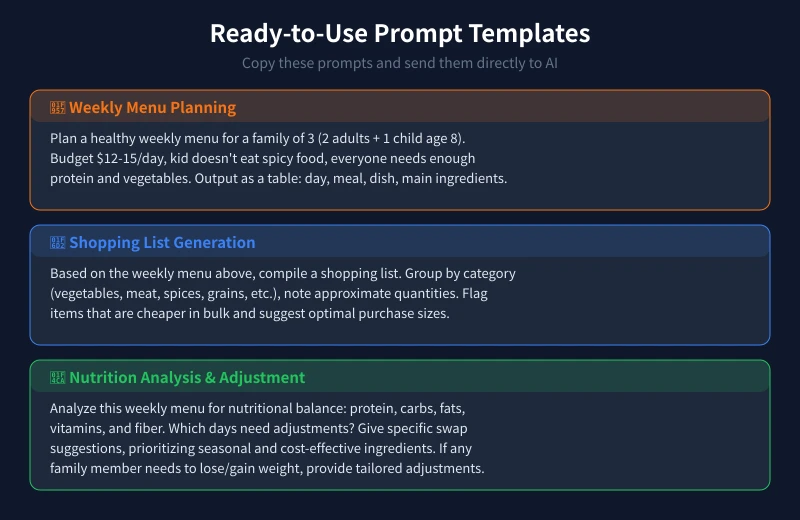
Based on the family situation above, plan a healthy weekly menu (Monday to Sunday) including breakfast, lunch, dinner, and afternoon snacks. Output as a table with: day, meal type, dish name, main ingredients, and estimated cooking time. Ensure nutritional balance with diverse vegetables and varied protein sources.
AI will generate a detailed table with daily dish arrangements. Don't rush to use it yet — see Step 3.
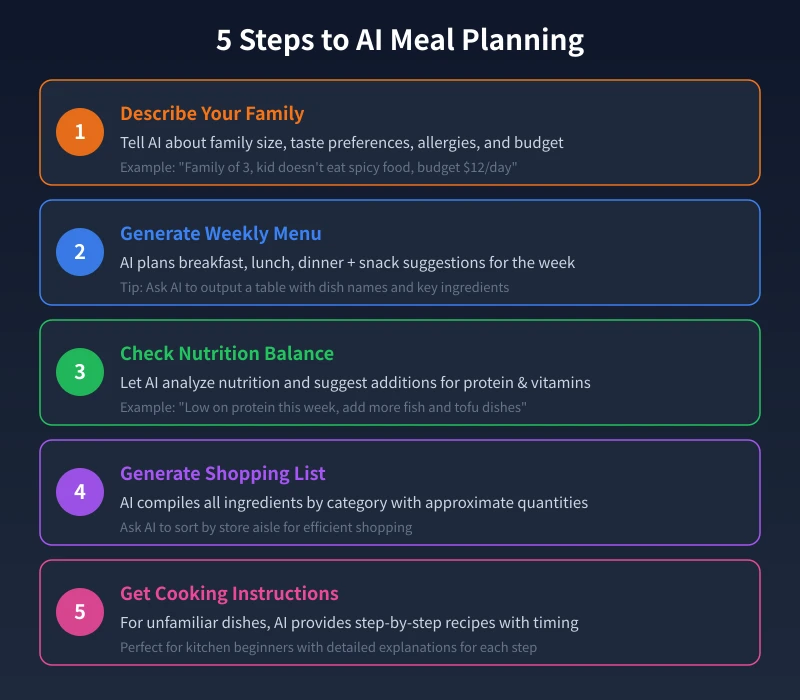
Step 3: Check Nutritional Balance
After the menu is ready, have AI perform a nutrition audit:
Analyze this weekly menu for nutritional balance: Are daily protein, carbohydrates, fats, vitamins, and fiber adequate? Which days need adjustments? Provide specific substitution suggestions.
Common issues include:
- Insufficient protein: No fish or tofu for several consecutive days
- Monotonous vegetables: Always spinach and tomatoes, lacking dark leafy greens
- Excess carbs: Too much white rice, can substitute with whole grains
After AI adjusts, check if it matches your family's taste. If not, simply say "Replace Wednesday's braised pork with sweet and sour ribs" and AI will update instantly.
Step 4: Generate a Shopping List
Once the menu is finalized, have AI auto-generate a shopping list:
Based on the finalized weekly menu above, compile all ingredients needed. Group by category (vegetables, meat, dairy/eggs, spices, grains, etc.) with approximate quantities. Flag items that are cheaper in bulk and suggest optimal purchase sizes.
This list goes straight to the supermarket or farmers' market. For extra precision, ask AI to sort items by store aisle.
Step 5: Get Cooking Instructions
For unfamiliar dishes, have AI teach you directly:
Please teach me how to make "Mushroom Chicken" in detail. What ingredients and seasonings do I need? What are the step-by-step instructions? What heat level? How long does it take? Any common mistakes beginners should avoid?
AI provides detailed instructions including heat levels, timing, and seasoning order. More convenient than videos because you can follow up on details anytime.
Advanced Tips
1. Save and Reuse
After the first successful plan, ask AI to save the menu as a document. Next time, just say "Use last week's menu but swap Wednesday and Friday" to skip replanning.
2. Seasonal Adjustments
Ingredient prices and freshness vary by season. Ask AI to recommend seasonal ingredients — cheaper and tastier.
3. Special Needs
Family members trying to lose weight, build muscle, or manage blood sugar? Tell AI about special needs, and it'll tailor portions within the same menu, like "my portion should be low-oil, low-salt; the kids' portions should have extra cheese."
4. Leftover Utilization
If you have leftovers, ask AI how to transform them into a new dish the next day to reduce waste. For example, "We have leftover rice and braised pork — what can we make tomorrow?"
Recommended AI Tools
These tools are all great for meal planning:
- ChatGPT / Claude: General-purpose AI, great for complex meal planning and nutrition analysis
- Gemini / Copilot: Good at structured output, ideal for tables and shopping lists
- Kimi: Excels at processing long documents, perfect for organizing menus, lists, and recipes in one go
Try one tool first. Once satisfied, stick with it — AI will better remember your preferences over time.
FAQ
Q: What if AI suggests dishes I don't like?
Tell it directly what you don't want, like "No organ meats" or "Less stew, more stir-fry." AI adjusts based on feedback.
Q: What if I can't find the ingredients?
Tell AI which ingredients are unavailable in your area and ask for substitutes. For example, "Salmon is too expensive — what can I use instead?"
Q: What if the budget is exceeded?
Ask AI to replan with a specific limit, like "Reduce the budget to $8/day." It will automatically choose more economical ingredient combinations.
Conclusion
The core AI meal planning workflow is: Describe needs → Generate menu → Nutrition audit → Shopping list → Cooking guidance. The entire process takes under 10 minutes but saves you from the daily "what's for dinner" dilemma while ensuring your whole family eats healthy.
The key is investing time upfront to describe your needs clearly. After that, AI will increasingly match your tastes. Start today and let AI solve your meal planning challenges.