AI-Powered Reading Notes: A Practical Guide to Knowledge Management
Why Use AI for Reading Notes?
Many people face the same struggle when reading: you highlight passages, make annotations, but forget half of it after closing the book. Traditional note-taking methods are either too slow (hand-copying) or too messy (pasting random snippets), turning your notes into a "digital junkyard."
AI has completely changed this. Simply feed the book content to AI, and it can quickly extract key points, organize them into structured notes, and even discover knowledge connections across different books. This isn't about being lazy — it's about learning smarter.
Step 1: While Reading — Let AI Extract Key Points
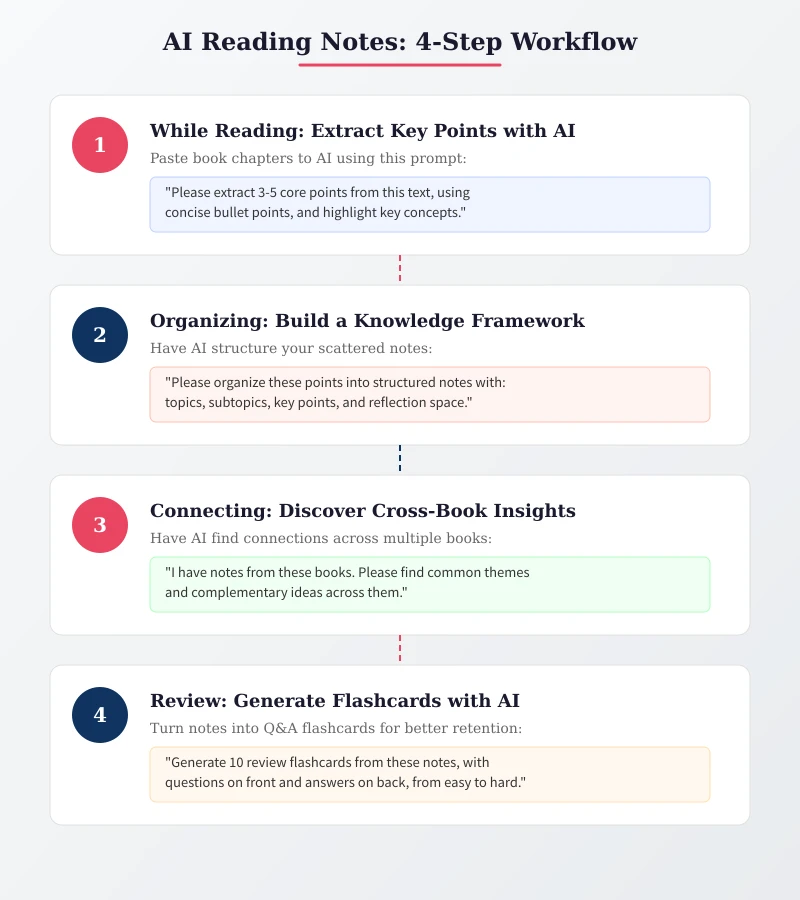
This is the most basic and practical use case. When you finish a chapter or important section, simply copy the text to AI with a simple prompt to get a refined summary of key points.
Recommended Prompt Templates
Basic version:
Please extract 3-5 core points from the following text, using concise bullet point format, and highlight key concepts.Advanced version:
Please analyze this text and complete the following tasks:
1. Extract 3-5 core viewpoints
2. Highlight key terms and explain them
3. Identify the author's reasoning logic
4. List questions worth deeper reflection
Practical Example
Suppose you're reading "Thinking, Fast and Slow" and just finished the chapter on "System 1 and System 2." Simply:
- Copy the key paragraphs from that section (no need for the full text, 200-500 words is enough)
- Paste it into ChatGPT or Claude's chat box
- Add the prompt: "Please extract the core points from this content and explain them in plain language"
- Within seconds, you'll have a clear list of key takeaways
Pro tip: If the book content is long, process it in segments — handling one subsection at a time yields much better results than dumping an entire chapter at once.
Step 2: Organizing — Build a Knowledge Framework with AI
Scattered key points are just the first step. True knowledge management lies in organizing these points into a structured note system. AI excels at this too.
Use AI to Structure Your Notes
Compile the key points you've extracted earlier, then use this prompt to have AI organize them:
I have the following scattered reading notes. Please organize them into a structured note that includes:
- Topic categories
- Subtopics
- Core content for each point
- Space for "personal reflections"
- Highlight the top 3 most important points with ⭐
Recommended Note Format
AI will typically generate a structure like this, which you can adjust to your preference:
- Book Info: Title, author, reading date, rating
- Core Ideas: The 3-5 most important ideas from the book
- Chapter Notes: Detailed notes organized by chapter
- Notable Quotes: Original passages worth revisiting
- Personal Reflections: Your thoughts and associations
- Action Items: What you can do after reading this book
Step 3: Connecting — Let AI Discover Cross-Book Insights
This is where AI-powered note-taking truly shines. Once you've accumulated notes from multiple books, AI can find knowledge connections across them — something that's incredibly difficult to do manually.
Cross-Book Connection Prompt
I have note summaries from the following books:
[Book A notes]...
[Book B notes]...
[Book C notes]...

Please help me:
1. Find common themes across these books
2. Identify which ideas complement or contradict each other
3. Suggest further research directions
4. Create a comparison table of different authors' views on the same topic
Practical Application
For example, if you're simultaneously reading "Atomic Habits" and "The Power of Habit," AI can compare the two authors' approaches to habit formation, giving you a more three-dimensional and deeper understanding.
Step 4: Output — Generate Review Flashcards with AI
The ultimate goal of notes is to remember and apply. AI can transform your notes into Q&A flashcards that help reinforce your memory.
Flashcard Generation Prompt
Based on these reading notes, generate 10 review flashcards:
- Front: question
- Back: answer
- Arranged from easy to difficult
- Keep each card under 50 words
How to Use
The generated cards can be imported into memory tools like Anki or Quizlet, using spaced repetition principles for regular review. You can also save them in your phone's notes app for quick browsing during your commute.
Recommended Tool Combinations
Based on different use cases, here are several recommended tool pairings:
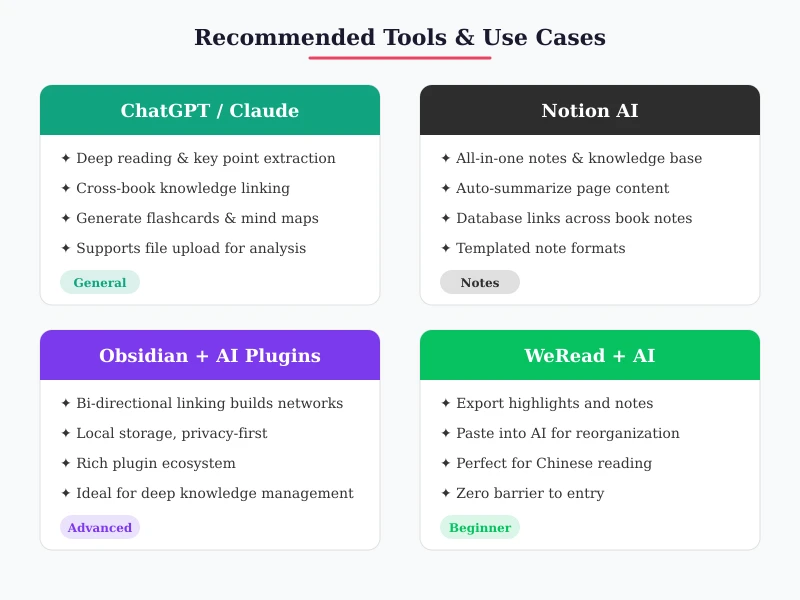
Beginner: WeRead + ChatGPT
If you primarily read Chinese books, WeRead is the most convenient choice. Simply copy your highlights to ChatGPT while reading and let AI organize them. Zero barrier to entry — you can start right away.
Intermediate: Notion + Notion AI
Notion's database features are perfect for knowledge management. You can create a page for each book, use Notion AI to auto-summarize page content, and connect different book notes through linked databases.
Advanced: Obsidian + AI Plugins
Obsidian's bi-directional linking automatically builds knowledge networks. Combined with AI plugins like Copilot, you can enable auto-tagging, intelligent connections, and batch summarization. Ideal for users with large note volumes who want deep knowledge management.
Common Questions
Will AI-generated notes be too generic?
The quality depends on your prompts. More specific prompts yield better results. Be clear about the format, depth, and focus you want. If the first result isn't satisfactory, ask AI to refine it.
Do I need to feed the entire book to AI?
No. Usually 200-500 words per batch works best. Too much content makes it hard for AI to focus on key points, while too little lacks context. Processing by chapter or topic is the most efficient approach.
Are free tools enough?
Absolutely. The free versions of ChatGPT and Claude can handle reading note organization perfectly well. WeRead is also free. You don't need to pay for premium tools just for note-taking.
Take Action Now
After reading this article, why not try it right now:
- Open a book you've been reading recently
- Choose a passage you find most valuable
- Copy it to ChatGPT or Claude
- Use the prompts from this article to have AI organize it
- Save the results to your note-taking tool
The entire process takes less than 5 minutes, but you'll find this approach is 10 times more efficient than organizing notes yourself. AI won't read books for you, but it can help you truly turn what you've read into your own knowledge.
Related Articles
AI Speech to Text: Beginner's Guide to Convert Voice to Text in 3 Steps
Learn how to convert speech to text using AI tools. Perfect for meeting notes, content creation, and video subtitles. Three practical scenarios with step-by-step instructions.
TutorialsAI Local Deployment Guide: Run Large Models in 3 Steps for Free
Learn how to deploy AI models locally in just 3 steps. No coding experience needed, completely free, and your data stays private on your own computer.
TutorialsAI Shopping Decision Guide: From Price Comparison to Avoiding Pitfalls
Learn how to use AI for shopping decisions. From price comparison to avoiding pitfalls - make smarter purchasing choices with AI assistance.
Comments are not yet available, stay tuned