AI Contract Review Guide: 5 Steps to Spot Hidden Risks, No Legal Background Needed
Why Do Ordinary People Always Get the Short End When Signing Contracts?
Renting, onboarding, shopping, taking on projects... contracts are everywhere in life. But most people, when handed a contract, either flip straight to the last page to sign, or struggle through it without spotting any issues. The result: you only realize a clause works against you after something goes wrong.
The problem isn't that you are not careful. It is that the "traps" in contracts are hidden in legal jargon. Without a legal background, it is hard to spot clauses that seem normal but are actually unfair.
The good news is that AI can help. You don't need to become a lawyer. You just need to learn how to ask the right questions, and AI will analyze the contract clause by clause, flag risks, and even suggest revisions.
What You Need
- The contract file: PDF, image, or Word document all work. Phone photos are fine too — AI can read text from images.
- An AI tool: ChatGPT (recommended, supports file and image uploads), Claude (great for long documents), or DeepSeek (cost-effective) will all work.
- 10-15 minutes: That is roughly how long it takes to review a standard contract.
No app downloads needed, no payment required (free tier is enough), no legal knowledge necessary. Just a contract and an AI tool.
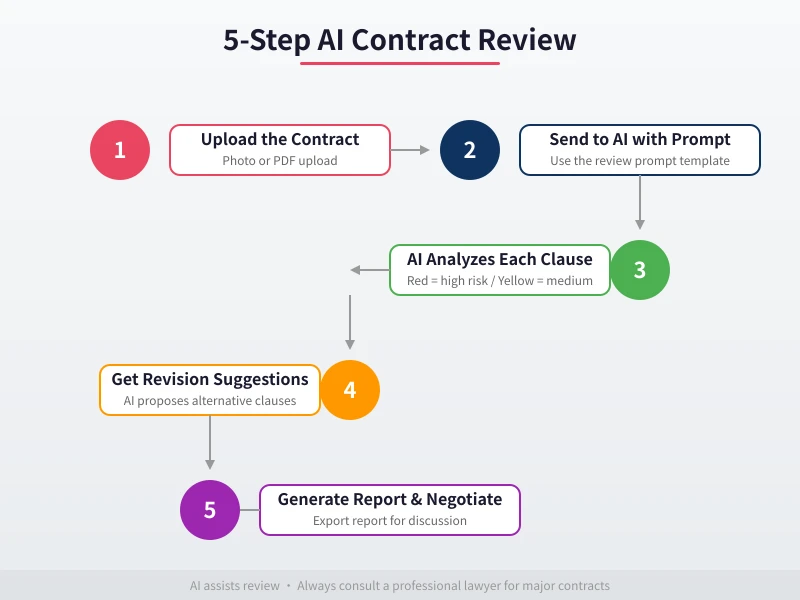
Step 1: Upload the Contract to AI
Open your chosen AI tool (ChatGPT is used as an example here) and send the contract file to it.
How to Upload
- PDF or Word files: Drag and drop into the chat, or click the attachment button to upload.
- Phone photos: Open the AI app on your phone, tap the camera icon, and take a photo.
- Screenshots: If the contract is on your computer, take a screenshot and paste it into the chat.
If the contract is long (over 10 pages), upload it in batches of 3-5 pages at a time. This way AI can analyze it more carefully.
First Message After Uploading
Don't just ask "does this contract have any problems" — that is too vague. Start by having AI give you a general overview:
"Please summarize the key points of this contract, including: the parties involved, the subject matter (sale/service/lease etc.), amount and payment method, contract duration, and penalty clauses. Present in list format."
The purpose of this step is to confirm AI has correctly read the contract. If AI misread anything (like getting the amount wrong), correct it before moving to the next step.
Step 2: Review Key Clauses One by One
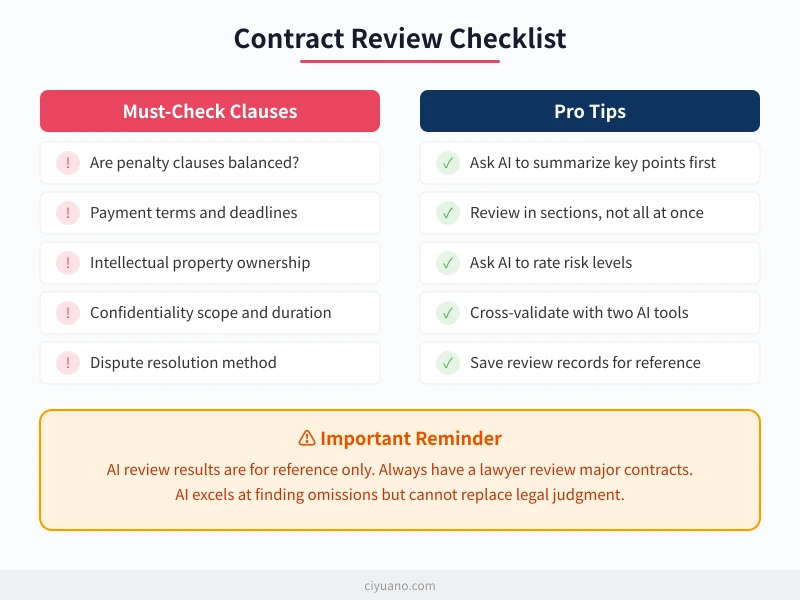
Contract review cannot be superficial. Focus on the following types of clauses. Send the prompt template below to AI for a detailed analysis:
Review Prompt Template
Copy and send this to AI:
"Please review this contract clause by clause, focusing on the following aspects. Give a risk assessment for each (High Risk / Medium Risk / Low Risk):
1. Penalty clauses: Are the penalties for breach equal for both parties? Is there a situation where one side faces heavy penalties while the other has almost none?
2. Payment terms: Are payment deadlines clear? Are there vague expressions that could lead to delayed payments?
3. Intellectual property: Who owns the work results? Are there overreaching clauses like "all results belong to Party A"?
4. Confidentiality: Is the scope too broad? Is the duration reasonable?
5. Liability exemptions: Are there unreasonable exemption or limitation clauses?
6. Termination conditions: Are the termination conditions fair? Is the unilateral right to terminate reasonable?
7. Dispute resolution: Is the agreed jurisdiction or arbitration body favorable to you?
Mark each high-risk clause in red and explain why it is risky."
How to Read the Results
AI will analyze each dimension as requested. Focus on clauses marked as "high risk":
- High risk (red): Must address — request modifications. Examples: unilateral exemptions, excessive penalties, unfair IP ownership.
- Medium risk (yellow): Worth noting but may not need changes. Examples: long confidentiality periods, inflexible payment cycles.
- Low risk (green): Basically normal, no concerns.
What If I Don't Understand the Legal Terms?
If the analysis contains legal jargon you don't understand, just ask:
"Please explain in plain language what a 'force majeure clause' means and how it affects me."
AI will explain in simple terms and tell you how the clause works in practice.
Step 3: Dig Deeper into High-Risk Clauses
For clauses AI flagged as high-risk, don't stop at the surface — ask follow-up questions.
Follow-Up Prompt
"Regarding the penalty clause in Section X, please analyze:
1. If I breach the contract, what consequences do I face?
2. If the other party breaches, what compensation can I get?
3. Is this arrangement common in the industry?
4. Are there fairer alternatives?"
By comparing "what happens if I breach" versus "what happens if they breach," you can quickly tell whether the clause is fair.
A Real Example
Say you are signing an outsourced development contract that states:
"For each day of delayed delivery, Party B shall pay Party A 2% of the total contract amount as a penalty. Party A bears no penalty liability for late payment."
AI will tell you:
- Problem: Penalties are clearly one-sided. You pay 2% per day (60% per month) for late delivery, but they face zero consequences for paying late.
- Risk level: High
- Suggested revision: Require equal penalties for both parties, or reduce the daily penalty rate to below 0.5%.
Without AI, you might have just signed it thinking "I probably won't be late anyway." But the risk is hidden in these details.
Step 4: Get Revision Suggestions
Finding problems is not enough — you need to know how to fix them. Ask AI for specific revision suggestions:
Revision Suggestion Prompt
"For each high-risk clause you identified, please provide:
1. Revision suggestion (what to change)
2. Revised clause text (ready to copy into the contract)
3. My bottom line if they refuse to change (minimum acceptable terms)"
AI will give you a revision plan you can use directly. Copy the revised clauses into the contract or use them as negotiation leverage.
Negotiation Scripts
Don't know how to ask for contract changes? Let AI write a script for you:
"I need to negotiate changing the penalty clause in my contract. The other party is quite assertive. Please write a tactful but firm negotiation script that expresses my needs without making them feel I am being difficult."
The scripts AI writes are usually both professional and persuasive — better than what most people would come up with on their own.
Step 5: Generate a Review Report
After the review, have AI generate a formal report for your records:
Report Generation Prompt
"Based on your analysis, generate a contract review report with the following format:
1. Basic contract info (parties, subject, amount, duration)
2. Risk clause summary table (clause number, risk level, issue description, revision suggestion)
3. Overall risk assessment (High/Medium/Low)
4. Signing recommendation (Sign as is / Sign after revisions / Do not sign)
Output in Markdown format."
Save this report as a reference for your decision. If a dispute arises later, this report also proves you conducted a thorough risk assessment before signing.
Different Contract Types: What to Focus On
Different contracts require different focus areas. Here are the key review points for common contract types:
Employment Contracts
- Probation period length and salary (probation pay must be at least 80% of regular salary)
- Non-compete clauses (scope, duration, compensation)
- Overtime pay and social insurance provisions
- Contract termination conditions
Rental Contracts
- Security deposit refund conditions and timeline
- Maintenance responsibility (who fixes what)
- Early termination penalties
- Rent increase terms (cap, notice period)
Outsourcing / Service Contracts
- Acceptance criteria (avoid "Party A is unsatisfied so won't accept")
- Intellectual property ownership
- Payment milestones (pay in stages, not all upfront)
- Change order and additional cost procedures
Sales Contracts
- Product specifications and quality standards
- Return and exchange conditions
- Warranty period and coverage
- Delayed delivery liability
Tell AI the contract type, and it will automatically adjust its focus areas.
Advanced Tip: Cross-Validate with Two AI Tools
AI can occasionally make mistakes, especially on nuanced judgments. For important contracts, use two different AI tools and compare results:
- First review: Use ChatGPT or DeepSeek and follow the steps above.
- Second review: Send the same contract to Claude and ask "Please review this contract for risk clauses."
- Compare results: Clauses flagged by both AIs are likely genuine risks; those flagged by only one need your own judgment.
This cross-validation approach significantly reduces the risk of AI errors.
FAQ
Can AI review results be used as legal evidence?
No. AI review results are for reference only and have no legal standing. For major contracts (large amounts, long duration, significant impact), always have a professional lawyer do the final review. AI's role is to help you do preliminary screening, catch obvious risks, and reduce your legal consultation costs.
Will AI leak my contract content?
Major AI tools (ChatGPT, Claude, DeepSeek) all have privacy policies. Generally:
- Free tiers may use your conversations for model training (but won't publicly share specific contract content).
- Paid tiers usually have stronger privacy protections and won't use your data for training.
- If the contract contains highly confidential information, use a paid tier or a locally deployed AI.
Is a phone photo good enough?
As long as the text is clear and not blurry, it works. Tips:
- Take photos in well-lit conditions.
- Hold the phone steady to avoid blur.
- Make sure the entire page fits in the frame.
- If the text is too small, take photos of sections separately.
Can it review contracts in other languages?
Yes. AI is actually even better at reviewing English contracts, since most legal AI training data is in English. You can upload an English contract and ask questions in your preferred language — AI will analyze and respond in your language.
Use the Ciyuano API to Access Multiple Models
Different AI models have different strengths in contract analysis. To switch between models flexibly, use a single API key from the Ciyuano platform:
- Visit Model List to see all available models.
- Create a key on the API Key Management page.
- Set the API endpoint to
https://www.ciyuano.com/v1and enter your key to start using.
One key gives you access to ChatGPT, Claude, DeepSeek, and more — choose the best model for each contract type.
Summary
Contract review doesn't require a legal background — just five steps: Upload contract → Review key clauses → Dig into risks → Get revision suggestions → Generate report.
Spending 10 minutes with AI before signing any contract can help you avoid most common pitfalls. Remember: AI is not a lawyer, but it can help you spot risks you might miss. After finding issues, decide whether you need a lawyer for further review.
Next time you get a contract, don't rush to sign — let AI review it first.
Related Articles
AI Speech to Text: Beginner's Guide to Convert Voice to Text in 3 Steps
Learn how to convert speech to text using AI tools. Perfect for meeting notes, content creation, and video subtitles. Three practical scenarios with step-by-step instructions.
TutorialsAI Local Deployment Guide: Run Large Models in 3 Steps for Free
Learn how to deploy AI models locally in just 3 steps. No coding experience needed, completely free, and your data stays private on your own computer.
TutorialsAI Shopping Decision Guide: From Price Comparison to Avoiding Pitfalls
Learn how to use AI for shopping decisions. From price comparison to avoiding pitfalls - make smarter purchasing choices with AI assistance.
Comments are not yet available, stay tuned