AI Daily Planning: Master Your Time & Habits Without Any Experience
Do you often feel like the day flies by, only to realize at night that the important things didn't get done? Or have you bought planners multiple times, only to give up after three days? Don't worry — it's not about willpower. You just need a smarter approach to time management.
This article teaches you how to use AI tools (like ChatGPT, Claude, or Gemini) to create, execute, and optimize your daily plan. No templates needed, no app downloads required — just one conversation for a personalized schedule.
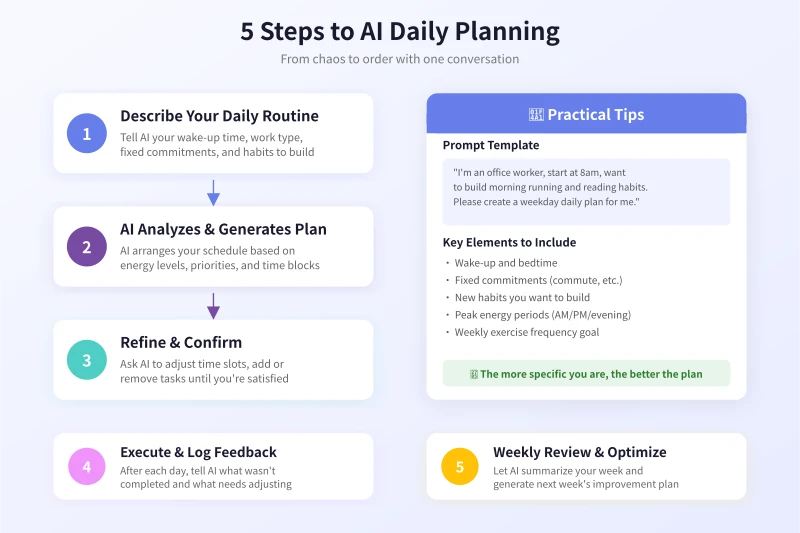
Step 1: Describe Your Daily Routine to AI
Open your preferred AI tool and enter the following information:
Key details to tell AI:
- Your wake-up and bedtime
- Work/class schedule
- Daily fixed commitments (commute, picking up kids, cooking)
- New habits you want to build (morning run, reading, learning English)
- Your peak energy period (morning? afternoon? evening?)
Example prompt:
You can type in the chat box:
I'm an office worker, at the office by 8:30 AM, off at 6 PM, with a 40-minute one-way commute. I want to build a habit of running 30 minutes every morning and reading 20 minutes before bed. My energy peaks in the morning, which is best for focused work. Please create a weekday daily plan for me.
Step 2: AI Generates a Personalized Schedule
Based on your input, AI will automatically arrange activities for each time slot. Generally, the generated plan will:
- Schedule high-focus tasks during your peak energy hours
- Insert reasonable buffer time between fixed commitments
- Place new habits in the easiest slots to execute
- Include lunch breaks and relaxation time
After getting the first version, don't rush to follow it — read on.
Step 3: Refine the Plan with AI
The first version won't be perfect, and that's normal. You can continue chatting with AI to adjust:
- "Waking up at 6:00 AM is too early, change it to 6:30"
- "I need at least 40 minutes for lunch break"
- "I have a fixed gym class on Wednesday evenings, adjust that day"
- "I want to listen to podcasts during my commute, add that"
Keep adjusting until the plan feels both ideal and realistic. The key: the plan must be executable — don't overpack it.
Step 4: Execute and Log Feedback
Plan ready? Now it's time to execute. Here's a crucial tip:
Spend 2 minutes each evening telling AI how your day went.
For example:
Today's plan: completed the morning run, but the afternoon deep work session was interrupted by a meeting, and I didn't get to reading.
Based on your feedback, AI will:
- Analyze which tasks get easily interrupted and suggest repositioning
- Celebrate habits you're doing well and encourage consistency
- Generate a slightly adjusted plan for tomorrow
Step 5: Weekly Review and Continuous Optimization
At the end of the week, ask AI to help with a weekly review. You can say:
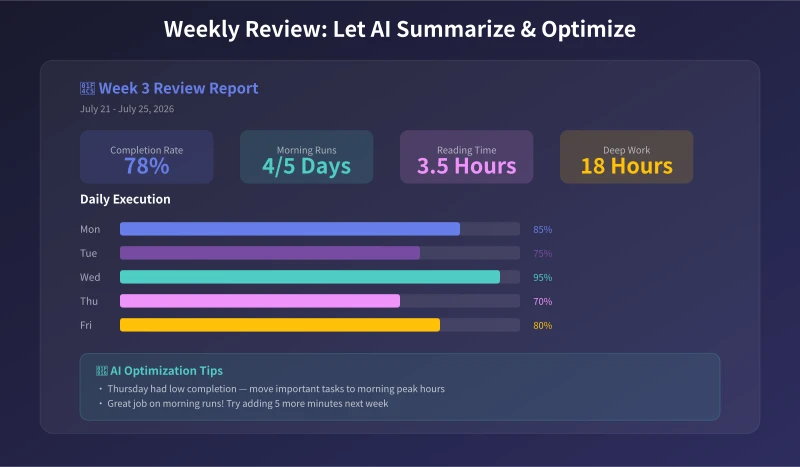
Here's my execution this week: Monday 85%, Tuesday 75%, Wednesday 95%, Thursday 70%, Friday 80%. Thursday afternoons are always low-efficiency, and I ran 4 days. Please summarize and give improvement suggestions for next week.
AI will generate a review report including:
- Weekly completion rate statistics
- Habit-building progress
- Efficiency bottleneck analysis
- Specific optimization suggestions for next week
After a few weeks of iteration, your schedule will become increasingly realistic, and your completion rate will steadily improve.
FAQ
Which AI tool is best?
ChatGPT, Claude, Gemini, or any major AI assistant works. The key is to stick with one, so it can learn your preferences over time and get more accurate.
What if I keep failing to follow the plan?
Tell AI about your struggles. It will help simplify tasks or break large tasks into smaller steps. Remember: completing 70% of a plan is better than abandoning 100% of it.
Do I need to regenerate the plan every day?
No. You can have AI create a general weekday template, then make minor daily adjustments. Do the full review on weekends.
How is AI better than a calendar app?
Calendar apps can only record — they can't help you plan. AI understands your life rhythm, gives reasonable suggestions, and dynamically adjusts based on your feedback. Using both together works best.
Summary
The core workflow for AI daily planning: Describe routine → Generate plan → Refine → Execute & log feedback → Weekly review. No coding needed, no tools to learn — just one conversation.
Try it today. Open your preferred AI tool, tell it about your daily routine, and see what kind of plan it creates for you.
Related Articles
AI Resume Writing: From Zero to Professional in 5 Steps
Learn how to use AI to write a professional resume. Five simple steps from basic information to polished final draft. Perfect for job seekers who want to stand out.
Productivity ToolsAI Note Organization: Build a Personal Knowledge System in 5 Steps
Learn how to use AI for note organization. Build a personal knowledge system in 5 steps. Perfect for knowledge workers and students.
Productivity ToolsAI Side Hustle Planning: Find Your Second Income Source
Want to earn extra income through a side hustle but don't know where to start? AI can help you analyze your skills, match directions, make plans, and track progress. Find your ideal side hustle within a month, even with zero experience.
Comments are not yet available, stay tuned