AI-Assisted Podcast Creation: A Complete Zero-to-Hero Guide
Why Now Is the Best Time to Start a Podcast
Podcasting is experiencing explosive growth. Whether you want to share professional knowledge, document life reflections, or build a personal brand, podcasting is a low-barrier, high-engagement content format. And the emergence of AI has reduced the difficulty of podcast production by an order of magnitude—work that once required professional equipment and technical expertise can now be done by one person with a smartphone and AI tools.
This article will walk you through 5 core steps to create a complete podcast from scratch using AI. No prior audio editing experience or expensive equipment needed—just follow along.
Getting Started: What Do You Need?
Before you begin, prepare the following tools:
- A smartphone: For recording—iPhone or Android will work
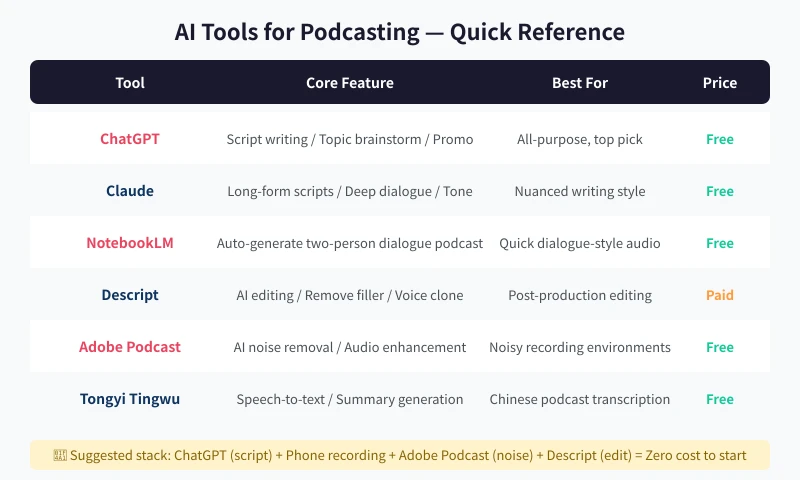
- An AI chatbot: ChatGPT (recommended), Claude, or others—the free tier is sufficient
- A quiet room: Close doors and windows to minimize echo and noise
- Headphones with a built-in microphone: Optional, but significantly improves recording quality
That is all you need to start. If you do not have headphones, your phone's built-in microphone will work, and you can use AI tools for noise reduction later.
Step 1: Use AI for Topic Planning
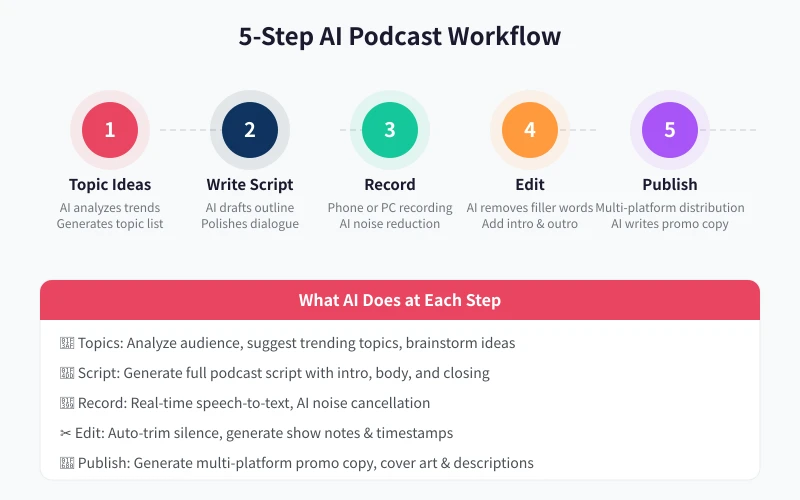
Many people get stuck at the first step: not knowing what to talk about. AI can help you quickly generate a list of topics.
How to Do It
- Open your AI tool and input your field and target audience
- Have the AI list 10-20 topic directions
- Pick 3-5 topics you are most interested in
- Have the AI analyze each topic's popularity and audience fit
Example prompt:
I am planning to start a podcast about "career growth," targeting working professionals aged 25-35. Please list 15 podcast topics for me, with the following requirements: 1) each topic should be enough to discuss for 15-30 minutes; 2) related to real problems encountered in daily work; 3) have enough depth for meaningful discussion, not just surface-level advice. Please sort by popularity and note which format each topic is best suited for (solo, interview, Q&A).
The AI will provide a structured list of topics, such as "How to Get Noticed in Meetings," "5 Things to Think Through Before Switching Jobs," and "The Right Way to Negotiate a Raise with Your Boss." Each topic will be tagged with a suitable format, helping you quickly decide what to discuss in your first episode.
Advanced Tips
- Have the AI create a "topic matrix": horizontal axis for topic type (practical, story, interview), vertical axis for difficulty level—this makes your content more diverse and engaging
- Study popular podcasts in your field and have the AI analyze which topics appear repeatedly (indicating high audience demand)
- For your first episode, choose the topic you are most confident about, then gradually expand from there
Step 2: Use AI to Write Your Podcast Script
The most common mistake beginners make is "talking off the top of their head," resulting in a loose structure and listener drop-off. A good script is the foundation of podcast quality.
How to Do It
- Decide on the episode topic and duration (beginners should start with 15-20 minutes)
- Have the AI generate a podcast script outline
- Have the AI expand each section into a complete spoken script
- Read through it and change any unnatural expressions to your own speaking style
Example prompt:
Please write a podcast script for me on the topic "How to Get Noticed in Meetings," approximately 15 minutes long, in solo format. Script structure requirements: 1) open with a real scenario (e.g., having ideas in a meeting but being afraid to speak up); 2) analyze 3 core reasons; 3) provide 3-4 actionable tips; 4) close with a powerful statement. Tone: natural, like chatting with a friend—no formal writing style, with natural conversational transitions.
The AI will generate a complete podcast script. You will find it has already arranged the pacing for you: a compelling opening, substantive middle, and impactful ending. You just need to adjust some expressions to match your personal style.
Advanced Tips
- Have the AI mark "pause points" and "emphasis points" in the script to help control rhythm during recording
- For conversation-style shows, have the AI generate dialogue scripts for two characters, noting who speaks first
- Print the script or use a teleprompter app—reading while recording is much more stable than relying on memory
Step 3: Record the Audio
Recording is the step that makes many people most nervous, but it is actually not that difficult. Remember one principle: if you make a mistake, just redo it—you can edit later.
How to Do It
- Find a quiet room, close the doors and windows, and turn off the AC and fans
- Place your phone 20-30 centimeters from your mouth
- Open your phone's built-in voice memo app and start recording
- Follow the script at a moderate pace. When you make a mistake, pause for 2 seconds, then redo that sentence
- When finished, transfer the audio file to your computer
Recording Tips:
- Recording inside a wardrobe works surprisingly well—clothes absorb echo
- Speaking into a pillow or sweater also reduces echo
- Not being satisfied with your first recording is completely normal—it gets more natural with practice
- Try to record in one take without too many segments to maintain emotional continuity
Processing Your Recording with AI
After recording, use Adobe Podcast (a free online tool) to upload your audio file. It will automatically perform AI noise reduction. Even audio recorded on a phone in an ordinary room can reach near-professional studio quality after processing.
The process is simple: open the Adobe Podcast website, upload your audio file, wait for processing to complete, and download the processed file. No audio editing knowledge required.
Step 4: Use AI for Post-Production Editing
Post-production editing is the key step that transforms your podcast from "listenable" to "great-sounding." The good news is that AI tools have made this step incredibly simple.
Recommended Tool: Descript
Descript is a tool that lets you "edit audio like editing a document." It automatically transcribes your audio into text—you just delete the text, and the corresponding audio is automatically cut.
How to Do It
- Create a Descript account (the free tier is sufficient)
- Upload your audio file and wait for AI transcription
- In the transcript, find mistakes, repetitions, and filler words, and simply delete the text
- Use the "Remove Filler Words" feature to clean up verbal stumbles and filler sounds in one click
- Add intro and outro music (Descript has a built-in free music library)
- Export the final audio file
Free Alternatives:
If you prefer not to use Descript, here are some free tool combinations:
- Audacity (free, open source): Manual audio editing—powerful but requires learning
- GarageBand (free on Mac): The go-to audio editing tool for Apple users
- Other transcription tools for reviewing and organizing content
Post-Production Editing Checklist
Before finalizing, check the following:
- Is the first 3 seconds compelling enough? (Go straight into the topic—no long pleasantries)
- Is the volume level consistent? (Use Descript's auto volume leveling)
- Are there any silent gaps longer than 3 seconds? (Auto-trim them)
- Is the ending impactful? (Summarize key points + invite follow/subscribe)
Step 5: Publish and Promote
Your show is ready—now the final step is getting it heard by more people.
Choosing a Publishing Platform
Major podcast platforms internationally:
- Apple Podcasts: The most established platform, essential
- Spotify: Growing rapidly, global reach
- YouTube Podcasts: Video podcasting option with massive audience
- Google Podcasts: Good for discoverability
- Amazon Music / Audible: Another growing platform
Using AI to Generate Promotional Content
After publishing, you need to promote on social media. AI can help you quickly generate:
- Show description: Have the AI generate a 100-200 word episode summary based on your script
- Social media copy: Generate promotional posts for Twitter, Instagram, LinkedIn, etc.
- Show Notes: Organize key points, timestamps, and references
- Cover image description: Have the AI generate design direction for your episode cover art
Example prompt:
I just published a podcast episode on the topic "How to Get Noticed in Meetings." Please write 3 promotional posts in different styles: 1) one for Twitter/X with hashtags; 2) one for LinkedIn in a professional tone; 3) one for a casual social media share. Each should be compelling enough to make people want to click and listen.
Frequently Asked Questions
Q: What if my voice does not sound good?
Your podcast does not need a broadcaster's voice. A genuine, natural voice actually feels more relatable. If you are really self-conscious, Descript's AI voice enhancement can optimize your tone.
Q: Will a one-person podcast be boring?
Solo podcasts are very common—the key is good content and pacing. To add a sense of interaction, you can include listener voice messages, sound effect transitions, etc. You can also invite friends as guests for remote recording sessions.
Q: How often should I release episodes?
Try to maintain a consistent schedule—weekly or biweekly. Regular updates help build an audience better than sporadic releases. AI can help you work more efficiently and maintain your publishing rhythm.
Q: Can I make money from podcasting?
Do not focus on monetization at the start. First produce 10-20 high-quality episodes to build your listener base. After that, you can monetize through ad placements, premium content, brand partnerships, and more.
Conclusion
The core workflow for AI-assisted podcasting is: Topic Planning → Script Writing → Recording → Editing → Publishing. AI tools help you reduce costs and boost efficiency at every step—what truly requires your investment is creativity and persistence.
Take action now: open an AI tool, enter your podcast direction, and have it list topics for your first episode. This step only takes 5 minutes, but it could be the beginning of your podcasting journey.
Related Articles
AI Speech to Text: Beginner's Guide to Convert Voice to Text in 3 Steps
Learn how to convert speech to text using AI tools. Perfect for meeting notes, content creation, and video subtitles. Three practical scenarios with step-by-step instructions.
TutorialsAI Local Deployment Guide: Run Large Models in 3 Steps for Free
Learn how to deploy AI models locally in just 3 steps. No coding experience needed, completely free, and your data stays private on your own computer.
TutorialsAI Shopping Decision Guide: From Price Comparison to Avoiding Pitfalls
Learn how to use AI for shopping decisions. From price comparison to avoiding pitfalls - make smarter purchasing choices with AI assistance.
Comments are not yet available, stay tuned