AI Document Processing Assistant: A Practical Guide
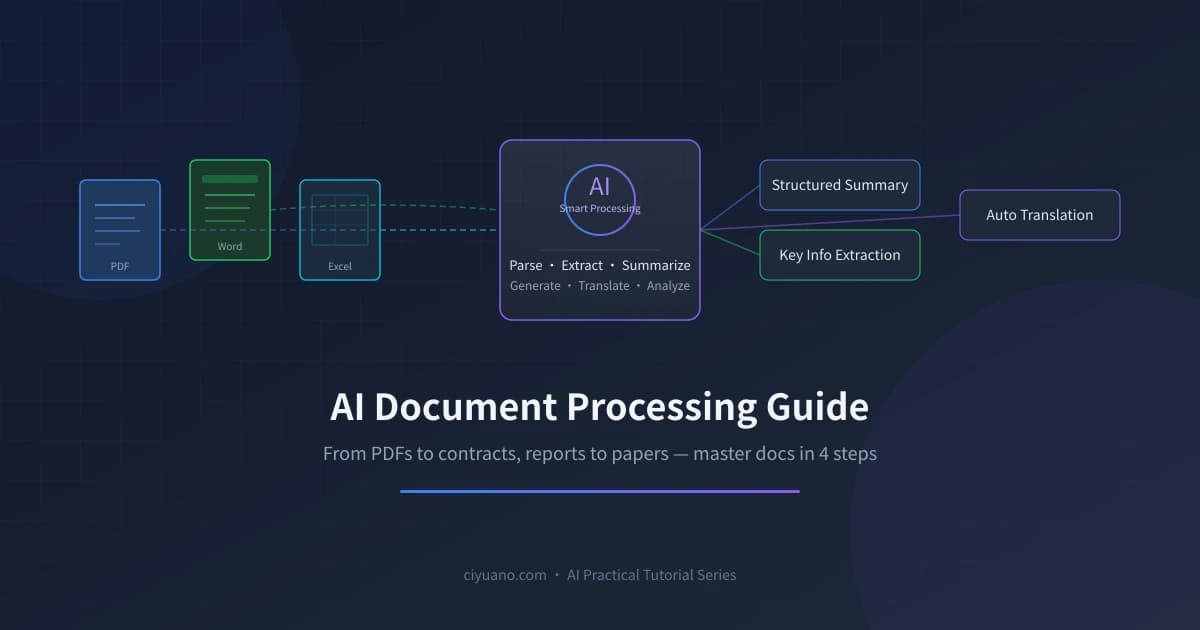
Why You Need an AI Document Processing Assistant
In daily work, we deal with various documents every day — dozens of pages of PDF reports that need quick summarization, dense contracts that need clause-by-clause risk review, Excel spreadsheets that need trend analysis... Doing these manually is time-consuming and labor-intensive, while AI can complete them in seconds.
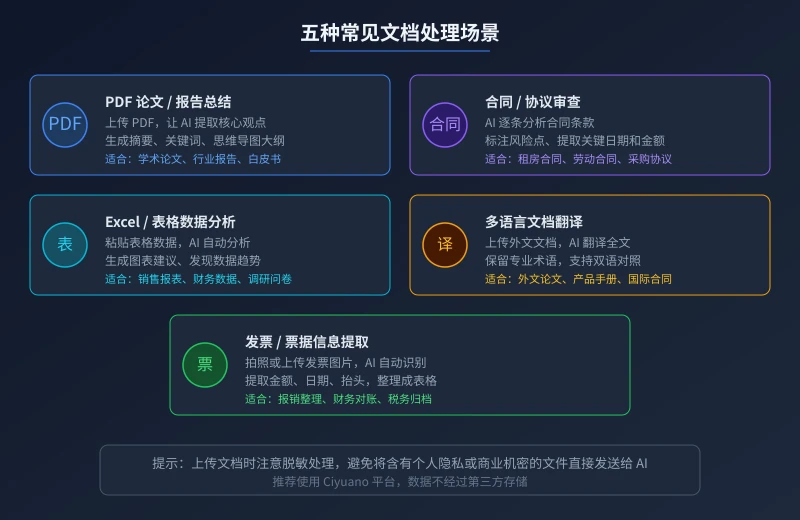
This guide walks you through 5 of the most common document processing scenarios, teaching you how to efficiently handle documents with AI. No technical background required — if you can type, you can get started.
Preparation
You need an AI tool that supports document uploads. Here are some recommendations:
- ChatGPT (GPT-4o): Supports uploading PDF, Word, Excel, images, and more
- Claude (Anthropic): Excellent at understanding long documents, supports ultra-long text analysis
- Tongyi Qianwen (Alibaba): Strong Chinese document processing, generous free quota
- Ciyuano Platform: Aggregates multiple models, supports document uploads, data not stored by third parties
Choose any one. Some free versions may limit upload file size or frequency, while paid versions typically have no such limits.
Scenario 1: Quick Summary of PDF Papers / Reports
Facing a dozens-of-pages industry report or academic paper, you don't need to read it from start to finish. AI can extract the core insights in seconds.
Steps
- Open your AI tool and find the "Upload File" or "Attachment" button
- Upload the PDF file you want to summarize
- Enter your request in the input box, for example:
Example Prompt:
Please summarize the core content of this report. Requirements: 1) List 3-5 key findings; 2) Extract important data mentioned in the report; 3) Present in concise bullet points.
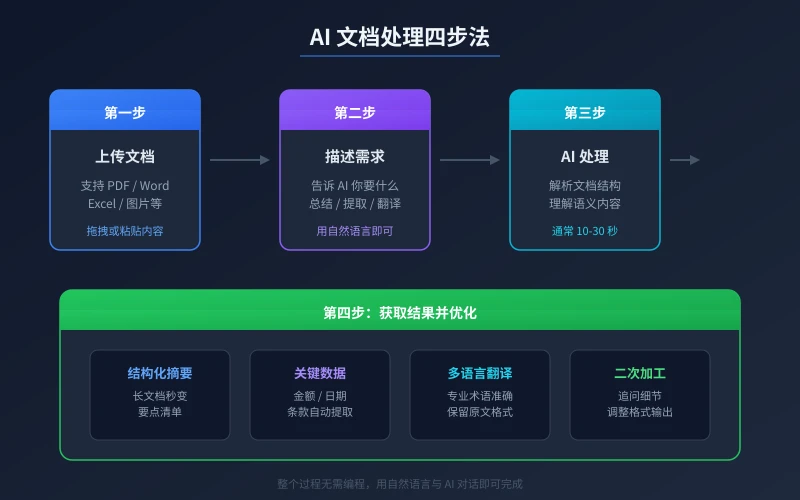
AI will read the entire document in 10-30 seconds and output a structured summary. You can follow up with details, like "What's the specific data for the third finding?" or "Does the report mention anything about the Chinese market?"
Advanced Tips
- If the PDF is a scanned version (images), use Claude or GPT-4o — they have stronger OCR capabilities
- For ultra-long documents (100+ pages), upload chapter by chapter and analyze in segments
- Ask AI to generate a mind map outline for easy presentation
Scenario 2: Contract / Agreement Clause Review
The scariest part of signing contracts is missing key clauses. AI can help you analyze contract content clause by clause and flag potential risks.
Steps
- Upload the contract file (PDF or Word) to your AI tool
- Enter review instructions, specifying what you want to focus on
- AI will analyze each clause and flag risk points
- For flagged risks, ask AI for revision suggestions
Example Prompt:
Please review this contract, focusing on: 1) Whether breach of contract clauses are fair; 2) Payment terms and timelines; 3) Any unreasonable liability waiver clauses; 4) Whether intellectual property ownership is clear. List each risk point and suggestion.
Especially suitable for reviewing: rental contracts, employment contracts, outsourcing service agreements, procurement contracts, confidentiality agreements, etc. AI can quickly identify clauses that are unfavorable to you, but final decisions still require your own judgment.
Scenario 3: Excel / Spreadsheet Data Analysis
Give spreadsheet data to AI, and it can help you discover trends, generate analysis reports, and even provide recommendations.
Steps
- Open the Excel file and select the data range you want to analyze
- Copy the data and paste it into the AI chat box
- Tell AI what you want to know
- AI will analyze the data and provide conclusions
Example Prompt:
Below is our company's sales data from last quarter. Please analyze: 1) Which product line grew the fastest; 2) Which region's performance declined; 3) Provide sales strategy recommendations for next quarter. Present data comparisons in table format.
Note: If the data is very large (thousands of rows), consider summarizing first before pasting, or upload the file directly (some tools support Excel file uploads).
Scenario 4: Multilingual Document Translation
Encountering English, Japanese, or other language documents? AI translation is not only fast but also preserves the accuracy of technical terminology.
Steps
- Upload the foreign-language document or paste the text into the AI chat box
- Specify the translation direction and requirements (e.g., "Translate to Chinese, keep technical terms")
- AI outputs the translation
- If needed, ask AI to generate a bilingual version
Example Prompt:
Please translate this English technical document into Chinese. Requirements: 1) Keep technical terms in English with Chinese explanations; 2) Maintain the original paragraph structure; 3) Ensure natural, fluent language without translationese.
Recommended Translation Scenarios
- Academic paper translation: Keep technical terms, suitable for bilingual reading
- Product manual translation: Accurately translate technical specs and operating instructions
- International contract translation: Legal terminology requires extra attention to accuracy
- Email translation: Quickly translate correspondence while maintaining business tone
Scenario 5: Invoice / Receipt Information Extraction
The most headache-inducing part of expense reporting is entering invoice information one by one. AI can automatically recognize invoice images and extract key data.
Steps
- Take a photo or scan the invoice and upload it to your AI tool
- Ask AI to extract key information from the invoice
- AI outputs structured data (amount, date, payee, etc.)
- Copy to an Excel spreadsheet to complete expense reporting
Example Prompt:
Please recognize this invoice image and extract the following information in table format: invoice number, issue date, seller name, buyer name, product name, amount, tax amount, total including tax.
4 Tips for More Efficient AI Document Processing
1. Be Clear About Your Needs
Don't just say "help me look at this document." Be specific about what you want — summarize key points, find risks, translate, or extract data. The clearer your request, the more precise the output.
2. Specify Output Format
Tell AI what format you want: bullet points, tables, segmented summaries, or mind map outlines. Clear formatting makes results easier to use.
3. Process Complex Documents in Steps
For particularly long or complex documents, don't process everything at once. First ask AI for an overall summary, then dive into specific chapters of interest. This yields higher quality results.
4. Mind Data Security
Before uploading documents, always redact sensitive information. Replace ID numbers, bank card numbers, phone numbers, etc. with "XXX." Especially for contracts, financial reports, and other files involving personal privacy or trade secrets — always redact before uploading.
Frequently Asked Questions
Can AI handle scanned PDFs?
Yes, but the quality depends on the AI tool's OCR capability. GPT-4o and Claude perform well on scanned documents, though complex layouts may still require manual proofreading.
Are uploaded documents saved?
Privacy policies vary by platform. Most major AI platforms don't use uploaded documents for model training, but it's still recommended to read privacy terms carefully. For sensitive files, using self-hosted solutions like Ciyuano is safer.
Are AI analysis results accurate?
AI's document analysis capabilities are quite powerful, but they can't completely replace human judgment. Especially for contract review and financial analysis, AI results should be used as reference, with critical decisions requiring professional oversight.
Is the free version sufficient?
For simple document processing (summarization, translation, information extraction), free versions are usually sufficient. If you need to frequently process large volumes of documents or handle ultra-long files, consider paid versions or the Ciyuano platform for a better experience.
Related Articles
AI Speech to Text: Beginner's Guide to Convert Voice to Text in 3 Steps
Learn how to convert speech to text using AI tools. Perfect for meeting notes, content creation, and video subtitles. Three practical scenarios with step-by-step instructions.
TutorialsAI Local Deployment Guide: Run Large Models in 3 Steps for Free
Learn how to deploy AI models locally in just 3 steps. No coding experience needed, completely free, and your data stays private on your own computer.
TutorialsAI Shopping Decision Guide: From Price Comparison to Avoiding Pitfalls
Learn how to use AI for shopping decisions. From price comparison to avoiding pitfalls - make smarter purchasing choices with AI assistance.
Comments are not yet available, stay tuned