AI Prompt Tips: 5 Ways to Double Your AI Response Quality
Ever felt like AI gives "bad answers"? The real issue is usually how you ask. The same question, phrased differently, can produce vastly different results. This article covers 5 proven prompt techniques to get genuinely useful responses from AI — no coding experience needed.
Why Prompt Style Matters
AI models are fundamentally "content generators that follow instructions." The vaguer your instructions, the more generic the output. The more specific you are, the more precise the response.
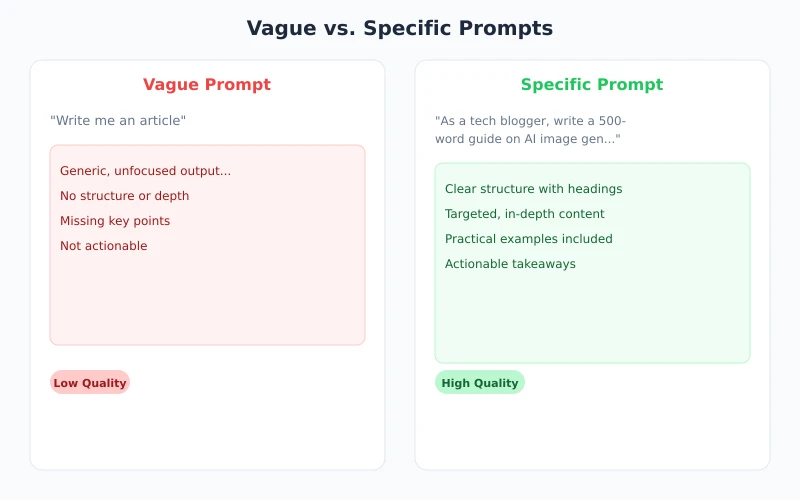
The image above shows a real scenario: the same task — "write an article for me" — produces a rambling, unfocused response when asked vaguely (left), but a high-quality, structured output when you add perspective, topic, and length requirements (right).
Tip 1: Assign a Clear Role to AI
Tell AI what role it should adopt when responding. Different roles lead to different language styles, depth of knowledge, and response angles.
Bad example:
"How do I learn Python?"
Good example:
"You are a senior Python backend engineer with 10 years of experience. Create a 3-month Python learning plan for a complete beginner, focusing on web development."
Common role assignments:
- Senior expert: "You are a data analyst with 10 years of experience..."
- Specific profession: "You are an elementary school teacher..."
- Specific perspective: "Analyze this from a user growth perspective..."
- Style imitation: "Write in the style of Hemingway..."
Tip 2: Provide Sufficient Context
AI doesn't know your situation. If you don't tell it, it can only guess. Sharing relevant background information leads to much more precise answers.
Bad example:
"This code has a bug, help me fix it."
Good example:
"I'm using Python 3.11 + FastAPI to build a user registration endpoint. When I call it, I get a 422 error. Here's the code and error message — please help me identify the issue."
Context can include:
- Tech stack: What language, framework, and version you're using
- Goal: What you ultimately want to achieve
- What you've tried: Methods you've already attempted
- Constraints: Any limitations (time, budget, technical restrictions)
Tip 3: Specify the Output Format
Do you want a list, table, or paragraph? 200 words or 2,000? Tell AI directly, and it will output in your requested format.
Common format instructions:
- "Compare these three options in a table with pros and cons"
- "List 5 key steps as a numbered list"
- "Write a summary in under 300 words"
- "Organize using a problem → solution → conclusion structure"
- "Include a concrete example for each point"
The benefit of specifying format: AI's output can be directly copied into your documents, presentations, or reports — no reformatting needed.
Tip 4: Break Complex Tasks into Steps
Don't throw a big question at AI all at once. Break it into smaller steps and work through them progressively — the results will be much better.
Example: Creating a market research report
- Step 1: "List the major players and market shares in the smartwatch market"
- Step 2: "Compare Apple Watch and Huawei Watch on core features and pricing strategy"
- Step 3: "Based on the above analysis, summarize 3 market opportunities"
- Step 4: "Compile everything into a 1,000-word report with title, body, and conclusion"
Benefits of stepping through:
- Each step can be checked and corrected, preventing error accumulation
- You can adjust direction mid-process
- AI stays more focused at each step, producing higher quality output
Tip 5: Give Examples to Show AI the Style You Want
If you have a specific style requirement, the best approach isn't describing it with words — it's providing a concrete example.
Example: Requesting a specific product description style
"Write a product description for our Bluetooth earbuds in the following style:
Reference example: 'These noise-cancelling earbuds are like hitting the world's mute button. Subway noise, office chatter — gone. 40-hour battery life means one charge per week.'
Requirements: conversational tone, vivid imagery, highlight one core selling point, keep it under 50 words."
This method works especially well for:
- Copywriting (ads, product descriptions, social media posts)
- Email drafting (business emails, client communication)
- Code style (generating code that follows team conventions)
- Translation style (formal / casual / literary)
Quick Reference: The Universal Prompt Template
Save this template and spend 10 seconds filling it in before each prompt:
Role: You are a [specific role]
Context: [Your situation / background]
Task: Please help me [specific request]
Requirements:
- [Format requirements]
- [Length requirements]
- [Style requirements]
- [Other constraints]
Example: [Optional — provide a reference sample]
Use this template to restructure your questions, and you'll notice a significant improvement in AI response quality.
Common Mistakes and Fixes
| Common Mistake | What's Wrong | How to Fix |
|---|---|---|
| "Write me a plan" | No topic, no context | "Write a [type] plan for [product], targeting [goal]" |
| "This code is wrong" | No code, no error message | Paste code + error message + expected behavior |
| "Translate to English" | No context or style guidance | "Translate to business English / casual English / academic English" |
| "Summarize this" | How long? What format? For whom? | "Summarize in 3 bullet points, one sentence each, for an executive audience" |
Try It Yourself
Open your AI chat tool (ChatGPT, Ciyuano, or any other) and practice with this scenario:
- Scenario: You want AI to help you write a leave request email
- Fill in the template:
- Role: You are a professional administrative assistant
- Context: I need to take 3 days off due to a family emergency
- Task: Write a leave request email to my direct manager
- Requirements: Formal but not stiff tone, under 200 words, include leave dates and work handover plan
- Compare: First ask "write me a leave email," then use the full version above — feel the difference
Core principle: Every second you spend crafting your question saves minutes of revising the answer. Better prompts = better answers.
Related Articles
AI Speech to Text: Beginner's Guide to Convert Voice to Text in 3 Steps
Learn how to convert speech to text using AI tools. Perfect for meeting notes, content creation, and video subtitles. Three practical scenarios with step-by-step instructions.
TutorialsAI Local Deployment Guide: Run Large Models in 3 Steps for Free
Learn how to deploy AI models locally in just 3 steps. No coding experience needed, completely free, and your data stays private on your own computer.
TutorialsAI Shopping Decision Guide: From Price Comparison to Avoiding Pitfalls
Learn how to use AI for shopping decisions. From price comparison to avoiding pitfalls - make smarter purchasing choices with AI assistance.
Comments are not yet available, stay tuned