AI-Powered Email & Work Report Writing: A Productivity Guide for Professionals
Why Do You Spend Every Day Overtime Writing Emails?
The first thing you do at work is reply to emails, and before leaving you write a work report. Many people spend more time on emails and reports than on actual work. What makes it worse is that after spending hours writing, your boss still says it is not clear.
Actually, AI can compress your email and report writing time from 1 hour to 5 minutes. It does not write everything for you without your input. Instead, it helps you quickly generate a high-quality draft that you only need to fine-tune before sending.
This guide teaches you step by step how to use AI for writing emails and work reports. Anyone can get started, even with zero experience.
Scenario 1: Writing Work Emails with AI
Work emails are the most common workplace writing scenario. Whether you are writing to clients, colleagues, or your boss, AI can help you get it done quickly.
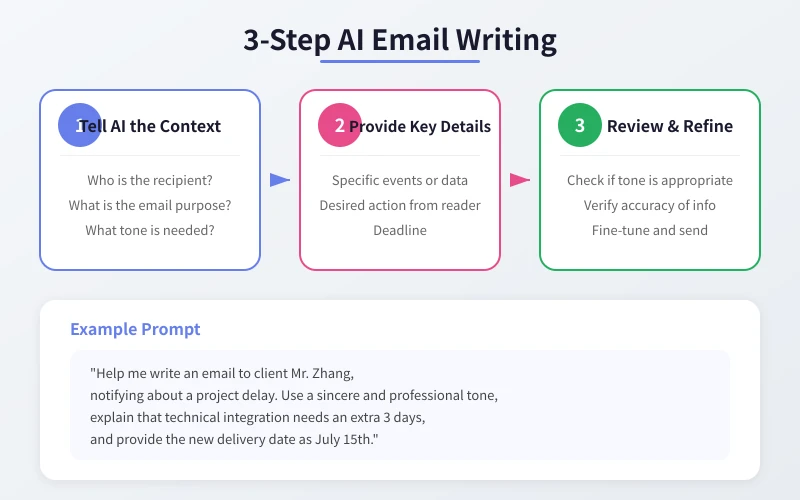
Step 1: Tell AI the Context
Open your preferred AI tool (ChatGPT, DeepSeek, Doubao, etc.) and start by clarifying:
- Who is the recipient: Client? Colleague? Boss? Different audiences require different tones.
- What is the email purpose: Notification? Request? Apology? Follow-up?
- What tone is needed: Formal and serious? Friendly and relaxed? Sincere and tactful?
Step 2: Provide Key Details
Give AI the specific content the email needs to include:
- What exactly happened
- Any data or dates involved
- What you want the recipient to do (reply, approve, confirm, etc.)
- Any deadlines
Step 3: Review and Refine
After AI generates the draft, check these areas:
- Is the tone appropriate for your relationship with the recipient
- Is the information accurate (especially numbers and dates)
- Is anything important missing
- Is the length appropriate (too long nobody reads, too short unclear)
Practical Example
Suppose you need to notify a client about a project delay, you can tell AI:
Help me write an email to client Mr. Zhang, notifying about a project delay. Use a sincere and professional tone, explain that technical integration needs an extra 3 days, and provide the new delivery date as July 15th.
AI will generate a well-structured, appropriately toned email. You just need to verify the specific details, make minor edits, and hit send.
Scenario 2: Writing Work Reports with AI
Work reports are more complex than emails, but AI can handle them equally well. The key is to provide AI with enough material.
Collect Your Material First
Before talking to AI, organize these items:
- What you did this week: List completed tasks with quantified data whenever possible (how many completed, how much improvement)
- What problems you encountered: Explain what the problem is and how big the impact is
- Next week plan: What you intend to do and when you expect to finish
- Support needed: Whether you need your boss to coordinate any resources
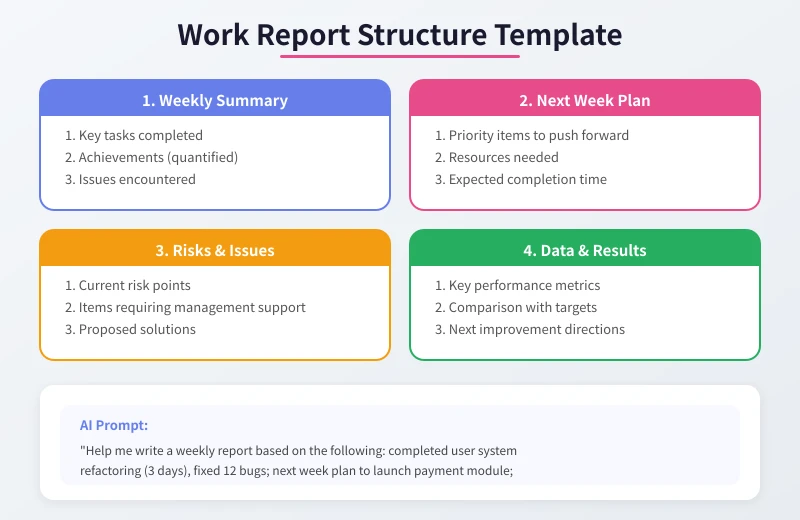
AI Prompt Template
Organize the information above and tell AI in this format:
Help me write a weekly report based on the following: completed user system refactoring (3 days), fixed 12 bugs; next week plan to launch payment module; encountered delays in third-party API integration.
AI will organize the content in a structure of Work Summary, Next Week Plan, and Risks and Issues.
Let AI Adjust the Style
If your boss prefers data-driven content, add: Use more data and fewer adjectives. If your boss likes brevity, say: Keep it under 300 words. AI will adjust the content based on your requirements.
Three Tips for Better AI Output
Tip 1: Use Role Setting for Better Quality
Add this at the beginning of your prompt: You are a workplace writing expert with 10 years of experience. AI will automatically switch to a more professional output mode.
Tip 2: Provide Reference Examples
If your company has a standard email format or report template, send it to AI first, then say: Help me write a new one following this format. AI will mimic your style.
Tip 3: Iterate for Optimization
Not satisfied with the first output? Do not rewrite the prompt. Just tell AI what to change: Make the tone more formal, the third paragraph is too long, shorten it, add a line of thanks. Conversational editing is more efficient than starting from scratch.
Common Questions
Will AI emails sound too generic?
If you give vague instructions, yes they can sound generic. But if you provide specific context and personalized details, AI output will be very natural. The key is the more specific your input, the less template-like the output.
Will using AI make my emails feel insincere?
AI only helps you write the draft. The final content you send is reviewed by you. Just like writing emails in Word, the tool does not affect sincerity, the content does. Moreover, time saved with AI can be spent on more valuable work.
Which emails are not suitable for AI?
Sensitive personnel changes, legal documents, and highly personal content (like comforting a colleague) are best written by yourself. AI is ideal for formatted, high-repetition email scenarios.
Summary
AI is not about being lazy. It is about spending your time on more important things. Emails and reports are essential workplace skills, but they should not be the most time-consuming part of your day. Try the methods in this article and start using AI to speed up from your next email.
Related Articles
AI Speech to Text: Beginner's Guide to Convert Voice to Text in 3 Steps
Learn how to convert speech to text using AI tools. Perfect for meeting notes, content creation, and video subtitles. Three practical scenarios with step-by-step instructions.
TutorialsAI Local Deployment Guide: Run Large Models in 3 Steps for Free
Learn how to deploy AI models locally in just 3 steps. No coding experience needed, completely free, and your data stays private on your own computer.
TutorialsAI Shopping Decision Guide: From Price Comparison to Avoiding Pitfalls
Learn how to use AI for shopping decisions. From price comparison to avoiding pitfalls - make smarter purchasing choices with AI assistance.
Comments are not yet available, stay tuned