Complete Guide to AI Translation & Multilingual Assistant: From Daily Conversations to Professional Documents
Why AI Translation Outperforms Traditional Tools
Traditional translation tools (like Google Translate) excel at sentence-by-sentence translation but often struggle with long texts, technical terminology, and contextual understanding. AI translation tools (like ChatGPT and Claude) can not only translate text but also understand context, adjust tone and style, preserve technical terms, and even optimize expressions based on your target audience.
This guide walks you through 6 common translation scenarios with step-by-step instructions. Even if you have never used AI translation before, you can get started in 5 minutes.
Getting Started
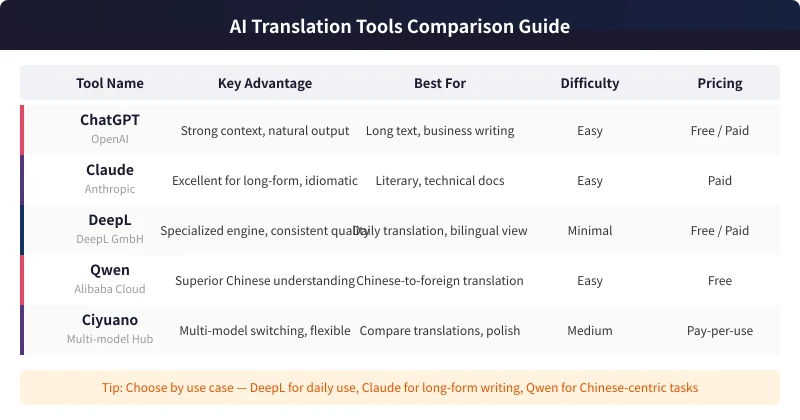
Before we begin, you need an AI tool. Here are the top recommendations:
- DeepL: A specialized translation engine, ideal for daily use, with a free tier available
- ChatGPT (OpenAI): Strong contextual understanding, great for long-form and business writing
- Claude (Anthropic): Excels at long texts, produces natural and idiomatic output
- Qwen (Alibaba): Superior Chinese comprehension, excellent for Chinese-to-foreign translation
- Ciyuano Platform: Multi-model hub with one-click switching, perfect for comparing translation results
Pick any of these to start — the workflow is essentially the same.
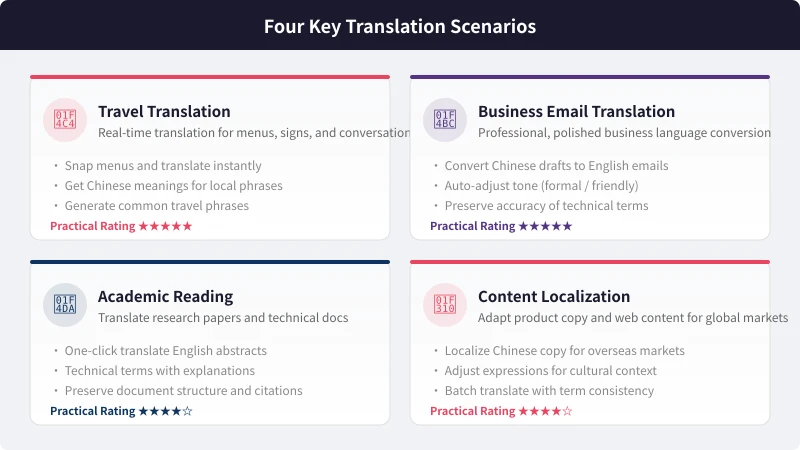
Scenario 1: Travel Translation
When traveling abroad, deciphering menus, road signs, and notices is the most common translation need. AI can quickly help you understand foreign content and even generate useful conversation phrases.
Steps
- Open your AI tool (mobile app or web browser)
- Enter the text to translate, or upload a photo of it
- Specify the translation direction (e.g., "translate to Chinese" or "translate to English")
- AI outputs the result, often with contextual notes on usage
Example Prompt:
I am traveling in Japan. Please translate the following menu into Chinese and note which items are popular dishes:
Pro Tips
- Ask AI to generate a "travel phrasebook" for common situations: asking directions, ordering food, shopping
- After photo translation, ask AI to explain cultural context (e.g., what does "set meal" mean on a Japanese menu)
- Need multiple languages? Have AI translate into Chinese, English, and Japanese simultaneously
Scenario 2: Business Email Translation
When writing emails to foreign clients or partners, you need more than accurate translation — you need polished, professional expression. AI automatically adjusts tone and word choice for business contexts.
Steps
- Enter the complete Chinese email content
- Specify the target language and tone (formal / friendly / concise)
- AI generates a business-appropriate translation
- Check technical terms for accuracy, then fine-tune and use
Example Prompt:
Please translate the following Chinese email into a professional English business email. Tone: professional yet friendly. The recipient is a US client:
"Dear Mr. Wang, thank you for your interest in our project. Regarding the technical solution discussed in the last meeting, we have completed the initial assessment. Please find the detailed feasibility analysis report attached. Feel free to reach out if you have any questions."
Why Not Just Use Google Translate?
Google Translate might render "please find attached" as "please check and accept" — grammatically correct but not idiomatic. AI understands this is a business context and uses natural expressions like "Please find the attached report for your review" and "feel free to reach out", which align with professional English writing conventions.
Scenario 3: Academic Reading
When reading English papers or technical documents, AI translation helps you quickly grasp content while preserving the accuracy of technical terminology.
Steps
- Copy an abstract or paragraph and paste it into the AI chat
- Specify: "Translate to Chinese, keep technical terms in English with Chinese annotations"
- AI outputs an annotated translation
- For unfamiliar concepts, follow up: "Please explain this term in detail"
Example Prompt:
Please translate the following English paper abstract with these requirements: 1) Translate to Chinese; 2) Keep technical terms in English with Chinese explanations in parentheses; 3) Maintain an academic writing style.
Tip: Generate Bilingual Side-by-Side Version
For research notes, ask AI to create a paragraph-by-paragraph bilingual format:
Example prompt: "Please translate the following content into a bilingual format with English followed by Chinese for each paragraph, separated by a divider line."
Scenario 4: Content Localization
Product localization, multilingual websites, and international social media — these scenarios require more than translation; they need localization: adapting content to fit the culture and expression norms of your target market.
Steps
- Tell AI your target market and audience (e.g., "young US consumers")
- Provide the original content and specify localization rather than direct translation
- AI adjusts expressions based on cultural differences
- Compare the original and localized versions to confirm consistent style
Example Prompt:
Please localize the following Chinese product copy for the US market. Requirements: 1) Do not translate literally — adapt to American consumer reading habits; 2) Use a light and energetic tone; 3) Preserve core product selling points.
Scenario 5: Multilingual Writing
Need to publish articles in both Chinese and English? AI helps you efficiently create multilingual content.
Steps
- Complete your article draft in Chinese first
- Have AI translate to English while preserving the logical structure
- Ask AI to adjust paragraph order and expressions for English readers
- Generate multiple versions and pick the best one
Advanced: Generate Bilingual Content in One Step
For bilingual publications, you can have AI do it all at once:
Example prompt: "Please write an article about AI translation tools, generating both Chinese and English versions simultaneously, with Chinese followed by English for each paragraph, separated by a divider."
Scenario 6: Language Learning Aid
AI translation is not just a translation tool — it is also an excellent language learning partner. You can use it to understand foreign expressions, learn idiomatic usage, and practice conversational dialogue.
Steps
- When encountering unfamiliar foreign sentences, ask AI to translate and explain the grammar
- Have AI compare "literal translation" vs. "natural expression"
- Let AI play a conversation partner role, simulating real dialogue scenarios
- Ask AI to correct your foreign language writing and explain the reasons for changes
Example Prompt:
I want to practice English speaking. Please simulate an ordering conversation at a cafe. You play the barista, I play the customer. After I speak, reply as the barista first, then explain whether my expression was natural. If not, provide a better alternative.
5 Tips for More Accurate AI Translation
1. State Your Purpose Clearly
Do not just say "translate to English" — say "translate into a business email for a US client." The clearer your purpose, the more targeted the translation.
2. Specify Tone and Style
Tell AI what style you need: formal, friendly, academic, or conversational. Different scenarios require different expressions.
3. Provide a Glossary
If you have specific terminology requirements (company jargon, industry-standard translations), include them in your prompt. AI will strictly follow your glossary.
4. Ask AI to Explain Translation Choices
When unsure about a translation, ask AI to explain why it chose that wording. This helps you make better decisions while learning translation techniques.
5. Compare Across Tools
For important content, translate with 2-3 tools and compare. DeepL excels at daily translation, Claude at long-form text, and ChatGPT offers the strongest overall capability. Choose the best version after comparison.
Frequently Asked Questions
Can AI Translation Be Used Directly in Formal Settings?
AI translations are high-quality first drafts. Check factual accuracy and technical term consistency before use. Business emails and academic papers benefit from a human review.
Are Free AI Translation Tools Sufficient?
For daily translation and learning, free tools (DeepL free tier, Qwen) are more than enough. For business and professional use, paid tools offer better translation quality.
How to Handle Cultural Differences in Translation?
Ask AI to include cultural annotations with the translation. For example, when translating Japanese content, have AI explain Japan-specific expressions and cultural background for more accurate and useful results.
Related Articles
AI Speech to Text: Beginner's Guide to Convert Voice to Text in 3 Steps
Learn how to convert speech to text using AI tools. Perfect for meeting notes, content creation, and video subtitles. Three practical scenarios with step-by-step instructions.
TutorialsAI Local Deployment Guide: Run Large Models in 3 Steps for Free
Learn how to deploy AI models locally in just 3 steps. No coding experience needed, completely free, and your data stays private on your own computer.
TutorialsAI Shopping Decision Guide: From Price Comparison to Avoiding Pitfalls
Learn how to use AI for shopping decisions. From price comparison to avoiding pitfalls - make smarter purchasing choices with AI assistance.
Comments are not yet available, stay tuned