AI Note Organization & Knowledge Management Tutorial: Let AI Help You Organize Information Efficiently
You've probably had this experience: you've bookmarked tons of articles and taken plenty of notes, but when you actually need that information, you can't find it anywhere. As information grows, the time to organize it shrinks. This guide will teach you how to use AI tools to efficiently organize notes and build a personal knowledge base, so your information actually works for you.
Why Use AI for Note Organization?
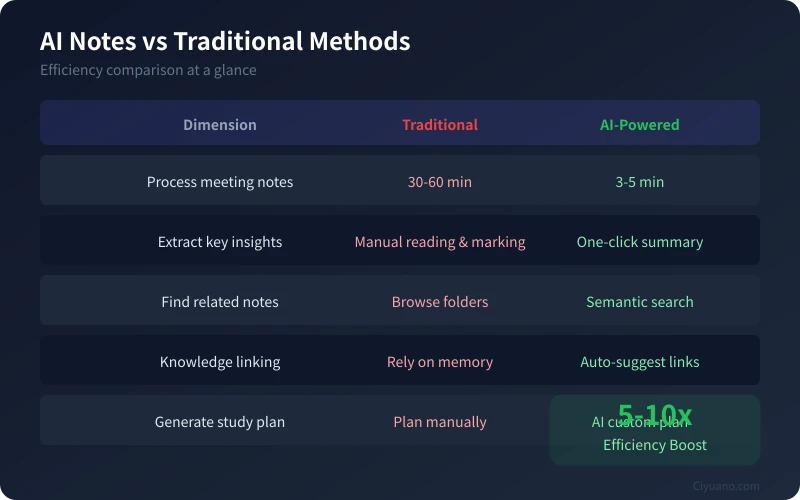
Traditional note organization requires manual sorting, writing summaries, and tagging — a single meeting transcript can take 30 minutes to an hour to process. AI can complete these tasks in just a few minutes:
- Automatic key point extraction — quickly find core ideas from lengthy content
- Smart classification — automatically sort content into the right topics
- Summary generation — condense an entire article into a few sentences
- Semantic search — find related notes using natural language descriptions
- Knowledge linking — automatically suggest related content
Hands-On: Organizing Meeting Notes with AI
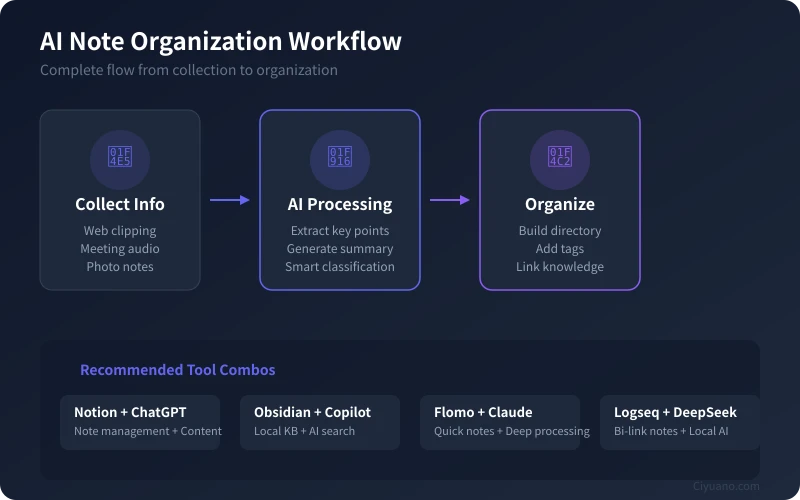
Suppose you just finished a project meeting and need to turn your notes into a clear document. Here's how to do it step by step:
Step 1: Record Raw Content
Open your preferred note-taking tool (Notion, Obsidian, Feishu, etc.) and quickly jot down the key information from the meeting. It doesn't need to be neat — just get the points down. If the meeting was recorded, save the audio file as well.
Step 2: Let AI Extract Key Points
Open ChatGPT, Claude, or DeepSeek, paste your raw notes, and enter a prompt like this:
Please help me organize the following meeting notes. Extract key decisions, action items, and deadlines, and present them in a clear format:
AI will generate a structured meeting summary in seconds, including discussion highlights, decisions made, and items that need follow-up.
Step 3: Add Tags and Categories
Copy the AI-generated summary back into your note system, then tag the note. You can also let AI suggest tags:
Recommend 3-5 appropriate tags for this meeting note to make it easy to find later:
Three Methods for Building a Personal Knowledge Base
Organizing individual notes is just the first step. What matters more is building a knowledge system that you can continuously grow. Here are three proven approaches:
Method 1: Topic-Based Directory
Create main topic folders based on your study or work areas. For example:
- Work projects: folders by project name
- Study notes: folders by knowledge domain
- Inspiration collection: folders by source type
Each time you organize notes, let AI help you decide which folder the note belongs to and what tags to add. Your knowledge base will become clearer the more you use it.
Method 2: Zettelkasten (Card Notes)
The core idea: each note is an independent knowledge card, and cards are linked to each other through connections. Here's how:
- Each note captures only one core idea
- Notes reference each other through bidirectional links
- Periodically let AI analyze connections between notes
Best suited for tools like Obsidian or Logseq that support bidirectional linking.
Method 3: Conversational Knowledge Base
This approach is ideal for those who don't want to spend much time organizing. The core idea:
- Store all materials in one place (e.g., a Notion database)
- When needed, simply ask AI: "I saved an article about X before, help me find it"
- Let AI answer questions based on your knowledge base
This requires AI tools with knowledge base retrieval capabilities, such as ChatGPT's file upload feature or a RAG-based personal Q&A system.
Recommended Tool Combos
Here are practical tool combinations for different needs:
Beginner: Notion + ChatGPT
Notion handles note storage and management, while ChatGPT handles content organization and generation. Perfect for users just getting started with AI note organization.
Intermediate: Obsidian + Copilot
Obsidian supports local storage and bidirectional linking, and the Copilot plugin enables AI semantic search. Ideal for users who value privacy and data security.
Power User: Flomo + Claude
Flomo handles quick, fragmented recording, while Claude handles deep processing and knowledge extraction. Perfect for people who generate ideas frequently but lack time to organize them.
Advanced: Logseq + DeepSeek
Logseq is an open-source bidirectional linking note tool, and DeepSeek can be deployed locally. Ideal for users with some technical background who want full control over their data.
Five Practical Tips for AI Note Organization
Tip 1: Establish a Fixed Workflow
Set aside a regular time each week to batch-process your scattered notes. Have AI generate summaries, extract action items, and suggest tags using a consistent template.
Tip 2: Use Structured Prompts
The more specific your prompts, the better the results. For example:
Please organize this note using the following structure: 1. Core idea (3 sentences max) 2. Key details (bullet points) 3. Action items (if any) 4. Suggested tags (3-5)
Tip 3: Do Regular Knowledge Reviews
Each month, have AI review your notes from the past 30 days and generate a knowledge summary. This helps you identify what you've mastered and what needs deeper study.
Tip 4: Build a Personal Glossary
Compile a glossary of your frequently used terms and abbreviations, and have AI automatically identify and label them when organizing notes. This makes future searches more accurate.
Tip 5: Use AI for Cross-Domain Connections
Have AI analyze notes from different fields and find potential connections between them. Innovation often comes from the collision of knowledge from different domains.
Frequently Asked Questions
Q: I have a lot of notes. Can AI process them all at once?
A: Most AI tools have input length limits. It's best to process in batches — handle 5-10 notes at a time, then have AI generate a comprehensive summary report.
Q: Is it safe to use AI for note organization?
A: If you use online AI services (like ChatGPT), note content is sent to the cloud. For sensitive information, consider using locally deployed AI models or sanitizing sensitive content first.
Q: I'm not good at writing prompts. What should I do?
A: You don't need complex prompts. Just clearly tell AI what you want it to do. Something like "help me organize these notes and extract key information" is enough. You'll naturally learn more efficient prompt writing as you use it more.
Get Started Today
Don't wait until everything is "perfectly ready" to begin. Try this today:
- Open your most-used note-taking tool
- Find an article you bookmarked but haven't organized yet
- Paste the content into an AI tool and have it extract key points
- Save the organized content back into your note system
A single operation takes just a few minutes, but building the habit will transform your knowledge management efficiency. AI won't think for you, but it can free up your time for what truly matters — learning and creating.
Related Articles
AI Speech to Text: Beginner's Guide to Convert Voice to Text in 3 Steps
Learn how to convert speech to text using AI tools. Perfect for meeting notes, content creation, and video subtitles. Three practical scenarios with step-by-step instructions.
TutorialsAI Local Deployment Guide: Run Large Models in 3 Steps for Free
Learn how to deploy AI models locally in just 3 steps. No coding experience needed, completely free, and your data stays private on your own computer.
TutorialsAI Shopping Decision Guide: From Price Comparison to Avoiding Pitfalls
Learn how to use AI for shopping decisions. From price comparison to avoiding pitfalls - make smarter purchasing choices with AI assistance.
Comments are not yet available, stay tuned