AI-Powered Podcast Creation: Complete Guide from Script to Publish
Podcasts are becoming an increasingly popular way for people to consume information and share ideas. But producing a quality podcast requires topic selection, scriptwriting, recording, editing, and publishing — a high barrier for beginners. The good news is that AI can handle most of these tasks for you. This guide walks you through the complete workflow of creating a podcast with AI assistance.
Step 1: Use AI to Find Your Topic
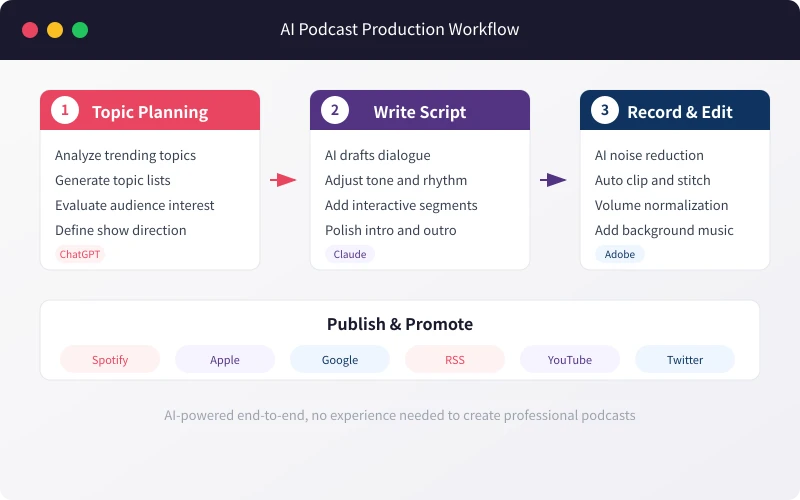
The topic is the soul of your podcast. A great topic attracts listeners; a mediocre one is forgotten instantly. AI can quickly analyze trending topics and help you find your unique angle.
How to Do It
Open ChatGPT or Claude and enter this prompt:
"I'm planning a podcast episode about [your topic]. It should be 15 minutes long. Please suggest 5 possible topic directions and explain the target audience and expected appeal for each."
AI will give you multiple suggestions. Follow up with: "Which topic is best for a beginner host? Which one is more likely to resonate with listeners?" This quickly narrows down your best option.
Advanced Tips
Don't stop at one question. Treat AI as your topic consultant — multi-turn conversations help you dig deeper. Share recent news or social media trends with AI and ask it to find connections with your field.
Step 2: Let AI Write Your Script
With your topic decided, it's time to write the script. This is one of AI's strongest capabilities. A good podcast script should include an opening hook, main content, interactive segments, and a closing.
Basic Script Generation
Provide AI with the following information:
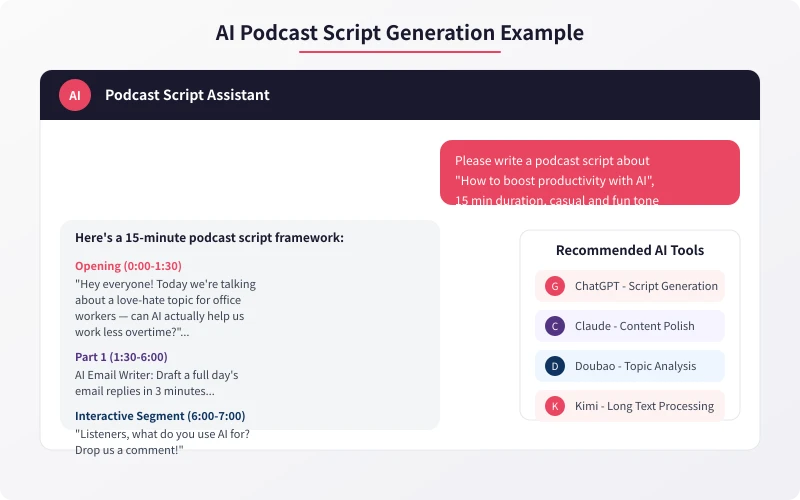
"Please write a podcast script. Topic: [topic]. Duration: [X] minutes. Tone: [casual/professional/humorous]. Target audience: [audience]. The script should include: opening hook (grab attention), main body (2-3 key points), interactive segment (questions or polls), and closing (summary and teaser)."
AI will generate a complete script framework. However, the initial draft is usually too "generic." You need to make these adjustments:
Add your own stories and experiences. AI doesn't know your life — these personal touches are yours to provide. Adjust the conversational level. AI tends toward formal writing; podcasts need natural, spoken language. Add humor. Appropriate laughter and self-deprecation help you connect with listeners.
Script Polishing Tips
After generating the first draft, use AI for a second polish. Try this prompt:
"Please review the script above, find anything that sounds too formal, and rewrite it in more natural spoken language. Also check the pacing to make sure listeners won't get bored."
You can also ask AI to play the listener role: "Imagine you're a 25-year-old office worker listening to this episode — where would your attention drift?" This feedback helps you optimize content pacing.
Step 3: AI-Assisted Recording and Post-Production
Once the script is ready, it's recording time. While AI can't record for you, it plays a huge role in post-production.
Recording Preparation
Before recording, ask AI to help check your environment: "My recording environment has [describe your setup]. Any suggestions to improve recording quality?" AI will offer professional acoustic advice, like hanging blankets on walls to reduce echo or turning off the AC to minimize background noise.
Post-Production
After recording, AI tools can help you:
Noise Reduction: Use Adobe Podcast or Auphonic for one-click background noise removal. Upload your raw recording and AI automatically identifies and eliminates environmental noise for clearer audio.
Auto-Editing: Use Descript to let AI identify and remove filler words like "um" and "uh." You can also edit audio like editing a document — deleting text deletes the corresponding audio segment.
Volume Normalization: AI automatically adjusts volume across different segments to ensure consistent levels throughout, preventing jarring volume changes.
Music Addition: Use Suno or Udio to generate custom intro and outro music. Describe the style you want and AI creates unique, royalty-free music.
Step 4: Publishing and Promotion
After production is complete, AI helps with publishing and promotion.
Generate Promotional Copy
Ask AI to write platform-specific promotional content:
"Based on this podcast episode, generate promotional copy for Xiaohongshu, Weibo, and WeChat Moments. Xiaohongshu should be playful and trendy, Weibo should be concise and punchy, WeChat Moments should be sincere and thoughtful."
Optimize Titles and Descriptions
A good title determines whether listeners click. Ask AI to generate multiple title options:
"Please generate 5 different title styles for this episode: one suspenseful, one question-based, one data-driven, one story-based, and one straightforward."
Multi-Platform Publishing Strategy
Different platforms have different optimal posting times and format requirements. Ask AI to create a publishing schedule: "My podcast will be published on Apple Podcasts, Spotify, and YouTube. Please create a weekly publishing and promotion timetable."
FAQ
Will AI-generated content sound too fake?
The key is post-processing. AI provides the framework and inspiration; you inject personality and emotion. The final content should be roughly 70% AI-assisted and 30% your own performance.
Can I use these tools with zero editing experience?
Absolutely. Tools like Descript and CapCut are very beginner-friendly — essentially "foolproof" operation. AI handles the most complex audio processing work for you.
Can one person make a podcast?
Of course. Many popular podcasts are solo productions. AI can help you with everything from topic selection to publishing — you just focus on the content itself.
Recommended Tools
Here are recommended AI tools for each stage:
Topics & Scripts: ChatGPT, Claude, Gemini, Kimi
Recording & Editing: Descript, Adobe Podcast, CapCut
Music Generation: Suno, Udio
Cover Design: Canva AI, Midjourney
Publishing Platforms: Apple Podcasts, Spotify, YouTube, Overcast
You don't need expensive equipment or professional skills to make a podcast. With AI assistance, all you need is a computer, a microphone, and some enthusiasm to start your podcasting journey. Try it today!
Related Articles
AI Speech to Text: Beginner's Guide to Convert Voice to Text in 3 Steps
Learn how to convert speech to text using AI tools. Perfect for meeting notes, content creation, and video subtitles. Three practical scenarios with step-by-step instructions.
TutorialsAI Local Deployment Guide: Run Large Models in 3 Steps for Free
Learn how to deploy AI models locally in just 3 steps. No coding experience needed, completely free, and your data stays private on your own computer.
TutorialsAI Shopping Decision Guide: From Price Comparison to Avoiding Pitfalls
Learn how to use AI for shopping decisions. From price comparison to avoiding pitfalls - make smarter purchasing choices with AI assistance.
Comments are not yet available, stay tuned