AI Email Writing Assistant Guide: Master Every Type of Email in 4 Steps
Writing tons of emails every day? Struggling with the right tone for business emails? AI email assistants can solve these problems. This guide walks you through practical scenarios and step-by-step instructions for writing high-quality emails with AI.
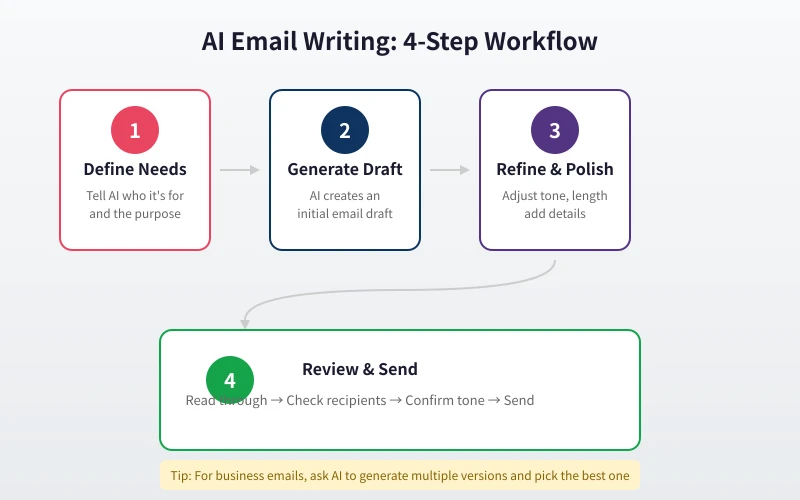
Step 1: Define Your Email Needs
Before asking AI to write, answer these four questions:
- Who is the recipient? — Boss, colleague, client, stranger? The relationship determines the tone.
- What is the purpose? — Report, request, apology, promotion, thanks? The purpose shapes the structure.
- What tone do you want? — Formal business, casual and friendly, or serious?
- What key info must be included? — Data, dates, project names, attachment notes, etc.
Step 2: Write High-Quality Prompts
Prompt quality directly determines email quality. Here are templates for common scenarios:
Scenario 1: Business Partnership Email
Write a business partnership email. Recipient is the Marketing Director at a tech company. We are an AI tools company exploring collaboration opportunities in content marketing. Tone: professional and friendly. Keep it under 200 words. End with my contact info awaiting their reply.
Scenario 2: Project Progress Report
Write a project progress report email to my boss. Project: Smart Customer Service Upgrade. Current progress: Frontend 80% complete, backend API integration ongoing. Issue: Third-party API response slowed down, needs 3 extra days. Estimated completion: next Friday. Tone: formal but not stiff, highlight progress and risks.
Scenario 3: Client Apology Email
Write an apology email to a client. Reason: order shipment delayed 5 days, client has followed up twice. Express sincere apology, explain the delay reason (warehouse system upgrade), offer compensation (free shipping + 10% off next order). Tone: genuine and respectful.
Step 3: Refine and Optimize
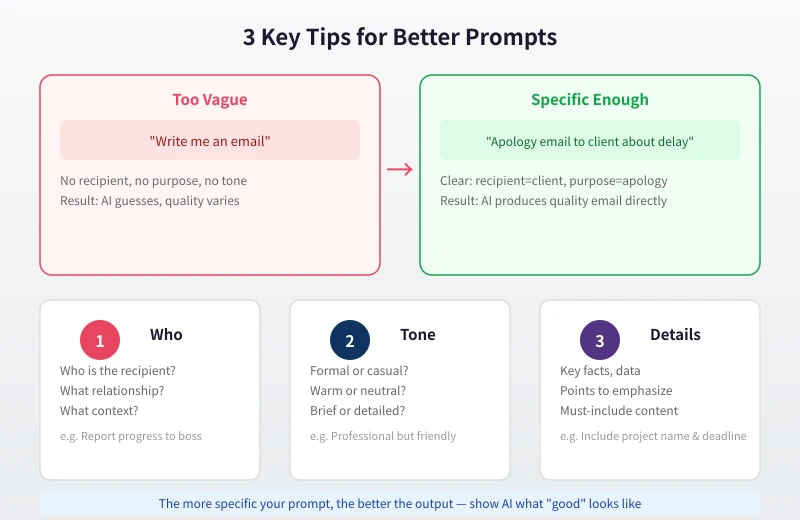
After AI generates a draft, you typically need to make these adjustments:
- Adjust length — Too long? Say "condense to 150 words." Too short? Say "add more specific details."
- Change tone — "Make it more formal" or "Make it more casual."
- Add info — "Include the specific deadline" or "Mention the quote in the attachment."
- Get alternatives — "Give me 3 different versions and I will pick one."
Advanced Tip: Let AI Help You Reply
Got an email and not sure how to respond? Paste the original email to AI and tell it your stance:
Here is an email from a client: [paste email]. The client wants a 20% discount, but our floor is 10%. Write a reply that shows understanding but holds our position, while offering other value-added services as alternatives. Tone: firm but sincere.
Step 4: Review and Send
Before hitting send, go through this checklist:
- Is the recipient email address correct?
- Is the subject line clear and concise?
- Do the greeting and sign-off match?
- Any typos or grammar errors?
- Are attachments included?
- Is the tone appropriate for this scenario?
- Are key details (dates, numbers, names) accurate?
Tone Guide for Different Scenarios
| Scenario | Recommended Tone | Key Words |
|---|---|---|
| Report to boss | Formal, concise | Report, request, suggest |
| Team communication | Casual, direct | Help, confirm, sync |
| Client relations | Professional, warm | Thanks, look forward, collaborate |
| Job application | Confident, humble | Eager, contribute, learn |
| Complaint or feedback | Firm, polite | Hope, suggest, concerned |
FAQ
Will AI-generated emails sound too generic?
They can, if your prompt is too vague. Fix this by describing your personal style in the prompt, like "casual tone like chatting with a friend" or "use short sentences, no long paragraphs." Generating multiple versions to choose from also helps avoid cookie-cutter output.
Can it write emails in other languages?
Absolutely. Just tell AI "write in English" (or any other language). If you are unsure about naturalness, add "ensure the grammar and phrasing sound native."
What about sensitive information?
Never include passwords, bank account numbers, or ID numbers in your prompts. For emails involving sensitive data, let AI write the framework first, then manually fill in the sensitive parts.
How do I make emails more personal?
Describe your writing style preferences in the prompt, or provide sample emails you have written before. AI will mimic your style, making the output sound more like you.
Related Articles
AI Speech to Text: Beginner's Guide to Convert Voice to Text in 3 Steps
Learn how to convert speech to text using AI tools. Perfect for meeting notes, content creation, and video subtitles. Three practical scenarios with step-by-step instructions.
TutorialsAI Local Deployment Guide: Run Large Models in 3 Steps for Free
Learn how to deploy AI models locally in just 3 steps. No coding experience needed, completely free, and your data stays private on your own computer.
TutorialsAI Shopping Decision Guide: From Price Comparison to Avoiding Pitfalls
Learn how to use AI for shopping decisions. From price comparison to avoiding pitfalls - make smarter purchasing choices with AI assistance.
Comments are not yet available, stay tuned