AI Reading Assistant Guide: Quickly Understand Articles, Books & Papers with AI
Facing a 20,000-word paper, a 300-page book, or a 50-page industry report? An AI reading assistant can help you quickly grasp the core content, turning "too much to read" into "thoroughly understood."
Why You Need an AI Reading Assistant
In the age of information overload, the volume of reading we face daily far exceeds our individual processing capacity:
- Academic papers: Full of jargon with long reasoning chains, requiring multiple reads to understand
- Industry reports: Often dozens of pages, but you may only need 20% of the key data
- Technical documentation: Complex structure and dry content, finding what you need is like finding a needle in a haystack
- English materials: Language barriers can halve your reading speed
- Books: You want to quickly determine if a book is worth a deep read, but lack the time to go cover to cover
The core value of an AI reading assistant is helping you extract 80% of the key information with just 10% of the time. It won't replace your thinking, but it can help you quickly locate key points, understand difficult concepts, and organize notes.
Step 1: Choose the Right Tool
Current mainstream AI reading tools each have their strengths. Choose based on your needs:
| Tool | Best For | Key Strength |
|---|---|---|
| ChatGPT | General reading, paper comprehension | File upload support, strong conversational ability |
| Claude | Long documents, book analysis | 200K context, reads entire books at once |
| Kimi | Chinese materials, web links | Paste URLs directly for parsing |
| DeepSeek | Technical docs, code reading | Strong reasoning, understands complex logic |
| NotebookLM | Multi-document cross-reading | By Google, supports multi-source comparison |
Beginner tip: If you only choose one tool, start with ChatGPT or Kimi. The former is feature-rich; the latter is more user-friendly for Chinese speakers.
Step 2: Upload or Input Content
There are three common ways to hand your reading material to AI:
Method 1: Direct File Upload
Most AI tools support uploading PDF, Word, TXT, and other file formats:
- Open the AI tool's chat interface
- Find the attachment upload button (usually a paperclip icon 📎)
- Select a local file to upload
- Wait for file parsing to complete (usually a few seconds to tens of seconds)
Note: Different tools have different file size limits. ChatGPT free tier supports about 10MB per file; Claude supports larger files.
Method 2: Paste Web Links
For web articles, you can paste the link directly to the AI:
- Copy the full URL of the web page
- Paste it in the chat box with a command, like "Please summarize this article for me"
- The AI will automatically fetch and analyze the web content
Method 3: Copy and Paste Text
For shorter content, simply copy and paste the text into the chat box and ask your question.
Step 3: Extract Core Content with AI
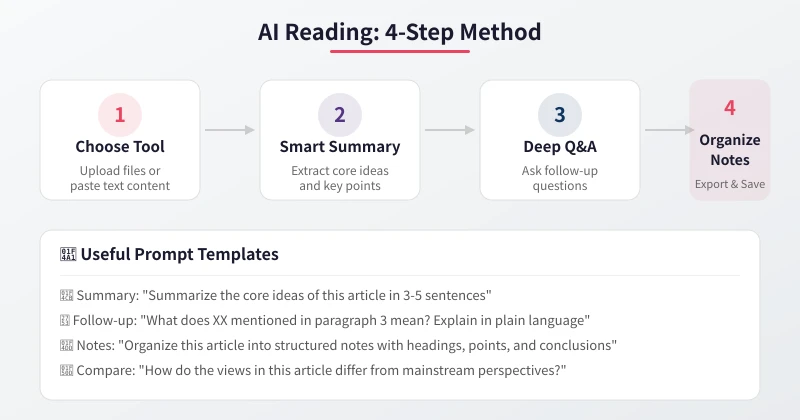
After uploading your content, use these prompts to have AI help you focus on the key points:
Quick Summary
Use when: Determining if an article is worth a deep read
- "Summarize the core ideas of this article in 3-5 sentences"
- "What are the 3 most important conclusions of this article?"
- "Summarize this article in one paragraph so someone who hasn't read it can understand"
Structured Key Points
Use when: Systematically understanding the article's framework
- "Organize this article into structured notes with main headings and key points for each section"
- "List all key arguments in this article and label the evidence supporting each one"
- "Summarize the core content of each chapter as bullet points"
Key Data Extraction
Use when: Quickly extracting data from reports
- "Extract all numbers, percentages, and statistics from the article"
- "What key metrics are mentioned in this report? Organize them in a table"
- "Find all citation sources and references in the article"
Step 4: Deep Q&A to Overcome Difficulties
Summary is just the first step. The real value lies in asking follow-up questions about what you don't understand:
Concept Explanation
When you encounter unfamiliar terms or concepts:
- "What does the 'vanishing gradient problem' mentioned in paragraph 3 mean? Explain in plain language"
- "What exactly does 'involution' mean in this context? Can you give an example?"
- "How was this formula derived? Please explain step by step"
Logic Clarification
When the article has a long chain of reasoning:
- "What is the logical chain from A to B? Are there any gaps in between?"
- "What is the argumentation structure of this article? Premise → Reasoning → Conclusion"
- "What viewpoints does the author oppose? What are the reasons for the rebuttal?"
Comparative Analysis
Compare the article's views with your existing knowledge:
- "How do the views in this article differ from mainstream perspectives?"
- "Do the author's conclusions contradict Professor XX's views?"
- "If I follow the article's advice, what are the potential risks?"
Practical Application
Convert theoretical knowledge into actionable steps:
- "Based on this article's advice, how should I plan my next steps?"
- "Which of the methods mentioned can I start doing right away?"
- "If I need to explain the core ideas to my colleague, how should I organize my language?"
Step 5: Organize Notes and Retain Knowledge
The ultimate goal of reading is to transform information into your own knowledge:
Generate Structured Notes
- "Please organize our conversation into a complete reading note, including: topic overview, key points, my questions and your answers, and action suggestions"
- "Organize this article using the Cornell note-taking method: key questions on the left, detailed notes on the right, summary at the bottom"
Generate Mind Map Outline
- "Organize this article's content into a mind map hierarchy for me to import into XMind"
- "Output this article's knowledge tree as a Markdown indented list"
Create Knowledge Cards
- "Break down the core knowledge from this article into 5-10 knowledge cards, each containing: concept name, definition, example, and relationship to other concepts"
Six Practical Scenarios
Scenario 1: Speed-Reading Academic Papers
Example prompts:
- "This is an academic paper. Please extract: research question, methodology, main findings, and limitations"
- "Explain the core contribution of this paper in language a non-expert can understand"
- "What important references does this paper cite? How do they relate to this paper?"
Scenario 2: Industry Report Analysis
Example prompts:
- "What are the core conclusions of this industry report? What data supports them?"
- "What industry trends are mentioned in the report? Which ones affect the XX industry I'm in?"
- "Extract all predictive data from the report and organize in a table"
Scenario 3: Technical Documentation Reading
Example prompts:
- "What is the core functionality of this API? Give 3 most common use cases"
- "What configuration options are in the documentation? Which are required, which are optional?"
- "According to the documentation, how should I set up this project from scratch?"
Scenario 4: Understanding English Materials
Example prompts:
- "Please translate this English article into Chinese, keeping technical terms in their original English"
- "What are the core ideas of this article? Summarize in Chinese"
- "The concept of XX mentioned in the text — how is it usually expressed in Chinese?"
Scenario 5: Quick Book Overview
Example prompts:
- "What is the core argument of this book? What cases does the author use to support it?"
- "If I only have 30 minutes, which chapters should I focus on?"
- "How does this book differ from similar books like XX?"
Scenario 6: Contract/Legal Document Review
Example prompts:
- "What are the key terms of this contract? Are there any clauses unfavorable to our side?"
- "Explain the meaning and potential risks of Clause X in plain language"
- "What common pitfalls should I watch out for in this contract?"
Practical Tips and Precautions
Tips for Improving Reading Efficiency
- Ask questions in stages: Don't dump all questions at once. Start with summary, then follow up step by step
- Provide context: Tell the AI your role and purpose, e.g., "I'm a product manager evaluating the feasibility of this technical solution"
- Request source citations: Ask AI to reference specific parts of the original text in its answers for verification
- Use multi-turn dialogue: Leverage context ability to explore multiple aspects in the same conversation
Important Considerations
- AI may "hallucinate": AI sometimes generates content that doesn't exist. Always verify critical information against the original text
- Long documents may have gaps: Even tools supporting long context may miss information in the middle sections. Ask about important content separately
- Opinions ≠ Facts: AI summaries may have bias. For controversial topics, verify from multiple angles
- Be cautious with sensitive files: For documents containing trade secrets or personal privacy, prioritize locally deployed AI tools
Recommended Workflow
Integrate the above steps into a complete reading workflow:
- Quick Preview (1 minute): Get an AI summary to determine if it's worth a deep read
- Structure Review (3 minutes): Have AI extract the article's framework and key points
- Focused Reading (10 minutes): Ask follow-up questions on key sections to understand core logic
- Note Organization (5 minutes): Have AI generate structured notes and export them
- Knowledge Internalization (Ongoing): Regularly review notes and apply knowledge to actual work
With this workflow, what would normally take 2 hours of deep reading can be compressed into 20 minutes. AI doesn't replace your thinking — it helps you spend your time on truly important thinking.
Conclusion
An AI reading assistant is an essential tool for the information age. The core workflow can be summarized in four steps: Upload → Summarize → Q&A → Notes. Remember these key points:
- Choose the right tool based on your reading material type
- Use effective prompts to get the information you truly need
- Always verify critical information against the original text
- Develop a note-taking habit to create long-term value from your reading
Starting today, try using AI to read that report or article you've been putting off. You'll find the improvement in reading efficiency is far greater than you imagined.
Related Articles
AI Speech to Text: Beginner's Guide to Convert Voice to Text in 3 Steps
Learn how to convert speech to text using AI tools. Perfect for meeting notes, content creation, and video subtitles. Three practical scenarios with step-by-step instructions.
TutorialsAI Local Deployment Guide: Run Large Models in 3 Steps for Free
Learn how to deploy AI models locally in just 3 steps. No coding experience needed, completely free, and your data stays private on your own computer.
TutorialsAI Shopping Decision Guide: From Price Comparison to Avoiding Pitfalls
Learn how to use AI for shopping decisions. From price comparison to avoiding pitfalls - make smarter purchasing choices with AI assistance.
Comments are not yet available, stay tuned