AI Email Writing Guide: Business, Job Applications, and Everyday Communication
Do You Have "Email Anxiety" Too?
You open your inbox, click "Compose," and then stare at the blank body text — many people experience this every day. Especially when writing English emails, reporting to your boss, or sending formal communication to clients, just deciding how to open with "Dear" can take ten minutes of deliberation.
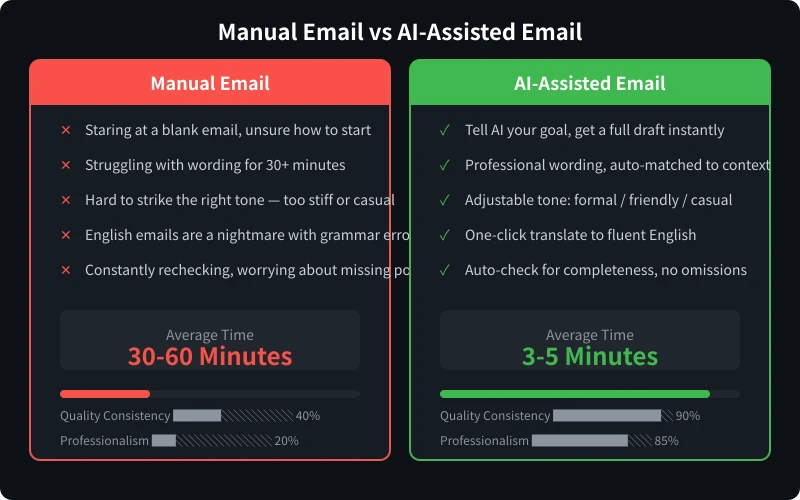
The difficulty of writing emails usually isn't the content itself, but not knowing how to organize your language. You know what you want to say, but don't know how to say it appropriately, professionally, and without causing offense. This anxiety is especially pronounced in these scenarios:
- Writing English emails to foreign clients, afraid of grammar mistakes causing embarrassment
- Self-recommendation emails for job applications, unsure how to highlight your strengths
- Follow-up emails to colleagues about progress, worried about sounding too aggressive
- Declining an invitation, not knowing how to politely say "no"
The good news is, AI can perfectly solve these problems. You just need to tell it the purpose and key information, and it will generate a well-structured, appropriately worded email. All you need to do is review and fine-tune.
Handwriting Emails vs AI-Assisted Email Writing
Four Steps to Write a Professional Email with AI
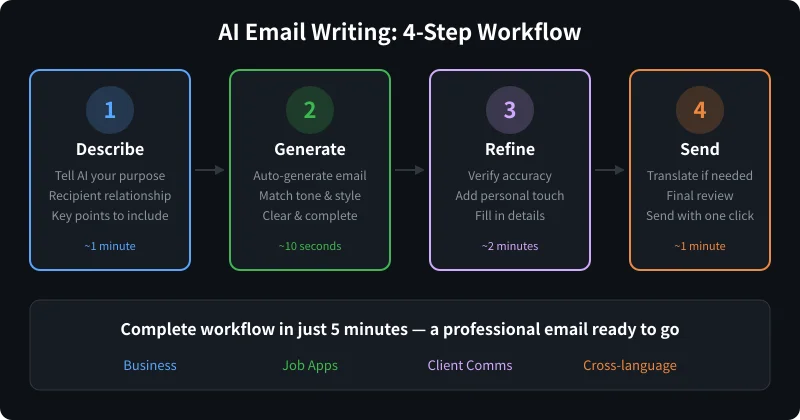
Step 1: Describe Your Needs (1 minute)
Open your preferred AI tool (ChatGPT, Claude, DeepSeek, etc. all work) and directly tell it what kind of email you need to write. The more specific the information, the better the generated email will match your needs.
Information you should provide includes:
- Email purpose: What do you want to achieve? (Job application, follow-up, quotation, thanks, apology...)
- Recipient: Who is it for? (Boss, client, colleague, stranger...) What's your relationship?
- Key information: Specific details that must be included (dates, numbers, requirements, etc.)
- Tone and style: Formal or casual? Friendly or serious?
Practical tip: You don't need to write it out perfectly — just describe it conversationally. For example: "Help me write an email to a client telling them the project is delayed by two weeks because we need extra testing. The tone should be sincere but not groveling." AI will understand your intent.
Step 2: AI Generates Email Draft (10 seconds)
After telling AI your requirements, it will generate a complete email within seconds. It typically includes:
- An appropriate greeting and opening
- A well-structured body (with paragraphs and highlights)
- A proper closing and signature
The generated draft is usually good enough to use directly, but it's recommended to continue with the next step.
Step 3: Review and Fine-Tune (2 minutes)
Although AI-generated emails are generally high quality, you still need to check the following:
- Fact-checking: Are dates, amounts, names, and other specific details accurate?
- Personal style: Does it match your usual communication style and company culture?
- Additional details: Are there any important points missing?
- Length adjustment: If it's too long or too short, ask AI to adjust
If you're not satisfied with a particular paragraph, you can tell AI directly:
- "The opening is too formal, make it more casual"
- "Expand the second paragraph to talk about our advantages"
- "Add a hint at the end hoping for a prompt reply"
- "Compress the entire email to under 150 words"
Step 4: Translate When Needed and Send (1 minute)
If you need to write an English email, let AI help you translate. Note that this isn't simple word-for-word translation — it's reorganizing the language according to English expression habits. You can tell AI:
Please translate the above email into English using authentic business English expressions. Don't translate word by word — make it follow English email writing conventions.
After translation, have AI check the grammar and word choice once more to ensure there are no errors. Then you're ready to send.
Prompt Templates for Four Common Scenarios
Scenario 1: Business Emails
Business emails are the most common need. Whether it's a quotation, partnership confirmation, or project update, you need to pay attention to professional wording.
Help me write a business email with the following details:
- Recipient: [Position] [Name] at [Company Name]
- Purpose: [Quotation / Partnership invitation / Project update / Contract confirmation]
- Key information: [Specific numbers, dates, terms]
- Tone: Formal, professional, friendly
- Length: 150-250 words
Example: Suppose you want to send a quotation email to a potential client. You could say: "Help me write an email to Manager Zhang at ABC Company, quoting our annual SEO service package at $16,000/year, including keyword optimization, content marketing, and monthly reports. The tone should be professional and friendly, aiming to close the deal."
Scenario 2: Job Application Emails
A job application email is your first business card. A good one helps you stand out among countless resumes.
Help me write a job application email:
- Position applied for: [Job title]
- Target company: [Company name]
- My strengths: [List 2-3 core advantages]
- Relevant experience: [Brief description of related work experience]
- Tone: Confident but not arrogant, enthusiastic but not sycophantic
- Attachment: Resume is attached
Practical tip: Have AI analyze the job description (JD), then tailor your email content accordingly. Paste the JD to AI, and it will help you identify matching skills and experience to highlight.
Scenario 3: Everyday Communication Emails
Follow-ups, declining invitations, apologies, thanks... These everyday communication scenarios are simple, but poor wording can easily cause misunderstandings.
Help me write an everyday communication email:
- Scenario: [Follow-up / Declining invitation / Apology / Thanks / Leave request / Recommendation]
- Recipient: [Colleague / Boss / Friend / Business partner]
- Specific situation: [What happened, what you need]
- Tone: [Friendly / Sincere / Diplomatic / Formal]
Special note: Follow-up emails are the trickiest to write. Too soft and they're ineffective; too harsh and they damage relationships. Let AI help you find that balance of being "firm but friendly." You can tell AI: "The tone should be firm but friendly, making the recipient feel urgency without feeling blamed."
Scenario 4: Cross-Language Emails
Need to write in English (or another language)? This is where AI adds the most value. Many people can read English but always end up writing "Chinglish."
I need to write an email in English to a foreign client with the following content:
[Describe the email content in your native language]
Requirements:
1. Use authentic business English, no Chinglish
2. Follow English email format conventions
3. Tone: [Formal / Friendly / Casual]
4. Give me a summary in my language first, then write the English version
Advanced tip: If you're unsure whether a certain expression is appropriate, ask AI to give you 3 different versions — formal, friendly, and casual — then pick the best fit.
Five Tips for More Professional Emails
1. Tell AI Your Industry Background
Email styles vary greatly across industries. Tech company emails tend to be more casual, while finance industry emails need to be more formal. Tell AI your industry, and it will automatically adjust the writing style.
2. Provide Background Information About the Recipient
The more AI knows, the more tailored the email. Tell it the recipient's position, your collaboration history, and the content of your last communication, and AI will write a more precise email.
3. Let AI Help with Subject Lines
The email subject line determines whether the recipient will open your email. Ask AI to write 3-5 subject line options and pick the most compelling one. Good subject lines should be concise, specific, and informative.
4. Use AI for "Email Upgrades"
If you've already written a draft but feel it's not good enough, paste it directly to AI and say: "Help me optimize this email to make it more professional / more concise / more persuasive." AI will improve the quality while preserving your original intent.
5. Build Your Email Template Library
Save the emails that AI generated that you're happy with, and reuse them for similar scenarios in the future. Over time, you'll accumulate a set of email templates covering various situations, making you increasingly efficient.
Frequently Asked Questions
Q: Will AI-written emails be too "template-like"?
A: If you only give AI a one-sentence description, it might indeed be somewhat templated. But if you provide specific background information, personal style preferences, and unique points you want to express, AI-generated emails will be highly personalized. The more information you provide, the better the quality.
Q: Is using AI to write emails "cheating"?
A: AI is a tool, just like using a spell checker isn't cheating. You review it before sending, you confirm it, and you take responsibility for it. AI helps you be more efficient, and the time saved can be used for more valuable work.
Q: Can I use AI for sensitive emails?
A: Yes, but keep two things in mind: First, don't paste confidential company information directly into public AI platforms. Second, always carefully review the generated content to ensure the wording and stance match your intentions. For particularly sensitive emails, AI is better used as a reference rather than for direct use.
Q: Is the translation quality for English emails good enough?
A: Current mainstream AI's English email writing ability is already very strong, even surpassing most non-native speakers' level. However, it's recommended to have AI do a "native speaker review" before sending to check for any unnatural expressions.
Conclusion
Using AI to write emails isn't being lazy — it's working smart. Writing a professional email in 5 minutes saves 25 minutes that can be spent thinking about more important things. Starting today, try using AI to handle your emails, and you'll find that "email anxiety" quietly disappears.
Related Articles
AI Speech to Text: Beginner's Guide to Convert Voice to Text in 3 Steps
Learn how to convert speech to text using AI tools. Perfect for meeting notes, content creation, and video subtitles. Three practical scenarios with step-by-step instructions.
TutorialsAI Local Deployment Guide: Run Large Models in 3 Steps for Free
Learn how to deploy AI models locally in just 3 steps. No coding experience needed, completely free, and your data stays private on your own computer.
TutorialsAI Shopping Decision Guide: From Price Comparison to Avoiding Pitfalls
Learn how to use AI for shopping decisions. From price comparison to avoiding pitfalls - make smarter purchasing choices with AI assistance.
Comments are not yet available, stay tuned