AI Home Budget Tracker: From Messy Receipts to Clear Budgets
Why You Need AI to Track Your Budget
Have you ever started the month vowing to track every expense, only to give up after three days? Or reached month-end wondering where all your money went? The biggest problem with traditional budgeting is not bad tools — it is that it takes too much time. Every purchase requires opening an app, entering the amount, choosing a category, and writing a note. Ten entries a day means ten minutes, and five hours a month.
AI budget assistants change the equation completely. You simply take a photo or briefly describe a purchase, and AI handles categorization, summarization, and analysis automatically. Budgeting goes from a daily ten-minute chore to a thirty-second habit.
Preparation: Choose Your AI Budgeting Method
You do not need a dedicated budgeting app. Any AI chat tool will do. Here are three common approaches:
- Direct chat — Open ChatGPT, DeepSeek, or Claude and tell it what you spent today
- Photo recognition — Snap a receipt or bill and let AI identify the amount and merchant
- Batch import — Send a full month of expenses to AI at once for bulk processing
If you are new to this, start with direct chat — the lowest barrier to entry.
Step 1: Snap and Record — No More Manual Entry
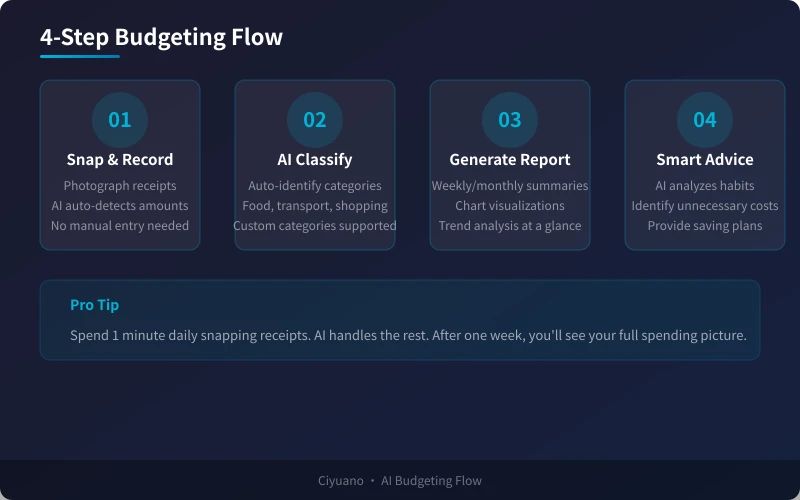
The biggest enemy of budgeting is laziness. Opening an app and typing in every purchase is tedious. AI budgeting solves this with one simple action: take a photo.
How to Do It
Option A: Photo receipt recognition
After a meal or shopping trip, snap a photo of the receipt and send it to AI with this prompt:
"Please identify the spending details from this receipt: merchant name, amount, date, and item list."
AI extracts all key information automatically. You just confirm and move on.
Option B: Text description
If you prefer not to take photos, just describe it in words:
"Had lunch at McDonald's for $5, took a taxi for $3, bought milk and bread at the supermarket for $8."
AI understands and organizes everything.
Option C: Batch recording
If you missed a day, catch up all at once:
"Help me organize this week's expenses: Monday lunch $5 taxi $3; Tuesday coffee $3 dinner $7; Wednesday groceries $20 clothes $45; Thursday lunch $5 subway $1; Friday dinner out $25 taxi $4."
Step 2: AI Auto-Categorizes — No More Manual Sorting
Traditional apps require you to manually select categories like "Food" or "Transport." AI does this automatically based on the spending content.
Classification Example
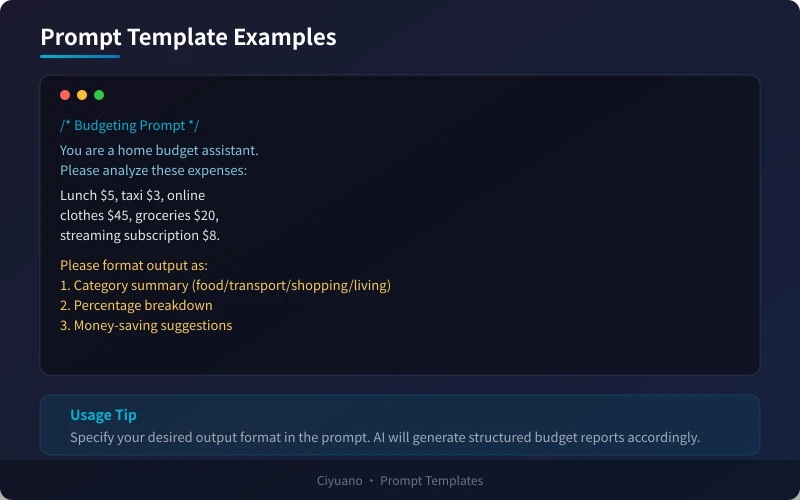
You just say "Lunch $5, taxi $3, online clothes $45, groceries $20" and AI automatically categorizes:
- Food: $5 + $20 = $25 (28.1%)
- Transport: $3 (3.4%)
- Shopping: $45 (50.6%)
- Other: $16 (18.0%)
No manual sorting needed — AI handles it all.
Step 3: Generate Spending Reports — See Where Your Money Goes
The purpose of budgeting is not recording, but analysis. AI can generate various spending reports for you.
Common Report Types
Weekly report — "Summarize this week's spending by category with amounts and percentages. Identify the top three largest expenses."
Monthly report — "Generate a monthly financial report with category summaries, trend analysis, and any unusual expenses to flag."
Comparison analysis — "Compare my spending from last month to this month. Which categories increased? Which decreased?"
Advanced: Visualization Recommendations
You can also ask AI to suggest the best chart types:
"What charts would work best for visualizing this spending data?"
AI will recommend pie charts for proportions, bar charts for trends, and line charts for changes.
Step 4: Smart Savings Advice — Real Money in Your Pocket
The ultimate goal of budgeting is saving money. AI not only records expenses but analyzes your spending habits and provides personalized savings suggestions.
Savings Analysis Directions
Identify recurring expenses — "How much did I spend on coffee this month? Can I reduce it?"
Find alternatives — "I take a taxi to work every day. Are there cheaper commute options?"
Budget overflow alerts — "At my current spending rate, will I exceed my budget this month?"
Savings goal tracking — "If I want to save $500 a month, where should I cut back based on current spending?"
Long-Term Habit Building
AI can also help you set spending rules:
- Set daily or weekly spending limits
- Identify impulse buying patterns
- Recommend more cost-effective purchase channels
- Remind you to review subscription services regularly
Ready-to-Use Prompt Templates
Here are several templates you can copy and use directly:
Template 1: Daily Recording
"You are a home budget assistant. Please record today's expenses: [fill in spending details]. Categorize by type, calculate the total, and show a summary."
Template 2: Weekly Summary
"Based on the following weekly expenses, generate a weekly spending report: [paste weekly records]. Requirements: 1. Category breakdown with amounts and percentages 2. Top three expenses 3. Week-over-week comparison (if data available) 4. Suggestions for next week."
Template 3: Monthly Analysis
"Analyze my monthly spending: [paste monthly records]. Requirements: 1. Category summary table 2. Spending trend analysis 3. Flag unusual expenses 4. Next month budget recommendation."
Frequently Asked Questions
Is AI budgeting secure? Will my financial data leak?
When using AI budgeting, your spending data is sent to AI servers. Choose reputable AI providers and avoid including bank card numbers or passwords in conversations. If privacy is a concern, consider using locally deployed AI models like Ollama.
How accurate is AI receipt recognition?
Major AI models achieve over 90% accuracy on standard receipts. Blurred, folded, or non-standard formats may cause recognition errors. Always quickly verify key information after AI recognition — it only takes a few seconds.
I already have a budgeting app. Do I still need AI?
AI budgeting and traditional apps are not mutually exclusive. Use your existing app for basic recording, then periodically send data to AI for deep analysis. AI excels at analysis and recommendations, not simple logging.
Summary
The core value of AI household budgeting is: lower the barrier to entry while deepening analysis. You do not need to be a finance expert or spend hours each day. Just spend thirty seconds daily describing your purchases, and AI handles categorization, summarization, analysis, and recommendations — all of it.
Try it now: Open your preferred AI tool and tell it about today's purchases. See what insights it uncovers. After one week, you will have a completely new understanding of your spending habits.
Related Articles
AI Speech to Text: Beginner's Guide to Convert Voice to Text in 3 Steps
Learn how to convert speech to text using AI tools. Perfect for meeting notes, content creation, and video subtitles. Three practical scenarios with step-by-step instructions.
TutorialsAI Local Deployment Guide: Run Large Models in 3 Steps for Free
Learn how to deploy AI models locally in just 3 steps. No coding experience needed, completely free, and your data stays private on your own computer.
TutorialsAI Shopping Decision Guide: From Price Comparison to Avoiding Pitfalls
Learn how to use AI for shopping decisions. From price comparison to avoiding pitfalls - make smarter purchasing choices with AI assistance.
Comments are not yet available, stay tuned