AI Home Emergency Plan: A Practical Guide from Safety Checks to Emergency Contacts
Have you ever thought about what you and your family would do if there was a sudden power outage, a burst pipe, or a fire? Most families have never created an emergency plan, always thinking "it won't happen to me." But reality is, emergencies don't pick and choose.
The good news is, AI can help you quickly create a complete home emergency plan. You don't need to download any apps — just have a conversation with AI, and you'll get a customized safety plan. This article will walk you through the process step by step.
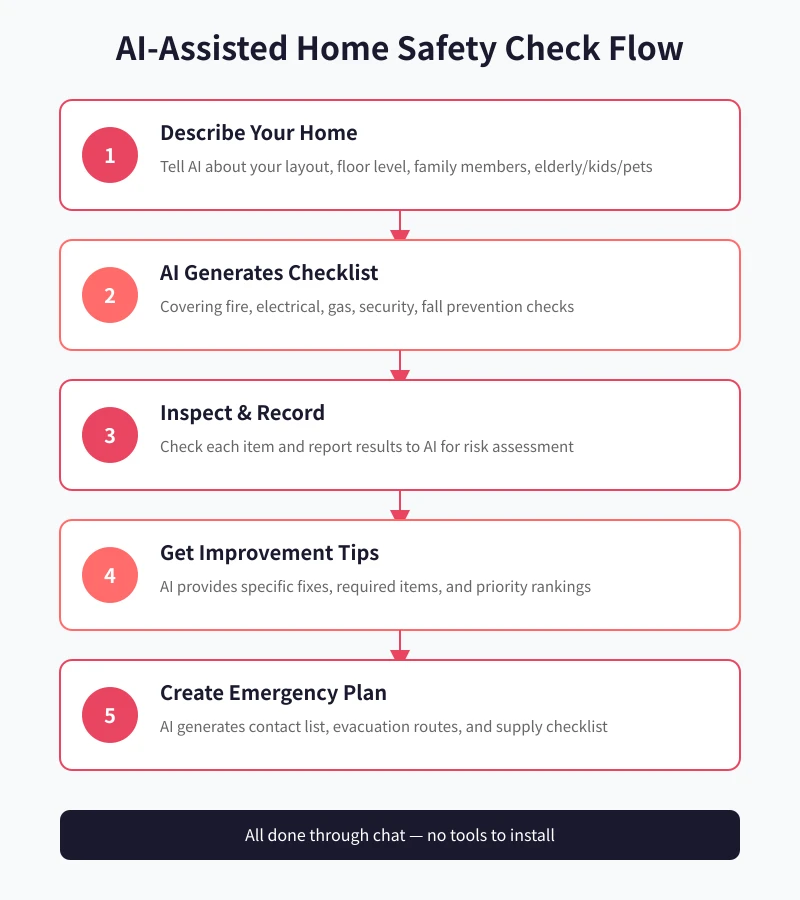
Step 1: Let AI Understand Your Home
Open any AI chat tool (such as ChatGPT, Claude, or similar), and enter the following prompt:
I want to create an emergency plan for my family. Please learn about my situation first:
- Layout: XX sqm, X bedrooms, X living room
- Floor: Xth floor (total X floors)
- Family members: X people (any elderly/kids/pets)
- City: XX
- Existing safety equipment: (fire extinguisher, smoke detectors, etc.)
Based on this information, please generate a complete home safety checklist for me.
AI will generate a checklist covering fire safety, electrical, gas, security, fall prevention, and more — all tailored to your specific home situation. This is much more precise than generic checklists you'd find online.
Step 2: Inspect Each Item and Report Back to AI
Once you have the checklist, spend a weekend checking each item. Report your findings to AI like this:
I've finished checking the list. Here are my results:
- Smoke detector: Not installed
- Fire extinguisher: Have one, but it's expired
- Gas pipes: Normal, no leaks
- Balcony railing: Too low, have a 3-year-old child
- Escape route: Clutter in the hallway
Please assess the risk level and give specific improvement suggestions.
AI will assign risk levels (high/medium/low) to each hazard and provide specific remediation plans, including what items to buy, approximate costs, and priority order.
Step 3: Create an Emergency Contact Sheet
This is the most critical part of your emergency plan. Ask AI to generate a contact sheet:
Please create a family emergency contact sheet including:
1. Emergency numbers (fire, ambulance, police)
2. Property management and community contacts
3. Family emergency contacts
4. Nearest hospital and fire station
5. Utility repair hotlines (water, electric, gas)
Please format it as a table for easy printing and posting.
Once generated, print it out and stick it on the refrigerator door or behind the front door — somewhere every family member can see at a glance.
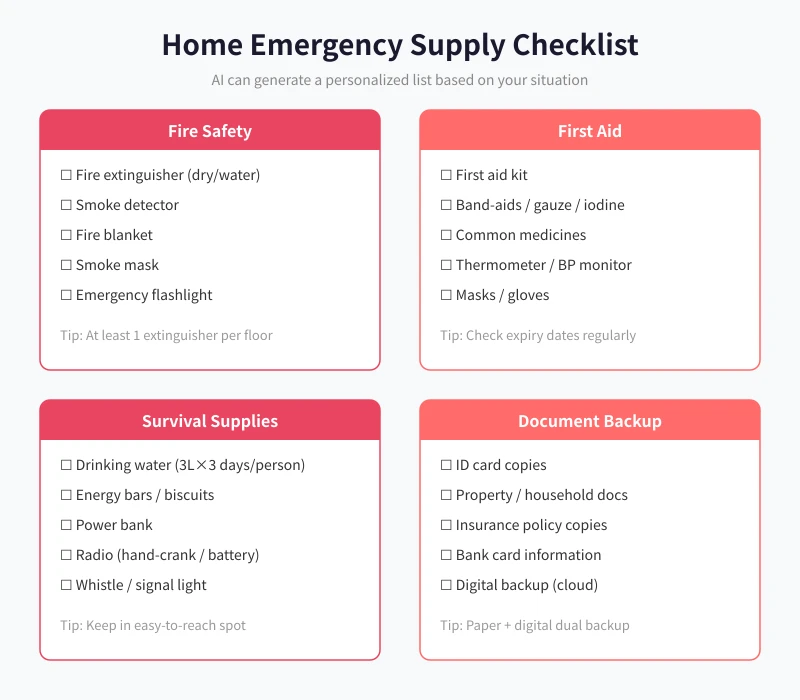
Step 4: Prepare an Emergency Supply Kit
Ask AI to recommend an emergency supply list based on your family composition. Key prompt:
My family has 2 adults, 1 child (age 3), and 1 cat. Please create an emergency supply list including:
- Fire safety (extinguisher, smoke detector, etc.)
- First aid (kit, common medicines, etc.)
- Survival supplies (water, food, flashlight, etc.)
- Document backup (what documents to copy)
Please include reference prices and where to buy each item.
AI will give you a detailed list with descriptions, reference prices, and even platform recommendations for the best deals. You can purchase items in batches based on your budget.
Step 5: Plan Evacuation Routes and Drills
Finally, ask AI to help you plan home evacuation routes:
I live on the Xth floor, total X floors, with 2 exits (front door and balcony). Please help me:
1. Plan fire evacuation routes (primary + backup)
2. Earthquake shelter spots
3. Create a family emergency drill plan (frequency and content)
4. Age-appropriate safety education scripts for young children
AI will not only give you route suggestions but also design child-friendly safety education scripts, using catchy phrases like "small fire — run fast, big fire — close the door" to help kids remember.
FAQ
Is AI's advice reliable?
AI's recommendations are based on extensive safety knowledge bases, covering common household hazards. However, for professional matters like gas pipe work or electrical rewiring, it's best to hire a professional inspector. AI works best as a "first line of defense" to help you identify obvious risks.
Do I need to pay to use this?
No. Free versions of ChatGPT and other AI tools can handle all the steps above. If you need more detailed analysis, you can consider paid versions.
How often should I update the emergency plan?
It's recommended to review every six months. You should also update whenever you move, family composition changes (new baby, elderly parent moves in), or you acquire major new appliances.
What if elderly family members can't use AI?
You can do the AI conversation for them and print out the checklists and contact sheets. The key is making sure every family member knows where emergency numbers are and what the evacuation routes look like.
Conclusion
Creating a home emergency plan with AI takes only about 30 minutes. Here's what you need to do:
- Spend 5 minutes telling AI about your home situation
- Spend one weekend checking items on the list
- Spend 5 minutes having AI generate the contact sheet and supply list
- Print everything out and post it in visible spots at home
- Chat with AI every six months to update the plan
When it comes to safety, 30 minutes buys your whole family peace of mind. Instead of regretting it later, open an AI chat window right now, enter your home's basic info, and take the first step.
Related Articles
AI Speech to Text: Beginner's Guide to Convert Voice to Text in 3 Steps
Learn how to convert speech to text using AI tools. Perfect for meeting notes, content creation, and video subtitles. Three practical scenarios with step-by-step instructions.
TutorialsAI Local Deployment Guide: Run Large Models in 3 Steps for Free
Learn how to deploy AI models locally in just 3 steps. No coding experience needed, completely free, and your data stays private on your own computer.
TutorialsAI Shopping Decision Guide: From Price Comparison to Avoiding Pitfalls
Learn how to use AI for shopping decisions. From price comparison to avoiding pitfalls - make smarter purchasing choices with AI assistance.
Comments are not yet available, stay tuned