5 Prompt Writing Skills for Beginners: Double Your AI Answer Quality
Why Are Your AI Answers Always "Just Okay"?
Many people try AI for the first time, type "help me write a plan," get a generic response, and conclude that "AI isn't that great." But the problem usually isn't the AI — it's how you're asking.
Think of it this way: if you walk into a restaurant and just say "bring me food," the chef has no idea what flavor, ingredients, or budget you want. But if you say "a light home-style dish for two, no spice," the chef can nail it. Talking to AI works exactly the same way.
This article teaches you 5 simple, practical prompting techniques. No technical background needed — you can start using them right away.
Tip 1: Assign AI a Role
This is the easiest step to overlook, yet it has the biggest impact. Tell AI "who it is" before asking your question, and its answers will immediately become more professional and targeted.
How to Do It
Add a role description at the beginning of your question: "You are an XX expert, please help me..."
Comparison Example
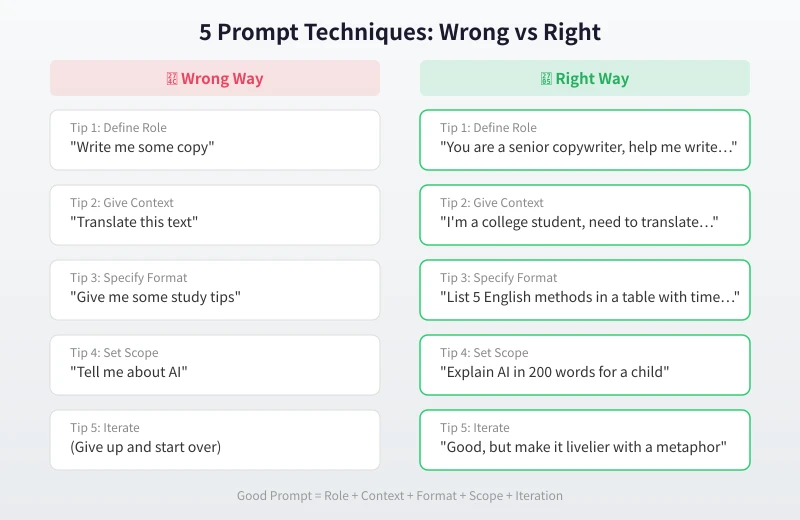
- No role: "Help me write a product description" → Generic, industry-unaware response
- With role: "You are a senior e-commerce copywriter skilled at writing compelling, concise copy. Help me write a product description for a thermos" → Professional, sales-focused, engaging response
Common Role Templates
- Writing: Senior editor, marketing copywriter, fiction writer
- Learning: Patient teacher, subject expert, study coach
- Work: Project manager, product manager, data analyst
- Daily life: Nutritionist, fitness coach, travel planner
Tip 2: Provide Enough Context
AI doesn't know your situation, so you need to tell it. The more context you provide, the more tailored the response.
What Context to Provide
- Who you are: Student, office worker, entrepreneur... different identities need different tones
- Purpose: Homework, social media post, executive report... different scenarios call for different styles
- Your level: Complete beginner or experienced? AI will adjust difficulty accordingly
Comparison Example
- No context: "Help me make a study plan" → Generic study advice
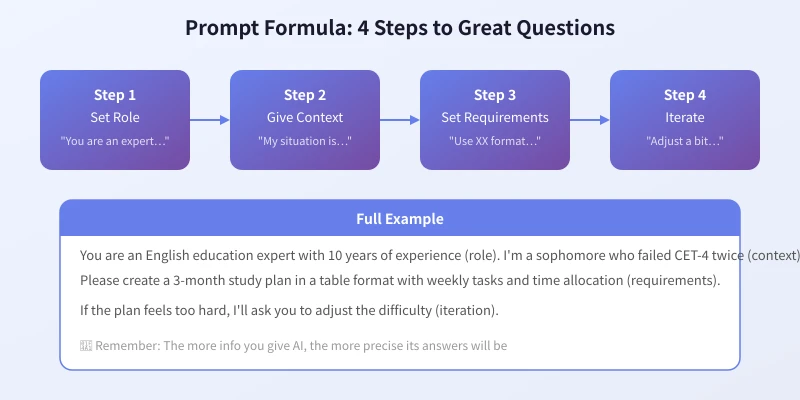
- With context: "I'm a sophomore who failed CET-4 twice. I can spend 1 hour per day on English. Help me create a 3-month prep plan" → Precise, actionable, personalized plan
Tip 3: Specify the Output Format
AI defaults to long paragraphs, but often you need tables, lists, step-by-step guides, or other specific formats. Directly telling it your preferred format saves tons of back-and-forth adjustments.
Common Format Instructions
- Table: "Compare the pros and cons of A and B in a Markdown table"
- List: "List 5 key points in numbered format, no more than 20 words each"
- Step-by-step: "Explain the process step by step, with a one-sentence explanation for each step"
- Code: "Provide Python code with comments"
- Word count: "Summarize in 100 words or less"
Comparison Example
- No format: "Give me some weight loss tips" → Wall of text, tiring to read
- With format: "Create a table listing 5 weight loss methods for office workers, including method name, daily time required, expected results, and difficulty level" → Clear at a glance
Tip 4: Set Scope and Constraints
Open-ended questions tend to get open-ended answers — in other words, fluff. Adding constraints makes AI's answers more focused and practical.
Constraints You Can Add
- Word limit: "Under 200 words" or "No more than 3 sentences"
- Difficulty limit: "Use language a 10-year-old can understand" or "No jargon"
- Content limit: "Only recommend free tools" or "Only things available in my country"
- Time limit: "Something I can finish in 5 minutes" or "Achievable within a week"
Comparison Example
- No constraints: "Tell me about artificial intelligence" → Might get a thesis-level response
- With constraints: "Explain AI in 200 words to a 10-year-old, with a real-life example" → Concise, vivid, easy to understand
Tip 5: Learn to Follow Up and Iterate
Many people give up after one unsatisfying answer. In reality, AI conversation is an iterative process — if the first answer isn't great, tell it what to change. That's far more efficient than starting over with a brand new question.
The Right Way to Follow Up
- Request additions: "Not bad, but can you add a real-world example?"
- Adjust style: "Make the tone more lively, add some humor"
- Narrow down: "Too long, condense to 100 words"
- Change direction: "That angle isn't quite right, I want to approach it from XX perspective"
Advanced: Multi-Turn Strategy
Don't expect to nail complex tasks in one go. Try this workflow:
- Round 1: Give general direction, let AI produce a first draft
- Round 2: Point out what needs changing
- Round 3: Fine-tune details and tone
- Round 4: Final confirmation
After 4 rounds, the output quality far exceeds a single question.
Hands-On: A Complete Prompt Example
Let's combine all 5 tips into one complete Prompt:
Scenario: You're an operations specialist at an internet company, writing a WeChat article.
Complete Prompt:
"You are a new media operations expert with 5 years of experience, skilled at writing viral WeChat articles. I'm an operations specialist at an internet company, writing an article about 'remote work efficiency tool recommendations' for our company WeChat account. Target audience: white-collar professionals aged 25-35. Use a casual, practical tone, recommend 5 tools, each with name, core features, use cases, and a one-line recommendation. Use subheadings format, around 1,500 words total."
See that? A good Prompt includes role (new media expert) + context (ops specialist writing WeChat article) + format (subheadings) + scope (5 tools, 1,500 words). When AI receives this kind of instruction, the quality difference is night and day.
Summary
Recap of the 5 tips:
- Set a role: Tell AI who it is
- Provide context: Tell AI your situation
- Specify format: Tell AI what output you want
- Set scope: Tell AI the constraints
- Iterate: If it's not right, keep adjusting
Remember this formula: Good Prompt = Role + Context + Format + Scope + Iteration. No need to memorize templates — just understand these 5 dimensions and mix freely.
Next time before talking to AI, spend 30 seconds thinking about these 5 points. You'll notice a dramatic jump in answer quality.
Related Articles
AI Speech to Text: Beginner's Guide to Convert Voice to Text in 3 Steps
Learn how to convert speech to text using AI tools. Perfect for meeting notes, content creation, and video subtitles. Three practical scenarios with step-by-step instructions.
TutorialsAI Local Deployment Guide: Run Large Models in 3 Steps for Free
Learn how to deploy AI models locally in just 3 steps. No coding experience needed, completely free, and your data stays private on your own computer.
TutorialsAI Shopping Decision Guide: From Price Comparison to Avoiding Pitfalls
Learn how to use AI for shopping decisions. From price comparison to avoiding pitfalls - make smarter purchasing choices with AI assistance.
Comments are not yet available, stay tuned