AI Image Generation Guide: Create Images from Text Starting from Zero
No drawing skills needed, no design experience required. If you can type, AI can generate the images you want. This guide starts from zero and teaches you the core techniques of AI image generation.
What is AI Image Generation
AI image generation is simple: you describe the scene you want in words, and AI automatically generates an image based on your description. No painting skills needed — you just need to express your idea clearly.
This technology has exploded over the past two years. Midjourney burst onto the scene in 2022, giving ordinary people their first taste of "text-to-image" magic. Since then, DALL·E, Stable Diffusion, and other tools have launched, and Chinese platforms like Tongyi Wanxiang and Wenxin Yiye have quickly followed. Today, AI-generated images are widely used for social media content, e-commerce assets, PPT illustrations, and even commercial advertising.
The core idea in one sentence: During training, AI "looked at" billions of images paired with text descriptions, learning "what kind of text should correspond to what kind of image." You give it a description, and it generates a brand-new, never-before-seen image based on the patterns it learned.
Main Tools Overview
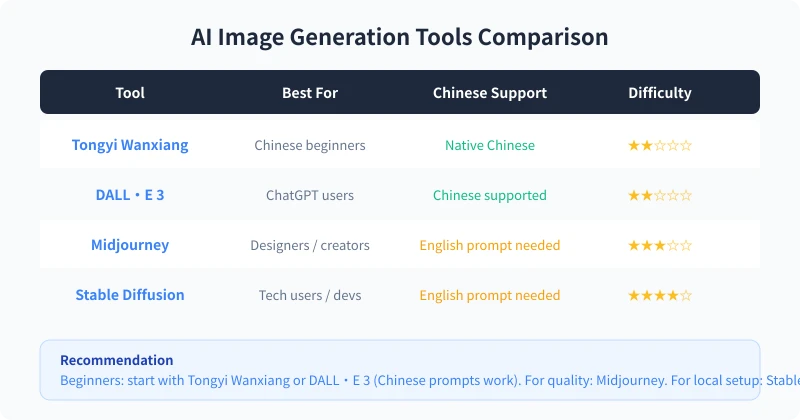
Current AI image generation tools fall into three categories:
Online Platforms (Recommended for Beginners)
Tongyi Wanxiang: By Alibaba, native Chinese support, generous free tier, use right after registration. Ideal for Chinese beginners.
DALL·E 3: By OpenAI, integrated into ChatGPT. If you're already a ChatGPT user, just ask it to create images in conversation. Chinese prompts work too.
Midjourney: Widely regarded as having the best image quality, but requires using Discord and prompts are mainly in English. Best for users who prioritize quality.
Local Deployment (For Tech-Savvy Users)
Stable Diffusion: Open source and free, can be deployed on your own computer for fully offline use. Rich community models, highest customizability, but requires decent hardware (dedicated GPU recommended).
Built into Other Tools
Many tools now have built-in AI image features: Canva's "Magic Media," Meitu's "AI Painting," Notion's AI image generation, and more. These are great for users who don't want to sign up for another tool.
Beginner advice: Start with Tongyi Wanxiang or DALL·E 3 to practice — zero cost, zero barrier. Once you're comfortable with prompt writing, consider Midjourney or Stable Diffusion.
Four-Step Generation Process
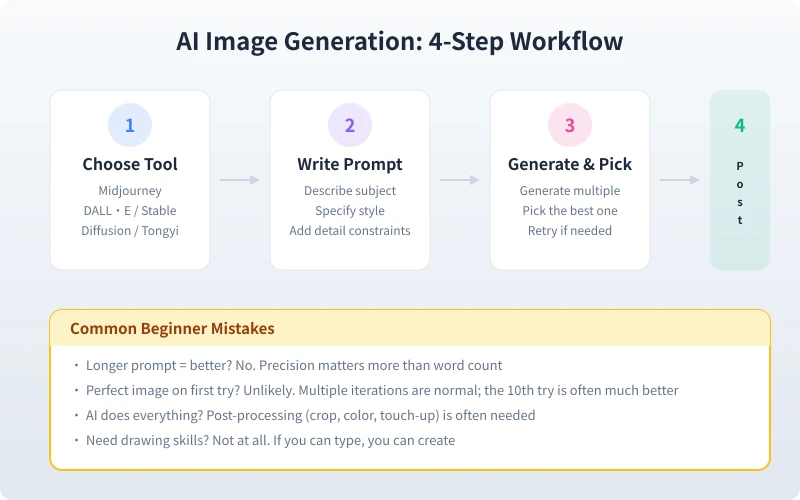
Step 1: Choose a Tool
Pick a platform based on your needs. Beginners should try Tongyi Wanxiang (free, Chinese-friendly) or DALL·E 3 (if you have a ChatGPT account). Register, log in, and find the image generation feature.
Step 2: Write a Prompt
This is the most critical step. A prompt is your "image description" for AI. Write it well and you get great results; write it poorly and the output may be nothing like what you imagined.
Basic prompt structure:
| Element | Description | Example |
|---|---|---|
| Subject | Core content of the image | An orange tabby cat |
| Scene | Where and under what conditions | Sitting on a windowsill, rainy day outside |
| Style | Artistic style of the image | Watercolor / realistic photography / pixel art |
| Details | Lighting, color tone, composition | Warm tones, soft lighting, close-up shot |
Complete prompt example:
A chubby orange tabby cat, sitting on a windowsill, rainy day outside, watercolor style, warm tones, soft lighting, close-up shot
Step 3: Generate and Select
After clicking generate, AI typically produces 2-4 candidate images. Pick the one closest to your vision. If unsatisfied, you can:
- Adjust the prompt: add or modify description details
- Change style keywords: e.g., swap "watercolor" for "oil painting"
- Add negative prompts: tell AI what you don't want, e.g., "no text, no blur"
- Simply retry: the same prompt produces different results each time — more attempts may yield a better result
Step 4: Post-Processing
AI-generated images rarely come out perfect for immediate use. Usually you'll need:
- Crop: adjust composition, remove unwanted parts
- Fix artifacts: AI often makes mistakes with fingers, text, and small objects — use editing tools to fix them
- Color correction: unify the color tone to match your use case
- Upscale: if resolution is insufficient, use AI upscaling tools (like Real-ESRGAN) to enhance clarity
Prompt Writing Tips
Tip 1: Start Simple, Add Details Gradually
Don't write a long prompt from the start. Begin with the core description, check the result, then gradually add details:
- Round 1:
An orange tabby cat - Round 2:
An orange tabby cat, sitting on a windowsill - Round 3:
An orange tabby cat, sitting on a windowsill, rainy day outside, watercolor style - Round 4:
A chubby orange tabby cat, sitting on a windowsill, rainy day outside, watercolor style, warm tones, soft lighting
Tip 2: Use Specific Adjectives Instead of Vague Words
| Not Good | Better |
|---|---|
| A nice picture | Cinematic quality, shallow depth of field, bokeh background |
| A beautiful city | Cyberpunk-style Tokyo nightscape, neon lights, rain-soaked streets |
| A cute dog | Golden retriever puppy, head tilted, big eyes, sunlight on grass |
Tip 3: Specify Image Purpose to Set Aspect Ratio
- Phone wallpaper:
vertical composition, 9:16 ratio - Blog cover:
horizontal composition, 16:9 ratio - Avatar:
square composition, 1:1 ratio, clean background - PPT illustration:
flat illustration style, clean and minimal, plenty of white space
Tip 4: Use Style Keywords Effectively
These style words can quickly change the look and feel:
- Realistic: realistic photography, cinematic quality, 8K resolution, ultra HD
- Illustration: flat illustration, vector style, Japanese illustration, picture book style
- Artistic: oil painting, watercolor, sketch, woodblock print, ukiyo-e
- Tech: cyberpunk, futurism, minimalism, neon lights
Practical Use Cases
Case 1: Blog Article Illustration
Flat illustration style, a person sitting at a computer working, coffee cup on the desk, city night view through the window, warm tones, clean and minimal, suitable for blog article illustration
Case 2: Product Display Image
A pair of white sneakers, placed on a marble countertop, soft studio lighting, pure white background, product photography style, high-definition detail
Case 3: PPT Background Image
Abstract geometric shapes, blue-purple gradient, tech feel, plenty of white space, suitable for PPT background, 16:9 ratio
Case 4: Social Media Avatar
Cartoon-style avatar, a Shiba Inu wearing sunglasses, cyberpunk color palette, neon light background, square composition
FAQ
Q: Who owns the copyright of generated images?
Policies vary by platform. Tongyi Wanxiang and DALL·E 3 paid users typically have commercial usage rights; free versions may have restrictions. Check the platform's terms of use before using images commercially.
Q: Why can't AI draw hands and text well?
This is because AI generates images through pixel statistical patterns, and it still struggles with fine structures (finger counts, Chinese character strokes). For these issues, post-processing is the most practical solution.
Q: How much does it cost to generate one image?
Tongyi Wanxiang has a free tier; DALL·E 3 is included in ChatGPT Plus; Midjourney starts at $10/month; Stable Diffusion running locally is completely free. For daily use, free options are usually sufficient.
Q: Will the same prompt produce the same image every time?
No. The AI generation process has randomness — the same prompt produces different results each time. This is why we recommend trying multiple times — the 3rd attempt might be much better than the 1st.
Summary
The core of AI image generation is: Choose tool → Write prompt → Generate and select → Post-process. No drawing skills needed, no design experience required. As long as you can describe the image in your mind with words, AI can bring it to life.
Start with Tongyi Wanxiang or DALL·E 3, practice with the prompt templates above, and soon you'll be generating stunning images that impress everyone.
Related Articles
AI Speech to Text: Beginner's Guide to Convert Voice to Text in 3 Steps
Learn how to convert speech to text using AI tools. Perfect for meeting notes, content creation, and video subtitles. Three practical scenarios with step-by-step instructions.
TutorialsAI Local Deployment Guide: Run Large Models in 3 Steps for Free
Learn how to deploy AI models locally in just 3 steps. No coding experience needed, completely free, and your data stays private on your own computer.
TutorialsAI Shopping Decision Guide: From Price Comparison to Avoiding Pitfalls
Learn how to use AI for shopping decisions. From price comparison to avoiding pitfalls - make smarter purchasing choices with AI assistance.
Comments are not yet available, stay tuned