AI Client Tools Guide: 5 Mainstream Tools Compared & Configured
Why Do You Need an AI Client?
There are more AI models than ever — ChatGPT, Claude, Gemini, and various domestic models. Each platform has its own web interface. But for users who truly want to leverage AI effectively, choosing the right client tool is the first step toward efficient AI usage.
This article compares 5 mainstream AI client tools and walks you through connecting via API Key, so you can freely switch between different models in a single interface.
1. Comparing 5 Mainstream AI Client Tools
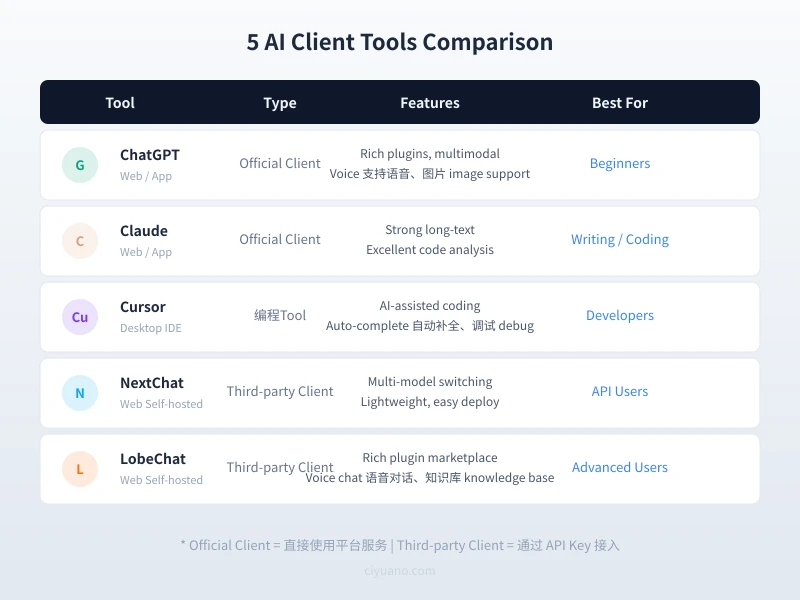
Here is a comparison chart to quickly understand each tool positioning:
1. ChatGPT Official Client
Officially made by OpenAI, available on web and mobile app. Its advantage lies in a rich plugin ecosystem, supporting image generation, voice conversations, file analysis, and other multimodal features. Ideal for beginners to use directly.
- Advantages: Ready to use, comprehensive features
- Limitations: Only supports OpenAI models
- Pricing: Free tier available, Plus at $20/month
2. Claude Official Client
Claude series models by Anthropic excel at long-text processing and code analysis. Supports file uploads for analysis and can handle very long texts in a single conversation.
- Advantages: Large context window, strong comprehension
- Limitations: Only supports Claude models
- Pricing: Free tier available, Pro at $20/month
3. Cursor
An AI-powered IDE built on VS Code with built-in AI coding assistance. Supports code auto-completion, debugging, and code explanation. The top choice for developers.
- Advantages: Deeply integrated with development environment, high coding efficiency
- Limitations: Primarily for coding scenarios
- Pricing: Free tier available, Pro at $20/month
4. NextChat (ChatGPT Next Web)
An open-source third-party AI chat client that supports connecting to multiple models via API Key. Clean interface, easy deployment, perfect for users who have their own API Key.
- Advantages: Multi-model switching, clean interface
- Limitations: Requires your own API Key
- Pricing: Completely free and open source
5. LobeChat
One of the most feature-rich open-source AI clients, supporting plugin marketplace, voice conversations, knowledge base management, and other advanced features. Ideal for advanced users who want a deeply customized AI experience.
- Advantages: Rich plugins, highly customizable
- Limitations: Relatively complex to configure
- Pricing: Completely free and open source
2. 4-Step API Setup Flow
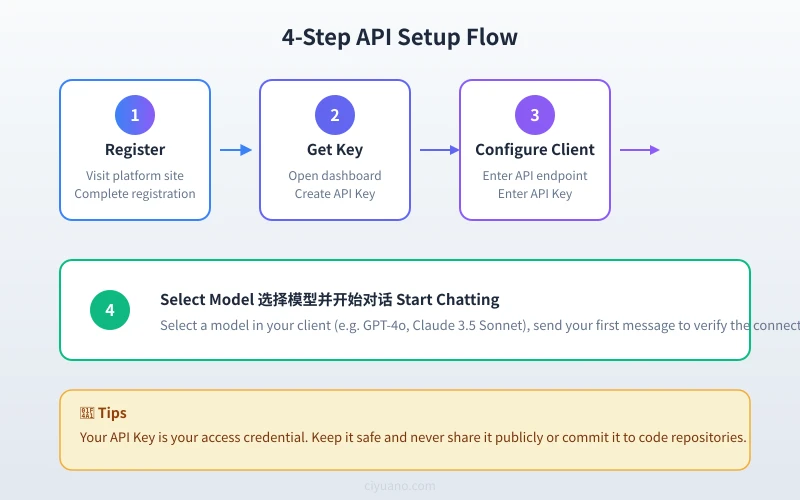
If you choose third-party clients like NextChat or LobeChat, you need to connect via API Key. Here is the universal four-step setup process:
Step 1: Register an Account
Visit your chosen AI platform (such as ciyuano.com) and register an account. Usually just an email is needed. Some platforms support third-party login.
Tip: After registration, link your phone number immediately for password recovery and notifications.
Step 2: Get Your API Key
After logging in, go to the Dashboard or API Management page and click Create API Key. The system will generate a key in the format sk-xxxxxxxxxxxx.
Important: The API Key is only shown once. Copy and save it to a secure location immediately. If lost, you will need to create a new one.
Step 3: Configure Your Client
Open your chosen client tool, find the Settings or Model Configuration page, and enter the following information:
- API Endpoint (Base URL): Enter the platform API address, e.g.,
https://api.ciyuano.com/v1 - API Key: Paste the key you obtained in Step 2
- Model Name: Select the model you want to use, such as
gpt-4o,claude-3.5-sonnet, etc.
Step 4: Select a Model and Start Chatting
After configuration, select a model from the client model dropdown menu, send a test message (such as Hello), and confirm the connection is working. If you receive a reply, congratulations — you are connected!
3. Which Tool for Which Scenario?
Based on your use case, here are our recommendations:
| Scenario | Recommended Tool | Why |
|---|---|---|
| Daily chat and Q&A | ChatGPT / Claude | Official clients, comprehensive, ready to use |
| Coding and debugging | Cursor | Deep IDE integration, AI-assisted coding |
| Multi-model comparison | NextChat | Lightweight, supports multiple API switching |
| Deep customization and plugins | LobeChat | Plugin marketplace, knowledge base, voice chat |
| Writing and document processing | Claude | Large context window, strong comprehension |
4. Security Best Practices
When using API integration, keep these security points in mind:
- Protect your API Key: Never share your key with others or upload it to public repositories (like GitHub)
- Set usage limits: Most platforms support monthly spending caps — enable them to avoid unexpected charges
- Rotate keys regularly: If you suspect a key has been compromised, disable it immediately and create a new one
- Use environment variables: Technical users should store API keys in environment variables rather than hardcoding them
5. FAQ
Q: What is the difference between using an API Key and using the web interface?
A: The web interface is a fixed-feature platform UI. API access lets you use various client tools freely with more custom configuration options, typically billed by usage — much more flexible.
Q: Can I use one API Key on multiple clients simultaneously?
A: Yes. The same key can be configured on multiple devices and clients, sharing the same account quota.
Q: What is the difference between free and paid models?
A: Paid models (like GPT-4o, Claude 3.5 Sonnet) typically have stronger comprehension, larger context windows, and faster response times. Free models are suitable for light usage; for heavy use, paid models are recommended.
Conclusion
Choosing the right AI client tool is like choosing the right tool for the job. Beginners should start with official client experiences, while advanced users can get more flexible usage through API + third-party client combinations. Regardless of your choice, the key is to dive in and try it — only by actually using it can you experience the efficiency gains AI brings.
Related Articles
AI Speech to Text: Beginner's Guide to Convert Voice to Text in 3 Steps
Learn how to convert speech to text using AI tools. Perfect for meeting notes, content creation, and video subtitles. Three practical scenarios with step-by-step instructions.
TutorialsAI Local Deployment Guide: Run Large Models in 3 Steps for Free
Learn how to deploy AI models locally in just 3 steps. No coding experience needed, completely free, and your data stays private on your own computer.
TutorialsAI Shopping Decision Guide: From Price Comparison to Avoiding Pitfalls
Learn how to use AI for shopping decisions. From price comparison to avoiding pitfalls - make smarter purchasing choices with AI assistance.
Comments are not yet available, stay tuned