AI Job Search Assistant Guide: Resume Optimization, Cover Letters & Interview Prep
What Can AI Do for Your Job Search?
Job hunting is a battle of information and efficiency. Resumes that get ignored, generic cover letters, and interview nerves — AI can help solve all of these. Just provide basic information, and AI will polish your resume wording, generate targeted cover letters, and simulate real interview scenarios.
This guide walks you through 5 common job search scenarios, teaching you step by step how to use AI to boost your success rate. Even if you have never used AI before, you can get started in 10 minutes.
Getting Started
Before you begin, you need an AI chat tool. Here are some recommended options:
- ChatGPT (OpenAI): Strong all-around capability, suitable for all job search scenarios
- Claude (Anthropic): Natural language expression, excels at long-form writing
- Tongyi Qianwen / Wenxin Yiyan: Strong Chinese understanding, ideal for domestic job searches
- Ciyuano Platform: Aggregates multiple models, one-click switching and comparison
Choose any one to start. The examples below use ChatGPT, but other tools work the same way.
Scenario 1: AI Helps Optimize Your Resume
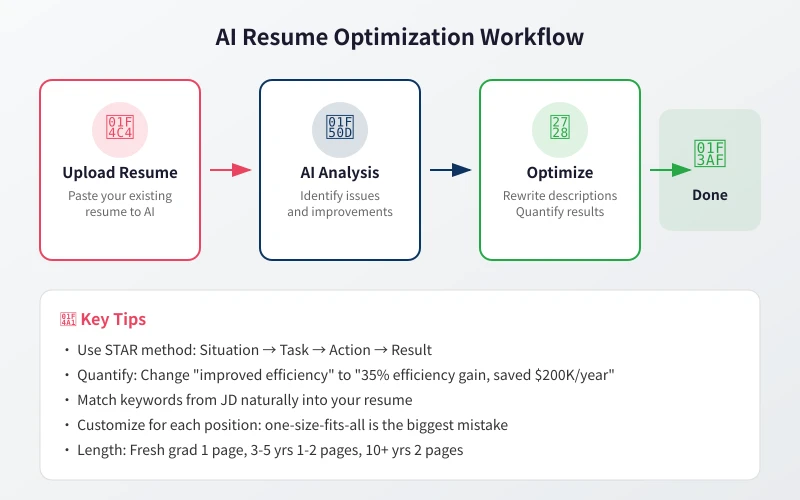
Many resumes get filtered out not because of lack of ability, but because they are not well presented. AI can help you describe your work experience professionally, making HR see your value at a glance.
Step-by-Step Guide
- Open your AI tool and enter the following prompt:
You are a senior HR professional and career consultant. I will give you my resume content. Please optimize it. Requirements:
1. Rewrite each work experience using the STAR method
2. Quantify all results (data, percentages, amounts)
3. Use industry-specific terminology
4. Keep language concise and powerful, no more than 2 lines per bullet
- Paste your resume content into the chat
- AI will optimize each work experience description one by one
- Review the optimized results, ensure data accuracy, and fine-tune wording
Before and After Comparison
| Before | After |
|---|---|
| Handled company product operations, ran many activities | Led 3 online marketing campaigns, generating 500K new users with a 23% conversion rate increase |
| Managed team, completed project development | Led an 8-person team to complete e-commerce platform rebuild in 6 months, improving system response time by 40% |
| Did data analysis work | Built user behavior analysis system, identified drop-off points through funnel analysis, increasing next-month retention by 15% |
Advanced Tips
If you have the target position JD (job description), send it directly to AI for targeted resume optimization:
Here is the target position JD. Please adjust my resume according to this role requirements, highlighting relevant experience and skills, using keywords from the JD:
Scenario 2: AI Helps Write Cover Letters
A good cover letter helps you stand out from many candidates. AI can generate personalized cover letters based on your background and target position.
Step-by-Step Guide
- Provide the following information to AI:
Help me write a cover letter. Information:
- Target company: [Company name]
- Target position: [Position name]
- My core strengths: [List 2-3]
- Why I want to join this company: [Reason]
- Tone: Professional but not stiff, showing enthusiasm
- AI will generate a complete cover letter
- Review the content, add specific details and real examples
- Adjust tone and length, generally 300-500 words
Cover Letter Structure
- Opening: State your application intent, one sentence on why you are a fit
- Body: 2-3 core strengths, supported by specific examples
- Closing: Express expectations, leave contact information
Scenario 3: AI Helps Prepare for Interviews
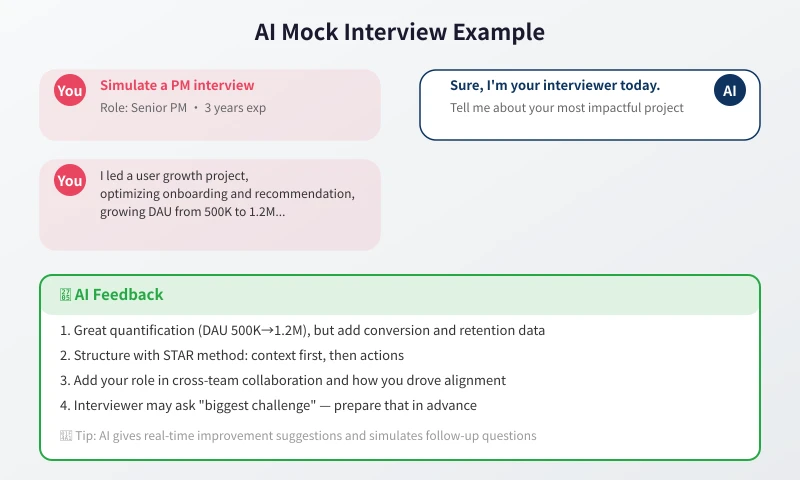
The interview is the most critical step. AI can simulate real interview scenarios, helping you practice in advance and spot issues in your answers.
Step-by-Step Guide
- Have AI play the interviewer:
Please simulate an interview for [position name]. You are the interviewer, I am the candidate.
- Job requirements: [Paste key JD requirements]
- My experience: [Brief description]
- Ask one question at a time, wait for my answer, give feedback, then ask the next
- Feedback includes: strengths of the answer, areas for improvement, better ways to express it
- Answer each question as you would in a real interview
- Read AI feedback carefully, note areas for improvement
- For weak questions, ask AI for reference answers and practice repeatedly
Common Interview Questions to Prepare
You can have AI help you prepare for these frequently asked questions:
- "Tell me about yourself" — Have AI help you keep it to 1-2 minutes, highlighting core strengths
- "What are your strengths and weaknesses?" — Have AI help you frame weaknesses as areas of growth
- "Why did you leave your last job?" — Have AI help you organize a positive expression
- "Do you have any questions for us?" — Have AI generate insightful questions to ask
Scenario 4: AI Helps with Salary Negotiation
Negotiating salary is a weak point for many. AI can help you prepare negotiation strategies and talking points in advance.
Step-by-Step Guide
- Tell AI about your salary situation:
I am about to enter salary negotiation. Details:
- Current salary: [Amount]
- Expected salary: [Amount]
- Market rate: [If known]
- HR asked about expected salary, I have not quoted yet
Please help me:
1. Analyze a reasonable salary range
2. Prepare negotiation talking points
3. List other benefits to negotiate (equity, vacation, remote work, etc.)
Salary Negotiation Tips
- Never quote first — let HR make the first offer
- Negotiate total compensation (annual salary + bonus + equity + benefits), not just monthly pay
- Use data to speak, show market rates and your unique value
- Stay friendly but firm, do not accept an offer below expectations just to be polite
Scenario 5: AI Helps with Career Planning
If you are unsure about your next move, AI can help you analyze your current situation and map out directions.
Step-by-Step Guide
- Describe your situation to AI:
Please help me with career planning analysis. My situation:
- Current position: [Position]
- Years of experience: [Years]
- Core skills: [List]
- Interest areas: [Direction you want to develop]
- Constraints: [City, salary floor, etc.]
Please provide:
1. 3 viable career development paths
2. Skills needed for each path
3. A 1-3 year action plan
Important Notes for Using AI in Job Search
- Authenticity first: AI helps optimize expression, but data and experience must be real. Interviewers will catch inconsistencies when they probe for details
- Customize for each role: Do not use the same resume for every position. Adjust for each JD
- Iterate multiple times: First drafts are usually not good enough. Have AI revise 2-3 rounds for ideal results
- Human review: AI may generate inaccurate information. Always check the final version yourself
- Protect privacy: Do not enter ID numbers, bank account numbers, or other sensitive information in AI tools
Frequently Asked Questions
Will HR notice my resume was written by AI?
If you use AI output directly, it may feel formulaic. Add personal expression habits, include real details, and adjust sentence structures. AI helps you write a draft, not the final version.
Which AI tool is best?
Both ChatGPT and Claude work well for job search scenarios. ChatGPT is stronger overall, while Claude has more natural language. Try the Ciyuano platform to access multiple models and compare results.
How different is AI mock interview from a real interview?
AI can cover 80% of common questions and scenarios, but cannot fully replicate the pressure and dynamics of a real interview. Use AI simulation as foundational practice, then do mock interviews with friends.
Can complete beginners use this?
Absolutely. Even if you only have campus experience, AI can help you highlight project work, club activities, and internship experiences in a professional way.
Related Articles
AI Speech to Text: Beginner's Guide to Convert Voice to Text in 3 Steps
Learn how to convert speech to text using AI tools. Perfect for meeting notes, content creation, and video subtitles. Three practical scenarios with step-by-step instructions.
TutorialsAI Local Deployment Guide: Run Large Models in 3 Steps for Free
Learn how to deploy AI models locally in just 3 steps. No coding experience needed, completely free, and your data stays private on your own computer.
TutorialsAI Shopping Decision Guide: From Price Comparison to Avoiding Pitfalls
Learn how to use AI for shopping decisions. From price comparison to avoiding pitfalls - make smarter purchasing choices with AI assistance.
Comments are not yet available, stay tuned