6 Practical Tips for Asking AI Better Questions: Double Your Answer Quality
Why Does AI Always Give You Bad Answers?
Many people feel that AI chat tools "aren't that smart" when they first use them. In most cases, it's not that the AI is bad—it's that our way of asking questions needs adjustment. It's like asking for directions by saying "how do I get to that place"—no one can help you unless you first say where you want to go.
This article will teach you a few simple and practical questioning techniques to get more precise and useful answers from AI.
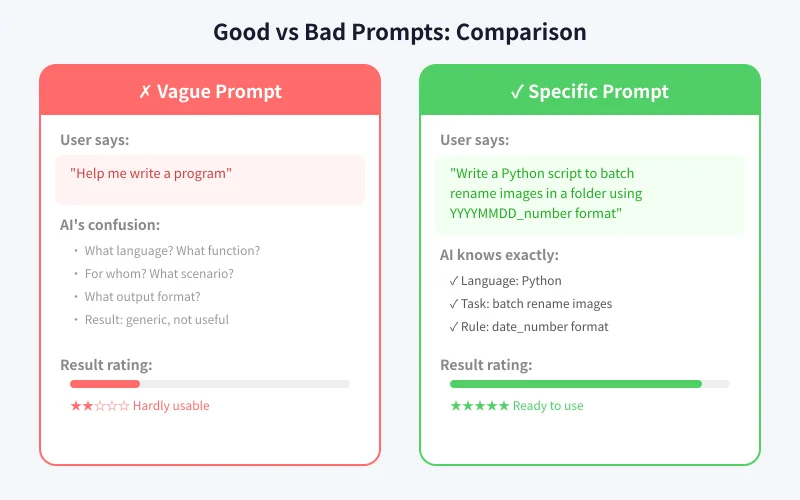
Tip 1: Be Specific About What You Want
The most common mistake is asking vague questions. Let's look at some examples:
Vague questions:
- "Help me write an article" — What topic? How long? For whom?
- "This code has a bug" — What code? What error? What's the expected result?
- "Recommend a useful tool" — For what? What platform? What budget?
Improved questions:
- "Help me write an ~800 word popular science article about the eight planets of the solar system, aimed at upper elementary school students"
- "This Python code throws an IndexError when running. I want it to correctly read the third column of a CSV file"
- "Recommend a free online flowchart tool that supports PNG export and doesn't require registration"
Remember this principle: Spending an extra 10 seconds describing your question clearly can improve AI's answer quality by 80%.
Tip 2: Give AI a Role
This is a "hidden trick" many people don't know about. You can tell AI what role to play at the beginning, and its answer style and expertise will change dramatically.
Example comparison:
Without a role:
"Explain what DNS is"
With a role:
"You are a network engineer. Please explain what DNS is in simple, easy-to-understand language for someone who knows nothing about technology, using everyday metaphors."
The second approach will give you a more vivid and easier-to-understand answer. You can have AI play the role of a teacher, programmer, product manager, doctor, lawyer, or any role you need.
Tip 3: Provide Background Information
AI doesn't know your situation, so you need to tell it proactively. The more background information you provide, the more tailored the answer will be.
Common background to provide:
- Your level: "I'm a programming beginner" vs "I have 5 years of Python experience"
- Use case: "This script needs to run daily on a Windows server"
- Existing conditions: "I already have a MySQL database and a Node.js backend"
- Constraints: "Budget under 500 yuan" or "Must be done within a week"
Tip 4: Specify the Answer Format
You can tell AI what format to use for its answer, making the results more convenient for direct use.
Common format instructions:
- "Compare the pros and cons of A and B in a table"
- "List in steps, no more than two sentences per step"
- "Give me a code example I can copy and run directly"
- "Output in Markdown format with headings and lists"
- "Give the conclusion first, then the detailed explanation"
Tip 5: Follow Up If Unsatisfied
Many people give up after one unsatisfactory answer. In reality, AI conversation is an iterative process—you can continuously improve results through follow-ups.
Effective follow-up methods:
- "This answer is good, but can you elaborate on the second point?"
- "Can you make the tone more formal/casual?"
- "I wanted the Python version, not JavaScript"
- "Can you give a real-world work example?"
- "This is too long, help me condense it to under 200 words"
Don't feel that follow-ups are "troubling" AI—that's exactly what it's designed for. Just like discussing a problem with a colleague, it often takes a few rounds to get the best solution.
Tip 6: Let AI Check and Improve Your Work
AI can not only answer questions but also help improve content you already have. This is a frequently overlooked use case.
Practical scenarios:
- Check emails: "Review this business email for any grammatical errors or impolite language"
- Optimize code: "This code works but is slow, help me optimize performance"
- Improve copy: "This product description is too bland, help me make it more engaging"
- Translation polish: "Translate this Chinese text into English with natural, idiomatic wording"
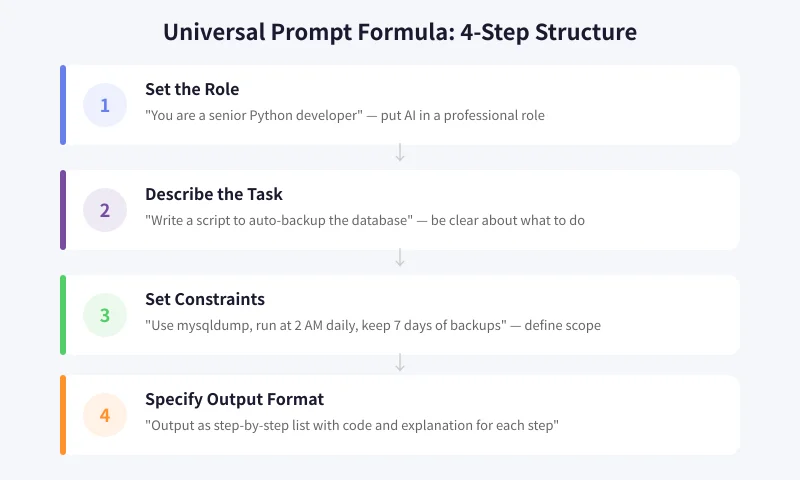
A Universal Question Template
If you can't remember too many tips, just remember this four-step template:
Role + Task + Constraints + Format
Practical example:
"You are a senior copywriter (Role), help me write a WeChat Moments promotion post (Task) for handmade cookies, targeting women aged 25-35, emphasizing healthy and additive-free (Constraints), keep it under 100 Chinese characters, with a light and lively tone (Format)"
Using this template for your questions, you'll notice a dramatic improvement in AI's answer quality.
Common Misconceptions
Misconception 1: Shorter questions are better
Wrong. AI is not a search engine—you don't need keywords. Complete sentences and detailed descriptions actually work better.
Misconception 2: AI can give a perfect answer in one try
Rarely. Good results often require 2-3 rounds of conversation to polish. Treat AI as an assistant that needs communication, not a magic button.
Misconception 3: Use the same approach for all questions
Different types of questions need different approaches. Writing uses one method, programming another, and analysis yet another. Try a few times and you'll find what works best.
Summary
Asking AI questions is a skill worth practicing. Key takeaways:
- Be specific—avoid vague expressions
- Set a role for AI to activate its expertise
- Provide sufficient background information
- Specify your desired answer format
- If unsatisfied, follow up and iterate
- Use AI to check and improve existing content
Starting today, try using these tips when asking questions. You'll find that AI becomes much "smarter"—it was always smart, it just needed you to point it in the right direction.
Related Articles
AI Speech to Text: Beginner's Guide to Convert Voice to Text in 3 Steps
Learn how to convert speech to text using AI tools. Perfect for meeting notes, content creation, and video subtitles. Three practical scenarios with step-by-step instructions.
TutorialsAI Local Deployment Guide: Run Large Models in 3 Steps for Free
Learn how to deploy AI models locally in just 3 steps. No coding experience needed, completely free, and your data stays private on your own computer.
TutorialsAI Shopping Decision Guide: From Price Comparison to Avoiding Pitfalls
Learn how to use AI for shopping decisions. From price comparison to avoiding pitfalls - make smarter purchasing choices with AI assistance.
Comments are not yet available, stay tuned