AI-Powered Knowledge Management: From Scattered Notes to a Smart Personal Knowledge Base
Is This Your Knowledge Management?
Your bookmarks hold 200 articles marked "read later," your notebook is filled with scattered thoughts, and your WeChat file transfer assistant has become a catch-all storage box — and when you actually need a piece of knowledge, you cannot find it anywhere.
This is not about being lazy. It is about lacking a systematic knowledge management approach.
The good news: AI tools can make this process incredibly simple. This article teaches you a four-step method to build your own smart knowledge base — no technical background needed.
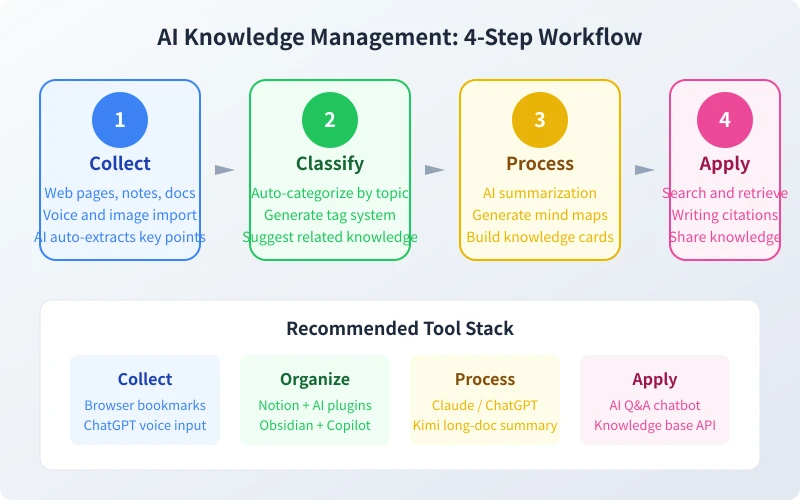
Step 1: Collect — Let AI Capture Your Fragments
The first step is gathering information. The real problem is not collecting too little, but collecting too scattered — articles in WeChat, notes in your memo app, ideas buried in chat logs.
What to Collect
- Articles and tutorials: good reads, technical guides, industry reports
- Ideas and inspiration: sudden creative sparks, work reflections
- Study notes: course highlights, book notes, meeting records
- Practical info: tool recommendations, step-by-step guides, common data
AI Collection Tips
Tip 1: Use ChatGPT Voice for Quick Capture
Open the ChatGPT mobile app, long-press the microphone icon, and speak your thoughts. AI automatically organizes them into structured text — 3x faster than typing.
Tip 2: Use AI to Summarize Saved Articles
Send a long article link or content to AI and say: "Summarize the 3 core points of this article in one sentence each." Now your saved articles are no longer unread bookmarks — they are refined summaries.
Tip 3: Photograph Physical Information
Great passages from books, whiteboard meeting notes, business card contact info — snap a photo and send it to AI to extract text and categorize it.
Step 2: Classify — Let AI Organize Your Archive
Unclassified information is like throwing all your clothes into one big box — takes forever to find anything.
Build a Classification System
You can ask AI to design a classification for you. Tell it your profession, interests, and common scenarios, and it will generate a tailored system.
Example prompt: "I am a product manager who follows industry trends, product design, user research, competitive analysis, and tech basics. Design a knowledge classification system with main categories and subcategories, one sentence each."
AI Auto-Classification Methods
Method 1: Tag System
Tag each piece of knowledge with 2-3 labels. For example, an article about user interviews gets #UserResearch #InterviewTips #ProductManager. Ask AI to generate tags: "Generate 3 appropriate tags for the following content: [paste summary]"
Method 2: Topic Clustering
Periodically (e.g., weekly), send all your collected content to AI for automatic grouping: "Here are 20 notes I collected this week. Please group them by topic and name each category."
Step 3: Process — Let AI Extract Value
Collecting and classifying is just the foundation. Real knowledge management lies in deep processing — turning information into your own understanding.
Processing Method 1: AI Summarization
For long articles, reports, and papers, let AI extract the core: "Summarize the core viewpoint of this article in 200 words and list 3 immediately actionable takeaways."
Processing Method 2: Generate Mind Maps
Send complex knowledge to AI and have it output a mind map structure in Markdown: "Organize the following into mind map Markdown format — topic, subtopic, key points — no more than 3 levels." Then paste it into XMind or MindNode for instant visualization.
Processing Method 3: Build Knowledge Cards
Condense each knowledge point into a card containing:
- One-line definition: what this knowledge point is
- Key points: 3-5 critical pieces of information
- Application scenarios: when you can use it
- Related knowledge: connections to other points
Ask AI to generate a card template: "Organize the following into a knowledge card format with definition, key points, application scenarios, and related knowledge."
Processing Method 4: Build Knowledge Connections
The value of knowledge lies in its connections. Let AI discover links between different pieces: "Here are 5 knowledge points I recently learned. Analyze their connections and find common themes and combinable application scenarios."
Step 4: Apply — Let AI Help You Use It
The ultimate goal of knowledge management is to use it. Stored but unused is the same as never stored.
Application 1: Quick Retrieval
Import your knowledge base into AI tools (like Claude Projects, Kimi long-document feature) and search with natural language: "I saved an article about user personas before. What was its core viewpoint?"
Application 2: Writing Citations
When writing articles or reports, let AI extract relevant content from your knowledge base: "I am writing an article about product pricing strategies. Find related notes and cases from my knowledge base."
Application 3: Knowledge Sharing
Turn your knowledge cards and notes into articles, shared documents, or training materials. Ask AI to transform scattered notes into structured content: "Here are 10 notes on a specific topic. Help me organize them into a 1000-word article for sharing."
Recommended Tool Combinations
Beginner: Zero-Cost Solution
- Collect: WeChat Favorites + Phone Memos
- Organize: ChatGPT (free tier) for classification and tagging
- Process: ChatGPT summarization
- Apply: Search and cite directly in ChatGPT
Best for: beginners starting with knowledge management
Intermediate: Professional Tools
- Collect: Notion Web Clipper (browser extension for one-click web saving)
- Organize: Notion database + AI plugin for auto-classification
- Process: Claude long-doc summarization + Kimi Chinese understanding
- Apply: Notion public page sharing
Best for: professionals who need systematic knowledge management
Advanced: Automation Solution
- Collect: RSS subscriptions + automated scraping (Zapier/n8n)
- Organize: Obsidian + Copilot plugin for auto-tagging
- Process: AI API auto-summarizes every new piece of content
- Apply: Build a personal AI Q&A chatbot
Best for: technical users and teams needing large-scale knowledge management
FAQ
Q: Where do I start with knowledge management?
A: Start today. Throw everything useful into one place (like Notion or Memos). Do not worry about classification — build the collection habit first. When you have 20-30 items, ask AI to help you sort and organize.
Q: Will using AI for knowledge management leak my privacy?
A: General notes and learning materials have no privacy concerns. For trade secrets or sensitive personal information, use local tools (like Obsidian) with local AI models (like Ollama).
Q: How often should I organize?
A: Spend 30 minutes weekly on batch organization. Send the week's collected content to AI for classification, tagging, and summary generation. Once it becomes a habit, your knowledge base grows increasingly valuable.
Summary
Knowledge management is not about storing things — it is about being able to quickly find, accurately understand, and flexibly apply knowledge when needed.
Four-step recap:
- Collect: Use AI voice input and photo recognition to capture fragmented information
- Classify: Let AI auto-generate tags and classification systems
- Process: AI summaries, mind maps, and knowledge cards
- Apply: Search, cite in writing, share knowledge
Start today — turn your scattered knowledge into an always-available personal knowledge base with AI.
Related Articles
AI Speech to Text: Beginner's Guide to Convert Voice to Text in 3 Steps
Learn how to convert speech to text using AI tools. Perfect for meeting notes, content creation, and video subtitles. Three practical scenarios with step-by-step instructions.
TutorialsAI Local Deployment Guide: Run Large Models in 3 Steps for Free
Learn how to deploy AI models locally in just 3 steps. No coding experience needed, completely free, and your data stays private on your own computer.
TutorialsAI Shopping Decision Guide: From Price Comparison to Avoiding Pitfalls
Learn how to use AI for shopping decisions. From price comparison to avoiding pitfalls - make smarter purchasing choices with AI assistance.
Comments are not yet available, stay tuned