AI Writing Assistant Complete Guide: Write Professional Content from Scratch
Why You Should Try AI Writing
The hard part of writing was never the typing — it's starting from a blank page. You open a document, stare at the blinking cursor, and your mind goes blank. Where do you begin? How should you open? Is the tone right? This "writing anxiety" is something almost everyone experiences.
AI writing assistants have completely changed this dynamic. They don't write for you — they help you quickly turn vague ideas in your head into structured, polished drafts. You just need to tell it what to write, who it's for, and what tone you want. In seconds, you get a usable starting point.
This guide starts from the very basics — choosing the right tool — and walks you through the complete writing workflow from ideation to publication.
Step 1: Choose the Right AI Tool
There are many AI writing tools on the market, but as a beginner, you don't need to overthink it. Here are the most popular options:
ChatGPT (OpenAI)
The most widely used AI conversation tool. The free version is sufficient, and the Plus version offers a better experience. Its biggest advantage is the mature ecosystem — tutorials are everywhere, and solutions to common problems are easy to find. Suitable for most writing scenarios.
Claude (Anthropic)
Excels at long-form writing and logical reasoning. If you need to write in-depth articles or complex reports, Claude's output quality is typically higher. The free version has daily usage limits.
DeepSeek
A Chinese-developed large language model with strong Chinese understanding and generation capabilities, at a more affordable price point. If you primarily write in Chinese, DeepSeek offers excellent value.
Doubao (ByteDance)
Integrated within the Douyin/TikTok ecosystem, ideal for short video scripts and social media content. The interface is friendly with the lowest barrier to entry.
Our advice: Pick one and start using it. Don't spend too much time comparing. The differences between tools are much smaller than you think — what matters is getting started.
Step 2: Master the Art of Good Prompts
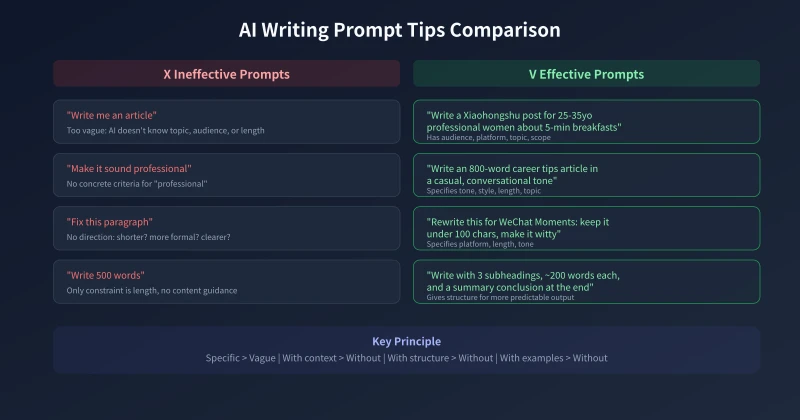
The quality of AI writing is 80% determined by the instructions you give it. This is called "prompt engineering" — it sounds technical, but the core is simple: the more specific information you give AI, the better results you get.
The Universal Prompt Template
Remember this structure, and it works for almost any writing scenario:
"Write a [type of content] about [topic] for [audience], approximately [length] words, in a [tone] tone."
For example, replacing "write me an article" with this kind of prompt makes a world of difference:
"Write a Xiaohongshu-style product recommendation post featuring 3 affordable moisturizers, targeting women aged 20-30, about 100 words per product, in a genuine and relatable tone — like a friend's recommendation."
With instructions like this, AI will typically produce quality output on the first try.
Advanced Technique: Step-by-Step Conversation
For complex tasks, don't try to cram everything into a single prompt. A better approach is to work in stages:
- First, define the structure: "Create an outline for an article about [topic], with 4-5 sections"
- Then, flesh it out: "Expand section 2 based on this outline, about 200 words"
- Finally, polish: "Rewrite this paragraph in a more conversational style with some examples"
This "skeleton first, flesh second" approach makes AI output more precise and gives you control at every stage.
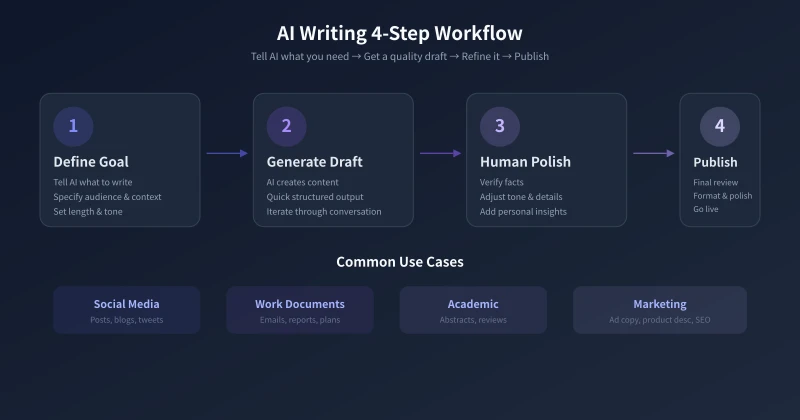
Step 3: Master Four Key Writing Scenarios
Scenario 1: Social Media Content
Xiaohongshu, WeChat Moments, Weibo — these platforms demand short, snappy, attention-grabbing content. AI excels at this.
Key tip: Always tell AI which platform you're posting on. Different platforms have very different voice requirements. Xiaohongshu needs a "recommendation" feel, WeChat Moments should be brief and witty, Weibo can be slightly more formal.
A good template: "Write a [platform] post about [topic], under 150 words, in a [specific style] tone, ending with an engaging question."
Scenario 2: Work Documents
Emails, weekly reports, proposals, presentation outlines — these are the writing tasks professionals dread most. The good news? They're perfectly suited for AI.
Key tip: Include relevant background information when writing work documents. For a weekly report, list what you accomplished first, then ask AI to organize it into a structured format.
Prompt reference: "Help me organize the following work items into a weekly report with three sections: 'This Week's Accomplishments,' 'Next Week's Plan,' and 'Items Needing Coordination': [list your items]"
Scenario 3: Long-Form Content
Blog posts, articles, columns — these require stronger logic and readability. AI can help with structure and drafts, but final quality depends on your edits.
Key tip: Have AI create an outline first. Confirm the direction is right before expanding. After getting the draft, always read it through yourself to check facts and add your own perspective and experience.
AI is best at "turning ideas into words" — but the ideas themselves still need to come from you.
Scenario 4: Marketing Copy
Product descriptions, ad copy, landing page text — marketing writing is about persuasion, which requires deep understanding of your target audience.
Key tip: Tell AI who your target users are, what they care about most, and what your product's biggest selling point is. The more specific the information, the more targeted the copy.
Advanced play: Have AI generate 3-5 versions of copy simultaneously, pick the best one, then ask it to refine further based on the direction you prefer.
Step 4: Optimize and Polish
AI output is always a first draft, not a final version. Here are some polishing tips:
Fact-check: AI may fabricate plausible-sounding data and citations. If your content involves specific numbers, names, or dates, always verify them yourself.
Adjust tone: If AI output is too formal or too casual, simply tell it: "Change the tone to [style]." It usually adjusts well.
Trim redundancy: AI sometimes uses unnecessary words. Delete the fluff, or ask AI directly: "Condense this paragraph to 100 words while keeping the core information."
Add personal flavor: On top of AI drafts, add your own catchphrases, personal experiences, and unique viewpoints. These are things AI can't create for you — and they're what make articles sound like you.
Frequently Asked Questions
Will AI-generated content be detected? If you use AI drafts without modification, they might be identified. But after thorough editing and polishing, it becomes "your" article. AI is a tool, not a ghostwriter.
Is using AI for writing considered plagiarism? No. AI-generated text is entirely original and doesn't raise copyright concerns. Just like using a calculator for math isn't cheating.
Will AI replace writers? Not in the near term. AI excels at the execution phase — turning ideas into text — but having ideas remains a core human capability. The emerging trend is: writers who use AI effectively will vastly outperform those who don't.
Final Thoughts
AI writing assistants aren't magic, but they're currently the most impactful efficiency tool available. Starting today, try handing your next writing task to AI assistance. You don't need to master everything at once — start with the simplest scenarios. Let AI help you write a WeChat Moments post, or organize a weekly report outline.
The more you use it, the more you'll find the workflow that works best for you. Remember: AI is your writing partner, not your replacement. The best articles are always a collaboration between human and machine.
Related Articles
AI Speech to Text: Beginner's Guide to Convert Voice to Text in 3 Steps
Learn how to convert speech to text using AI tools. Perfect for meeting notes, content creation, and video subtitles. Three practical scenarios with step-by-step instructions.
TutorialsAI Local Deployment Guide: Run Large Models in 3 Steps for Free
Learn how to deploy AI models locally in just 3 steps. No coding experience needed, completely free, and your data stays private on your own computer.
TutorialsAI Shopping Decision Guide: From Price Comparison to Avoiding Pitfalls
Learn how to use AI for shopping decisions. From price comparison to avoiding pitfalls - make smarter purchasing choices with AI assistance.
Comments are not yet available, stay tuned