AI Meeting Assistant: A Practical Guide
What's the most headache-inducing part after a meeting? Not the meeting itself, but the messy pile of notes afterward. Misstatements, repetitions, scattered thoughts — two days later you can't remember what was even discussed. This guide teaches you how to use AI to turn any meeting recording or transcript into well-structured meeting minutes, action items, and summaries — no coding required.
What Can an AI Meeting Assistant Do for You
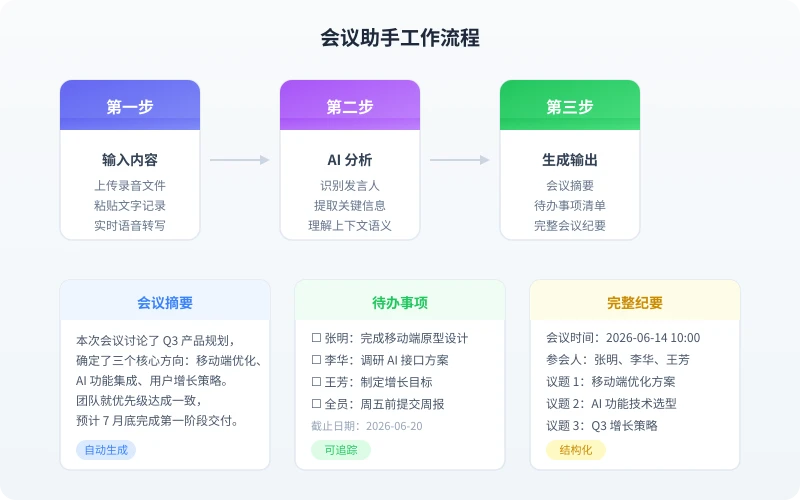
In simple terms, AI can turn a 1-hour meeting into the following in just minutes:
- Meeting Summary: 3-5 sentences capturing the core conclusions
- Action Item List: Automatically extracts who needs to do what and by when
- Structured Meeting Minutes: Organized by topic, with decisions and follow-up items marked
- Speaker Identification: Distinguishes what different people said (requires a speech-to-text tool)
Raw Notes vs. AI-Organized Results
Here's a real comparison to feel the difference between before and after AI organization:
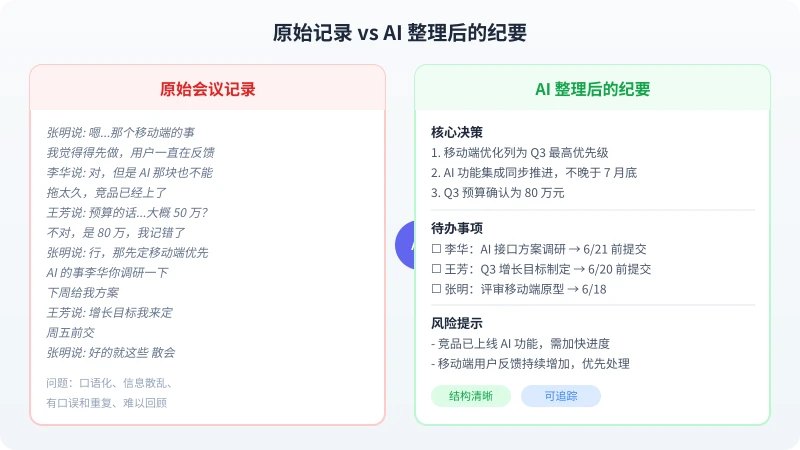
The left side shows typical raw meeting notes — colloquial, with misstatements and scattered information. The right side shows the AI-organized version — clear structure, decision summaries, action items with deadlines. This is the value of an AI meeting assistant.
Step 1: Prepare Your Meeting Content
You first need to convert meeting content into text. There are three ways to do this:
Method 1: Paste Text Transcripts Directly
If you already have a text transcript (e.g., auto-generated minutes from Tencent Meeting, DingTalk, or Feishu), just copy and paste. This is the simplest method.
Method 2: Upload Audio Recordings
If you only have recordings, you'll need to process them with a speech-to-text tool first. Recommended free tools:
- Feishu Minutes: Upload audio for automatic transcription, supports Chinese, with a free monthly quota
- iFlytek Transcription: Professional speech-to-text with high accuracy, billed per minute
- OpenAI Whisper: Open-source model, runs locally for free, requires some technical knowledge
Method 3: Real-Time Notes
During the meeting, open a document and have attendees take turns recording key points. After the meeting, feed this rough transcript to AI for organization.
Tip: The more complete the text, the better AI's output. If your transcription has many errors, manually proofread key information (names, numbers, proper nouns) before processing with AI.
Step 2: Choose the Right AI Tool
Here are several common AI tools that can be used to organize meeting minutes:
| Tool | Advantages | Best For |
|---|---|---|
| Ciyuano | Supports long text, multiple models, API integration | API automation or long meeting transcripts |
| ChatGPT | Great conversational experience, supports file uploads | Occasional use, shorter meetings |
| Kimi | Strong Chinese understanding, supports ultra-long text | Very long meeting transcripts (2+ hours) |
| DeepSeek | Free, strong reasoning ability | Limited budget, need high-quality output |
Step 3: Use the Right Prompts to Organize Meetings
This is the most critical step. Many people just throw meeting notes at AI saying "help me organize this," and the results are either too vague or incorrectly formatted. Using the prompt templates below will greatly improve results.
Template 1: Generate Meeting Summary
Based on the following meeting transcript, generate a concise meeting summary. Requirements:
1. Summarize the core content in 3-5 sentences
2. Extract all clear decisions (start with "Decided:")
3. Mark topics that were controversial but not resolved
4. Use formal, concise language; avoid colloquial expressions

Meeting transcript:
[Paste your meeting transcript]
Template 2: Extract Action Items
Extract all action items from the following meeting transcript, output in this format:

| Assignee | Task | Deadline | Priority |
|----------|------|----------|----------|

Rules:
- Only extract explicitly assigned tasks; don't guess
- If no deadline is mentioned, mark as "TBD"
- Determine priority based on context (High/Medium/Low)
- Remove colloquial expressions; use formal language

Meeting transcript:
[Paste your meeting transcript]
Template 3: Generate Complete Meeting Minutes
Organize the following meeting transcript into structured minutes in this format:

## Meeting Information
- Date:
- Attendees:
- Topic:

## Topic 1: [Topic Name]
### Discussion
[Key points summary, not verbatim]
### Decisions
[Agreed-upon conclusions]
### Follow-up
[Items needing further action]

## Topic 2: ...

## Action Items Summary
[All action items with assignees and deadlines]

## Next Meeting
[If mentioned]

Requirements:
- Organize by topic, not chronologically
- Remove colloquial expressions and irrelevant content
- Preserve all numbers, dates, names, and other key information
- If a topic has no clear conclusion, mark as "Pending Discussion"

Meeting transcript:
[Paste your meeting transcript]
Step 4: Optimize and Verify
AI-organized content isn't 100% accurate. You need to manually check the following:
- Name verification: AI may confuse homophones (e.g., "Zhang Ming" vs. "Zhang Ming" with different characters). Always verify.
- Number verification: Carefully check amounts, dates, percentages, and other numerical data.
- Decision accuracy: Confirm that AI-extracted decisions were actually agreed upon in the meeting, not just one person's suggestion.
- Action item completeness: Check for missed tasks, especially those verbally assigned without explicitly saying "you're responsible."
Quick Verification Method:
After AI organizes the content, send the summary to 1-2 attendees for confirmation. If they say "that's about right," you're good to go. This is far more efficient than proofreading word by word.
Advanced Tips
Tip 1: Specify Output Format
If you need to import minutes into a specific tool (e.g., Notion, Feishu Docs, Markdown), specify the output format in your prompt:
Please output in Markdown format, using ## for topic headings, - for list items, and **bold** for key decisions.
Tip 2: Handle Multilingual Meetings
If the meeting mixes Chinese and English (e.g., technical discussions with English terminology), you can request:
The meeting transcript contains mixed Chinese and English content. Please organize everything in Chinese, keeping technical terms in English with Chinese explanations in parentheses.
Tip 3: Batch Process Multiple Meetings
If you need to process multiple meetings from a week, put all transcripts in one file with separators:
The following contains transcripts from 3 meetings, separated by "---MEETING SEPARATOR---". Please organize each meeting's minutes and action items separately, then generate a weekly meeting summary.
Recommended Workflow
To integrate AI meeting assistant into your daily work, follow this process:
- During the meeting: Start recording or have a colleague take simple text notes
- 10 minutes after: Paste the transcript into an AI tool and use templates to generate minutes
- 20 minutes after: Quickly verify names and numbers, send to attendees for confirmation
- After confirmation: Import minutes and action items into your project management tool (Feishu, Notion, DingTalk, etc.)
- Before next meeting: Ask AI to compare last meeting's action items with completion status and generate a follow-up list
The entire process takes about 20-30 minutes, saving more than half the time compared to traditional handwritten minutes.
Frequently Asked Questions
| Question | Answer |
|---|---|
| The meeting transcript is too long for AI to handle. What should I do? | Process in segments: split by topic first, organize each separately, then merge. Or use a model that supports long text (e.g., Kimi, Claude). |
| There are too many transcription errors. What should I do? | Manually proofread key information (names, numbers, proper nouns) first, then let AI organize. Or use a more accurate transcription tool. |
| How do I protect meeting content privacy? | Use locally deployed AI models (e.g., Ollama + DeepSeek) so data doesn't go to external servers. |
| Will AI miss important information? | Possibly. Use prompts like "Please don't miss any action items" to reinforce, and always do a manual review. |
Summary
The core workflow for using AI to organize meeting minutes is three steps:
- Prepare text content: Transcribe audio or paste existing notes
- Use structured prompts: Let AI output in the format you need
- Manually verify key information: Confirm names, numbers, and decisions are accurate
Core Principle: AI is your meeting scribe, not your decision-maker. It saves you time on organization, but final confirmation and distribution still require your oversight.
Related Articles
AI Speech to Text: Beginner's Guide to Convert Voice to Text in 3 Steps
Learn how to convert speech to text using AI tools. Perfect for meeting notes, content creation, and video subtitles. Three practical scenarios with step-by-step instructions.
TutorialsAI Local Deployment Guide: Run Large Models in 3 Steps for Free
Learn how to deploy AI models locally in just 3 steps. No coding experience needed, completely free, and your data stays private on your own computer.
TutorialsAI Shopping Decision Guide: From Price Comparison to Avoiding Pitfalls
Learn how to use AI for shopping decisions. From price comparison to avoiding pitfalls - make smarter purchasing choices with AI assistance.
Comments are not yet available, stay tuned