AI Personal Finance Assistant Guide: Budgeting, Shopping & Savings Made Easy

Ever reached the end of the month wondering where all your money went? Want to save but can never stick to it? Unsure which store has the best deal? AI can be your personal finance advisor. No financial knowledge needed — if you can type, AI can help you manage your money.
What Can AI Do for You?
Many people think managing finances requires professional knowledge. It does not. AI excels at processing data and giving advice. Think of AI as a 24/7 "financial assistant" that can help you:
- Expense Analysis: Feed it your spending records and it will categorize, summarize, and spot patterns
- Budget Planning: Based on your income and spending habits, create a realistic monthly budget
- Price Comparison: Cross-platform price checks to find the best deals
- Savings Planning: Based on your goals, create a practical savings plan
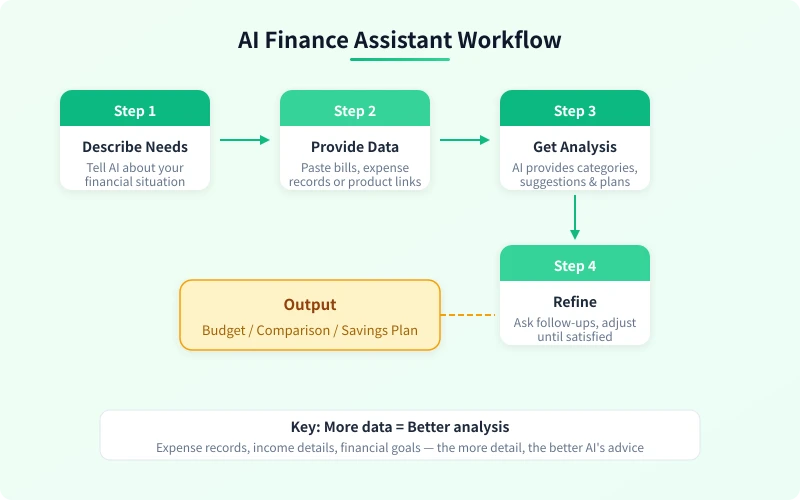
Scenario 1: Expense Analysis with AI
Wondering where your money goes each month? Let AI analyze your spending records for a clear picture.
Steps
- Export Your Records: Open your payment app, go to Bills, and export your recent spending details
- Organize into a Simple List: No need for fancy formatting — just include date, amount, and purpose
- Send to AI for Analysis: Paste the records into an AI chat and ask it to categorize and summarize
- Review the Results: AI will auto-categorize and provide spending insights
Prompt Template:
Here are my expenses from last month. Please: 1. Categorize them (dining, transport, shopping, entertainment, daily necessities, etc.) 2. Calculate total amount and percentage for each category 3. Identify areas where I can save 4. Suggest a budget for next month Expense records: June 1 - Lunch delivery June 1 - Taxi ride June 2 - Grocery shopping 2 June 3 - Video subscription .5 ... (paste your full records)
AI will typically give you a detailed analysis report including category breakdown, spending trends, unusual expense alerts, and more. You might be surprised how much those coffee runs and delivery orders add up.
Advanced Tips
- Ask AI to compare multiple months of data to spot spending trends
- Set a spending cap and let AI monitor if you are over budget
- Have AI classify expenses as need / want / saveable to identify cutback opportunities
Scenario 2: Monthly Budget Planning with AI
Once you have your expense analysis, the next step is creating a realistic budget. AI can tailor a budget plan based on your income and spending habits.
Steps
- Tell AI Your Income: Monthly income, any fixed expenses (rent, utilities, loan payments)
- State Your Savings Goal: How much you want to save monthly, any short-term targets
- Let AI Allocate the Budget: Distribute remaining funds across categories
- Adjust Until Realistic: Iterate with AI based on your actual situation
Prompt Template:
Please create a monthly budget plan for me: - Monthly income: ,700 - Fixed expenses: rent 30, utilities 8, commute 2 - Savings goal: 30 per month - Discretionary: 70 Allocate budget across: dining, shopping, entertainment, social, learning, other. Requirements: 1. Suggest an amount for each category 2. Mark which are flexible expenses that can be adjusted 3. Provide weekly budget reference values 4. Give 2-3 money-saving tips
AI-generated budget plans are usually quite practical. It considers your quality of life and will not squeeze your budget too tight. You can fine-tune based on your actual situation.
Scenario 3: Shopping Price Comparison with AI
Always wondering which platform has the best price before buying? Let AI do cross-platform price analysis for you.
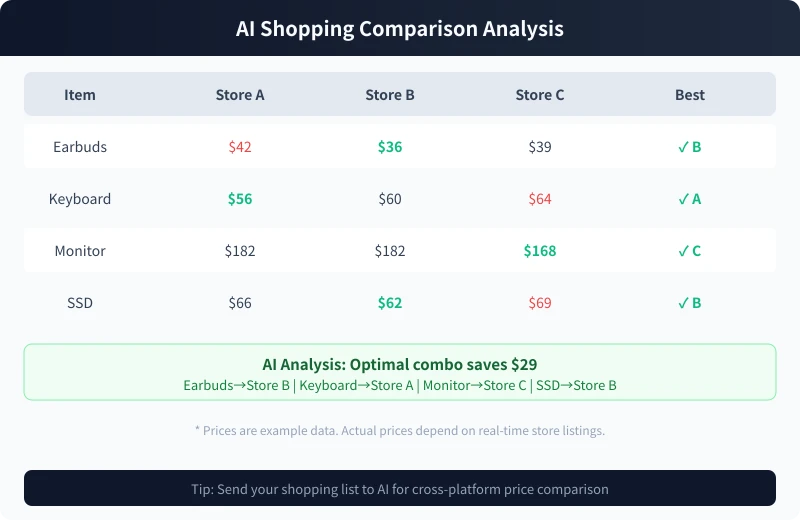
Steps
- Make a Shopping List: Write down everything you need to buy
- Gather Price Info: Check prices on major platforms
- Send to AI for Analysis: Give AI the price data and ask for the optimal buying combination
- Review Recommendations: AI tells you which platform offers the best deal for each item
Prompt Template:
I want to buy these items. Please do a cross-platform price comparison: Shopping list: 1. Wireless earbuds - Store A 2 / Store B 6 / Store C 9 2. Mechanical keyboard - Store A 6 / Store B 0 / Store C 4 3. Monitor - Store A 82 / Store B 82 / Store C 68 4. External SSD - Store A 6 / Store B 2 / Store C 9 Please analyze: 1. Which platform is cheapest for each item 2. If buying all at once, which platform has the lowest total 3. Optimal cross-platform buying combination 4. Total savings
Practical Tips
- Prices do not need to be exact — approximate ranges work fine for AI analysis
- Tell AI if you have membership discounts on any platform
- During major sales events, ask AI to calculate stacking coupon deals for maximum savings
Scenario 4: Savings Plan with AI
Want to save money but can never stick to it? AI can create a practical savings plan based on your actual situation.
Steps
- Define Your Goal: How much to save, what for, and by when
- Share Income and Expense Data: Let AI know your monthly disposable income
- Choose a Savings Strategy: AI will recommend several saving methods
- Create an Execution Plan: Determine exact monthly amounts and where to save
Prompt Template:
Please create a savings plan for me: - Monthly income: ,700 - Fixed monthly expenses: 00 (rent + utilities + commute) - Goal: Save ,850 in 6 months (for travel) - Current savings: 15 - Monthly discretionary: about 70 Please provide: 1. How much to save each month 2. Weekly spending limit 3. Specific execution tips (like 52-week savings challenge, 365-day method, etc.) 4. How to recover if I overspend one month 5. Motivational tips for saving
AI-generated savings plans usually include concrete action steps, like transfer a fixed amount to a dedicated account every Monday — practical advice you can follow immediately.
4 Tips to Get Better Financial Advice from AI
| Tip | What to Do | Why It Matters |
|---|---|---|
| Use Real Data | Share actual spending records, not made-up numbers | More accurate data = better analysis |
| Share Personal Context | Age, occupation, family situation | Different life stages need different strategies |
| Set Clear Goals | How much, what for, and when | Goals are needed to create a plan |
| Execute Step by Step | Analyze first, then budget, then save | Gradual approach works best |
Important Disclaimer
AI financial advice is analysis based on the data you provide. It is reference advice only and does not constitute professional financial planning. Keep these points in mind:
- Investment Risk: AI is not a financial advisor. Consult professionals for stock, fund, or investment decisions
- Protect Your Privacy: Data sent to AI may be logged. Never share bank account numbers, passwords, or sensitive info
- Verify Data: AI price data may not be current. Always verify with actual store prices before purchasing
- Individual Variation: AI advice is general in nature. Adjust execution based on your specific situation
Get Started Now
Open your AI tool (Ciyuano, ChatGPT, or others) and start with the simplest task — expense analysis:
- Open your payment app and find last month's bill
- Copy out your recent week's spending records
- Paste into an AI chat and use the prompt templates above to get analysis
- Review AI's findings and identify areas to optimize
Core Idea: Financial management is not about cutting expenses — it is about making every dollar count. AI shows you where your money goes. You make the better decisions.
Related Articles
AI 本地部署入门:零基础三步跑起大模型,完全免费
不用注册、不用充钱、完全离线。本文手把手教你用 Ollama 等工具,在自家电脑上部署运行开源大模型,从零开始完成本地 AI 部署的全过程。
TutorialsAI 帮你做购物决策:从比价到避坑的完整实操指南
买手机、买耳机、买电脑,AI 真的能帮你选对吗?本文用五个实操步骤,手把手教你让 AI 完成价格对比、参数解析、口碑筛选和避坑提醒,小白也能 10 分钟搞定购物决策。
TutorialsAI 语音输入与语音转文字:零基础 5 分钟上手,解放双手的写作新方式
打字太慢?说话比打字快 3 倍。这篇文章手把手教你用 AI 语音输入工具,从选择工具、开始录音到转文字、编辑导出,五大步骤、六大场景,让你从此"说话即写作"。
Comments are not yet available, stay tuned