Getting Started with AI Image Generation: Creating Images Using DALL·E / Flux APIs
Want to generate a beautiful image with just one sentence? AI image generation technology can already do this. Through the Ciyuanq API, you can call mainstream image models like DALL·E 3 and Flux to turn text descriptions into high-quality images. This article will guide you step by step from scratch on using the image generation API.
What is AI Image Generation
AI image generation (Text-to-Image) is a technology that automatically generates images based on text descriptions. You only need to describe the desired scene in natural language, and the AI can generate a corresponding image in seconds.
The core principles of this technology:
- Text Understanding: The AI parses your description, extracting key information (subject, style, composition, etc.)
- Image Synthesis: Based on the understood content, it progressively "restores" a complete image from noise
- Quality Optimization: Through multiple iterations, it produces a finished product with rich details and excellent visual effects
Choosing the Right Model
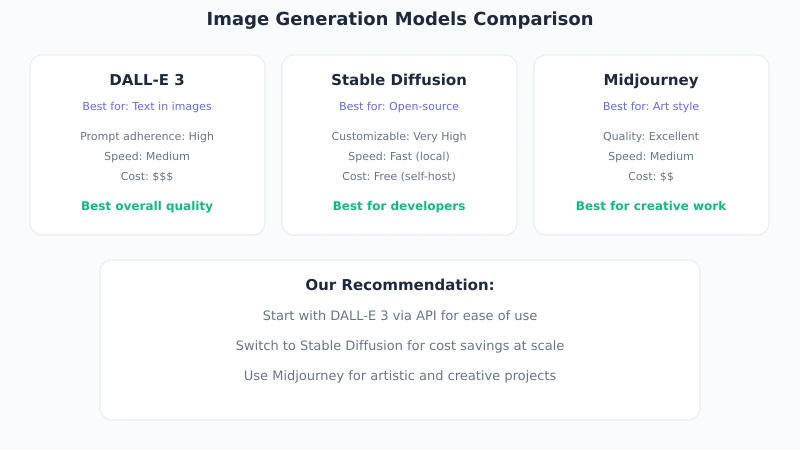
Ciyuanq offers a variety of image generation models, each with its own characteristics:
Selection suggestions:
- Beginners: Start with DALL·E 3, stable results, high prompt tolerance
- Cost-effective: Flux offers fast generation and low price, suitable for batch use
- Specific styles: Flux performs better in anime and illustration styles
- Need text: DALL·E 3 has stronger capability for rendering text in images
Detailed Steps
Step 1: Get an API Key
Log in to the Ciyuanq dashboard and go to the "API Keys" page:
- Click the "Create Key" button
- Enter a key name (e.g., "Image Generation Test")
- Copy the generated key, format:
sk-relay-xxxxxxxxxx
Security Reminder: The key is only shown once, please save it securely. It is recommended to store the key in an environment variable and not hardcode it in your code.
Step 2: Send a Request with curl
Open your terminal and execute the following command to generate an image:
curl -X POST https://www.ciyuano.com/v1/images/generations   -H "Authorization: Bearer sk-relay-YOUR_API_KEY"   -H "Content-Type: application/json"   -d '{
    "model": "dall-e-3",
    "prompt": "a cute cat sitting on a windowsill, watching sunset, watercolor style",
    "n": 1,
    "size": "1024x1024"
  }'
Parameter description:
| Parameter | Description | Available Values |
|---|---|---|
model |
Model to use | dall-e-3, flux |
prompt |
Image description (English works better) | Any text description |
n |
Number of images to generate | 1-4 |
size |
Image size | 1024x1024, 1792x1024, 1024x1792 |
After successful execution, the API will return a JSON response containing the URL of the generated image. Open that URL in a browser to view and download the image.
Step 3: Call with Python
If you prefer coding, Python is the simplest way:
import requests
import json

url = "https://www.ciyuano.com/v1/images/generations"
headers = {
    "Authorization": "Bearer sk-relay-YOUR_API_KEY",
    "Content-Type": "application/json"
}
data = {
    "model": "dall-e-3",
    "prompt": "a cozy coffee shop interior, warm lighting, illustration style",
    "n": 1,
    "size": "1024x1024"
}

response = requests.post(url, headers=headers, json=data)
result = response.json()

# Get image URL
image_url = result["data"][0]["url"]
print(f"Image generated: {image_url}")

# Download image to local
img_response = requests.get(image_url)
with open("generated.png", "wb") as f:
    f.write(img_response.content)
print("Image saved: generated.png")
Step 4: Optimize Your Prompt
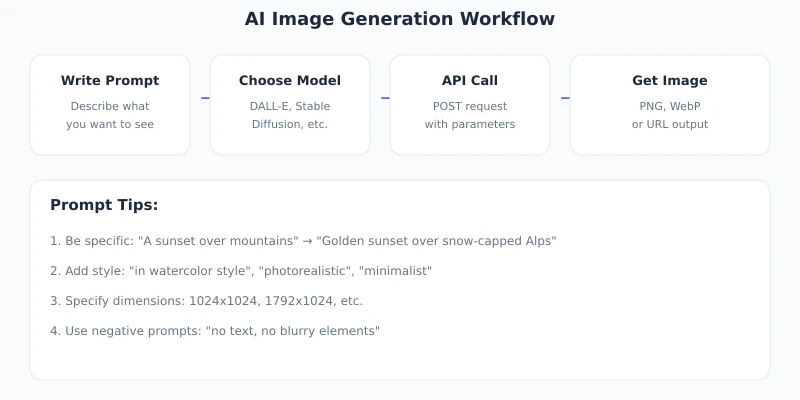
The quality of your prompt directly determines the generated image's effect. Here are some key points for writing a good prompt:
Structure of a Good Prompt
[Subject] + [Scene] + [Style] + [Lighting] + [Composition] + [Color Tone]
Comparison examples:
| Prompt | Result |
|---|---|
| "cat" | Random cat image, quality uncontrollable |
| "a fluffy orange tabby cat sitting on a wooden windowsill, golden hour sunlight, soft focus background, warm tones, cozy atmosphere" | Rich details, finely composed cat image |
Prompt Writing Tips
1. Write Prompts in English
Current mainstream image models have stronger understanding of English. If you need images with Chinese content, first conceptualize in Chinese, then translate to English.
2. Specify Artistic Style
Common style keywords:
- Realistic: photorealistic, cinematic, 8k, detailed
- Illustration: illustration, watercolor, oil painting, digital art
- Anime: anime style, manga, Studio Ghibli style
- Design: flat design, minimalist, geometric, poster
3. Describe Lighting and Atmosphere
Lighting greatly affects the image result:
golden hour— warm sunset lightsoft diffused light— soft diffused lightingdramatic lighting— dramatic light and shadowsneon lights— neon lighting
4. Control Image Composition
close-up— close-up shotwide angle— wide anglebird's eye view— top-down viewsymmetrical— symmetrical composition
Batch Image Generation
If you need to generate images in batches, you can use a simple Python script:
import requests
import time

prompts = [
    "a modern office desk with laptop, minimalist style",
    "a tropical beach at sunset, vibrant colors",
    "a futuristic city skyline at night, cyberpunk style",
    "a cozy reading nook with books, warm lighting"
]

for i, prompt in enumerate(prompts):
    response = requests.post(
        "https://www.ciyuano.com/v1/images/generations",
        headers={"Authorization": "Bearer sk-relay-YOUR_API_KEY"},
        json={"model": "flux", "prompt": prompt, "n": 1, "size": "1024x1024"}
    )
    url = response.json()["data"][0]["url"]

    img = requests.get(url)
    with open(f"image_{i+1}.png", "wb") as f:
        f.write(img.content)

    print(f"[{i+1}/4] Generated: image_{i+1}.png")
    time.sleep(2)  # Control request frequency
Practical Use Cases
Social Media Images
Generate custom images for articles and social media posts, which are more distinctive than stock photos and free from copyright issues.
Product Prototype Design
In early product design stages, use AI to generate concept images and wireframes to quickly validate design directions and save designer communication costs.
E-commerce Product Images
Generate product display images, scene images, or replace backgrounds for existing product images to enhance visual appeal on product pages.
Educational and Training Materials
Generate illustrations and diagrams for courseware and training materials to make content more vivid and understandable.
Common Issues
| Issue | Solution |
|---|---|
| Generated image does not match description | Optimize the prompt, add more detailed descriptions |
| 429 error returned | Too many requests, increase request interval or upgrade plan |
| Text in image is deformed | Try using the DALL·E 3 model, which has better text rendering |
| Slow generation speed | Flux is faster than DALL·E 3; reduce image resolution |
| Cost exceeds expectations | Use Flux model instead, which is cheaper; control the number of generations |
Summary
With the Ciyuanq Image Generation API, you can generate high-quality images with just one sentence. The entire process requires only three steps:
- Get an API key
- Send an HTTP POST request with the image description
- Get the generated image URL and download it for use
Core Suggestions:
- Writing a good prompt is key; the more detailed, the better the result
- Choose the appropriate model based on your needs
- Control request frequency when generating in batches
- English prompts usually yield better results than Chinese
Next Steps: Try generating images of the same subject with different prompts and models to compare results. Then integrate image generation capabilities into your application to create richer visual experiences for your users.
Related Articles
AI Speech to Text: Beginner's Guide to Convert Voice to Text in 3 Steps
Learn how to convert speech to text using AI tools. Perfect for meeting notes, content creation, and video subtitles. Three practical scenarios with step-by-step instructions.
TutorialsAI Local Deployment Guide: Run Large Models in 3 Steps for Free
Learn how to deploy AI models locally in just 3 steps. No coding experience needed, completely free, and your data stays private on your own computer.
TutorialsAI Shopping Decision Guide: From Price Comparison to Avoiding Pitfalls
Learn how to use AI for shopping decisions. From price comparison to avoiding pitfalls - make smarter purchasing choices with AI assistance.
Comments are not yet available, stay tuned