A Practical Guide to AI Project Management Assistants: Task Breakdown, Progress Tracking, and Team Collaboration All in One
Many people think "project management" is something only project managers need to do. In fact, projects are everywhere in life — renovating a house, planning a wedding, organizing an event, or even completing a work report are all "projects." The emergence of AI tools allows even those without management experience to efficiently drive complex tasks.
What can AI do in project management?
Traditional project management requires you to manually break down tasks, schedule, track progress, and write reports. AI can speed up each step:
- Requirements breakdown: You describe a goal, and AI automatically breaks it into executable subtasks
- Priority sorting: AI helps you determine the execution order based on dependencies and urgency
- Progress tracking: Spend 2 minutes each day telling AI your progress, and it updates status and identifies risks for you
- Meeting minutes: Throw meeting recordings to AI, and it automatically generates to-do items and action items
- Review summary: After the project ends, AI helps you sort out lessons learned and generate a review report
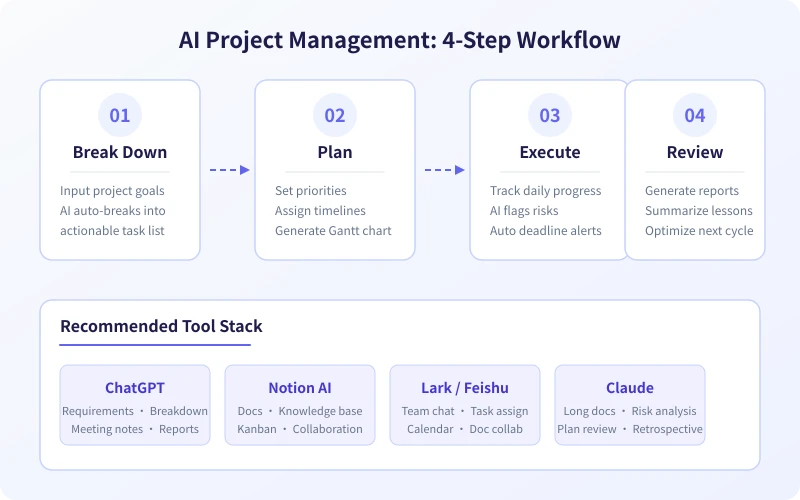
Step 1: Use AI to break down project requirements
This is the most critical step. Many people fail to carry out a project not because of lack of ability, but because they didn't break down the big goal into small tasks from the start.
How to do it
Open ChatGPT, Doubao, or any AI chat tool, and enter the following prompt:
I want to complete a project: [describe your goal].
Please help me:
1. Break this project into 5-8 main phases
2. Break each phase into 2-4 specific tasks
3. Mark the estimated time for each task
4. Mark dependencies between tasks (which must be done first)
Example
Suppose you want to "build a personal blog within a month", AI will help you break it down into:
- Week 1: Determine technical solution (1 day) → Purchase domain and server (1 day) → Set up basic framework (2 days)
- Week 2: Design page layout (2 days) → Develop core features (3 days)
- Week 3: Write initial content (2 days) → Test and fix (2 days) → Deploy live (1 day)
- Week 4: SEO optimization (2 days) → Promotion (3 days)
Each task is specific to "what to do" and "how long it takes", no longer a vague "build a blog".
Step 2: Use AI to create an execution plan
Once tasks are broken down, the next step is to schedule. You need to tell AI your available time and resource constraints.
How to do it
Continue in the same conversation:
Based on the task breakdown above, please help me create a detailed execution plan:
- Total duration: [X] days/weeks
- Available time per day: [X] hours
- Number of participants: [X] people
- Please output a day-by-day schedule with specific tasks for each day
Advanced tip: Let AI identify risks
Add one more sentence:
Please analyze the potential risk points of this plan: which parts are most likely to be delayed? How do you suggest reserving buffer time?
AI will help you identify weak points on the critical path and prepare contingency plans in advance.
Step 3: Use AI to track execution progress
Once the plan is made, the hardest part is sticking to it. AI can act as your "virtual project manager", checking progress every day.
Daily stand-up (2-minute version)
Before starting work each day, spend 2 minutes telling AI:
Today's date is [date].
Completed yesterday: [list completed tasks]
Plan for today: [list today's tasks]
Problems encountered: [describe obstacles, or say 'none']
Please help me update the project progress and give execution suggestions for today.
Using Feishu or Notion as support
If your project involves collaboration, it's recommended to also use:
- Feishu Multi-dimensional Table: Create a project board, import the tasks broken down by AI, and update status daily
- Notion Board: Use Kanban view to manage tasks, drag and drop to update progress
- Feishu Minutes: Automatically record and transcribe meetings, then have AI extract to-do items
Risk alerts
If a task shows no progress for two consecutive days, AI will automatically remind you:
- Does this task need priority adjustment?
- Do you need to seek help or add resources?
- Will it affect deadlines of subsequent tasks?
Step 4: Use AI for project review
After the project is completed, spend 10 minutes letting AI do a review for you, which is much more effective than summarizing on your own.
How to do it
This project is complete. Please help me do a review:
1. Overall project completion status (on time/delayed/ahead of schedule)
2. Things done well (3 points)
3. Areas for improvement (3 points)
4. Suggestions for similar projects next time
5. Generate a concise review report
AI will sort through the entire conversation history during the project and produce a well-structured review report. You can save this report and refer to it directly next time you do a similar project.
Recommended tool combinations
Depending on the project type, the following tool combinations are recommended:
Personal projects (solo)
- ChatGPT / Doubao: Task breakdown, planning, daily tracking, review summary
- Notion: Task board, documentation
- Calendar reminders: Set reminders for key milestones
Team projects (collaborative)
- ChatGPT / Claude: Requirements analysis, meeting minutes, risk assessment
- Feishu: Team communication, task assignment, schedule management
- Feishu Multi-dimensional Table: Project board, progress tracking
- Feishu Minutes: Meeting recording transcription, automatic to-do extraction
Complex projects (cross-department)
- Claude: Long document analysis, plan review (good at handling large context)
- ChatGPT: Daily communication, quick Q&A
- Feishu / DingTalk: Enterprise-level collaboration
- Gantt chart tools: Such as Teambition, Feishu Projects
Practical application scenarios
Scenario 1: Renovating a house
Tell AI: "I want to complete an 80-square-meter renovation within 3 months, with a budget of 150,000 yuan." AI will break it down into design phase, construction phase, and soft furnishing phase, listing specific tasks and time nodes for each phase, and even help you allocate budget.
Scenario 2: Planning a wedding
Tell AI the wedding date, budget, and style preferences. AI will generate a countdown plan, from venue selection to sending invitations, with specific time nodes and to-do items for each step.
Scenario 3: Organizing a department team building
Tell AI the number of people, budget, and time. AI will help you plan activities, list purchase items, create a schedule, and even write the team building notification email.
Scenario 4: Completing a work report project
Your boss asks you to "research the competitive landscape and report next week." Tell this goal to AI, and it will break it down into: define research scope (1 day) → collect information (2 days) → analyze and compare (1 day) → create report (1 day) → prepare presentation (1 day).
Efficiency improvement tips
Tip 1: Keep the same conversation
Project management is a continuous process. Try to complete the entire process from breakdown to review within the same AI conversation, so that AI can remember previous context and give more accurate suggestions.
Tip 2: Reuse experience with templates
After completing a project, ask AI to organize the entire conversation into a project template. Next time you do a similar project, just send the template to AI and it can quickly generate a plan.
Tip 3: Make good use of "Please check for me"
Spend 5 minutes each week asking AI to check: "Please check the current progress, which tasks might be delayed? Do we need to adjust the plan?" This regular check helps you identify problems early.
Tip 4: Let AI help you communicate
Need to send progress updates to the team, write reports to your boss, or email partners? Let AI generate them based on project progress, saving you time organizing language.
Frequently asked questions
Are AI-generated plans reliable?
AI's plan is generated based on the information you provide. Its quality depends on the level of detail you input. It is recommended that you provide as much background information as possible (budget, number of people, time constraints, etc.) and then fine-tune based on actual circumstances. AI's plan is more of a "starting point" — you need to adjust based on experience.
What if requirements change mid-project?
Simply tell AI: "Project requirements have changed: [describe the change]. Please help me adjust the plan." AI will reassess the impact and update your task list and timeline. This is also the biggest advantage of AI project management — rapid response to changes.
Does a solo project also need project management?
Of course. It's easier to "go off track" when doing a project alone — you might forget the original plan as you go. AI helps you maintain rhythm, so you know "what to do today" every day, much more efficient than figuring it out on your own.
What if team members are uncooperative?
AI can help you generate clear task assignment tables and progress reports, so everyone knows their responsibilities. When tasks and deadlines are clearly written in black and white, the chance of shirking responsibility is greatly reduced.
Related Articles
AI Speech to Text: Beginner's Guide to Convert Voice to Text in 3 Steps
Learn how to convert speech to text using AI tools. Perfect for meeting notes, content creation, and video subtitles. Three practical scenarios with step-by-step instructions.
TutorialsAI Local Deployment Guide: Run Large Models in 3 Steps for Free
Learn how to deploy AI models locally in just 3 steps. No coding experience needed, completely free, and your data stays private on your own computer.
TutorialsAI Shopping Decision Guide: From Price Comparison to Avoiding Pitfalls
Learn how to use AI for shopping decisions. From price comparison to avoiding pitfalls - make smarter purchasing choices with AI assistance.
Comments are not yet available, stay tuned